
RTX 5060 8GB vs 16GB is one of the most searched — and most misunderstood — GPU questions of 2026. Here is the key fact up front: the standard RTX 5060 only comes in 8GB, so the real 8GB-versus-16GB decision is the RTX 5060 Ti, which offers both. This comparison clears up the confusion and shows exactly when paying for 16GB is worth it.


Prime
Limited Time
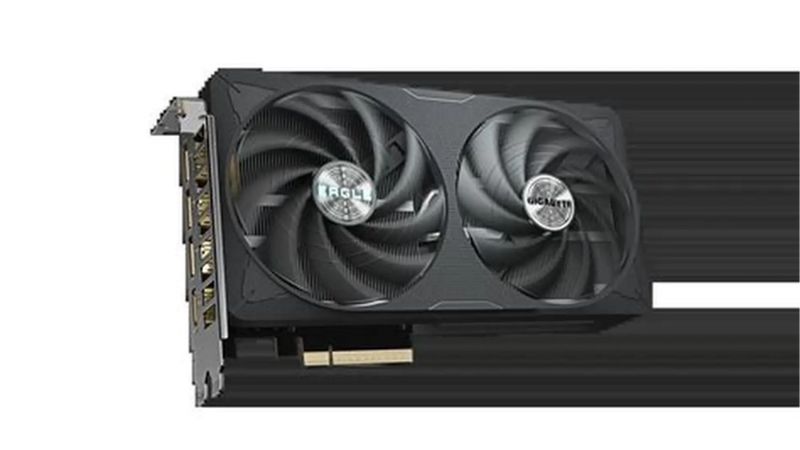
PNY NVIDIA GeForce RTX™ 5060 OC Dual Fan, Graphics Card (8GB GDDR7, 128-bit, SFF-Ready, PCIe® 5.0, HDMI®/DP 2.1, 2-Slot, NVIDIA Blackwell Architecture, DLSS 4)
The Quick Verdict: 8GB vs 16GB in the RTX 5060 Family
Short version: if you play strictly at 1080p and upgrade often, 8GB is enough and saves you money. If you want 1440p, heavy textures, ray tracing, or long-term headroom, the 16GB card is the safer buy and well worth the extra $50. Since the plain RTX 5060 is 8GB-only, “16GB” here means the RTX 5060 Ti 16GB.
As an Amazon Associate we earn from qualifying purchases at no extra cost to you.



Why the Standard RTX 5060 Is 8GB Only
The bus width also explains why you will not see oddball capacities like 12GB on this specific card. Memory has to be installed in configurations the controller supports, so the available choices are dictated by engineering rather than marketing, and 8GB is simply where the non-Ti 5060 lands.
The RTX 5060’s 128-bit memory bus dictates its memory in multiples that land it at 8GB, and Nvidia never released a 16GB version of the non-Ti card. So if you specifically want 16GB in this tier, the RTX 5060 Ti is the card that offers it.
That is why so many “RTX 5060 8GB vs 16GB” searches are really about the 5060 Ti. Getting this straight first saves you from shopping for a product that does not exist.
It is an easy point to miss, because the naming implies a choice that only exists one rung up the ladder. Clear that up and the rest of the decision falls into place quickly.
Who Wins for Most Buyers
The asymmetry of the risk is what tips the scale. Overspending $50 on memory you occasionally use is a minor regret, whereas running short on VRAM produces stutters that no settings tweak fully fixes, so when in doubt the larger buffer is the lower-risk decision for most people.
For future-proofing and anything beyond 1080p, 16GB wins. The extra buffer is cheap insurance against the growing number of games that exceed 8GB at high settings, and it costs only about $50 more on the 5060 Ti.
For pure 1080p budget gaming, 8GB still holds up today, and the savings can go elsewhere in the build. The decision is genuinely about your resolution and how long you keep hardware.
If you are on the fence, the small price gap tips most buyers toward 16GB, since the downside of running short on memory is far more disruptive than the modest extra cost.
Specification Comparison Table
Here is how the relevant cards line up, so the choice is clear before we dig into what VRAM actually does in games.
| Spec | RTX 5060 Ti 8GB | RTX 5060 Ti 16GB |
|---|---|---|
| GPU / CUDA cores | Blackwell, 4,608 | Blackwell, 4,608 |
| Memory | 8GB GDDR7 | 16GB GDDR7 |
| Bandwidth | 448 GB/s | 448 GB/s |
| TDP | 180W | 180W |
| DLSS 4 Multi Frame Gen | Yes | Yes |
| Launch MSRP | $379 | $429 |
| Standard RTX 5060 | 8GB only, $299 MSRP | |
Deep Dive Face-Off: What VRAM Actually Changes
The two 5060 Ti cards are identical in every way except memory capacity: same GPU, same 4,608 cores, same 448 GB/s bandwidth, same 180W. So this comparison is purely about what that extra 8GB of VRAM does — and does not — do for you.
How VRAM Capacity Works
This is also why two cards with identical specs can feel completely different in the same game. Right up until the 8GB card fills its memory, the experience is indistinguishable from the 16GB version; the moment it overflows, the gap between them becomes obvious and unpleasant in a way averages never capture.
VRAM holds textures, frame buffers, and assets the GPU needs immediately. When a game needs more than the card has, it spills over to slower system memory, which causes stutters, frame-time spikes, and sudden texture pop-in rather than a clean drop in average frame rate.
Crucially, more VRAM does not make a card faster when you are within budget; both 5060 Ti variants perform identically until the 8GB card runs short. The 16GB advantage only appears at the exact moment the 8GB card runs out of room.
This is why average-FPS charts can be misleading for the 8GB card: the number looks fine, but the stutters and 1% lows tell the real story once memory fills up. Smoothness, not headline frame rate, is what suffers first.
8GB in 2026 Games
The safest planning assumption is that memory demands will keep rising, not hold steady. Betting that today’s 8GB comfort will last the full life of the card is betting against a very consistent industry trend, which is precisely why cautious buyers lean toward the larger buffer.
At 1080p, 8GB is generally fine for most titles today. The trouble starts at 1440p, with ultra textures, or with ray tracing enabled, where a rising number of 2026 games push past 8GB and the smaller card begins to stutter while the 16GB card stays smooth.
This is the core of the decision. If your reality is 1080p esports and mainstream games, 8GB rarely bites. If you push settings, resolution, or modded games, the 16GB card is the one that ages gracefully.
The trend line matters here: games have demanded more VRAM year after year, so an 8GB card that is comfortable today is more likely to feel constrained tomorrow. Sixteen gigabytes is a hedge against that trajectory.
DLSS 4 and Future Headroom
There is a mild irony worth noting here. The very features that make this card attractive for years to come are also the ones that consume memory, so pairing them with only 8GB can leave you unable to fully use what you paid for, whereas the 16GB card has room to run everything at once.
Both cards share the full Blackwell feature set, including DLSS 4 with Multi Frame Generation and Reflex, so neither has a software advantage. What differs is longevity: as games and AI-driven features grow more memory-hungry, the 16GB card has room to absorb that trend.
Buying 16GB is essentially buying time. It is a bet that future titles will demand more memory, and given the last few years of game releases, that is a bet with strong odds behind it.
Frame generation and higher-resolution assets both lean on VRAM, so the very features that keep this card relevant also consume the memory the 8GB version is short on. That makes the 16GB card the better match for its own feature set.
Price, Value, and the Alternative
The performance question is settled by resolution; the value question is settled by price. And in 2026, memory pricing is precisely what makes this decision timely rather than academic.
The $50 Gap and Memory Costs
Viewed as a percentage of the total build cost, that $50 is almost noise. Against a full gaming PC of well over a thousand dollars, the premium for double the VRAM is one of the cheapest pieces of future-proofing you can buy, which is why so many builders simply default to it.
At MSRP the 16GB 5060 Ti costs $429 against the 8GB card’s $379 — a $50 difference for double the memory. In a normal market that is an easy upsell; in 2026’s market it is even more compelling, because rising memory costs mean VRAM is only getting more valuable, not less.
Component prices, memory especially, have trended upward and pushed street prices above MSRP across the range. That makes locking in the larger buffer at a fair price a sensible hedge against a market where memory keeps getting pricier.
Put simply, the 16GB you buy today may cost more to obtain later. Securing the capacity now, while the gap is only $50 at MSRP, is the value-conscious move.
Is Price Relief Coming?
There is modest good news: the steep climb of late 2025 has eased into a period of relative stability, though suppliers still warn of possible movement. Prices have levelled off rather than dropped.
Because meaningful new memory supply is not expected until 2027-2028, prices are more likely to stay firm than to fall soon. That argues for buying the capacity you need now rather than waiting for cheaper VRAM that is still years out.
For a buyer weighing 8GB against 16GB, the timeline reinforces the same conclusion: if 16GB fits your budget, secure it rather than betting on a future discount that the supply picture does not promise.
The Alternative If Budget Is Tight
If the 16GB card is out of reach, the standard RTX 5060 8GB at $299 is the entry point for pure 1080p gaming, keeping full DLSS 4 support. If you can stretch further, the RTX 5070 12GB steps up in raw speed with a wider bus.
Check the live price on all three before deciding — in this market, the gap between them narrows and widens week to week, and the best value is whichever sits closest to its MSRP when you buy.
Staying open to the neighboring cards is smart, because an unusually good price on any one of them can beat sticking rigidly to your first pick. Let the current numbers guide the final call.
Final Verdict: RTX 5060 8GB vs 16GB
The decision is refreshingly clear once you know the plain 5060 is 8GB-only. Match the card to your resolution and your upgrade habits, and the right amount of VRAM becomes obvious.
Who Should Buy 8GB
This is a perfectly rational choice, not a compromise to apologize for. For a focused 1080p player who upgrades on a regular cycle, paying only for the memory you will actually use is smart budgeting, and the money saved can strengthen the rest of the system where it counts.
Strict 1080p gamers on a budget who upgrade every few years. The standard RTX 5060 8GB or the 5060 Ti 8GB delivers full features and strong 1080p performance for the lowest outlay.
Who Should Buy 16GB
Think of it as buying insurance you hope you slightly overpay for. If games stay tame, you lose only $50; if they keep demanding more memory, as they have for years, that buffer is what keeps the card smooth and relevant long after an 8GB equivalent has started to struggle.
Anyone gaming at 1440p, using heavy textures or ray tracing, or planning to keep the card for years. The RTX 5060 Ti 16GB is the future-proof choice, and $50 over the 8GB card is money well spent.
See More:
- TechPowerUp GPU
- Nvidia H200 GPU price
- RTX 5050 Mobile
- Nvidia competitors
- Nvidia Reflex low latency on or off
Pros and Cons at a Glance
The summary below distills the trade-offs that actually change the decision, so you can match a column to your own situation.
| 8GB (5060 / 5060 Ti 8GB) | 16GB (5060 Ti 16GB) | |
|---|---|---|
| Best for | Budget 1080p, frequent upgraders | 1440p, textures, RT, long-term use |
| Strength | Cheapest entry, full DLSS 4 | No stutter headroom, ages well |
| Weakness | Runs short past 8GB in newer games | $50 more, unnecessary for pure 1080p |
To settle the RTX 5060 8GB vs 16GB question: buy 8GB for budget 1080p, buy the 5060 Ti 16GB for longevity and higher settings, and remember the plain 5060 only comes in 8GB. Memory prices keep shifting, so tap the link on our site to check today’s live price before you decide, and remember that buying the right capacity at a fair number today beats waiting on the memory relief that is still years away.
Frequently Asked Questions
Does the RTX 5060 actually come in a 16GB version?
Not the base RTX 5060, which is 8GB only. The 16GB option in this tier is the RTX 5060 Ti 16GB, which sits one step above and also exists in an 8GB configuration. So the real decision is between an 8GB RTX 5060, an 8GB RTX 5060 Ti, and the 16GB RTX 5060 Ti, which carries both more memory and more shading power.
When does 8GB genuinely become a problem?
When a game’s working set exceeds the frame buffer, the card streams assets across the PCIe bus, producing traversal stutter, texture pop-in and sudden frame time spikes rather than a smooth average drop. This shows up at 1440p with high textures, in titles with ray tracing enabled, and when frame generation adds its own memory overhead on top.
Is the extra cost of 16GB worth it?
For 1080p esports and older titles, no; 8GB is fine and the money is better spent elsewhere. For 1440p, modern single-player releases with high texture packs, or any plan to keep the card for four or more years, the 16GB model is the safer purchase because texture settings are the first thing you have to sacrifice on a memory-limited card.
Does more VRAM help with creative and AI workloads?
Substantially. Video editing with high-resolution timelines, 3D scenes in Blender, and local AI model inference are all capacity-bound rather than compute-bound at this tier. A model or scene that does not fit in memory either fails outright or falls back to system RAM at a severe speed penalty, so 16GB opens workloads 8GB simply cannot run.
Can I add more VRAM later?
No. Graphics memory is soldered to the board next to the GPU and is not upgradeable in any consumer card. The capacity you buy is the capacity you keep for the life of the card, which is exactly why the decision matters more than most other specifications and why buyers regularly regret choosing the cheaper 8GB variant.
Ready to decide? Our #1 pick for 2026 is the GPU / CUDA cores.
Live price & availability on Amazon.











Write Your Review
No reviews yet. Be the first to share your experience!