
⚡ Key Takeaways
- Every texture, shadow map, and frame your card renders has to live somewhere with extremely fast access, and that somewhere is video memory.
- Clock speed, measured in megahertz, is how many cycles per second the GPU's shader cores execute.
- To see how these specs line up across the current lineup, the table below compares VRAM capacity, memory type, and boost clocks for popular cards.
- The practical answer comes down to whether you are memory-limited or compute-limited in your specific scenario.
The debate of VRAM vs clock speed is one of the most common questions gamers face when comparing graphics cards, and the honest answer is that it depends entirely on what you play and at what resolution. Video memory (VRAM) is the dedicated pool of high-speed memory that stores textures, frame buffers, and assets, while clock speed determines how fast the GPU’s processing cores crunch through those assets each second. Neither number alone tells the whole story, but understanding how they interact will help you avoid overpaying for capacity you cannot use or, worse, buying a card that chokes on modern games. This guide breaks down what each spec actually does and which one deserves your attention.
What VRAM Actually Does
VRAM is your GPU’s working space. Every texture, shadow map, and frame your card renders has to live somewhere with extremely fast access, and that somewhere is video memory. When a game needs more memory than the card has, it spills over into slower system RAM across the PCIe bus, causing stutter, texture pop-in, and sudden frame drops. The amount you need scales with three things: resolution, texture quality settings, and the game itself.
How Much VRAM Do You Need?
At 1080p, 8GB remains workable for most titles, though a handful of newer releases with ultra texture packs are starting to brush against that ceiling. At 1440p, 12GB is the comfortable baseline and 16GB gives you headroom for the future. At 4K with maxed settings and ray tracing, 16GB is the practical minimum and high-end users increasingly want more. This is why the RTX 5090 ships with a massive 32GB of GDDR7, the RTX 5080 and 5070 Ti carry 16GB, and the RTX 5070 lands at 12GB. On the AMD side, the RX 9070 XT and RX 9070 both offer a generous 16GB of GDDR6, which is part of their appeal at 1440p and 4K.
What Clock Speed Actually Does
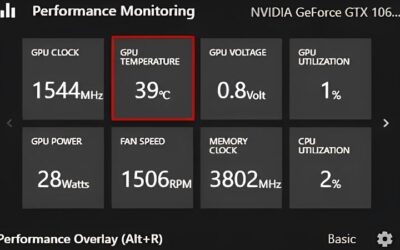
Clock speed, measured in megahertz, is how many cycles per second the GPU’s shader cores execute. A higher boost clock means more raw computational throughput, which translates to higher frame rates when the card is not bottlenecked by memory. Cards advertise a base clock and a boost clock; in practice, a well-cooled GPU spends most of its gaming time at or near boost, and can even exceed it briefly when thermals and power allow. Clock speed scales your frame rate directly when you have enough VRAM, but it does nothing to rescue a card that has run out of memory.
Why Clock Speed Alone Is Misleading
Here is the catch that trips up shoppers: you cannot compare clock speeds across different architectures or even different tiers within the same generation. An RTX 5070 might boost higher than an RTX 5090 on paper, yet the 5090 obliterates it in real games because it has vastly more cores, wider memory bandwidth, and more of everything else. Clock speed is only a meaningful comparison between two otherwise identical cards, for instance a factory-overclocked RTX 5080 versus a reference RTX 5080. Across different models, the core count and memory subsystem matter far more.
VRAM vs Clock Speed: A Direct Comparison
To see how these specs line up across the current lineup, the table below compares VRAM capacity, memory type, and boost clocks for popular cards. Notice that memory bandwidth, driven by the GDDR7 transition on NVIDIA’s side, often matters as much as raw capacity.
| GPU | VRAM | Memory Type | Boost Clock | Best Resolution |
|---|---|---|---|---|
| RTX 5090 | 32GB | GDDR7 | ~2.41 GHz | 4K / 8K |
| RTX 5080 | 16GB | GDDR7 | ~2.62 GHz | 4K |
| RTX 5070 Ti | 16GB | GDDR7 | ~2.45 GHz | 1440p / 4K |
| RTX 5070 | 12GB | GDDR7 | ~2.51 GHz | 1440p |
| RTX 5060 | 8GB | GDDR7 | ~2.50 GHz | 1080p |
| RX 9070 XT | 16GB | GDDR6 | ~2.97 GHz | 1440p / 4K |
| RX 9070 | 16GB | GDDR6 | ~2.52 GHz | 1440p |
| RX 9060 XT | 16GB / 8GB | GDDR6 | ~3.13 GHz | 1080p / 1440p |
Look closely and you will see that the RX 9070 XT boasts a higher boost clock than the RTX 5090, yet nobody would argue it is the faster card. The 5090’s enormous core count, 512-bit memory bus, and GDDR7 bandwidth leave it in a class of its own. This is the clearest illustration of why headline clock numbers can deceive.
Which One Matters More for Gaming?
The practical answer comes down to whether you are memory-limited or compute-limited in your specific scenario.
When VRAM Wins
VRAM becomes the deciding factor at high resolutions, with high-resolution texture packs, and in games that aggressively cache assets. If you play at 4K, run mods that add ultra textures, or use ray tracing and frame generation (which themselves consume extra memory), capacity is king. A card that runs out of VRAM does not slow down gracefully; it stutters violently and drops frames in a way no amount of clock speed can fix. For 4K gaming specifically, prioritize the 16GB-and-up cards, as detailed in our best GPU for 4K gaming comparison.
When Clock Speed Wins
Clock speed and core throughput dominate when you have VRAM to spare, which is the common case at 1080p and often 1440p. Competitive esports players chasing 240+ frames per second in titles like Valorant or Counter-Strike benefit far more from raw GPU horsepower than from extra memory they will never fill. In these scenarios, a higher-clocked card with adequate VRAM delivers the smoother, faster experience. This is also where a good factory overclock or a manual tune can pay real dividends.
The Spec That Quietly Matters: Memory Bandwidth
There is a third number that often resolves the VRAM-versus-clock argument: memory bandwidth. Bandwidth is capacity multiplied by speed, the rate at which the GPU can move data in and out of VRAM. NVIDIA’s jump to GDDR7 in the RTX 50-series dramatically increased bandwidth even where capacity stayed flat, which is why a 16GB RTX 5080 feels faster than its raw specs might suggest. Bandwidth ensures that the cores, spinning at their high clock speeds, are actually fed with data rather than sitting idle. When two cards have similar VRAM and clocks, the one with higher bandwidth usually pulls ahead.
Don’t Forget Cooling and Sustained Clocks
One overlooked truth is that clock speed is only useful if the card can sustain it. GPUs throttle, reducing their clocks, when they get too hot, typically once the core approaches the mid-80s Celsius. A card with excellent cooling holds its boost clock longer and therefore delivers more consistent frame rates than an identical card running hot. This is why aftermarket models with beefier heatsinks frequently outperform reference designs despite identical specs on paper. Improving your case airflow with better fans, or fitting an aftermarket cooler, keeps clocks high; see our picks for the best GPU cooler fans of 2026 and the best AIO GPU coolers if you want to push sustained performance.
Top-Rated Picks


Dropped $0.02


| Product | Brand | Rating | Reviews | Price |
|---|---|---|---|---|
| ARCTIC MX-4 (4 g) – Premium Performance Thermal Paste… | ARCTIC | ★ 4.8 | 104k | $4.99 |
| ARCTIC MX-4 (incl. Spatula, 4 g) – Premium Performanc… | ARCTIC | ★ 4.8 | 71.9k | $5.49 |
| Crucial 8GB DDR4 RAM 3200MHz (PC4-25600), Downclockab… | Crucial | ★ 4.8 | 62.8k | $74.99 |
| AMD Ryzen 5 5600X 6-core, 12-thread unlocked desktop … | — | ★ 4.8 | 30.2k | $177.60 |
| NVIDIA Shield Remote; Voice Search, Motion-Activated,… | — | ★ 4.7 | 10.6k | $25.99 |
Frequently Asked Questions
Is more VRAM always better?
No. Beyond what your games actually use, extra VRAM sits idle and does nothing for performance. A 1080p gamer gains nothing from 24GB over 12GB because the games never fill it. VRAM only helps when you would otherwise run out; past that point, more cores and clock speed drive frame rates.
Will a higher clock speed make my games run faster?
Within the same card model, yes, a higher clock yields higher frame rates as long as you have enough VRAM and aren’t CPU-limited. But you cannot compare clock speeds across different GPU models to judge which is faster, because core count and architecture differ dramatically.
How much VRAM do I need for 1440p gaming?
12GB is the comfortable baseline for 1440p today, and 16GB gives you future-proofing for upcoming titles with heavier texture demands. Cards like the RTX 5070 Ti and RX 9070 XT, both with 16GB, are ideal sweet-spot choices for this resolution.
Does VRAM affect ray tracing performance?
Indirectly, yes. Ray tracing and especially frame generation consume additional VRAM on top of the base game. If you enable these features on a card with marginal memory, you can tip it into a stutter-inducing overflow, so the headroom that extra VRAM provides becomes more valuable.
Should I prioritize VRAM or clock speed when buying a GPU?
Look at the whole card rather than a single spec. Match VRAM to your resolution first, then choose the model with the strongest overall performance within your budget. Our best graphics card comparison ranks cards by real-world results rather than any one number.
Conclusion
VRAM versus clock speed is not a true rivalry; the two work together, and the right balance depends on your resolution and games. Treat VRAM as a gate, you need enough to avoid running out, and treat clock speed and core throughput as the throttle that determines how fast you go once that gate is clear. For most gamers, the smart move is to secure adequate VRAM for your resolution first, then maximize raw performance and bandwidth within your budget. Judge cards by their measured frame rates, not by any single headline figure, and you will always pick the right one.

Write Your Review
No reviews yet. Be the first to share your experience!