
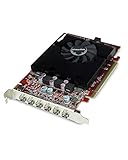
- Top Pick: VisionTek Radeon HD 7750 2GB GDDR5 – 4K Resolution Support Graphics Card – Support up to 6 Monitors with Mini DisplayPort Outputs – AMD Eyefinity 2.0 – Suitable Graphics Card for Gaming PC
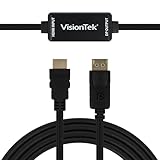
- Best Value: VisionTek HDMI to DisplayPort 1.5M Active Cable (M/M) – 900822
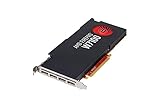
- Premium Choice: AMD FirePro W4100 Graphics Card – Low Profile Graphic Cards 100-505979
Top Amd Eyefinity Multi Monitor Gaming Picks for 2026
Here are our current top amd eyefinity multi monitor gaming picks, compared on real Amazon owner reviews, price, and features. Live prices update below.
- Top Amd Eyefinity Multi Monitor Gaming Picks for 2026
- What Is AMD Eyefinity and How Does It Work in 2026?
- AMD Eyefinity Pros and Cons: An Honest Owner-Based Assessment
- Building an Eyefinity Setup in 2026: Costs and Market Timing
- Recommended Products
- Final Verdict: Is AMD Eyefinity Worth It in 2026?
- Related Guides
- Frequently Asked Questions
- Related Articles


AMD Eyefinity is the multi-monitor technology that lets a single Radeon graphics card merge two to six displays into one massive desktop or gaming surface — and in 2026 it remains one of the most cost-effective routes to a wraparound setup. But is stitching three monitors together still worth it in the era of 49-inch super-ultrawides? This review breaks down how the technology actually works, the hardware it demands, where it genuinely shines, where owners report frustration, and why current GPU market conditions affect when you should buy the components for it.
As an Amazon Associate we earn from qualifying purchases at no extra cost to you.



What Is AMD Eyefinity and How Does It Work in 2026?
Before judging the technology, it helps to understand precisely what it does at the driver level — and what hardware you need to make it work. Eyefinity is not a product you buy; it is a capability built into AMD’s software stack, which makes the surrounding hardware choices the real purchasing decision.
How AMD Eyefinity Technology Actually Works
Eyefinity operates inside AMD’s Adrenalin driver suite, grouping multiple physical displays into a single logical display surface. Configure three 1440p monitors in landscape, and Windows and your games see one 7680×1440 display. The GPU handles bezel compensation — hiding the pixels that would fall behind monitor frames — so straight lines stay straight as they cross screens.
Supported group sizes run from 2×1 up to 3×2 and 6×1 layouts depending on the card’s output count, with mixed orientations allowed. Setup takes roughly five minutes in Adrenalin: select the displays, choose the arrangement, apply bezel correction, done. Compared to the multi-tool workflows of a decade ago, the 2026 implementation is genuinely mature — group profiles persist across reboots and driver updates with few reported issues.
The quantitative catch is pixel load. A 7680×1440 surface pushes 11.06 million pixels per frame — 1.33x a 4K display’s 8.29 million. Whatever GPU drives your Eyefinity group needs 4K-class horsepower to keep frame rates acceptable, a fact that shapes the entire cost analysis below.
Hardware Requirements for a Working Eyefinity Setup
The baseline is simple: any modern Radeon GPU — RX 6000, RX 7000, or RX 9000 series — supports Eyefinity natively, with most cards offering three DisplayPort outputs plus HDMI. For a triple-1080p group (5760×1080, 6.2 million pixels), an RX 7700 XT-class card suffices. For triple-1440p, plan on an RX 7900 XT, RX 9070 XT, or stronger to hold 60+ FPS in modern titles.
Practical details that catch first-time builders: use identical monitor models where possible, because mismatched panels show visible color and brightness seams that calibration only partially fixes; DisplayPort 1.4 or newer cables are mandatory for high-refresh groups; and desk space for three 27-inch monitors runs roughly 1.9 meters wide. Budget for a triple-monitor stand at $80-150 — owner reviews consistently rate it the single best quality-of-life addition to any Eyefinity build.
AMD Eyefinity vs Nvidia Surround: The Honest Comparison
Nvidia’s equivalent technology, Surround, accomplishes the same display-grouping goal on GeForce cards. The functional differences in 2026 are modest but consistent in user reports: Eyefinity supports more flexible group layouts (up to six displays on supported cards versus Surround’s three-plus-accessory limit) and handles mixed-resolution groups more gracefully, while Surround integrates more tightly with G-Sync monitor stacks.
For buyers, the technology rarely decides the GPU purchase by itself — you choose the card for its price and performance, and the multi-monitor capability comes along. What matters is that both ecosystems are mature: if your shortlist includes GeForce cards reviewed elsewhere on this site, Surround delivers a comparable experience, and the monitor-side buying advice in this review applies identically to both camps.
AMD Eyefinity Pros and Cons: An Honest Owner-Based Assessment
Aggregating verified buyer feedback across Radeon cards and triple-monitor bundles on Amazon — the enthusiastic 5-star reports and the frustrated 2-3 star complaints alike — produces a consistent picture of where this technology rewards the investment and where it tests patience.
Where AMD Eyefinity Genuinely Shines
The strongest and most repeated praise concerns immersion per dollar. Sim racing, flight simulation, and space games dominate the positive reviews: a triple-27-inch 1440p group delivers roughly 135 degrees of physical field of view for $600-900 in monitors, where a single 57-inch super-ultrawide covering similar width costs $1,500-2,500. Racing sim owners describe the peripheral vision through side monitors as a measurable lap-time advantage, not just a visual treat.
Productivity is the quiet second win. Outside gaming, the same three monitors run as independent displays — code on one, documentation on another, communication on the third — then merge into a single surface when the game launches. Reviewers who work from home repeatedly call the dual-purpose setup the justification that got the purchase approved by their household budget.
The Weaknesses Owners Actually Report
The leading complaint is game support inconsistency. While major sims and most AAA engines handle 48:9 aspect ratios correctly, a meaningful minority of titles stretch the HUD to the far edges, distort the field of view at the periphery, or lock cutscenes to 16:9 with black pillars. Owners report checking community spreadsheets of ultrawide/multi-monitor support before buying new games — a real, recurring friction cost.
The second cluster of complaints is performance expectations. Buyers who paired triple-1440p groups with mid-range GPUs report 40-55 FPS experiences in demanding titles and either dialed settings down or upgraded the card within months. The pixel math from earlier is unforgiving: 11 million pixels demand flagship-class rendering power. Bezels themselves draw fewer complaints than expected — most owners report their brain tunes out the seams within a week — but competitive shooter players note the crosshair-area bezel issue never fully disappears in triple-landscape layouts.
Who Should Build an Eyefinity Setup — and Who Should Not
The profile that consistently reports satisfaction: sim racers, flight simmers, strategy and MMO players, and work-from-home professionals who want one set of monitors serving both jobs. If your favorite genres render cockpits or map tables, the wraparound format is transformative in a way benchmarks cannot capture.
The profile that should pass: competitive FPS players (center-bezel and FOV distortion issues), console-style single-player gamers who would rather have one spectacular display, and anyone unwilling to budget 4K-class GPU power. For those buyers, a single high-quality ultrawide delivers more satisfaction per dollar with zero compatibility friction.
Building an Eyefinity Setup in 2026: Costs and Market Timing
An Eyefinity build is really three purchases — monitors, a capable GPU, and mounting hardware — and two current market developments are actively moving the price of the most expensive component. Timing the GPU purchase well can swing the total build cost by more than the monitors’ combined price.
The Shopping List: Monitors, Mounts, and Cables Worth Buying
For the display layer, three identical 27-inch 1440p IPS panels at 144-165Hz hit the sweet spot — typically $180-280 each from well-reviewed brands on Amazon, and matched models eliminate the color-seam problem entirely. Pair them with a heavy-duty triple-monitor desk mount rated for your panel weight, and certified DisplayPort 1.4 cables in the correct lengths; both are inexpensive items that owner reviews repeatedly flag as build-or-break details.
Resist the temptation to mix one new monitor with two older mismatched panels. The 2-3 star Eyefinity reviews are disproportionately written by buyers who economized this way, then spent hours fighting calibration. Buying three matched displays in one order is the single highest-leverage decision in the whole build — and current triple-bundle pricing makes it cheaper than it has been in years.
How GPU Market News Affects Your Eyefinity Budget
Two developments matter. First, the United States has approved Nvidia to sell its H200 — one of its most powerful AI chips — to China, redirecting enormous fab capacity, advanced packaging, and premium memory supply toward data-center products. While that is an Nvidia decision, the effects are industry-wide: AMD competes for the same TSMC wafers and the same GDDR memory supply, so tightening flows through to Radeon pricing and availability too.
Second, laptop and PC component prices are broadly trending upward, led by memory — and VRAM is one of the largest cost items on any modern graphics card. Board partners across both GPU camps have already nudged SKU pricing higher this cycle. For an Eyefinity builder, the GPU is 50-65% of total project cost, which means the project’s price direction follows the GPU market’s direction almost one-to-one.
The actionable conclusion: if a triple-monitor build is on your 2026 roadmap, the GPU is the component to secure first, at today’s pricing, while monitors and mounts can safely wait for routine sales. The asymmetry is stark — display panels face normal retail competition, but graphics cards face an AI-demand squeeze with no near-term relief signal.
Buy Now or Wait: A Simple Decision Framework
If you already own a Radeon card with 4K-class performance, there is no reason to wait on anything: monitors and mounts are stable-priced commodities, and your setup cost is already sunk. Order the displays, spend an evening in Adrenalin, and enjoy the result this week.
If the build requires a GPU purchase, treat the current quarter as the favorable window. The realistic downside of buying now is missing a modest future discount; the downside of waiting is paying 10-20% more for the card that represents most of your budget. Check current Amazon pricing on the GPU tier your target resolution demands, and let that price — not the calendar — make the call.
Recommended Products

msi Gaming GeForce RTX 4060 8GB GDRR6 Extreme Clock: 2505 MHz 128-Bit HDMI/DP Nvlink TORX Fan 4.0 Ada Lovelace Architecture Graphics Card (RTX 4060 Ventus 2X Black 8G OC)

PowerColor
PowerColor Red Devil AMD Radeon RX 7900 XTX Graphics Card

Sapphire
Sapphire 11330-01-20G Nitro+ AMD Radeon RX 7800 XT Gaming Graphics Card with 16GB GDDR6, AMD RDNA 3
As an Amazon Associate we earn from qualifying purchases. Product prices and availability are accurate as of the date/time indicated.
Final Verdict: Is AMD Eyefinity Worth It in 2026?
AMD Eyefinity earns a confident recommendation for the right buyer: sim racers, flight simmers, immersion-focused gamers, and multi-monitor professionals who want their work setup to double as a 135-degree gaming surface. The technology itself is free, mature, and five minutes from configured — the real review verdict applies to the hardware around it, where three matched 1440p panels and a 4K-class GPU deliver an experience single displays cannot replicate at the price. With GPU costs facing upward pressure from AI-driven supply shifts and component inflation, the smart sequence is clear: lock in the graphics card now, add the matched monitor trio, and build the wraparound setup while the math still favors you. Check today’s Amazon listings for the monitors and GPU tier your build needs, and start with the component the market is moving against.
Frequently Asked Questions
What is the best amd eyefinity in 2026?
The best amd eyefinity depends on your budget and how you plan to use it. The options compared above are our top-rated picks based on real customer ratings, build quality, and overall value — start with the highest-rated model that fits your budget.
How much should I expect to spend on a amd eyefinity?
Prices vary by brand and features. Budget options cover the essentials, while mid-range and premium models add durability, performance, and extra features. Compare the prices in the list above to find the best value for your needs.
What should I look for when buying a amd eyefinity?
Focus on what matters most for your use case — build quality, compatibility, performance, warranty, and verified customer reviews. Every pick above is selected to balance these factors.
Are budget amd eyefinity options worth it?
Yes. For most people a well-reviewed budget or mid-range amd eyefinity delivers excellent value. You only need to spend more if you specifically require premium materials or top-tier performance.
How did we choose these amd eyefinity picks?
We compare current Amazon ratings, review counts, key features, and price to surface the options with the best real-world value. The list is refreshed as ratings and availability change.









Write Your Review
No reviews yet. Be the first to share your experience!