




NVIDIA BlueField 3 is one of the few pieces of NVIDIA silicon almost nobody has made a video about, which is convenient, because nothing about a DPU is best understood by watching someone hold it. You are here with a datasheet open in another tab and a specific question: does this thing earn a slot in my racks, and what does it actually cost me to run. This page covers the architecture, the offload claims examined rather than repeated, the deployment requirements that catch teams out, and what AI infrastructure demand is doing to your procurement timeline.
What NVIDIA BlueField 3 Actually Is, and What It Is Not
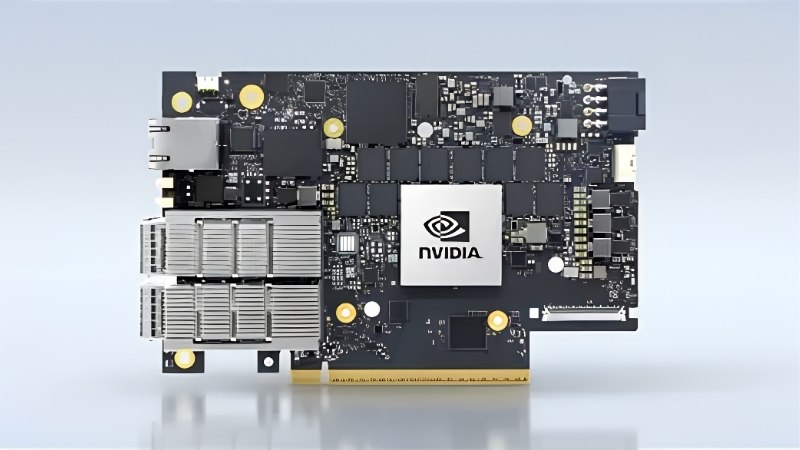
The category confusion around this product is the single biggest source of wasted evaluation time. BlueField-3 is not a fast network card, and treating it as one produces a business case that collapses in the first review meeting. It is a server that lives on your server’s PCIe bus and runs its own operating system.
As an Amazon Associate we earn from qualifying purchases at no extra cost to you.


DPU, SmartNIC and SuperNIC: The Distinction That Decides Your Design
A NIC moves packets. A ConnectX-7 does that at 400Gb/s and does it very well, and if connectivity is your problem, that is your answer and it is cheaper.
A DPU is an independent compute node with its own Arm cores, its own DRAM, and its own OS, sitting in the data path. That independence is the entire point: it can run infrastructure services that the host cannot see or interfere with, which is what makes zero-trust isolation possible rather than aspirational.
The BlueField-3 SuperNIC is the same architecture tuned differently — smaller, lower power, optimised for RoCE between GPU servers at 400Gb/s in AI clusters. If your goal is GPU-to-GPU east-west traffic, the SuperNIC is the variant to price, not the full DPU. Buying the wrong one of these three is the most expensive mistake available here.
The Silicon: 16 Arm Cores, 256 Threads, 400Gb/s
BlueField-3 integrates 16 Armv8.2+ Cortex-A78 cores on a coherent mesh network, a 256-thread programmable datapath accelerator, and an RDMA network adapter supporting up to 400Gb/s Ethernet or NDR 400Gb/s InfiniBand across one or two ports. The chip carries roughly 22 billion transistors.
| Attribute | BlueField-3 |
|---|---|
| Arm cores | 16x Armv8.2+ Cortex-A78, 64-bit |
| Datapath accelerator | 256 threads |
| Network | 1–2 ports, up to 400Gb/s Ethernet or NDR 400Gb/s InfiniBand |
| Host interface | Up to 32 lanes PCIe Gen 5.0 |
| Onboard memory | 32GB DDR5 with ECC |
| Onboard storage | 128GB SSD |
| Form factor | FHHL or HHHL, tall bracket |
| Security | AES-GCM, AES-XTS, PKA, TRNG, hardware root-of-trust |
| Management | Onboard BMC |
Note the 32GB of DDR5 and the 128GB SSD. Those are not marketing garnish — they are what let the card boot and run a real Linux stack independently of the host, and they are also why this product is exposed to the memory market in a way a plain NIC is not.
What It Offloads, and What DOCA Unlocks
Concretely: software-defined networking including overlay tunnelling, NAT, load balancing and service chaining; storage via NVMe-oF, BlueField SNAP, and RAID; inline encryption and decryption including AES-XTS during persistence; telemetry collection; and traffic inspection and microsegmentation for security.
BlueField SNAP is the capability worth understanding even if you buy nothing. It presents network-attached flash to the host as if it were a local NVMe device, with no host driver changes. That is what makes genuine storage disaggregation practical rather than a slide.
DOCA is the forward-looking part of the argument. It abstracts DPU programming the way CUDA abstracts GPU programming — runtime, orchestration for thousands of DPUs, and a growing library set. NVIDIA’s roadmap points at BlueField-4 integrating GPU capability at up to 800Gb/s, which means the DOCA work you do now is an investment in a platform rather than a card. That is either the strongest reason to start or the strongest reason to wait, depending on your appetite for being early.
Deployment Reality Before You Build the Business Case
This is where DPU projects die. The silicon is genuinely impressive and the offload claims are broadly real. The friction is everywhere else, and it is worth surfacing before you write a number on a slide rather than after.
The 300-Core Claim, Examined
NVIDIA states that a single BlueField-3 can deliver data center services equivalent to up to 300 CPU cores. Read the sentence carefully. It says up to, it says data center services, and it does not say your services.
Supporting figures are specific: Elastic Block Storage performance up to 18 million IOPS, and virtualisation I/O acceleration up to 80 million packets per second. Those are ceilings under favourable conditions, not averages under yours.
The honest way to build a case: measure what percentage of your host CPU is currently burned on the infrastructure tasks BlueField-3 offloads — virtual switching, encryption, storage virtualisation, telemetry. In a hypervisor-heavy or encryption-heavy estate that number is often 20–30% of every socket you own, and the maths works comfortably. In an estate where CPUs are busy running applications, it does not. Do not budget on 300.
Slot, Power, BMC and What Your Servers Actually Need
The practical checklist, in the order it bites. Form factor is FHHL or HHHL depending on the ordering part number, and every card ships with a tall bracket — verify against your chassis before ordering, because a half-height slot and an FHHL card is a returned pallet.
Host interface wants up to 32 PCIe Gen 5.0 lanes, which is more than many servers will give a single slot. Check lane allocation, not just slot count. Power draw is DPU-class rather than NIC-class and varies by OPN — pull the specific datasheet for the part number you are quoting rather than assuming a family figure.
And the one people forget: the onboard BMC needs its 1GbE management interface connected to your management network through the top-of-rack switch. Without that you have a card you cannot remotely power cycle, monitor, or recover — which defeats a meaningful share of the reason you bought it.
Pros and Cons of Putting BlueField 3 in Your Racks
Pros: Real CPU core recovery in infrastructure-heavy estates, with the freed sockets going back to revenue workloads. Genuine zero-trust isolation, because the security domain sits outside the host OS rather than inside it. 400Gb/s with RDMA and RoCE removes east-west bottlenecks in AI clusters. Storage disaggregation via SNAP with no host driver changes. Hardware root-of-trust and inline crypto. DOCA is a platform with a roadmap, not a dead-end SDK.
Cons: This is a second fleet of Linux machines to patch, monitor and secure — the operational cost is real and routinely underestimated. DOCA is a learning curve with a small talent pool. Benefits concentrate at scale; a dozen servers will not amortise it. Procurement runs through OEM and channel rather than a shopping cart. And BlueField-4 is on the roadmap, which makes timing a live question.
What AI Infrastructure Demand Means for DPU Procurement
Two market forces are moving the price and lead time of everything in your rack, and neither has anything to do with DPU engineering. If you are building a case this quarter, these determine whether your numbers survive to purchase order.
The H200 Export Decision and the $10 Billion Overhang
Following the December 2025 policy change, the US Commerce Department now reviews H200 export licences to approved Chinese customers case by case. Roughly ten Chinese firms have been cleared, and approved licences are estimated at around $10 billion.
Almost none of those chips have shipped. Testifying on 14 July 2026, the Under Secretary of Commerce for Industry and Security described the volumes as trivial, with Beijing discouraging purchases to protect domestic accelerator development. For an infrastructure architect that gap is the risk to model: $10 billion of approved-but-undelivered demand sitting on the same HBM, packaging and networking capacity your cluster queues behind. If it releases, it competes with you. The asymmetry does not favour waiting.
DDR5 Supply: Why 32GB Onboard Matters to Your Quote
Here is the specific reason a DPU is more price-exposed than a NIC: it carries 32GB of DDR5. Memory is the component under the most pressure right now, and every card that ships with a real DRAM complement inherits that pressure directly.
Relief is coming and it deserves accurate framing. OEMs can now source DDR5 from Chinese suppliers such as CXMT, and Micron is building two fabrication plants in Idaho. That is genuine new capacity — but those plants do not run until 2027–2028. Nothing they produce touches a quote you receive this year or next.
Practical Procurement Timing
Put those two together and the guidance is unglamorous but clear. Build your business case on today’s quoted pricing with a contingency line rather than a discount line, because the case that only closes at last year’s numbers needs rewriting, not postponing.
Lock quotes with expiry dates you can actually hit, and stage deployments so that a lead-time slip does not strand a project. If you are evaluating rather than deploying, the sensible move is to prove the offload maths on a small footprint first — a ConnectX-7 NIC, the right 400G transceivers or DAC cables, and a lab host will tell you what percentage of your CPU is really recoverable long before you commit a rack. Those components are worth pricing now, while the evaluation is cheap and the conclusion is still reversible.
See More:
- NVIDIA
- NVIDIA DeepStream
- NVIDIA GPU driver update
- NVIDIA GeForce NOW download
- NVIDIA RTX A2000 12GB driver
Final Verdict on NVIDIA BlueField 3
NVIDIA BlueField 3 is a genuinely well-engineered piece of infrastructure silicon and a genuinely conditional purchase. Sixteen A78 cores, a 256-thread datapath accelerator, 400Gb/s with RDMA, 32GB of DDR5 and hardware root-of-trust make it capable of everything the datasheet claims. Whether it earns its slot depends on one number you have to measure yourself: how much of your CPU is currently spent on infrastructure rather than applications.
Buy it if you run a large, hypervisor-heavy or encryption-heavy estate where 20–30% of every socket goes to virtual switching, storage virtualisation and crypto, or if you are building an AI cluster where multi-tenant isolation and east-west bandwidth are architectural requirements rather than nice-to-haves. In those cases the core recovery is real and the zero-trust model is worth the operational cost.
Do not buy it because of the 300-core headline, at a scale too small to amortise a second Linux fleet, or before you have connected the BMC management interface into your plan. And do not wait for the market to improve — with $10 billion of approved AI chip demand sitting undelivered and no new memory capacity until 2027–2028, the quote you have today is more likely to expire upward than downward. Measure the offload on a small footprint, then commit on current numbers.
Frequently Asked Questions
What does a BlueField-3 DPU actually do?
It offloads networking, storage and security work off the host CPU onto its own Arm cores and hardware accelerators. That means encryption, packet processing, virtual switching, NVMe over Fabrics and telemetry run on the card, freeing server cores for revenue-generating workloads and creating an isolated control plane the host operating system cannot tamper with.
How does it differ from a normal ConnectX NIC?
ConnectX is a SmartNIC with fixed-function offloads driven by the host. BlueField-3 adds 16 Arm Cortex-A78 cores, DDR memory and its own operating system, so it runs software independently. You can host a full infrastructure stack on the card rather than merely accelerating packets the host still orchestrates.
What bandwidth and slot does it require?
BlueField-3 scales to 400Gb/s Ethernet or NDR InfiniBand and needs a PCIe Gen5 x16 slot to avoid bottlenecking. In a Gen4 slot you lose roughly half the theoretical throughput. Power draw reaches 150W on top models, so check auxiliary power availability and airflow in dense chassis before ordering.
Is it worth it for a small cluster?
Usually not. The economics depend on core savings multiplied across many hosts, plus security isolation requirements. Below roughly a rack of servers, the licensing, DOCA development effort and integration time rarely pay back. Small deployments get more value from faster conventional NICs and RDMA tuning.
What software do I need to program it?
NVIDIA DOCA is the SDK and runtime, covering flow steering, storage emulation, regex acceleration and the DPU operating system image. Deployments typically run DOCA on top of Ubuntu on the Arm complex, managed centrally. Budget real engineering time, since porting infrastructure services to the DPU is not a drop-in change.
Ready to decide? Our #1 pick for 2026 is the Attribute.
Live price & availability on Amazon.






Write Your Review
No reviews yet. Be the first to share your experience!