
- Top Pick: The Omniverse and Beyond : Mastering NVIDIA Omniverse for the Future of Virtual Worlds
- Best Value: NVIDIA Certified Associate: Generative AI LLMs (NCA-GENL) (NVIDIA Certification Guides)
- Premium Choice: NVIDIA GPU Performance Engineering: A Comprehensive Guide to PTX, SASS, CUDA Optimization, Kernel Analysis, Memory Hierarchies, Warp Execution, and High-Throughput Parallel Computing
NVIDIA Omniverse is a platform that has quietly become central to how many industries design, simulate, and collaborate on 3D worlds, from factories and buildings to robots and virtual environments. It connects the tools creators already use, adds photorealistic rendering and physically accurate simulation, and lets teams work together on the same virtual scene in real time. This guide explains what NVIDIA Omniverse is and how its key pieces fit together, what you can actually do with it, and how to get started, so you can understand whether this powerful platform belongs in your workflow.
What Is NVIDIA Omniverse?
Before exploring its capabilities, it helps to understand what Omniverse is at a high level. It is a platform for building and operating 3D applications and virtual worlds, designed around open standards and powerful rendering and simulation. Knowing how its foundations work makes it far easier to see where it fits into real projects.
The Omniverse Platform Overview
NVIDIA Omniverse is a platform for creating, simulating, and collaborating on 3D content and virtual environments, bringing together design tools, rendering, and physics into one connected ecosystem. Rather than a single application, it is a foundation on which 3D workflows and applications can be built.
Its defining idea is connection: Omniverse links together the many different software tools that 3D professionals use, letting them work on a shared scene rather than exporting and importing files between programs. This removes a huge amount of friction from collaborative 3D work, which has traditionally been fragmented across incompatible tools.
Because it is built on NVIDIA’s technology, Omniverse leverages powerful GPU-accelerated rendering and simulation throughout, enabling photorealistic visuals and physically accurate behavior. This foundation is what allows it to handle demanding, large-scale 3D projects that would overwhelm conventional workflows.
OpenUSD and Connecting Your Tools
At the heart of Omniverse is OpenUSD, an open standard for describing 3D scenes that acts as a common language between different tools. This shared format is what lets Omniverse connect software like 3D design, animation, and engineering programs so they can all contribute to the same virtual world.
The practical benefit is enormous, since teams using different tools can collaborate on one scene without the constant, error-prone process of converting files between formats. By standardizing on OpenUSD, Omniverse turns a collection of separate programs into a connected pipeline, which is one of the biggest reasons the platform has gained traction in professional settings.
The significance of an open standard here is easy to underestimate. Because OpenUSD is not locked to a single vendor, it encourages a broad ecosystem where many tools can interoperate, which protects the investment organizations make in their pipelines. This openness is a large part of why Omniverse is seen as a foundation to build on rather than a closed product, giving teams confidence that their 3D work can flow between the tools they choose.
RTX Rendering and Simulation
Omniverse delivers photorealistic, real-time rendering powered by NVIDIA’s RTX technology, letting creators see accurate lighting, materials, and reflections as they work rather than waiting for slow renders. This immediate, high-quality visualization is a major advantage for design and review.
Beyond visuals, the platform includes physically accurate simulation, so objects behave realistically according to physics, which is essential for applications like robotics, engineering, and digital twins. Combining lifelike rendering with accurate simulation is what makes Omniverse suitable not just for making things look right, but for testing how they actually behave.
This dual capability is what elevates Omniverse beyond a visualization tool. In fields like engineering and robotics, it is not enough for a scene to look convincing; it must also behave according to real physics so that tests and predictions are meaningful. By handling both the appearance and the behavior of a virtual world to a high standard, the platform supports serious analysis and decision-making, not just attractive imagery.
What You Can Do with NVIDIA Omniverse
Understanding the platform’s foundations naturally leads to the question of what it enables. Omniverse is used across many industries and applications, and its collaborative, simulation-driven nature shapes the kind of work it excels at. Seeing these possibilities clarifies who the platform is really for.
Common Use Cases and Industries
NVIDIA Omniverse is used across a wide range of fields, including manufacturing, architecture, media and entertainment, product design, and robotics development. Its ability to connect tools and simulate accurately makes it valuable anywhere complex 3D work and collaboration are involved.
Industries use it to design and visualize products, plan and simulate factories and buildings, create virtual environments, and develop and test robots and autonomous systems in realistic virtual settings. The common thread is projects that benefit from bringing many tools and stakeholders together around a shared, accurate 3D representation, which is exactly what the platform is built to enable.
The scale of these projects is often what makes Omniverse worthwhile. A single designer might not need such a platform, but a large team coordinating a factory layout, a building design, or a fleet of robots gains enormously from a shared virtual space where everyone’s contributions come together accurately. The bigger and more collaborative the undertaking, the more the platform’s connective strengths pay off.
Digital Twins and Collaboration
One of Omniverse’s most powerful applications is creating digital twins, which are accurate virtual replicas of real-world objects, machines, or facilities used to simulate, monitor, and optimize their real counterparts. This lets organizations test changes and predict outcomes virtually before acting in the physical world.
Equally important is real-time collaboration, where multiple people across different tools and even different locations can work on the same virtual scene simultaneously. This combination of accurate digital twins and seamless collaboration is transforming how industries design and operate, letting teams work together on complex projects far more efficiently than traditional methods allow.
Digital twins in particular point to where much of this technology is heading, since a living virtual replica can be used not only during design but throughout a facility’s operating life to monitor performance and test improvements safely. Paired with real-time collaboration, this turns Omniverse from a design tool into an ongoing operational platform, which is a large part of why so many industries are investing in the approach.
Pros and Cons of Omniverse
Weighing the trade-offs helps set expectations. On the plus side, Omniverse offers powerful connection of many 3D tools through open standards, photorealistic real-time rendering, accurate physics simulation, and strong collaboration features, all of which make complex 3D and industrial work far more efficient. For its intended users, that combination is genuinely transformative.
On the downside, the platform is specialized and has a learning curve, it is aimed at professionals and organizations rather than casual users, and getting the full benefit typically requires capable NVIDIA hardware. For those without a genuine 3D or simulation need, it is not relevant, but for its target audience, the depth and integration justify the investment of time and resources.
Getting Started with NVIDIA Omniverse
For those interested in exploring the platform, knowing what you need and where to learn makes the first steps far less daunting. A little preparation sets you up to make the most of Omniverse’s capabilities as you begin working with it.
What You Need to Run It
To use NVIDIA Omniverse effectively, you generally need capable NVIDIA graphics hardware, since its real-time rendering and simulation are demanding workloads that benefit greatly from strong GPU power. A suitable system ensures you can actually take advantage of the photorealistic rendering and accurate physics the platform offers.
Beyond hardware, some familiarity with 3D concepts and the tools you plan to connect helps, since Omniverse is built to enhance professional 3D workflows rather than to be a beginner’s first 3D program. Having the right setup and background in place before diving in ensures you can use the platform’s powerful features productively rather than being held back by an underpowered system.
Learning Resources and Ecosystem
NVIDIA provides extensive documentation, tutorials, and resources for Omniverse, along with a growing community of users, which makes learning the platform much more approachable. Starting with the official getting-started materials is the best way to understand how its components and connections work.
The broader ecosystem, including integrations with widely used 3D and design tools and NVIDIA’s other technologies, means your existing skills and software often carry over. Tapping into these resources and the community helps you climb the learning curve faster and avoid common pitfalls, turning a powerful but complex platform into a genuinely productive part of your workflow.
Frequently Asked Questions About NVIDIA Omniverse
These quick answers resolve the questions that most often come up about NVIDIA Omniverse.
Is NVIDIA Omniverse free? Options are available for individual users and developers, though professional and enterprise use has its own licensing, and you generally need capable NVIDIA hardware.
Who is Omniverse for? It is aimed at 3D professionals, designers, engineers, and organizations working on complex 3D, simulation, and collaboration, rather than casual users.
See More:
- NVIDIA
- NVIDIA DeepStream
- NVIDIA GPU driver update
- NVIDIA GeForce NOW download
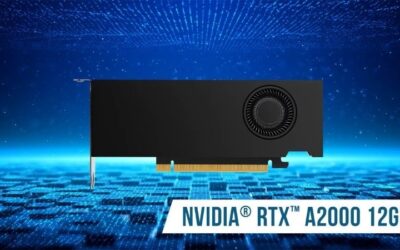
- NVIDIA RTX A2000 12GB driver
Final Thoughts on NVIDIA Omniverse
NVIDIA Omniverse is a powerful platform for building, simulating, and collaborating on 3D worlds, connecting the tools professionals already use through open standards while adding photorealistic rendering and accurate physics. With OpenUSD linking software together, RTX rendering delivering lifelike visuals, and real-time collaboration and digital twins transforming how industries work, it streamlines 3D workflows that have traditionally been fragmented. It is specialized and demands both suitable hardware and expertise, so it is aimed at serious professional work rather than casual use. Its learning curve and hardware needs mean it rewards genuine professional use rather than casual curiosity. For designers, engineers, and organizations working on serious 3D, simulation, and collaboration, though, NVIDIA Omniverse offers a genuinely compelling foundation for the future of connected 3D, and its documentation and community are the best starting point for putting it to work.
As an Amazon Associate we earn from qualifying purchases at no extra cost to you.




Write Your Review
No reviews yet. Be the first to share your experience!