
- Top Pick: NVIDIA Certified Professional: Agentic AI (NCP-AAI) (NVIDIA Certification Guides)
- Best Value: Mastering PTX and SASS: Low-Level GPU Programming for NVIDIA Architectures (GPU Expert Engineering: Mastering Design, Programming, and Optimization)
- Premium Choice: Getting Started with NVIDIA GPUs : A Beginner’s Guide to AI Acceleration with python, C++ and Cuda
Nvidia apps go far beyond the single program most people use to update drivers, and knowing the full software lineup can genuinely improve your gaming, streaming, and creative work. From the central Nvidia app to cloud gaming and AI-powered broadcasting tools, each piece of software unlocks different value from the GPU you already own. This guide walks through the essential Nvidia apps, explains what each one actually does for you, and helps you decide which ones are worth installing for your setup.
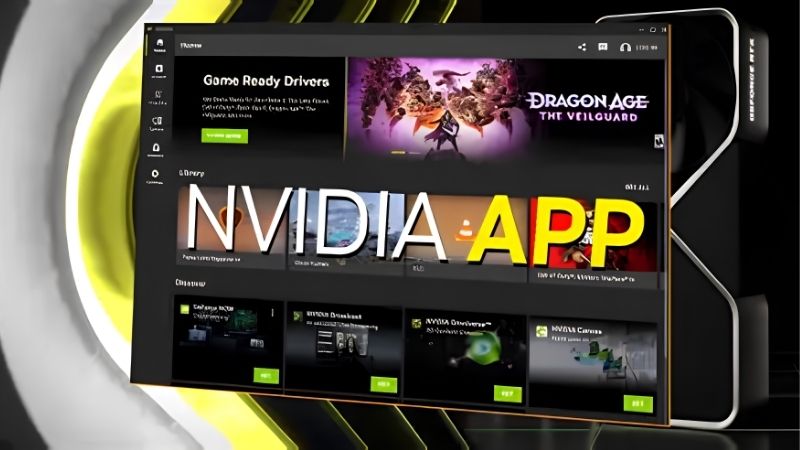
The Essential Nvidia Apps
Nvidia’s software ecosystem has grown well beyond drivers, and a handful of apps stand out as genuinely useful for different needs. Understanding what each one is for helps you build a software setup that matches how you actually use your PC, rather than installing everything or missing tools that could meaningfully help you.
The Nvidia App
The Nvidia app is the central hub and the one most users should have, replacing the older GeForce Experience with a cleaner, faster interface. It manages your graphics drivers, keeping them current with a click.
Beyond drivers, it offers per-game optimization, an in-game overlay, performance monitoring, and built-in recording, bringing the core GPU management tasks into one place. It is the foundation of the Nvidia software experience.
For nearly everyone with an Nvidia GPU, this is the essential starting app, since it handles the everyday maintenance and tuning that keep your card performing at its best.
If you install only one piece of Nvidia software, this is the one. It quietly takes care of the tasks that are easy to neglect, notifying you of new drivers, applying them cleanly, and keeping your games optimized, so that your card continues to deliver the performance you paid for without you having to think about it much at all.
GeForce NOW
GeForce NOW is Nvidia’s cloud gaming service, which streams games from powerful remote servers to almost any device, from a modest laptop to a phone or TV. It effectively rents you a high-end GPU by the hour.
This is especially valuable if your local hardware is limited, as it lets you play demanding titles you own without a powerful graphics card of your own. The heavy lifting happens in the cloud.
For gamers with older machines, GeForce NOW can bridge the gap between upgrades, though a strong internet connection is essential for a smooth, responsive experience.
Because the demanding computation happens on Nvidia’s servers rather than your PC, GeForce NOW can make a thin-and-light laptop or an aging desktop punch well above its weight for the titles it supports. The trade-off is that your experience is only as good as your connection, so a stable, low-latency internet link matters far more here than your local graphics hardware does.
Nvidia Broadcast
Nvidia Broadcast is an AI-powered tool aimed at streamers and remote workers, using the GPU to enhance audio and video in real time. It turns a regular room into a cleaner studio.
Its standout features include AI noise removal that strips background sound from your microphone, virtual backgrounds without a green screen, and auto-framing that keeps you centered. These meaningfully improve calls and streams.
For anyone who streams, records video, or takes frequent video calls, Broadcast adds real polish using hardware you already own, making it one of the more quietly powerful Nvidia apps.
What makes Broadcast especially appealing is that it delivers effects that once required expensive equipment or a dedicated studio. AI noise removal alone can transform how you sound on calls and streams, cutting out keyboard clatter and background chatter, and it does so using your GPU’s spare capacity rather than asking you to buy new microphones or backdrops.
What Each App Does for You
Knowing the names of the apps is only half the picture; the real value lies in what they let you accomplish. This section groups their capabilities by task, managing your GPU, creating and sharing content, and tapping AI features, so you can see which apps map to the things you actually want to do.
Managing Drivers and Game Settings
The Nvidia app handles the fundamentals of GPU management, most importantly keeping your drivers current so games run their best and new titles are supported on day one. This is maintenance you should not skip.
It also offers one-click optimization that adjusts a game’s settings to suit your hardware, taking the guesswork out of balancing quality and performance. For less technical users, this is genuinely handy.
Together, these features mean the app keeps your system tuned with minimal effort, which is why it is the one piece of Nvidia software almost everyone should run.
The one-click optimization deserves a special mention for less technical users. Rather than researching the ideal settings for each game, you can let the app analyze your hardware and apply a sensible balance of quality and performance automatically. It is not always the choice an enthusiast would make by hand, but it is a genuinely helpful starting point that gets most people to a good experience quickly.
Recording and Streaming Tools
The Nvidia app includes a built-in overlay for recording gameplay and capturing highlights, letting you save your best moments without separate software. It is efficient because it uses the GPU’s dedicated encoder.
For those who share content, this pairs naturally with Broadcast’s audio and video enhancements, giving you a clean capture and a polished presentation. The two apps complement each other well.
Whether you record casually or stream regularly, these tools let you produce good-looking content using the hardware in your PC, without investing in extra capture equipment.
Because the recording uses the GPU’s dedicated hardware encoder, it captures your gameplay with minimal impact on your frame rate, which is a real advantage over software-only recorders that can bog down a system. For clipping highlights or building a library of your best moments, this built-in capability removes a lot of the friction that used to come with separate recording programs.
AI-Powered Features
A growing share of Nvidia’s software value comes from AI, and Broadcast is the clearest example, using the GPU’s AI capabilities to clean up audio and video in real time. These effects would be impossible without dedicated hardware.
Nvidia’s GPUs also power AI-driven features in games and creative apps, from DLSS upscaling to accelerated content creation, all of which the software helps you access. The card does the heavy computation.
As AI features expand, keeping your Nvidia software current ensures you can actually use these capabilities as they arrive, turning your GPU into more than just a gaming component.
Getting the Most From Nvidia Apps
With the lineup and its capabilities clear, the practical question is which apps deserve a place on your PC and how to keep them serving you well. This section helps you choose based on your needs, weighs the overall software suite, and covers the simple upkeep that keeps everything running smoothly.
Which Apps You Actually Need
Almost everyone with an Nvidia GPU should install the Nvidia app, since it handles the essential driver updates and tuning that keep your card healthy. It is the non-negotiable starting point.
Beyond that, install based on your habits: GeForce NOW if you want cloud gaming or have limited hardware, and Broadcast if you stream, record, or take video calls. There is no need to install tools you will not use.
This tailored approach keeps your system uncluttered while ensuring you have exactly the capabilities that match how you use your PC, which is the sensible way to approach the ecosystem.
There is no penalty for starting small and adding more later. You can begin with just the core Nvidia app, then install GeForce NOW or Broadcast if and when a specific need arises, so your software footprint always reflects your real habits rather than a pile of tools you never open. Building up your setup gradually this way is almost always better than installing everything on day one and sorting it out later.
Pros and Cons of the Nvidia Software Suite
Pros: a unified, modern set of tools that manage drivers, optimize games, enable cloud gaming, and add AI-powered streaming features, all designed to squeeze more value from your existing GPU.
Cons: not every app is useful to every user, some features require capable hardware or a strong internet connection, and occasionally an app needs reinstalling when it misbehaves.
On balance, the suite adds substantial value for most Nvidia owners, especially the core app, and the flexibility to install only what you need keeps the downsides minimal.
See More:
Keeping Everything Updated
To get the most from these apps, keep them current, since updates deliver new features, performance improvements, and fixes. The Nvidia app can notify you when driver and software updates are available.
Staying updated also ensures you benefit from the latest AI and gaming features as they roll out, which is where much of the ongoing value lies. Current software unlocks current capabilities.
Of course, software can only do so much, and if your GPU itself is holding back your experience even with everything updated, a hardware upgrade may be the real answer. Use the links on this page to compare modern cards and see what more power would unlock.
The full range of Nvidia apps turns a graphics card into a far more capable tool, with the central Nvidia app handling essentials and specialized software like GeForce NOW and Broadcast adding real value for the right users.
Choose the Nvidia apps that match how you play and create, keep them updated to unlock the newest features, and remember that when software has given all it can, a modern GPU is what takes your experience to the next level.
Frequently Asked Questions
What is the Nvidia App and how does it differ from GeForce Experience?
The Nvidia App is the unified replacement for GeForce Experience and much of the legacy Control Panel. It handles driver updates, game optimisation, the overlay with performance monitoring and recording, and driver settings, all without requiring a login. GeForce Experience is deprecated and existing installations are prompted to migrate.
Do I still need the Nvidia Control Panel?
Increasingly not. The Nvidia App now exposes display settings, colour controls, G-SYNC, resolution and 3D settings that previously lived only in the Control Panel. The legacy panel still ships with the driver for some specialised options, but for the vast majority of users the App covers everything they will touch.
Is ShadowPlay recording free and does it cost performance?
Recording and instant replay are included at no cost and use the dedicated NVENC hardware encoder, so the performance impact is small, usually a few percent at most. Instant replay does continuously buffer to disk, so allocate a sensible buffer length and store clips on a drive with room and reasonable write endurance.
What is Nvidia Broadcast and do I need it?
Broadcast is a separate application that applies AI effects to webcam and microphone streams, including noise removal, background replacement and eye contact. It runs on tensor cores and requires an RTX card. It is genuinely useful for streaming and calls, but it is optional and consumes GPU resources while active.
Is any of this software required to game?
No. The display driver alone is sufficient to play games. The Nvidia App adds convenience: driver notifications, per-game settings, overlay statistics, recording and DLSS override controls. If you prefer a minimal system, install the driver only, though you will then need to manage updates and settings manually.
As an Amazon Associate we earn from qualifying purchases at no extra cost to you.













Write Your Review
No reviews yet. Be the first to share your experience!