
- Top Pick: ASUS Dual NVIDIA GeForce RTX 5060 Ti 16GB GDDR7 OC Edition Graphics Card, (PCIe 5.0, DLSS 4, HDMI 2.1b, DisplayPort 2.1b, 2.5-Slot, Axial-tech Fan, 0dB Technology), 3 Year Warranty
- Best Value: ASUS Dual NVIDIA GeForce RTX 5060 8GB GDDR7 OC Edition (PCIe 5.0, 8GB GDDR7, DLSS 4, HDMI 2.1b, DisplayPort 2.1b, 2.5-Slot Design, Axial-tech Fan Design, 0dB Technology), 3 Year Warranty
- Premium Choice: ASUS Dual NVIDIA GeForce RTX 3050 6GB GDDR6 OC Edition Gaming Graphics Card – PCIe 4.0, HDMI 2.1, DisplayPort 1.4a, 2-Slot Design, Axial-tech Fan Design, Steel Bracket, 3 Year Warranty
NVIDIA 4090 drivers are the first thing everyone blames and the last thing that is usually at fault. If you are reading this with a crash log open, you want the version number, the fix, and nothing else — so this review front-loads the diagnostics, lists the specific error codes worth searching for, and then does the part most driver articles skip: explaining when the driver is genuinely the problem and when you are chasing software for a hardware fault that will keep happening.
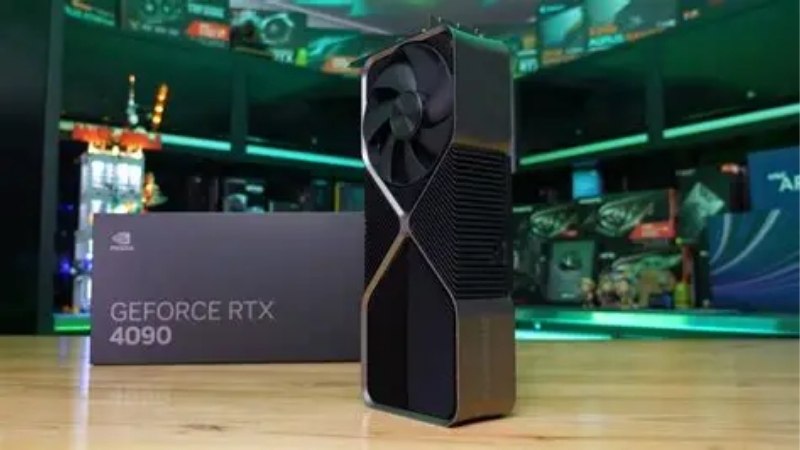
Why NVIDIA 4090 Drivers Get Blamed More Than Any Other Card
The 4090 sits in an unusual position. It is powerful enough that it exposes weaknesses everywhere else in the system, and expensive enough that owners are unwilling to consider that the card itself might be fine. When a 450W card with transient spikes into the 600W range meets a power supply sized for a previous generation, the symptom looks exactly like a driver crash: black screen, display driver stopped responding, event log entry, no useful information. This section separates the failures that a driver actually fixes from the ones it only masks.
The Error Codes Worth Searching For
If you arrived here with a specific message, these are the four that account for most 4090 reports and what each one actually means.
Event ID 4101 — “Display driver nvlddmkm stopped responding and has successfully recovered.” This is a timeout detection and recovery event. It means the GPU failed to respond within roughly two seconds. It is a symptom, not a cause. If it appears under load it is usually power or thermal; if it appears at idle or on the desktop it is more likely a genuine driver or display-mode issue.
Error 43 in Device Manager. The card stopped and reported a fault. On a 4090 this is disproportionately a seating or connector issue rather than a driver one — reseat the card and the power connector before reinstalling anything.
“NVIDIA installer cannot continue” / installer failure. Almost always a leftover from a previous driver, or a Windows Update driver installing underneath yours. This one is genuinely a driver problem and the clean install below fixes it.
Black screen under load with no event log entry at all. This is the important one, because the absence of an error is itself diagnostic. A driver crash writes something. A power supply protection trip does not. If your log is empty, stop reading driver articles and read the power section below.
Driver Branch Choice: Game Ready vs Studio
The two branches are not “gaming” and “professional” in the way the names imply. They are the same driver on different release cadences. Game Ready ships frequently and is validated primarily against upcoming game releases. Studio ships less often and is validated against creative applications — Adobe, DaVinci Resolve, Blender, Autodesk.
The practical consequence: Studio is not slower in games. It is simply older, which for a 4090 owner experiencing instability is frequently a feature rather than a limitation. Studio branch drivers have accumulated more validation time and fewer regressions.
The recommendation that shows up repeatedly in owner reports is unglamorous and effective: if you are chasing stability rather than day-one support for a specific title, move to the Studio branch and stop updating every fortnight. A 4090 does not need a new driver to run a game that shipped two years ago.
The Clean Install That Actually Works
Most “clean installs” are not clean. Checking the clean install box in the NVIDIA installer removes settings; it does not remove every driver remnant, and it does not stop Windows from reinstalling its own version afterwards.
The sequence that works: disconnect from the network first, so Windows cannot fetch a replacement mid-process. Boot into Safe Mode and run a display driver removal utility to strip every remnant. Reboot, still offline, and install your chosen driver package manually. Only then reconnect. Finally, disable automatic driver updates through Group Policy or the device installation settings so Windows Update cannot overwrite a stable driver with a newer one at 3am.
That last step is the one people skip and the one that causes the problem to return a week later, apparently spontaneously.
What 4090 Owners Report When the Driver Fix Does Not Hold
Reading through owner reports on this card produces a clear split. The 4- and 5-star reports rarely mention drivers at all — they mention that the card has been stable for two years, which is the point. The 2- and 3-star reports mention drivers constantly, but when you read past the headline the underlying cause is almost always physical. Three patterns dominate, and none of them are solved by a version number.
The 12VHPWR Connector: When It Is Not the Driver
The connector is the single most reported hardware issue on this card, and its failure mode is easily mistaken for driver instability. A partially seated connector does not fail cleanly. It develops resistance, the resistance produces heat, the heat produces intermittent contact, and intermittent contact at 450W produces a black screen that looks exactly like a driver timeout.
The check takes thirty seconds and is worth doing before any software step. The connector must click. There must be no visible gap at the plastic housing. The cable must not bend within 35mm of the connector — this is the specification, not a suggestion, and it is the reason many owners could not close their side panel without creating the fault. If you are running a third-party or adapter cable, that is the first suspect.
Discolouration or a melted smell on the connector is a stop-immediately situation, not a driver conversation.
Power Supply Transients and the Empty Event Log
A 4090 has a board power near 450W and transient spikes that can briefly exceed 600W on a sub-millisecond timescale. Power supplies measure and protect on their own timescale. A unit that is nominally sufficient can trip its over-current protection on a spike it was never designed to ride out.
The arithmetic owners get wrong: they add 450W for the card and 150W for the rest of the system, arrive at 600W, and conclude that their 750W unit is comfortable. It is not, because the calculation should be based on transient headroom rather than average draw. The practical figure that shows up in stable builds is 1000W, with 850W as an absolute floor on a high-quality modern unit.
The diagnostic that settles it: cap the card’s power limit to 70% in a monitoring utility. If the crashes stop entirely and performance drops only a few percent — which is exactly what happens on this card, since it is well past the efficiency knee — the problem was never the driver.
Pros and Cons of Staying on Older 4090 Drivers
Pros: Stability is the obvious one — an older, well-validated driver has had months of real-world exposure and its regressions are known. You stop introducing a new variable every two weeks, which makes any remaining fault far easier to isolate. Older branches are also generally free of the performance regressions that occasionally ship and get quietly fixed two releases later. And for a card of this class running titles that already shipped, there is genuinely nothing in a new driver you need.
Cons: You lose day-one optimisation for new releases, which for some titles is a real double-digit performance difference in the first weeks. You miss security fixes, which matters more than most gamers assume given that graphics drivers run in kernel space. New features — updated upscaling and frame generation implementations, new application profiles — pass you by. And if you eventually do need to update, jumping many versions at once is more likely to go wrong than incremental steps.
The balanced position for most owners: stay on a known-good driver, update deliberately when a title you actually intend to play needs it, and always via the offline clean-install sequence above. If your diagnostics point to the power side rather than the software side, the connector and PSU components discussed here are worth checking current specifications and availability on before the problem escalates into a replacement card.
The 2026 Context: Why Keeping Your 4090 Alive Is the Right Call
There is a temptation, once a card starts crashing, to treat replacement as the clean solution. Three developments this year make that a worse decision than it looks, and they are worth understanding before you spend anything.
The H200 Export Decision and What It Signals
The United States has approved NVIDIA to sell the H200 — among its most capable AI accelerators — into China. For a 4090 owner this appears irrelevant, but it is not, for one specific reason: the 4090 has its own history with that market, and demand from AI buyers has repeatedly distorted its availability and pricing well past its expected end of life.
The relevant read is not that the H200 decision will move 4090 prices directly. It is that policy on high-end accelerators is now demonstrably fluid, and that the same manufacturing and packaging capacity serves both the data centre and the consumer stack. A card in your machine that works is worth more than the same card as a line item on a wishlist, because the supply picture behind it is not moving in your favour.
Component Prices Are Still Climbing
The broader market gives the same answer. Laptop and component prices continue to trend upward, driven principally by memory. This matters to a 4090 owner in a specific way: if your diagnosis points to the power supply, that is a $150–250 fix. If you decide to replace the card instead, you are re-entering a market where the replacement costs more than the 4090 did and the rest of the build likely needs upgrading with it.
Repair economics on this card are unusually favourable. Very few components in a PC are worth troubleshooting for three hours. This one is.
Memory Supply: Flat, Not Falling
The honest version of the good news: prices have stopped rising at the rate seen through late 2025, and there has been a stretch of relative stability. New sources are appearing — OEMs can now draw DDR5 from Chinese suppliers such as CXMT, and Micron is building two plants in Idaho. But those plants do not produce until 2027 or 2028. The market has levelled off; it has not come down, and genuine relief is years out.
Applied to your decision: the plan of “let it crash for now and buy a new card when prices drop” is built on an assumption the supply data does not support. Fix the 4090.
See More:
- NVIDIA
- NVIDIA DeepStream
- NVIDIA GPU driver update
- NVIDIA GeForce NOW download
- NVIDIA RTX A2000 12GB driver
Conclusion
Working through NVIDIA 4090 drivers correctly means starting with the diagnosis rather than the download. Check the connector seating before anything else, because that is the highest-probability cause and the cheapest to rule out. Check whether your event log is empty — an absence of errors points at power, not software. Cap the power limit to 70% as a five-minute test that definitively separates the two. Only when those are clear should you run the offline clean-install sequence, ideally onto the Studio branch, and then disable automatic updates so the fix stays fixed.
In a year where component prices have flattened but show no route downward before 2027, and where policy on high-end silicon is visibly in motion, the economics favour repair decisively. A correctly seated connector and a power supply with real transient headroom will keep this card productive for years. If your research has narrowed the fault to the power side, checking current pricing and stock on a properly rated unit and a native cable is the highest-value thing you can do today — it costs a fraction of a replacement card and it addresses the fault the driver never could.
Frequently Asked Questions
Why does my RTX 4090 black screen under load?
The most common causes are a poorly seated 12VHPWR connector, an inadequate or aging power supply tripping on transients, and a corrupted driver install. Reseat the cable until it clicks fully, avoid tight bends within 35mm of the plug, verify the PSU is at least 850W, then clean install the driver.
Which driver branch is currently most stable for Ada?
Recent 580 series builds are mature for Ada Lovelace and include fixes for idle clock spikes and DisplayPort 2.1 handshake problems. If a new release introduces stuttering in your titles, the previous branch’s final hotfix build is usually the safest fallback rather than jumping several branches backward.
How do I stop stutter after updating drivers?
Clear the shader cache. Delete the DirectX and NVIDIA cache folders, or set the shader cache size to unlimited in the control panel, then replay the affected section so caches rebuild once. Persistent stutter after that usually points at background overlays, XMP instability, or a CPU bottleneck rather than the GPU driver.
Does the 4090 need an ATX 3.0 power supply?
Not strictly. The included four-way 8-pin adapter works on quality older units, but an ATX 3.0 or 3.1 supply with a native 12V-2×6 cable removes adapter failure points and handles the card’s brief power excursions without nuisance shutdowns. Aim for 850W minimum, or 1000W with a high core count CPU.
Should I use Studio drivers instead of Game Ready?
If your machine is mainly for rendering, video editing or AI work, yes. Studio builds ship less frequently and receive longer validation against creative applications, which reduces the chance of a regression breaking a project. Gamers who also create can switch branches freely, but should clean install when changing.
As an Amazon Associate we earn from qualifying purchases at no extra cost to you.














Write Your Review
No reviews yet. Be the first to share your experience!