

Save $40.00


Save $30.31


The best gpu for triple monitor gaming powers the ultimate immersive setup, spanning three displays for sim racing, flight simulation and panoramic gameplay. Driving that combined resolution demands serious horsepower, abundant VRAM and enough display outputs to connect every screen. Using current benchmarks and owner feedback, this guide ranks the top cards for triple monitor gaming, shows what each delivers across surround setups, and gives you a clear buying guide. Let’s find the card that fills all three of your screens with smooth, detailed motion.
As an Amazon Associate we earn from qualifying purchases at no extra cost to you.


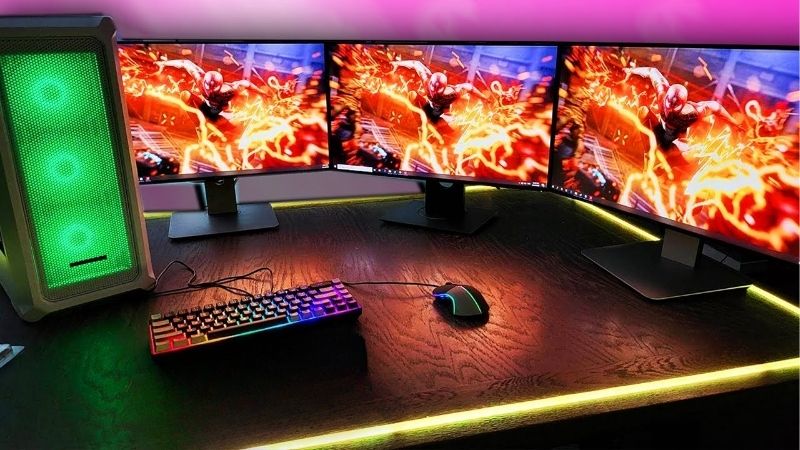
Quick Picks: Best GPU for Triple Monitor Gaming at a Glance
If you only have a minute, these three cards cover the core needs for surround gaming, balancing raw power, VRAM and output flexibility so you can choose quickly based on your screens and budget.
Best Overall: Nvidia RTX 5080 ($999, 16GB) – the power to drive huge surround resolutions smoothly.
Best Value: AMD Radeon RX 9070 XT ($599, 16GB) – strong raw performance for multi-screen setups.
Best Premium: Nvidia RTX 5090 ($1999, 32GB) – massive VRAM for the most demanding triple-screen rigs.
| Card | VRAM | Price | Best For |
|---|---|---|---|
| Nvidia RTX 5080 | 16GB | $999 | Surround all-round |
| AMD RX 9070 XT | 16GB | $599 | Raw value |
| Nvidia RTX 5090 | 32GB | $1999 | Demanding rigs |
Best Overall: Nvidia RTX 5080
The RTX 5080 is the ideal triple monitor card because its flagship-class power drives the enormous combined resolution of three screens at smooth frame rates. Whether you run three 1080p or three 1440p panels, it has the horsepower for the job.
Its 16GB of VRAM handles the high pixel count well, and DLSS 4 helps keep demanding surround setups fluid. For sim racing and flight simulation, it delivers the immersive scale these genres reward.
It also offers ample modern display outputs to connect all three screens cleanly. For most surround enthusiasts, it is the sweet spot of power and value.
Best Value: AMD Radeon RX 9070 XT
The RX 9070 XT delivers strong native performance across multi-screen setups for $599, making it the raw value leader for triple monitor gaming. Its 16GB of VRAM supports the large combined resolution well.
For players who prioritize native frame rates and want to save money for the monitors themselves, it is an excellent foundation. It handles surround sim titles confidently at sensible settings.
Ray tracing trails Nvidia and FSR is good rather than best, so feature-focused buyers may prefer the 5080. As a value performer for surround play, it is hard to beat.
Best Premium: Nvidia RTX 5090
The RTX 5090 and its 32GB of VRAM are built for the most demanding triple-screen rigs, especially high-resolution surround setups that overwhelm lesser cards. It removes the memory ceiling entirely.
Its enormous raw power drives even three high-resolution panels at smooth frame rates with high settings. For the ultimate sim racing or flight cockpit, it is the no-compromise engine.
It commands a flagship price and significant power, so it suits dedicated enthusiasts with the most ambitious setups. For them, it delivers unmatched surround performance.
In-Depth Reviews of the Top Triple Monitor Cards
Choosing among these cards comes down to how demanding your surround setup is and whether you weight features or raw value, so here is a closer look at how each performs across multi-screen gaming.
RTX 5080: The Surround Standard
In real-world use, the 5080 drives large surround resolutions at smooth frame rates, making it the go-to for serious sim racers and flight sim pilots. DLSS 4 helps keep demanding setups fluid.
Owners praise how it balances flagship-level power with a price below the top tier, making ambitious triple-screen builds attainable. It is the practical benchmark for surround gaming.
Its blend of power and modern outputs makes wiring up three screens straightforward, which removes a common headache for first-time surround builders.
RX 9070 XT: The Value Foundation
Benchmarks show the 9070 XT handling multi-screen resolutions confidently, particularly in well-optimized sim titles. It is a strong, affordable base for a surround rig.
Where it gives ground is ray tracing and upscaling polish, so visual purists may lean Nvidia. For raw value across three screens, it is one of the smartest choices.
It pairs especially well with three matched 1080p panels, where its strong native performance keeps sim titles smooth across the full wraparound view.
RTX 5090: The Ultimate Engine
The 5090 crushes the most demanding surround scenarios, including high-resolution triple-panel setups that bring other cards to a crawl. Its memory headroom is the key to the most ambitious rigs.
It is the card you buy when you refuse to compromise on resolution, refresh or settings across three screens. For that audience, it is a straightforward path to the best experience.
Its 32GB of VRAM is the standout feature for high-resolution surround, comfortably absorbing the enormous combined pixel count that overwhelms lesser cards.
Pros and Cons of a Triple Monitor Gaming GPU
Building a surround setup brings unmatched immersion along with real demands, so here is an honest look at the pros and cons tied to powering three screens at once.
The Strengths That Create Immersion
Pros: Total peripheral immersion ideal for sim racing and flight, abundant VRAM for the large combined resolution, multiple display outputs, and DLSS 4 to help maintain frame rates. Surround transforms simulation gaming.
These cards deliver a panoramic experience no single screen can match, wrapping the action around your field of view. For simulation fans, the immersion is the entire point.
The Trade-Offs to Weigh
Cons: The enormous combined resolution demands serious power, so budget cards are not viable here. Not every game supports surround cleanly, and some require configuration to span all three screens.
You also choose between Nvidia’s features and AMD’s raw value. For the immersion surround delivers in supported genres, these trade-offs are worth it.
Who Should Buy in This Range
This category suits sim racers, flight sim pilots and immersion enthusiasts who want a wraparound view across three displays. If that describes your setup, these cards provide the horsepower it demands.
If you game on a single screen, a less powerful card will suffice. For surround gaming, though, these picks deliver the performance three panels require.
Getting the Most from a Triple Monitor Setup
A powerful card is essential, but a few configuration choices determine whether your surround setup runs smoothly and looks right, so these tips help you make the most of three screens. Getting the configuration right is what separates a seamless panoramic view from a disjointed one, so it is worth a few extra minutes.
Configuring Surround Correctly
Both Nvidia and AMD offer surround features that combine three displays into one large gaming canvas, and setting these up correctly is the first step to a seamless view. Matching resolutions and refresh rates across screens keeps things consistent.
Bezel correction settings help align the image across the gaps between panels for a more natural look. Taking time with configuration pays off in immersion.
Saving a tested surround profile also makes it easy to switch between gaming and a standard desktop layout, which is handy if the same screens double as a work setup.
Managing the Combined Resolution
Three screens multiply the pixel count dramatically, so leaning on upscaling like DLSS 4 or FSR is the practical way to keep frame rates high. Quality mode preserves detail across the wide canvas.
Keeping textures high while trimming the heaviest effects is the smart balance for surround. This protects your frame rate without sacrificing the detail that makes the setup worthwhile.
Ensuring Enough Display Outputs
Before buying, confirm the card has enough modern outputs, typically DisplayPort and HDMI, to connect all three monitors at your desired resolution and refresh. This is an easy detail to overlook.
Checking output compatibility ahead of time avoids the frustration of a card that cannot drive every screen. For surround builds, outputs are as important as raw power.
Buying Guide and FAQs
A few final fundamentals will help you choose the right triple monitor card and avoid the mistakes that hold back surround builds.
What to Look For in a Triple Monitor GPU
Prioritize strong raw power, at least 16GB of VRAM and enough display outputs to connect all three screens. DLSS 4 or FSR support is also valuable for managing the large combined resolution.
Confirm your power supply and case can handle the card, especially the flagship. Matching the card to the demands of your specific surround resolution is what delivers the best result.
How Much VRAM Do I Need for Three Screens?
16GB is the comfortable target for most triple monitor setups in 2026, giving room for the high combined pixel count. For high-resolution surround rigs, the 32GB RTX 5090 offers extra headroom.
Lower-memory cards may force compromises across three screens. For a smooth, future-resistant surround experience, 16GB or more is the sensible amount.
See More:
Do All Games Support Triple Monitors?
Many simulation and racing titles support surround natively, but not every game does, and some require configuration to span three screens correctly. Checking compatibility for your favorite titles is worthwhile.
Sim racing and flight simulation are the strongest use cases, where the wraparound view adds genuine immersion and awareness. For those genres, triple monitors shine.
In the end, the best gpu for triple monitor gaming in 2026 is the RTX 5080 for its blend of power, VRAM and outputs, with the RX 9070 XT for raw value and the RTX 5090 for the most demanding surround rigs. Configure surround carefully, lean on upscaling and confirm your outputs, and your three screens will deliver the panoramic immersion they promise. Check current pricing on these cards through the links above before you build. As an Amazon Associate we may earn from qualifying purchases.
Frequently Asked Questions
How much GPU power do I need for triple monitor gaming?
Three 1080p displays in surround equals 5760×1080, roughly the pixel count of 1440p plus a margin, so an RTX 5070 Ti or RX 9070 XT is a reasonable target. Three 1440p panels equal 7680×1440, which exceeds 4K and realistically needs an RTX 5080 or 5090 class card for modern titles.
How much VRAM do triple monitor setups need?
Frame buffers scale with total resolution, so plan for at least 12GB at triple 1080p and 16GB or more at triple 1440p. Racing and flight simulators with high resolution textures are especially memory hungry. Running short on VRAM at these resolutions produces severe stutter rather than a gradual frame rate decline.
Do all three monitors need to be identical?
For surround or Eyefinity spanning, yes in practice. NVIDIA Surround and AMD Eyefinity require matching resolution and refresh rate to create a single logical display. Mismatched panels still work fine for productivity or for games rendered on one screen with the others showing maps, telemetry or a browser.
What display outputs should I check before buying?
Count the physical ports. Most modern cards offer three DisplayPort and one HDMI, which is enough for three monitors plus a spare. Verify DisplayPort 2.1 support if you want high refresh at 1440p or above without heavy compression, and confirm your cables are certified for the bandwidth you need.
Does having three monitors connected reduce gaming performance?
Only slightly when the extra screens display static content, since the card must still drive them and may hold higher memory clocks. Playing video or running a demanding application on secondary displays does cost measurable frame rate. Closing background video and animations on side monitors recovers most of that loss.











Write Your Review
No reviews yet. Be the first to share your experience!