
Most modern motherboards offer only one or two 5V 3-pin addressable RGB headers, yet a typical build now includes three case fans, a liquid cooler, and a light strip that all want that same signal. A passive ARGB splitter cable solves the shortage without adding a controller, a remote, or extra power wiring. It takes one header and mirrors its data signal to several devices at once, so every connected fan and strip follows the same motherboard effect in perfect sync.
- Quick Answer
- How to Choose
- Cooler Master 1-to-5 ARGB Splitter Cable (MFX-AWHN-1NNN5-R1)
- Jstincal 1-to-3 ARGB Splitter Cable (2 Pack)
- Jstincal 1-to-4 ARGB Splitter Cable (2 Pack)
- Micro Connectors Premium Sleeved 1-to-5 ARGB Splitter Cable, 70cm, White (F04-15AS70-W)
- ELFJMZP ARGB 1-to-4 Splitter Cable, 55cm
- Who Should Skip It
- FAQ
- Final Verdict
- Product and ASIN Reference
This guide covers only true 5V 3-pin ARGB splitter cables. These are signal cables, not fan power cables, so the separate guide to 4-pin PWM fan splitters on this site remains the right place for motor wiring. Nothing here is a 12V 4-pin RGB splitter, and nothing here is a powered hub with its own remote control. Each pick below is a passive cable sold as a splitter, verified against its Amazon listing, with a clear split count, length, and connector style to match different case layouts.
As an Amazon Associate, we earn from qualifying purchases.
Quick Answer
For most builders, the Cooler Master 1-to-5 ARGB Splitter Cable is the safest all-round pick, with long reach and broad motherboard support. Choose the Jstincal 1-to-3 two-pack for small builds, the Jstincal 1-to-4 two-pack for mid-tower fan sets, the Micro Connectors sleeved 1-to-5 for long white runs, and the ELFJMZP 1-to-4 for extended routing.
How to Choose
Start by confirming the header itself. An ARGB header is a 3-pin connector with a gap between pins, rated for 5 volts, and it carries a digital data line rather than separate color channels. A 12V 4-pin RGB header looks similar at a glance but uses different voltage and signaling, and plugging a 5V device into it can damage the LEDs. Check the motherboard manual for the header label, usually marked as addressable, digital, or D-LED, and match the arrow or voltage marking on the cable plug to the correct pin before powering on.
Next, count devices honestly and respect the header limit. A splitter does not create new power or new data channels. Every device on the splitter shares the current rating of the single header and displays the same effect at the same time. Motherboard manuals state a maximum current and a maximum number of addressable LEDs per header, and long strips consume that budget quickly. If the combined draw approaches the limit, brightness can sag or colors can shift, so keep a sensible margin rather than filling every branch with the longest strip available.
Split count should follow the build, not ambition. A 1-to-2 or 1-to-3 cable suits a cooler plus a pair of fans. A 1-to-4 fits a standard mid-tower set, and a 1-to-5 makes sense only when several short devices share one header. Remember that daisy-chained fans already count as one branch in many layouts, which can reduce the splitter size needed. Buying one size larger than the current plan is reasonable for a future fan, but stacking splitters on splitters invites voltage drop and tangled routing.
Length and connector gender matter more than marketing labels. Short cables around thirty centimeters keep a compact case tidy, while fifty to seventy centimeter cables reach across a full tower without strain. Many ARGB devices end in female plugs, so a splitter with female outputs needs the small male pin adapters included in the pack to complete the connection. Confirm those adapters are listed before ordering, keep spares in the motherboard box, and route each branch without sharp bends near the connector housing.
Finally, separate splitters from hubs before buying. A passive splitter needs no SATA power, no remote, and no software, because the motherboard still does all the work. A powered hub is better when the LED count is large or independent effects are wanted. For a handful of devices that should simply match, the passive cable is simpler and easier to remove later.
Cooler Master 1-to-5 ARGB Splitter Cable (MFX-AWHN-1NNN5-R1)

The Cooler Master 1-to-5 is the most established name in this category, built for builders who want one header to feed a full set of addressable fans, a liquid cooler, and case lighting together. Its five branches give the most headroom of any pick here, which suits larger cases where the cooler, three intake fans, and a rear fan all need the same motherboard signal. Cooler Master lists compatibility with the major motherboard lighting ecosystems from ASUS, MSI, GIGABYTE, and ASRock, so it slots into most mainstream builds without adapter hunting.
Because five outputs share one header, check the power budget first. Five fan lighting rings sit comfortably within typical limits, while five long strips may not. Plan the route before plugging in, tuck unused branches away from fan frames, and move to a powered hub if the manual limit comes close. Used within its limits, this is the cleanest way to expand one header across a full build.
Specs
| Item | Detail |
|---|---|
| Brand | Cooler Master |
| Model | MFX-AWHN-1NNN5-R1 |
| Split | 1 to 5 |
| Connector | 5V 3-pin ARGB |
| Compatibility | ASUS, MSI, GIGABYTE, ASRock ARGB headers |
| Power | Passive, header powered |
Jstincal 1-to-3 ARGB Splitter Cable (2 Pack)

The Jstincal 1-to-3 is the straightforward choice for a small or mid-sized build that needs to join a cooler and two fans, or three fans on their own. Each pack contains two splitter cables, which is genuinely useful: one can serve the front fans while the second handles the cooler and rear fan from another header, or simply stay in the parts box as a spare for the next upgrade. The listing is explicit that the cable supports only 3-pin 5V addressable headers and does not support 4-pin 12V RGB headers, which is exactly the clarity a first-time builder needs.
At thirty centimeters, the branches suit compact and mid-tower layouts where the header sits near its devices. The pack includes the small male connectors needed to join female-ended device cables to the female outputs, so the chain is complete out of the bag. With only three branches, staying inside a header limit is easy and troubleshooting takes minutes, which makes this the lowest-risk way to learn how splitters behave.
Specs
| Item | Detail |
|---|---|
| Brand | Jstincal |
| Model | 1-to-3 ARGB Splitter Cable |
| Split | 1 to 3 |
| Length | 30 cm per cable |
| Pack | 2 cables with male pin connectors |
| Connector | 5V 3-pin ARGB, female to female |
Jstincal 1-to-4 ARGB Splitter Cable (2 Pack)
Stepping up within the same family, the Jstincal 1-to-4 adds one more branch for the common four-device layout: three front fans plus a cooler, or four case fans in a row. Like its smaller sibling, it ships as a two-pack with the male pin connectors included, and each cable runs thirty centimeters. Having two identical four-way splitters also opens a tidy option for dual-header boards, with one splitter per header and balanced loads on each side.
Four devices still fit inside typical header limits when they are fans and a cooler block, but a long strip as the fourth device deserves a check against the manual. The shared listing covers the whole Jstincal range, so confirm the 1-to-4 option is selected before ordering. Choose it over the 1-to-3 when a fourth fan or lighted bracket is already planned; otherwise the smaller cable leaves less slack to hide.
Specs
| Item | Detail |
|---|---|
| Brand | Jstincal |
| Model | 1-to-4 ARGB Splitter Cable |
| Split | 1 to 4 |
| Length | 30 cm per cable |
| Pack | 2 cables with male pin connectors |
| Connector | 5V 3-pin ARGB, female to female |
Micro Connectors Premium Sleeved 1-to-5 ARGB Splitter Cable, 70cm, White (F04-15AS70-W)

The Micro Connectors premium sleeved splitter is built for reach and presentation. At seventy centimeters, it is by far the longest cable in this guide, which makes it the natural pick for full-tower cases, bottom-mounted headers, or any layout where a standard short splitter simply cannot span from the board to the farthest fan. The white premium weave sleeving also suits white-themed builds, where a plain black cable would stand out against pale fans and a light interior.
Five branches spread along that length, and male pins are included for the female outputs. The sleeving holds a planned route nicely once shaped, but needs more room at bends, so measure the path in a compact case first. This long-running model remains a passive cable with the same header limits as every other pick: the length solves distance, not power. For a large white build with devices far apart, nothing else here matches its span and finish.
Specs
| Item | Detail |
|---|---|
| Brand | Micro Connectors |
| Model | F04-15AS70-W |
| Split | 1 to 5 |
| Length | 70 cm |
| Finish | White premium sleeved |
| Connector | 3-pin ARGB with male pins included |
ELFJMZP ARGB 1-to-4 Splitter Cable, 55cm
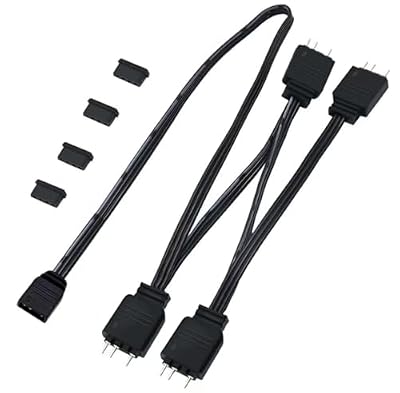
The ELFJMZP splitter takes a different approach to the four-way layout, using a segmented design with male output connectors rather than the female outputs and loose pin adapters found in most packs. Its total length of about fifty-five centimeters sits between the compact Jstincal cables and the long Micro Connectors model, giving mid-tower and larger cases useful reach without excessive slack. The listing names compatibility with popular motherboard brands including ASUS, MSI, and GIGABYTE, and describes each output set as ready for 5V addressable fans, liquid cooling components, and light strips.
Direct male outputs simplify the chain when devices end in female plugs, the most common arrangement for fans and strips, and fewer loose adapters means fewer small parts to lose. The flexible jacket bends around tight corners, and the segmented branches keep each run separate. This is the newest listing here, so double-check availability and connector orientation before ordering.
Specs
| Item | Detail |
|---|---|
| Brand | ELFJMZP |
| Model | 1 to 4 ARGB Splitter |
| Split | 1 to 4 |
| Length | 55 cm total |
| Connectors | 4P-3Pin female input to male outputs |
| Connector | 5V 3-pin ARGB |
Who Should Skip It
Skip a passive splitter if each device must show a different effect at the same time, since every branch mirrors the same data. A powered hub with separate channels is the correct tool for independent zones. Skip it too when the combined LED count or current draw would exceed the header rating, because no passive cable adds power capacity. Also skip these cables if the board has no 5V 3-pin header, if only a 12V 4-pin header is available, or if the fans already daisy-chain neatly into one header.
FAQ
Will all devices on a splitter show the same effect?
Yes. A passive ARGB splitter copies one data signal to every branch, so all connected fans, coolers, and strips display the same colors and animation at the same time. That shared behavior is ideal for a unified case theme. Builders who want different effects in different zones need separate motherboard headers or a controller with independent channels instead of a splitter cable.
Can an ARGB splitter damage a motherboard header?
A correctly matched 5V 3-pin splitter used within the header current and LED limits in the motherboard manual is a normal accessory. Damage risk comes from misuse: forcing the plug onto a 12V 4-pin header, reversing the connector, or loading the header far beyond its rating with long strips. Match the voltage marking, align the plug carefully, and keep the total load inside the stated limit.
Does a splitter cable also power the fan motors?
No. These cables carry only the lighting signal and lighting power for the LEDs. Fan motors are powered separately through their own fan connectors on the motherboard or a fan hub. That is why a build with many fans often needs both an ARGB splitter for the lights and a separate PWM splitter or hub for the motors, and the two should never be interchanged.
How many devices can one header handle through a splitter?
The limit comes from the motherboard, not the cable. Manuals state a maximum current and often a maximum number of addressable LEDs for each header. Count the LEDs in every fan, cooler, and strip on the splitter and keep the total inside that figure with room to spare. If the total is close to the ceiling, split the load across two headers or move to a powered hub.
Final Verdict
The Cooler Master 1-to-5 is the default recommendation for a full build, thanks to its reach, five branches, and broad motherboard support. The Jstincal 1-to-3 and 1-to-4 two-packs cover most compact and mid-tower systems with useful spares included, while the Micro Connectors sleeved 1-to-5 serves long runs and white builds better than any short cable. The ELFJMZP 1-to-4 earns its place for longer routing with direct male outputs. Choose by device count, distance, and the header limit in the manual, and a passive splitter will keep the whole case in sync with no controller in sight.
Product and ASIN Reference
| Product | ASIN |
|---|---|
| Cooler Master 1-to-5 ARGB Splitter Cable (MFX-AWHN-1NNN5-R1) | B083X1W5G4 |
| Jstincal 1-to-3 ARGB Splitter Cable (2 Pack) | B0C59BB6HY |
| Jstincal 1-to-4 ARGB Splitter Cable (2 Pack) | B0C59BF1T3 |
| Micro Connectors Premium Sleeved 1-to-5 ARGB Splitter Cable, 70cm, White (F04-15AS70-W) | B08FBN4XYX |
| ELFJMZP ARGB 1-to-4 Splitter Cable, 55cm | B0FRG3TTWB |




Write Your Review
No reviews yet. Be the first to share your experience!