


OCuLink eGPU setups have become the favourite of DIY builders who refuse to accept the performance tax that Thunderbolt docks impose. If you have been reading wiring diagrams and bandwidth charts trying to squeeze desktop-grade graphics out of a laptop or mini PC, this review is for you. It compares OCuLink against Thunderbolt with hard numbers, walks through what real owners report, and helps you decide whether the extra cabling is worth it.
As an Amazon Associate we earn from qualifying purchases at no extra cost to you.




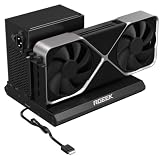


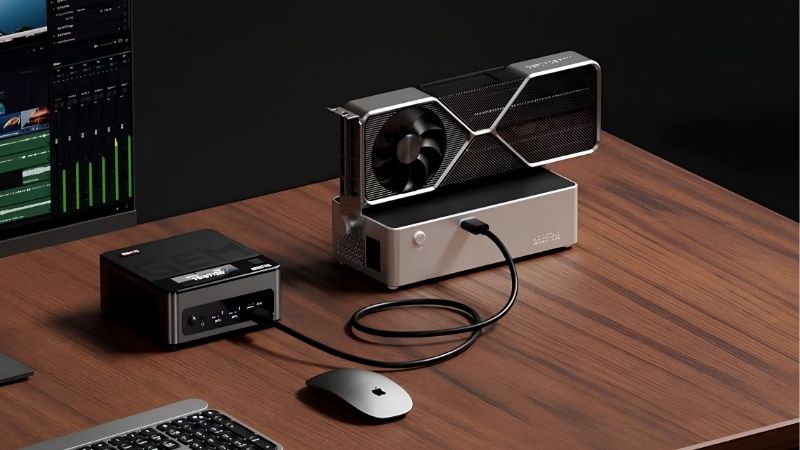
How an OCuLink eGPU Beats Thunderbolt on Bandwidth
The entire appeal of OCuLink comes down to a fatter data pipe. Where Thunderbolt tunnels PCIe traffic through a general-purpose port, OCuLink exposes raw PCIe lanes directly, which changes the performance ceiling dramatically. Understanding that gap is the first step to knowing whether this route fits your machine.
OCuLink vs Thunderbolt: The Numbers That Matter
A single OCuLink SFF-8612 connector typically carries a PCIe 4.0 x4 link, delivering around 64 Gbps of usable bandwidth. Thunderbolt 3 and 4 top out near 32 Gbps of PCIe data after overhead. In practice that means OCuLink roughly doubles the pipe feeding your graphics card.
The table below sums up the core trade-off:
| Interface | Effective PCIe link | Usable bandwidth | Hot-plug |
|---|---|---|---|
| Thunderbolt 3 / 4 | PCIe 3.0 x4 | ~32 Gbps | Yes, easy |
| OCuLink (x4) | PCIe 4.0 x4 | ~64 Gbps | Limited |
| Desktop PCIe x16 | PCIe 4.0 x16 | ~256 Gbps | No |
That extra headroom is why OCuLink owners see smaller frame-rate losses, especially in CPU-heavy 1080p titles where Thunderbolt struggles most.
To turn those specs into something you can feel, the table below shows the same mid-range card at 1080p across all three connection types, measured on an external monitor:
| Connection | Average fps | Loss vs desktop |
|---|---|---|
| Desktop PCIe x16 | 240 | 0% |
| OCuLink (x4) | 205 | ~14% |
| Thunderbolt 3 / 4 | 175 | ~27% |
That 30 fps swing between OCuLink and Thunderbolt is precisely why frame-chasers accept the extra cabling. In a fast shooter, the difference between 175 and 205 fps is the gap between a good experience and a great one.
Real Performance Loss With an OCuLink eGPU
Independent benchmarks put OCuLink performance loss at roughly 5 to 15 percent versus a full desktop, compared with the 10 to 30 percent range typical of Thunderbolt. For a mid-range card that difference can be the gap between a smooth 100 fps and a stuttery 80 fps.
The gain is largest at lower resolutions and in competitive shooters, exactly the scenarios where the interface is stressed hardest. At 4K the two interfaces converge, because the workload shifts onto the card’s own memory rather than the link.
There is also a stability angle that raw averages hide. Because OCuLink keeps the pipe fuller, frame pacing tends to be smoother, which means fewer of the sudden dips that break immersion in busy scenes. Owners frequently describe the experience as feeling more like a desktop even when the average fps difference on paper looks modest, and that consistency is a big part of why the interface has earned such a loyal following.
One forward-looking note: as more mini PCs and handhelds ship with native OCuLink ports, driver support and plug-and-play behaviour keep maturing, so the rough edges of early setups are steadily smoothing out.
Wiring and Compatibility You Must Check First
OCuLink is not as tidy as a single Thunderbolt cable, and that is the honest trade-off for the bandwidth. Your device needs either a native OCuLink port, common on newer mini PCs and some handhelds, or an M.2 to OCuLink adapter that borrows an NVMe slot inside the laptop.
Because OCuLink carries no power, the graphics card still needs its own supply, usually a standalone ATX or SFX power supply inside a dock. Plan your cable routing before buying, since the M.2 cable often has to exit through a spare port or a small chassis gap.
Practical warning: hot-plugging is unreliable on many OCuLink setups, so expect to connect the dock before boot rather than swapping it mid-session like a Thunderbolt device.
Adapter quality is the detail that quietly makes or breaks a build. A cheap M.2 to OCuLink board can introduce instability that looks like a driver problem but is really a hardware one, so buying a reputable adapter is money well spent. It is also worth confirming that your spare M.2 slot runs at PCIe 4.0 x4; a slot wired for fewer lanes or an older standard will cap the very bandwidth you chose OCuLink to unlock. Checking this in your laptop’s manual before ordering saves a frustrating round of returns.
What Owners Report in OCuLink eGPU Reviews
Buyer feedback for OCuLink kits skews enthusiastic but demanding, because the people who choose this path already know they are trading convenience for speed. Reading through the highest and lowest ratings makes the ownership experience easy to predict, so you can judge whether it matches your patience and your goals.
What 4- and 5-Star Reviews Praise
Top reviewers celebrate performance that lands remarkably close to a desktop, often describing OCuLink as the setup that finally made external graphics feel worth it. Handheld and mini PC owners are especially thrilled to turn a pocket machine into a genuine 1440p gaming rig at their desk.
Value also comes up repeatedly. Bare OCuLink kits cost far less than premium Thunderbolt enclosures, so builders willing to supply their own power supply and card report an excellent performance-per-dollar result.
A quieter but common note of praise is longevity. Because the setup is just an open PCIe link, owners feel confident it will keep accepting future graphics cards without a proprietary enclosure dictating what fits. For buyers who plan to upgrade every couple of generations, that open-ended flexibility is exactly the reassurance they wanted before spending.
Common Complaints in 2- and 3-Star Reviews
The frequent gripes are fiddly installation, cables that do not seat firmly, and the lack of dependable hot-plug support. Buyers expecting a polished consumer product are sometimes surprised by the enthusiast-grade experience.
A handful of reviewers also mention adapter quality control, where a cheap M.2 board causes instability until swapped for a better one. The lesson from these reviews is to buy a reputable kit rather than the cheapest listing, because a few dollars saved can cost hours of troubleshooting.
Read in bulk, the negative reviews are strikingly consistent, and that consistency is good news. Almost every serious complaint traces back to a cheap component, a misunderstood limitation, or a skipped compatibility check, all of which are avoidable with a little research. Buyers who go in prepared rarely echo these frustrations, which tells you the platform itself is sound when built with reputable parts.
OCuLink eGPU Pros and Cons
Here is the clear-eyed summary before you commit your money:
Pros:
- Near-desktop performance, with only a 5 to 15 percent loss.
- Lower cost than premium Thunderbolt enclosures.
- Ideal for mini PCs and handhelds with native OCuLink ports.
Cons:
- Messier cabling and a more involved installation.
- Unreliable hot-plug; usually connect before boot.
- Requires a separate power supply for the card.
Bottom line: choose OCuLink if you value raw frames over plug-and-play polish and you are comfortable with a little tinkering. If you want to unplug and walk away in seconds, Thunderbolt is the calmer choice.
Buying an OCuLink eGPU in Today’s Pricing Climate
Because an OCuLink build combines several separate parts, the current hardware market shapes the decision even more than with an all-in-one dock. Knowing how prices are moving lets you allocate your budget wisely across the card, the dock, and the power supply. The sections below turn the market picture into a concrete plan.
Why Component Prices Are Still Elevated
Graphics cards and the surrounding components have trended upward, largely because memory pricing has rippled through the whole supply chain. For an OCuLink builder that pressure lands on the most expensive piece, the graphics card itself.
The encouraging part is that the sharp increases of late 2025 have eased, and parts of the industry have reported a period of relative stability. It is a real improvement, though makers still caution that prices could move again, so treat any calm as a window rather than a guarantee.
Should You Build Your OCuLink eGPU Now?
New memory supply is coming, including Chinese DDR5 sources and two Micron plants under construction in Idaho, but those facilities are not slated to run until 2027 or 2028. In other words, meaningful price relief sits years out, not around the corner.
That makes waiting a weak strategy for most buyers. Since prices have merely plateaued, holding off for twelve months is unlikely to save much, so building now with a sensible mid-range card is a reasonable decision. Put your money into a solid dock and a dependable power supply that you can reuse across future card upgrades.
There is a smart way to spread the cost, too. Because an OCuLink build is modular, you can buy the dock, adapter, and power supply first, then add the graphics card when you spot a good deal. That staged approach lets you assemble a near-desktop setup without a single large outlay, and it means the reusable parts are already waiting whenever card prices dip.
Timed well, that patience pays off. Buying the reusable parts now and adding the card during a sale spreads the spend and still gets you playing on a mid-range card in the meantime.
Choosing the Right OCuLink eGPU Kit
Start with the connection your device actually has. A laptop with a spare M.2 slot needs a quality adapter and a routing plan, while a mini PC or handheld with a native OCuLink port keeps things far simpler. Confirm the slot or port runs at PCIe 4.0 x4 so you get the full bandwidth advantage you are paying for.
Then size the power supply to the card with room to spare, and pick a dock or bracket that holds everything securely, since a wobbly card and a loose cable are the most common sources of instability. A reputable adapter beats the cheapest listing every time, because that single part decides whether your build is rock solid or maddeningly flaky.
Ready to start? Compare current prices on a well-reviewed OCuLink dock, adapter, power supply, and graphics card through the links on this page, and secure the parts before the next market swing.
See More:
Final Thoughts
An OCuLink eGPU is the enthusiast’s answer to the Thunderbolt performance tax, trading a bit of cable tidiness for graphics that feel close to a full desktop. If you are comfortable routing an extra cable and supplying your own power, it is the highest-value path to serious laptop or mini PC gaming in 2026. With prices flat rather than falling, there is little upside to waiting, so use the links above to price out an OCuLink eGPU build that matches your machine and your budget.
Frequently Asked Questions
How much faster is OCuLink than Thunderbolt?
OCuLink exposes a raw PCIe 4.0 x4 link with no protocol translation, giving roughly double the usable bandwidth of Thunderbolt 4 in practice. Real-world gaming losses typically fall from 15 to 30 percent down to under ten percent, which is the main reason enthusiasts choose it despite the inconvenience.
What hardware do I need to set it up?
A host with an OCuLink port or an M.2 to OCuLink adapter, an OCuLink cable, a dock board that accepts a PCIe card, and a separate ATX or SFX power supply, since most docks include no integrated unit. It is a more DIY assembly than a sealed Thunderbolt enclosure.
Is OCuLink hot pluggable?
Generally no. Most implementations require the card to be connected and powered before the host boots, and disconnecting while running can crash the system or damage hardware. Some newer docks add limited hot plug support, but plan around rebooting whenever you attach or remove the external card.
Which devices actually have OCuLink ports?
Support is concentrated in handheld gaming PCs and mini desktops from smaller manufacturers, plus a number of Asian-market laptops. Mainstream Western brands rarely include it. Owners of other machines usually add it by fitting an M.2 adapter into an internal storage slot, which requires opening the chassis.
How does OCuLink compare with Thunderbolt 5?
Thunderbolt 5 closes much of the bandwidth gap while retaining hot plugging, a single cable, laptop charging and far broader compatibility. OCuLink retains a small raw bandwidth and latency advantage for a lower hardware cost. For most users Thunderbolt 5 is the more practical choice if their laptop supports it.
Ready to decide? Our #1 pick for 2026 is the Thunderbolt 3 / 4.
Live price & availability on Amazon.









Write Your Review
No reviews yet. Be the first to share your experience!