
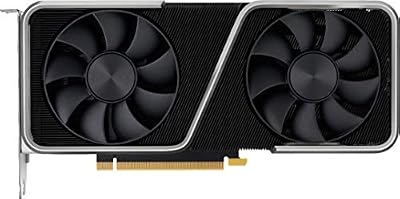
- Top Pick: NVIDIA GeForce RTX 3060 Ti Founders Edition 8GB GDDR6 PCI Express 4.0 Graphics Card (Renewed)
- Best Value: maxsun Graphics Card GeForce RTX 3060 Ti OC Edtion 8G Vidoe Gaming Computer Graphics Cards for Copmputer Gaming PC PCI Express 4.0 x16 HDMI 2.1 GPU (GDDR6 8G)
- Premium Choice: Geforce Nvidia RTX 3060ti Founders Edition 8GB
RX 6700 XT vs RTX 3060 Ti is a classic used-market matchup, since both are last-generation 1440p-class cards that now sell for budget money. The RX 6700 XT brings stronger 1440p performance and 12GB of VRAM; the RTX 3060 Ti counters with better ray tracing, DLSS, and efficiency. For a value buyer shopping new-old-stock or the second-hand market, this comparison cuts to the decision with a quick verdict, a full specs table, a feature-by-feature face-off, an alternative if neither fits, and a clear recommendation on which card you should actually buy.
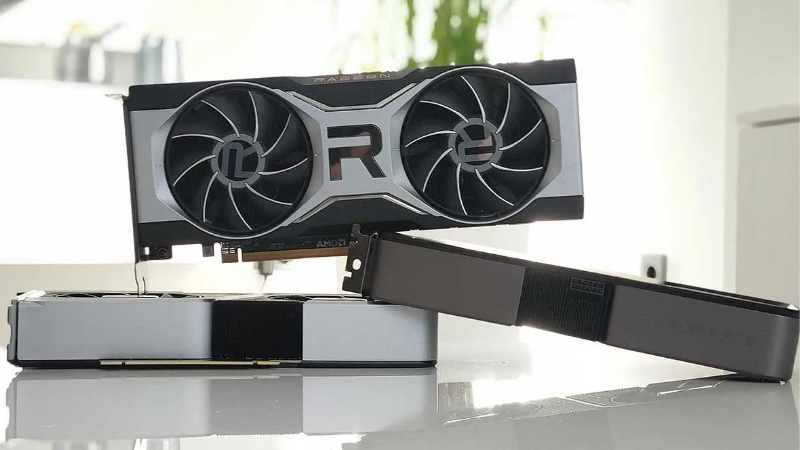
The Quick Verdict: RX 6700 XT vs RTX 3060 Ti at a Glance
Here is the short version. The RX 6700 XT wins on rasterized 1440p performance and carries 12GB of VRAM against the 3060 Ti’s 8GB, making it the better pick for 1440p gaming and longevity. The RTX 3060 Ti wins on ray tracing, brings DLSS upscaling and slightly better efficiency, and is a strong 1080p performer. Choose the 6700 XT for rasterized 1440p value and VRAM headroom; choose the 3060 Ti for ray tracing, DLSS, and efficient 1080p gaming.
As an Amazon Associate we earn from qualifying purchases at no extra cost to you.



Who Wins on Raw Rasterization
In traditional rasterized gaming, the RX 6700 XT is the stronger card, particularly at 1440p. Across most modern titles it posts higher frame rates than the RTX 3060 Ti, and its wider memory configuration helps it hold up better as resolution and texture detail climb.
The 3060 Ti remains a capable performer, especially at 1080p where it is excellent, but the 6700 XT’s rasterized lead grows at 1440p. For a buyer focused on raw frames at 1440p, AMD has the edge, and it is the 6700 XT’s strongest argument.
This is also why the two cards suit slightly different buyers. The 6700 XT is the one to choose if you are building specifically for 1440p, while the 3060 Ti makes more sense for a high-refresh 1080p setup where its strengths are best used.
Who Wins on Ray Tracing and Features
Turn on ray tracing and the RTX 3060 Ti pulls ahead, since its ray-tracing hardware is more capable than the 6700 XT’s RDNA 2 implementation. The 3060 Ti also brings DLSS upscaling, which generally produces a cleaner image than FSR at equivalent settings.
One important nuance: as a 30-series card, the 3060 Ti supports DLSS Super Resolution but not DLSS 3 Frame Generation, which is exclusive to newer NVIDIA cards. The 6700 XT relies on FSR, including the software-based FSR 3 Frame Generation that works across many cards, so on frame-generation upscaling the gap is narrower than it might first appear. Neither card supports the newest FSR 4, which is RDNA 4 exclusive.
The practical upshot is that NVIDIA’s upscaling still looks a little cleaner, but the gap is smaller than the marketing suggests, especially since both cards now have access to frame-generation upscaling through their respective software. For most buyers, ray-tracing performance, not upscaling, is the bigger differentiator here.
Specs Comparison Table
The specifications explain the split: the 6700 XT leans on raw raster and VRAM, the 3060 Ti on ray tracing and DLSS. The VRAM row is the one to watch, since it drives the longevity difference below.
| Spec | RX 6700 XT | RTX 3060 Ti |
|---|---|---|
| Architecture | RDNA 2 (Navi 22) | Ampere (GA104) |
| VRAM | 12GB GDDR6 | 8GB GDDR6 |
| Raster performance | Stronger at 1440p | Strong at 1080p |
| Ray tracing | Weaker | Stronger |
| Upscaling | FSR (incl. FSR 3) | DLSS (no Frame Gen) |
| Board power | 230W | 200W |
| Best for | 1440p raster + VRAM | Ray tracing + 1080p |
Read across the table and the trade-off is plain: the 6700 XT offers more VRAM and stronger 1440p raster, the 3060 Ti better ray tracing and a slightly lower power draw. Those rows, more than any single benchmark, are what should guide your choice.
Deep Dive Face-Off: Performance, VRAM and Efficiency
A glance at the headline traits is not enough to spend even budget money wisely, so this section compares the two cards on the axes that decide long-term satisfaction: real gaming performance across resolutions, how the VRAM difference plays out, and how efficiency shapes the build around them.
1440p and 1080p Gaming Performance
At 1440p the RX 6700 XT is the more comfortable card, holding higher frame rates and handling demanding titles with more headroom than the 3060 Ti. This is the resolution where the 6700 XT’s advantage is clearest, making it the better choice for a 1440p build.
At 1080p both cards are strong, and the 3060 Ti in particular is an excellent high-refresh 1080p performer with the bonus of better ray tracing if you want to enable it. The decision turns on your target resolution: the 6700 XT for committed 1440p, the 3060 Ti for high-refresh 1080p with stronger ray-tracing options.
The practical takeaway is that the 6700 XT buys you more raw 1440p capability and VRAM, while the 3060 Ti buys you ray tracing and DLSS at a slightly lower rasterized tier.
VRAM, Longevity and the 8GB Concern
This is the most consequential difference for a buyer planning to keep the card for years. The 6700 XT’s 12GB against the 3060 Ti’s 8GB is a meaningful gap, and it is growing: newer titles with high-resolution textures and ray tracing increasingly push past 8GB, where the result is stutter and texture pop-in rather than a graceful slowdown.
For a buyer who games at 1440p or plans to keep the card a long time, the 6700 XT’s larger buffer is genuine insurance, and it is the single strongest long-term argument in its favour. The 3060 Ti’s 8GB is fine at 1080p today but is the more limited side of this comparison going forward.
For a used-market buyer planning to keep the card for years, that VRAM gap is the single most future-relevant factor. It is the main reason many value shoppers lean toward the 6700 XT even though the 3060 Ti is the stronger ray-tracing card.
Power Draw, Efficiency and Build Notes
Efficiency slightly favours the RTX 3060 Ti, which at 200W draws a little less than the 6700 XT’s 230W and runs marginally cooler. The difference is modest, and both cards are easy to power with a quality 600W to 650W supply, so neither is hard to build around.
For used buyers, the more important practical factor is the condition of the specific card rather than the small efficiency gap. With either card, a clean, well-kept example with healthy fans and fresh thermal paste will run far better than a neglected one, so inspect before you buy.
It is also worth asking the seller about the card’s age and how hard it has been used, since a card from a heavy mining or overclocking history may have more wear. A little diligence here protects what is otherwise a strong-value purchase on either side.
Pricing, Alternatives and Final Recommendation
Performance and features only become a decision once price and timing are on the table, and for used cards in particular, the broader component market shapes that. This final section covers where prices stand, what to consider if neither card fits, and exactly which buyer should pick which.
Current Pricing and the Component-Cost Picture
Both cards are now value buys, often used, so compare the live cost of each at the moment you buy and weigh it against newer budget cards. The wider backdrop matters too: PC component prices have broadly trended upward, pushed mainly by memory costs, which affects graphics cards and whole builds alike.
There is cautious good news. The sharp climb of late 2025 has eased, and some makers, Framework included, have noted a relatively stable recent stretch while still warning of further movement. New memory supply is coming, with OEMs able to source DDR5 from suppliers like CXMT and Micron building two fabs in Idaho, but those plants are not expected to run until 2027–2028.
The reading for this matchup: prices have stopped spiking rather than started falling, so there is little to gain by waiting, and a good used deal on either card can be strong value. Just make sure the saving over a newer budget card is real, since a current-generation option brings modern features and a warranty.
The Alternative If Neither Fits
If you would rather buy new, a current budget card like the RX 7600 brings modern features, AV1 encoding, and a warranty, though often with less VRAM than the 6700 XT. It is the safer choice for a buyer who values peace of mind over the used market.
The RX 6750 XT is a near-twin of the 6700 XT that is slightly faster and worth considering if priced similarly, while a used RTX 3070 steps up NVIDIA’s performance if you want more headroom. For most buyers in this comparison, though, the choice is really between the two cards themselves at their current used prices.
Whichever you choose from that pair, the decision really hinges on the same two factors throughout this comparison: how much you value the 6700 XT’s larger VRAM buffer versus the 3060 Ti’s stronger ray tracing, weighed against the live used price on the day.
Final Verdict: Who Should Buy Which Card
Buy the RX 6700 XT if you game at 1440p, want stronger rasterized performance and 12GB of VRAM for longevity, and care more about raw frames than ray tracing. For a 1440p value build, new or used, it is the better all-round pick.
Buy the RTX 3060 Ti if you game at 1080p, want better ray tracing and DLSS image quality, and value slightly better efficiency. Whichever way you lean, compare the live prices for both through the links here before deciding, and on the used market, inspect the specific card’s condition, since that matters as much as the price.
For a value-focused 1440p build, the 6700 XT is the safer default thanks to its larger VRAM buffer, while the 3060 Ti is the pick for a high-refresh 1080p setup that leans on ray tracing. Either way, a healthy used example at a fair price is a lot of gaming card for the money.
See More:
- Colorful iGame RTX 4090
- Founders Edition vs AIB
- Best RTX 4080 Super card
- Best RTX 5080 AIB
- Best RTX 5070 Ti card
Conclusion: RX 6700 XT vs RTX 3060 Ti, the Smart Buy
There is no single winner in the RX 6700 XT vs RTX 3060 Ti debate, only the right one for your needs. The 6700 XT is the rasterization-and-VRAM choice for 1440p gaming and longevity, while the RTX 3060 Ti is the ray-tracing and efficient-1080p option. The 12GB versus 8GB VRAM gap is the most important long-term factor. Let your target resolution, your feelings about ray tracing, and the live used price make the final call.
Top-Rated Picks
Best Seller
NVIDIA GeForce RTX 3060 Ti Founders Edition 8GB GDDR6 PCI Express 4.0 Graphics Card (Renewed)
Save $148.03

Best Seller
EVGA GeForce RTX 3060 Ti FTW Ultra Gaming, 08G-P5-3667-KL, 8GB GDDR6, iCX3 Cooling, ARGB LED, LHR (Renewed)
Save $110.65


| Product | Brand | Rating | Reviews | Price |
|---|---|---|---|---|
| ARCTIC MX-4 (4 g) – Premium Performance Thermal Paste… | ARCTIC | ★ 4.8 | 104k | $4.99 |
| ARCTIC MX-4 (incl. Spatula, 4 g) – Premium Performanc… | ARCTIC | ★ 4.8 | 71.9k | $5.49 |
| Crucial 8GB DDR4 RAM 3200MHz (PC4-25600), Downclockab… | Crucial | ★ 4.8 | 62.8k | $74.99 |
| AMD Ryzen 5 5600X 6-core, 12-thread unlocked desktop … | — | ★ 4.8 | 30.2k | $177.60 |
| NVIDIA Shield Remote; Voice Search, Motion-Activated,… | — | ★ 4.7 | 10.6k | $25.99 |
Frequently Asked Questions
Which card performs better today?
At 1080p they are close, with the RTX 3060 Ti often slightly ahead. At 1440p the RX 6700 XT tends to win, because its 12GB of VRAM on a 192-bit bus avoids the buffer pressure that hits the 8GB GeForce card in modern titles with high texture settings.
Is 12GB versus 8GB the deciding factor?
Increasingly, yes. An 8GB buffer is now the limiting factor at 1440p in several recent releases, showing up as stutter and texture pop-in rather than a lower average frame rate. The 6700 XT extra 4GB gives it a longer usable life for anyone planning to keep the card several more years.
How do power requirements compare?
The RX 6700 XT is rated at 230W and the RTX 3060 Ti at 200W, both typically using dual 8-pin connectors on partner designs. A good 600W to 650W supply covers either. Neither uses 12VHPWR, so there are no adapter concerns when buying second hand.
Which is better for ray tracing and upscaling?
The RTX 3060 Ti. Ampere RT cores outperform RDNA 2 equivalents, and it supports DLSS 4 super resolution, which looks better than FSR 3.1 and is available in more titles. The 6700 XT cannot run FSR 4, since that requires RDNA 4, though AFMF frame generation does work on it.
Which is the smarter used purchase?
If you play at 1440p and prioritise raw raster performance and memory headroom, the RX 6700 XT is the better value. If you want ray tracing, DLSS and lower power draw, or use CUDA for any creative work, the RTX 3060 Ti justifies its usually higher second hand price.






Write Your Review
No reviews yet. Be the first to share your experience!