
⚡ Key Takeaways
- The first source of confusion is that a modern GPU reports several different temperatures, and they are not interchangeable.
- Use the table below as a practical reference for interpreting your readings during gaming.
- The real reason to care about heat is not fear of a melted GPU; it is lost performance.
- If your card runs hotter than the ideal range, the cause is usually one of a handful of culprits.
If you have ever watched your GPU temperatures climb during a long gaming session and wondered how hot is too hot for a GPU, you are asking exactly the right question. Modern graphics cards are engineered to run warm, far warmer than most people expect, but there is a real difference between a healthy operating temperature and one that signals trouble. The short answer is that most GPUs are perfectly happy in the 60-75C range under gaming load, begin throttling somewhere around 83-90C, and have hard safety limits (Tjmax) that can reach 90-110C depending on which sensor you are reading. This guide explains what those numbers mean, why your card might be running hot, and exactly when you should act.
Understanding GPU Temperature Readings
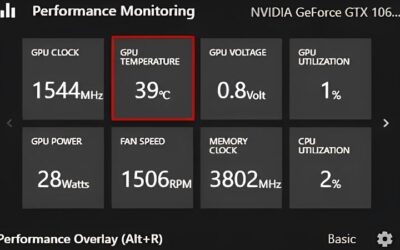
The first source of confusion is that a modern GPU reports several different temperatures, and they are not interchangeable. The number most software shows by default is the GPU core (or edge) temperature. But the card also monitors a hotspot (junction) temperature, which is the single hottest point on the silicon, and a memory junction temperature for the VRAM chips. The hotspot always runs hotter than the core, often by 10-20C, and that gap is completely normal. When people panic about an 85C reading, they are frequently looking at the hotspot or memory sensor, not the core.
Core vs Hotspot vs Memory Temperature
NVIDIA’s RTX 50-series and AMD’s RX 9000 series both expose these sensors through monitoring tools like HWiNFO, GPU-Z, or the manufacturer software. On an AMD card, the hotspot reading is prominent and the throttle point is tied to it, so seeing the junction temperature hit 90C is not necessarily alarming. GDDR6 and GDDR7 memory is rated to run hot as well, with memory junction temperatures up to around 95-105C considered within spec. Knowing which sensor you are reading is half the battle in deciding whether your card is genuinely too hot.
What Counts as a Safe GPU Temperature?
Use the table below as a practical reference for interpreting your readings during gaming. These ranges apply broadly to current NVIDIA and AMD desktop cards.
| Temperature Range (Core) | Status | What It Means |
|---|---|---|
| Below 50C | Idle / Light Load | Normal at desktop or during video playback. |
| 60-75C | Ideal Gaming | The healthy target zone under sustained load. |
| 76-82C | Warm but Fine | Acceptable, common in compact cases or summer heat. |
| 83-87C | Throttle Threshold | The card may start reducing clocks to protect itself. |
| 88-90C+ | Hot | Investigate cooling; sustained operation here is undesirable. |
| Tjmax (90-110C) | Hard Limit | The card throttles hard or shuts down to prevent damage. |
The key takeaway is that hitting the low-to-mid 80s during an intense session is not a crisis. Cards are designed with these thermal limits as part of normal operation, and the protective throttling exists precisely so the silicon is never actually damaged. You should only be concerned when temperatures consistently sit at or above the throttle threshold, because that means you are leaving performance on the table.
Why Throttling Matters More Than the Number
The real reason to care about heat is not fear of a melted GPU; it is lost performance. When a card reaches its throttle point, it automatically lowers its boost clock to bring temperatures back into a safe band. The result is lower and less consistent frame rates. A card pinned at 87C and throttling will deliver noticeably worse and choppier performance than the same card held at 70C, even though neither is in any danger of failing. So the practical goal is not to chase the lowest possible number but to keep the card below the point where it starts pulling back its clocks.
Common Causes of an Overheating GPU
If your card runs hotter than the ideal range, the cause is usually one of a handful of culprits.
Poor Case Airflow
The most frequent offender is inadequate airflow. A GPU dumps a lot of heat, an RTX 5090 can pull up to 575W, into the case, and if that hot air has nowhere to go, it recirculates and raises every temperature. Ensuring you have intake fans at the front and exhaust at the rear and top creates a clear path for heat to escape. Upgrading to higher-static-pressure fans can drop GPU temperatures by several degrees; our roundup of the best GPU cooler fans of 2026 covers strong options.
Dust Buildup
Over months and years, dust accumulates in the heatsink fins and clogs fans, acting as insulation. A can of compressed air aimed at the GPU cooler and case filters every few months makes a measurable difference. This is the cheapest fix available and the first thing to try if a once-cool card has gradually gotten hotter.
Aggressive Overclocks or Stock Fan Curves
Factory fan curves are often tuned for quietness over cooling, letting the card run warm to stay silent. Setting a more aggressive custom fan curve in the manufacturer software trades a little noise for cooler operation. Conversely, if you have manually overclocked the card, you may simply be pushing more heat than the cooler can handle, and dialing the overclock back will help.
Old or Degraded Thermal Paste
On older cards, the thermal paste between the die and the heatsink can dry out, worsening heat transfer. Repasting is an advanced fix and will void some warranties, so it is a last resort. For high-wattage flagships, an aftermarket liquid solution like one of the best AIO GPU coolers can dramatically lower temperatures.
How to Lower Your GPU Temperatures
Start with the free and easy fixes before spending money. Clean out dust, set a more aggressive fan curve, and improve case airflow by adding or repositioning fans. Make sure the card is not starved of fresh air by a glass front panel with no intake. If you have a small form factor build, a hot-running card may be unavoidable to some degree, and choosing an efficient card like the RX 9070 or RTX 5070 rather than a flagship can sidestep the problem entirely. When picking a new card, our best graphics card comparison notes which models run cool and quiet out of the box.
Top-Rated Picks


Dropped $0.02


| Product | Brand | Rating | Reviews | Price |
|---|---|---|---|---|
| ARCTIC MX-4 (4 g) – Premium Performance Thermal Paste… | ARCTIC | ★ 4.8 | 104k | $4.99 |
| ARCTIC MX-4 (incl. Spatula, 4 g) – Premium Performanc… | ARCTIC | ★ 4.8 | 71.9k | $5.49 |
| Crucial 8GB DDR4 RAM 3200MHz (PC4-25600), Downclockab… | Crucial | ★ 4.8 | 62.8k | $74.99 |
| AMD Ryzen 5 5600X 6-core, 12-thread unlocked desktop … | — | ★ 4.8 | 30.2k | $177.60 |
| NVIDIA Shield Remote; Voice Search, Motion-Activated,… | — | ★ 4.7 | 10.6k | $25.99 |
Frequently Asked Questions
Is 80C too hot for a GPU?
No, 80C on the core is perfectly safe and well within normal operating range for both NVIDIA RTX 50 and AMD RX 9000 cards. Throttling typically doesn’t begin until the mid-80s, and the hard safety limit sits much higher. You only need to act if temperatures climb past the throttle threshold and stay there.
What temperature will damage a GPU?
In practice, modern GPUs protect themselves before damage can occur. They throttle aggressively as they approach Tjmax (90-110C depending on the sensor and model) and will shut the system down rather than allow harmful temperatures. Sustained operation right at the limit isn’t ideal for long-term lifespan, but a brief spike will not destroy the card.
Why is my GPU hotspot temperature so much higher than the core?
The hotspot, or junction, temperature reflects the single hottest point on the die, so it is always higher than the average core reading, often by 10-20C. This gap is normal and expected. A larger-than-usual gap can indicate poor heatsink contact or aging thermal paste, but a moderate difference is just how the sensors work.
Does running hot shorten my GPU’s lifespan?
Consistently running near the thermal limit can accelerate wear over many years, but cards comfortably handle the temperatures they are rated for. Keeping your GPU in the 60-75C range under load is a good habit that preserves both performance and longevity without any real downside.
How do I check my GPU temperature?
Use a free utility like HWiNFO, GPU-Z, or MSI Afterburner, or the temperature readout built into NVIDIA and AMD’s own software. Run a demanding game or a stress test, then watch the core, hotspot, and memory junction temperatures to get a complete picture of how your cooling is performing.
Conclusion
So, how hot is too hot for a GPU? Treat 60-75C as your healthy target, accept that the low 80s during heavy gaming is completely fine, and only take action when the card consistently reaches its throttle threshold in the mid-to-high 80s. Remember that modern cards are built to protect themselves, so a high number is a cue to improve cooling for better performance rather than a sign of imminent failure. Clean out the dust, optimize your airflow, and tune your fan curve, and your GPU will reward you with cooler temperatures and steadier frame rates.

Write Your Review
No reviews yet. Be the first to share your experience!