
A fast NVMe drive that runs hot does not stay fast for long. During a long game install or a sustained file copy, the controller on a bare M.2 2280 drive can heat up enough that the drive protects itself by slowing down. That slowdown is called thermal throttling. It arrives without warning, and the drive simply delivers lower speeds until it cools again.
An aftermarket heatsink adds metal mass and surface area over the controller and flash chips, spreads heat through a thermal pad, and releases it into case airflow. The right design depends on clearance and workload. A finned tower suits an open desktop slot. A thin graphene coated copper plate suits a laptop, a console, or a slot under a graphics card. A fan cooled model suits a hot PCIe Gen 5 drive where passive cooling is not enough. This guide covers five heatsinks for M.2 2280 drives only, each checked against a listing source for its exact model.
As an Amazon Associate, we earn from qualifying purchases.
Quick Answer
For most open desktop slots, choose the Thermalright HR10 2280 for its double sided body and heatpipes. For a tight or low cost slot, choose the Thermalright TR-M.2 2280 Type A G. For a proven branded sink, choose the Sabrent Rocket Heatsink. For the thinnest fit, choose the icepc graphene copper plate, and for active cooling, choose the EZDIY-FAB Shield ARGB.
How to Choose
Start with clearance, because height decides more purchases than any other factor. Measure the space above the M.2 slot before ordering. A slot under a wide graphics card or a motherboard cover leaves very little vertical room. Thin plates only a few millimeters tall fit almost anywhere, including many laptops and the PlayStation 5 expansion bay when the listing confirms that use. Tall tower sinks need a genuinely clear area and should never be forced under a card or cover. Width matters too, since a wide sink can foul a neighboring slot or cable.
Next, check whether the drive is single sided or double sided. Many high capacity 2280 drives place flash chips on both faces. A sink that only contacts the top face leaves the underside chips without a direct cooling path. Double sided designs wrap the drive with pads and metal on both faces, or include a backplate. Look at the underside before buying. Chips on both sides point toward a double sided heatsink, while a bare underside works with either style.
Mounting method matters as well. Screw together sandwich designs give firm, even pressure and stay secure in a moved machine, but they take longer to remove. Clip, band, and adhesive designs install faster, yet adhesive pads rarely survive repeated removal cleanly. A drive that stays in place for years suits a screwed design. A test bench drive that moves weekly suits something simpler.
Pad contact matters as much as the metal. The pad bridges tiny height differences between the controller, flash, and the heatsink face. Too thick, and it holds the sink away from the hottest chip. Too thin, and it leaves a gap. Keep good contact across the controller as the priority, because the controller usually triggers throttling first.
Passive sinks are silent and have nothing to wear out, so they are the default for Gen 3 and Gen 4 drives and for most Gen 5 drives in a ventilated case. Active models add a fan that helps in a cramped case or a sustained Gen 5 workload, but they add noise, a cable, and a moving part. Choose active cooling for a clear thermal problem, not as a default. Keep the original motherboard plate and screws safe if one is replaced.
Thermalright HR10 2280 SSD Heatsink

The Thermalright HR10 2280 is the heavy duty passive option here, built around a double sided body and copper heatpipes that move heat from the controller into a finned aluminum structure. A flat plate relies only on the metal directly above the chips. The heatpipe design spreads heat along the full length of the sink, so the whole fin area does useful work. That matters most during sustained transfers, cloning jobs, and long game installs, where heat builds steadily rather than in short bursts.
Fit is the trade off. The HR10 needs an open desktop slot with real clearance and decent airflow across the fins. It belongs on a primary drive in a mid tower or full tower build, not in a laptop or a console bay. Installation is a sandwich pattern, with the drive between pads and metal on both faces, which also suits double sided modules. Once fitted, there is nothing to configure and no noise to manage.
Specs
| Item | Detail |
|---|---|
| Form factor | M.2 2280 |
| Cooling type | Passive, double sided |
| Heatpipes | Copper heatpipes in finned body |
| Drive support | Single and double sided modules |
| Best use | Open desktop primary slot |
| Extras | Thermal silicone pads included |
Thermalright TR-M.2 2280 Type A G Heatsink
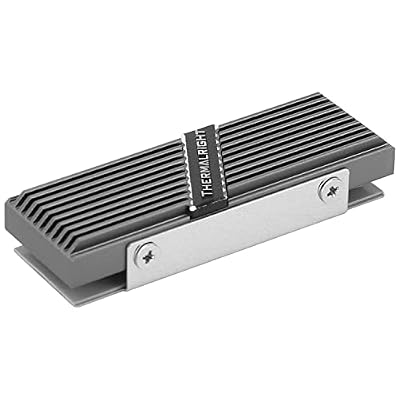
The Thermalright TR-M.2 2280 Type A G is a straightforward aluminum heatsink that adds useful surface area and proper pad contact without adding much height or complexity. For a Gen 3 or Gen 4 drive that runs warm during ordinary desktop work, that simpler formula is often enough to keep speeds steady through a long download, install, or file copy.
This is the natural pick for a secondary drive, a budget build, or a slot where a taller tower would never fit. The grooved aluminum body gives heat somewhere to go, and the assembly stays close to the footprint of the drive itself. The limit is thermal mass. A compact sink like this is not the answer for a hot Gen 5 drive writing continuously in a poorly ventilated case, and it still needs at least modest case airflow to release the heat it collects.
Specs
| Item | Detail |
|---|---|
| Form factor | M.2 2280 |
| Cooling type | Passive aluminum |
| Material | Aluminum body |
| Drive support | M.2 2280 SSD modules |
| Best use | Secondary and budget slots |
| Extras | Thermal pads included |
Sabrent M.2 2280 SSD Rocket Heatsink (SB-HTSP)

The Sabrent Rocket Heatsink, model SB-HTSP, is the established branded option in this lineup. A machined aluminum body with copper elements draws heat from the drive, the proportions stay controlled enough for a typical desktop slot, and the finish looks at home in a windowed build where a rough generic plate would stand out.
The Rocket Heatsink handles single sided and double sided 2280 drives and uses a screwed assembly that holds firm once fitted. That suits a primary system drive installed once and left alone, including in a machine that gets moved between rooms. Compared with the tallest Thermalright tower, it gives up some fin area for easier clearance. Compared with the thinnest graphene plate, it offers far more metal mass. That middle position makes it a sensible default for a Gen 4 gaming or workstation drive, provided the case has reasonable airflow.
Specs
| Item | Detail |
|---|---|
| Form factor | M.2 2280 |
| Model | SB-HTSP |
| Cooling type | Passive aluminum and copper |
| Drive support | Single and double sided modules |
| Best use | Primary Gen 4 desktop drive |
| Extras | Mounting hardware and pads included |
icepc M.2 Graphene Coating Copper Heatsink

The icepc heatsink is the thin solution for builds where height is the whole problem. Instead of a finned block, it uses a full cover copper plate with a graphene coating, paired with thermal conductive adhesive, to spread heat across the face of a 2280 drive while adding very little thickness. That profile opens up placements no tower can serve, including many laptops, compact systems, and the PlayStation 5 expansion area where the listing supports that fit.
Copper conducts heat quickly along the plate, moving it away from the controller hotspot toward cooler areas. Expectations should stay realistic. A plate this thin has little mass, so it smooths short heat spikes and helps moderate loads rather than absorbing a long sustained write like a heavy sink. Fitting is adhesive based, so the surface needs to be clean and the plate aligned before it is pressed down. For a fixed drive in a tight machine, that trade is worthwhile.
Specs
| Item | Detail |
|---|---|
| Form factor | M.2 2280 |
| Cooling type | Passive thin plate |
| Material | Copper with graphene coating |
| Mounting | Thermal conductive adhesive |
| Best use | Laptops, compact builds, consoles |
| Profile | Ultra low, full cover design |
EZDIY-FAB Shield ARGB M.2 SSD Heatsink with Fan

The EZDIY-FAB Shield ARGB is the active option, combining a premium aluminum body with a built in 20mm PWM fan that pushes air directly across the cooling surface. A passive sink in still air can only wait for heat to leave. This design forces the exchange, which helps a Gen 5 drive or a hard working Gen 4 drive hold speed through workloads that would otherwise end in throttling.
The fan needs a power connection and a header within reach of the slot, plus a sensible speed curve set in the motherboard controls. Run flat out, a small fan can be audible in a quiet room. Tuned moderately, it stays unobtrusive while moving far more air than a passive slot receives by chance. The ARGB lighting syncs with a compatible 5V 3 pin header and can be left unconnected. The listing also covers shorter 2230, 2242, and 2260 drives, but the fan housing needs clearance above the slot.
Specs
| Item | Detail |
|---|---|
| Form factor | M.2 2280, plus shorter lengths |
| Cooling type | Active fan cooled |
| Fan | Built in 20mm PWM fan |
| Lighting | 5V 3 pin ARGB sync |
| Material | Premium aluminum body |
| Best use | Hot Gen 5 and gaming builds |
Who Should Skip It
Anyone whose motherboard already covers the only M.2 slot with a well fitted plate, and whose drive holds full speed through its longest real workload, already has the problem solved. A different sink changes appearance more than performance in that case.
Laptop owners should check serviceability first. Some laptops leave no room above the drive, route a cable over the slot, or use the bottom panel as part of the cooling path. A plate that presses against a panel or cable creates a new problem. Console owners likewise need to confirm bay dimensions, since a sink that stops the bay cover seating correctly should never be forced. A light workload can also skip this category. A Gen 3 drive used for documents or a game library rarely sustains writes long enough to throttle in daily use, and none of these products fits inside a USB enclosure.
FAQ
Do M.2 heatsinks really stop thermal throttling?
They help when heat is the cause of the slowdown. A heatsink spreads heat away from the controller and releases it into case airflow, which delays or prevents the temperature rise that triggers throttling during sustained transfers. A heatsink cannot fix a slowdown caused by a nearly full drive, a slow source drive, or a slot wired for fewer PCIe lanes than the drive supports.
Will a tall heatsink fit under a graphics card?
Often it will not. Slots beneath a wide graphics card usually have only a few millimeters of spare height, which suits a thin plate or a low finned sink rather than a tower design. Measure the gap with the card installed before ordering, and check width as well as height.
Is a fan cooled M.2 heatsink worth the extra noise?
It can be for a PCIe Gen 5 drive, a small form factor case with weak airflow, or long continuous writes such as video capture. For a typical Gen 4 gaming drive in a ventilated mid tower, a good passive sink usually holds speed without adding noise, a cable, or a moving part.
Can one heatsink be moved to a new drive later?
Screwed sandwich designs usually transfer well, since pads can be replaced and the metal body is undamaged by removal. Adhesive thin plates transfer poorly, because the adhesive rarely survives removal in good condition. Budget for fresh thermal pads when moving any sink, and never reuse a pad that has torn or dried out.
Final Verdict
The best m2 ssd heatsinks solve a narrow problem well, and the right choice follows from clearance and workload. The Thermalright HR10 2280 is the strongest passive pick for an open desktop slot. The Thermalright TR-M.2 2280 Type A G covers a secondary slot simply and compactly. The Sabrent Rocket Heatsink SB-HTSP is the balanced branded default for a primary Gen 4 drive. The icepc graphene copper plate reaches laptops and console bays that nothing else here can fit. The EZDIY-FAB Shield ARGB adds a fan for Gen 5 heat and warm gaming cases. Measure the slot, confirm the drive layout, and match the sink to the longest workload the drive truly faces.
Product and ASIN Reference
| Product | ASIN |
|---|---|
| Thermalright HR10 2280 SSD Heatsink | B0C4FZL7GG |
| Thermalright TR-M.2 2280 Type A G Heatsink | B0C4FJFFPH |
| Sabrent M.2 2280 SSD Rocket Heatsink (SB-HTSP) | B0B5FGHHN6 |
| icepc M.2 Graphene Coating Copper Heatsink | B09WR8Z2VC |
| EZDIY-FAB Shield ARGB M.2 SSD Heatsink with Fan | B0DL9SJ6D4 |




Write Your Review
No reviews yet. Be the first to share your experience!