
Every PC build eventually comes down to a handful of small screws. A case ships with a starter bag of hardware, but that bag rarely survives a motherboard swap, a drive upgrade, or a second build. Standoffs go missing, a thumbscrew rolls under a desk, and the one M.2 mounting screw a new SSD needs is nowhere to be found. A dedicated screw kit solves that problem by putting the common PC fasteners in one place, sorted and ready before the side panel comes off.
- How to Choose the Right PC Screw Kit
- mankk 400PCS Computer Screws Assortment Kit
- StarTech.com PC Mounting Computer Screws M3, Pack of 50
- WLXTREE NVMe M.2 SSD Standoff and Mounting Screws Kit, 36 Pieces
- WLXTREE 20x Computer Case Thumb Screws, 6-32 Thread
- LuKaiSen 516PCS Computer Screws Assortment Kit with Storage Box
- Frequently Asked Questions
- Product and ASIN Reference
The best pc screw kits are not all built for the same job, though. Some are broad assortments covering standoffs, case screws, fan screws, and drive screws in one box. Others focus on a single task, such as mounting an M.2 SSD or replacing case thumbscrews. This guide compares five kits across those scopes and explains which screw types a build actually uses.
As an Amazon Associate, we earn from qualifying purchases.
How to Choose the Right PC Screw Kit
Start with the screw types a desktop build actually needs. Motherboard standoffs are the brass or steel posts that screw into the case tray and hold the board off the metal surface. Most standoffs use a 6-32 thread on the case side and accept an M3 screw on the board side, though some kits include M3-threaded standoffs as well. Mixing these two threads up is the most common beginner mistake, because a 6-32 screw and an M3 screw look nearly identical at a glance.
Drive screws split by size. Traditional 3.5-inch hard drives and power supplies typically use coarse 6-32 screws, while 2.5-inch SSDs and optical drives use finer M3 screws. M.2 SSDs are a separate case again: they need a small standoff matched to the motherboard brand plus a tiny retaining screw, and those parts are small enough that losing one can stall an upgrade entirely. Case fans use their own coarse self-tapping screws, and side panels often use 6-32 thumbscrews that turn by hand.
Thread checking matters more than thread counting. Before forcing any screw, confirm the thread by hand: a correct screw turns smoothly with fingertip pressure for the first rotations. If it binds immediately, stop and try the other thread standard rather than reaching for more torque, since cross-threading a standoff or drive cage is far harder to fix than the original missing screw.
Finally, decide between a broad kit and a focused one. A builder who assembles or repairs many machines benefits from a large assortment with an organizer case, because labeled compartments turn a five-minute search into a ten-second grab. Someone fixing a single problem, such as a missing M.2 standoff, is better served by a small targeted pack.
mankk 400PCS Computer Screws Assortment Kit

| Spec | Detail |
|---|---|
| Brand | mankk |
| Pieces | 400 |
| Material | Carbon steel and nylon |
| Exterior finish | Zinc |
| Head style | Flat |
| Intended uses listed | Motherboard standoffs, PC case, fan, SSD, CD-ROM |
| ASIN | B0D72NGGWJ |
The mankk 400PCS kit is the broad-assortment option in this guide. Its listing describes a 400-piece set of computer screws and motherboard standoffs aimed at DIY PC installation and repair, covering the case, fans, SSDs, and CD-ROM drives. For a builder who wants one purchase to stand in for the hardware bags from several cases, that breadth is the main appeal.
The listed materials are carbon steel with a zinc exterior finish, plus nylon components, and the screws use a flat head style. Zinc plating is the standard finish on PC fasteners and helps resist the light corrosion that builds up in a warm case over years of service. The black color keeps the hardware visually consistent inside dark cases, which matters for windowed builds where silver screws would stand out.
Choose this kit if the goal is general coverage for builds and repairs rather than one specific job. It suits a first proper toolkit or a spare-parts drawer for a home office. As with any assortment, check the listing’s breakdown of screw types against the parts being installed, and confirm thread sizes against the case manual before the build starts.
StarTech.com PC Mounting Computer Screws M3, Pack of 50

| Spec | Detail |
|---|---|
| Brand | StarTech.com |
| Model | SCREWM3 |
| Pieces | 50 |
| Thread size | M3 |
| Length | M3 x 1/4 inch |
| Intended uses listed | Mounting motherboards to a PC chassis, floppy, CD-ROM and DVD-ROM drives |
| ASIN | B00032Q1J4 |
StarTech.com takes the opposite approach to a big assortment: this pack contains 50 screws of a single type, M3 x 1/4 inch. The listing describes them for mounting a motherboard to a PC chassis and for attaching floppy, CD-ROM, and DVD-ROM drives. A uniform pack is the right buy when the missing hardware is known exactly, because every screw in the bag is the one the job needs and there is nothing to sort through.
Single-type packs also make sense for repair work that repeats the same task. A technician who mounts boards or optical drives regularly goes through M3 screws steadily, and a 50-count bag keeps a bench stocked without paying for standoffs, fan screws, and thumbscrews a particular job never uses. The SCREWM3 model designation also makes reordering the identical part straightforward.
The obvious limitation is scope: this pack will not help with a 6-32 hard drive mount, a fan install, or an M.2 SSD. Check the standoffs in the case before ordering, since the screws only help if they match the thread the standoffs accept. For builders whose cases use M3 board screws, though, it is a clean, focused restock.
WLXTREE NVMe M.2 SSD Standoff and Mounting Screws Kit, 36 Pieces

| Spec | Detail |
|---|---|
| Brand | WLXTREE |
| Model | WT-LS-M2-36PCS |
| Pieces | 36 |
| Contents listed | M.2 standoffs for Asus, MSI and Gigabyte boards, M2 and M3 screws, magnetic screwdriver |
| Board brands named in listing | Asus, ASRock, Gigabyte, MSI |
| ASIN | B0DG2873WB |
M.2 mounting hardware is the easiest to lose and the hardest to improvise, which is exactly the gap this WLXTREE kit fills. The 36-piece set includes standoffs in several sizes matched to different motherboard brands, as the listing breaks them down: M2x3+2.5 and M2x3+4.5 standoffs for Asus boards, M3x6+3 standoffs for MSI boards, and M2x6+4 standoffs for Gigabyte boards, along with 16 M2x2.5 screws, four M3x3 screws, and a magnetic screwdriver.
That brand-by-brand breakdown matters because M.2 standoff heights and threads are not fully standardized across board makers. A standoff that sits too tall leaves the SSD angled and stressed; one with the wrong thread simply will not seat. Buying a kit that names the board brands it covers, as this listing does, is safer than a generic bag of small screws. The included magnetic screwdriver is also genuinely useful here, since a magnetic tip is often the difference between a two-minute install and a search across the floor.
Pick this kit for storage upgrades and board swaps where the original M.2 hardware is missing. It is a focused set, so it will not replace a general screw assortment for case and fan work. Confirm the motherboard brand and standoff size against the listing’s contents before ordering, and keep the spares for the next drive.
WLXTREE 20x Computer Case Thumb Screws, 6-32 Thread
| Spec | Detail |
|---|---|
| Brand | WLXTREE |
| Pieces | 20 |
| Thread | 6-32 (listed as M3.5) x 6 mm |
| Material | Stainless steel |
| Color | Black |
| Intended uses listed | Computer case covers, side panels, power supply, PCI slots, hard drives, drive bays |
| ASIN | B0D2Q1W9XJ |
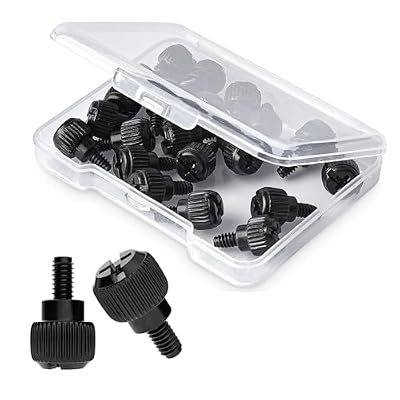
Thumbscrews are the fasteners handled most often in a PC’s life, since they hold the side panel that comes off for every cleaning, cable change, and upgrade. This WLXTREE pack includes 20 thumb screws with a 6-32 thread and a 6 mm length, made from stainless steel with a black finish. The listing names case covers, side panels, power supply mountings, hard drive mountings, PCI slots, and drive bays among their uses.
A 20-count pack is sized for more than one machine, or for one machine plus a healthy reserve. Thumbscrews are also a practical upgrade for cases that shipped with plain Phillips panel screws: swapping them makes routine maintenance tool-free. Stainless steel suits a part that gets handled constantly, and the listing highlights rust and oxidation resistance among its qualities.
Before ordering, confirm the case panel actually uses 6-32 threads, because a minority of cases use M3 or M4 thumbscrews instead. The check takes seconds: thread an existing panel screw into a known 6-32 mount, such as a power supply hole, and see whether it turns smoothly.
LuKaiSen 516PCS Computer Screws Assortment Kit with Storage Box

| Spec | Detail |
|---|---|
| Brand | LuKaiSen |
| Model | LK-516 |
| Pieces | 516 |
| Material | Carbon steel, black zinc plated |
| Thread sizes listed | 6-32, M2, M3, M5 |
| Storage | Storage box with clear label |
| ASIN | B0DMKGM2MR |
The LuKaiSen 516PCS kit is the largest assortment here and the one built around its organizer case. The listing’s contents run to 14 categories: fan screws, chassis screws, hard drive screws, M3x5 screws for 2.5-inch SSDs, two standoff types (M3x6+6 and M3x6 with a 6-32 thread), CD-ROM and 2.5-inch HDD screws, 12 hand twist screws, main board screws, Phillips flat head screws, M2 and M3 SSD screws, and 54 insulation gaskets, all in a storage box with a clear label.
Two details stand out. First, the standoff selection covers both common standards, with M3-threaded and 6-32-threaded versions, which removes the most common assortment-kit mismatch. Second, the 12 hand twist screws bring thumbscrew convenience into a kit that otherwise focuses on driver-driven fasteners. The insulation gaskets are a thoughtful inclusion as well, since they are exactly the kind of small part that disappears between builds. The listing states the screws are carbon steel with a zinc-plated surface, and describes the standoff sizes as fitting the great majority of computer cases in the maker’s own terms.
This is the kit for a workbench, a small repair side business, or a household maintaining several desktops. The labeled box keeps 516 pieces usable rather than becoming a mixed jar, and the breadth means most fastener emergencies end at the box instead of at a checkout page.
Frequently Asked Questions
What is the difference between 6-32 and M3 PC screws?
The 6-32 screw uses an imperial thread and is slightly coarser, while M3 is a metric thread of similar diameter. They are not interchangeable: a screw forced into the wrong thread can damage a standoff or drive cage. Cases and drives use both standards, so check the case manual or test-fit by hand before tightening.
How many standoffs does a motherboard need?
A motherboard needs one standoff for every mounting hole in the board, positioned to match the case tray. Full-size boards use more mounting points than smaller form factors. Every hole should land on a standoff, and no extra standoff should sit under the board where there is no hole, since a stray standoff can contact the board’s underside.
Can a regular screw replace an M.2 SSD mounting screw?
Not reliably. An M.2 drive needs a standoff of the correct height and thread for the specific motherboard, plus a small retaining screw that matches it. Board makers vary these parts, which is why M.2 kits list the brands they cover. A screw of the wrong height can leave the SSD bent or unseated.
Is a big assortment kit worth it for a single build?
For one build, usually not: the case includes the hardware the build needs, and a small focused pack covers any single missing part. A large assortment earns its place across multiple builds, upgrades, and repairs, where labeled compartments save repeated searching and spare-part orders.
Product and ASIN Reference
| Product | ASIN |
|---|---|
| mankk 400PCS Computer Screws Assortment Kit | B0D72NGGWJ |
| StarTech.com PC Mounting Computer Screws M3, Pack of 50 (SCREWM3) | B00032Q1J4 |
| WLXTREE NVMe M.2 SSD Standoff and Mounting Screws Kit, 36 Pieces | B0DG2873WB |
| WLXTREE 20x Computer Case Thumb Screws, 6-32 Thread | B0D2Q1W9XJ |
| LuKaiSen 516PCS Computer Screws Assortment Kit with Storage Box | B0DMKGM2MR |



Write Your Review
No reviews yet. Be the first to share your experience!