
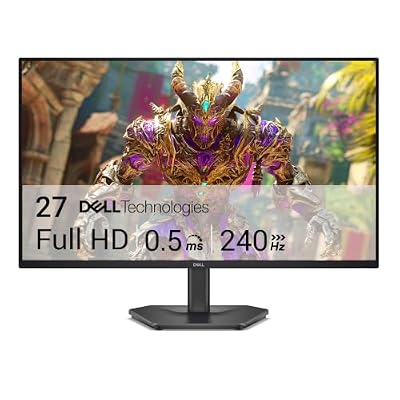
- Top Pick: Dell 27 240Hz Gaming Monitor – SE2726HG – 27-inch FHD (1920×1080) 240Hz Display, in-Plane Switching (IPS) Technology, AMD FreeSync Premium, TÜV 3-Star, 2X HDMI, DisplayPort 1.4, Tilt
- Best Value: Dell 24 Monitor – SE2426H – 23.8-inch FHD (1920×1080) 144Hz 1ms Display, in-Plane Switching (IPS) Technology, AMD FreeSync™, TÜV 3-Star 2X HDMI, Tilt
- Premium Choice: Sceptre 27-inch Prime Gaming Monitor 100Hz 1ms DisplayPort HDMI x2 100% sRGB AMD FreeSync Build-in Speakers, Eye Care Frameless Machine Black 2025 (E275W-FW100T Series)
Top Amd Freesync Smooth Gaming Any Picks for 2026
Here are our current top amd freesync smooth gaming any picks, compared on real Amazon owner reviews, price, and features. Live prices update below.
- Top Amd Freesync Smooth Gaming Any Picks for 2026
- What AMD FreeSync Is and How It Actually Works
- AMD FreeSync Pros and Cons: The Honest Ledger
- Buying FreeSync Well in 2026: Checklist and Market Timing
- Recommended Products
- Final Verdict: Is AMD FreeSync Worth It in 2026?
- Related Guides
- Frequently Asked Questions
- Related Articles
Save $40.00

Save $31.00


Save $11.00

Save $30.00
AMD FreeSync is the technology that quietly fixed PC gaming’s oldest visual problem — screen tearing — and then did something rarer: it became free for everyone, including Nvidia owners. Built on the royalty-free VESA Adaptive-Sync standard, FreeSync now ships in thousands of monitors at every price, and since Nvidia opened its drivers to “G-Sync Compatible” operation, the same panels serve both ecosystems. This review explains how the technology actually works, decodes the three certification tiers that confuse monitor listings, tests where it stumbles, and identifies what to verify before buying — because the FreeSync badge alone guarantees less than most shoppers assume.
As an Amazon Associate we earn from qualifying purchases at no extra cost to you. Product prices and availability are accurate as of the date shown and are subject to change.




What AMD FreeSync Is and How It Actually Works
Judging the technology requires understanding the problem it solves and the mechanism it uses — including the tier system AMD layered on top, and the cross-brand compatibility that makes this review relevant to readers shopping Nvidia cards.
Variable Refresh Rate, Explained Properly
A fixed-refresh monitor redraws at rigid intervals — 60, 144, 165 times per second — while a GPU renders frames at whatever rate the scene allows. The mismatch produces the classic failure pair: tearing when a new frame arrives mid-redraw, and stutter plus input lag when V-Sync forces frames to wait. FreeSync dissolves the mismatch at the source by letting the GPU set the monitor’s refresh timing dynamically — each frame displays the moment it finishes, within the panel’s supported range.
The experiential result is disproportionate to the explanation: the 45-90 FPS band where mid-range GPUs actually live — usually the choppiest, most artifact-prone zone — becomes perceptually smooth, with no tearing, no V-Sync latency penalty, and no performance cost. Owner reviews converge on the same phrase across a decade: once you game on variable refresh, fixed refresh feels broken. Among the free upgrades in PC gaming, only upscaling rivals it.
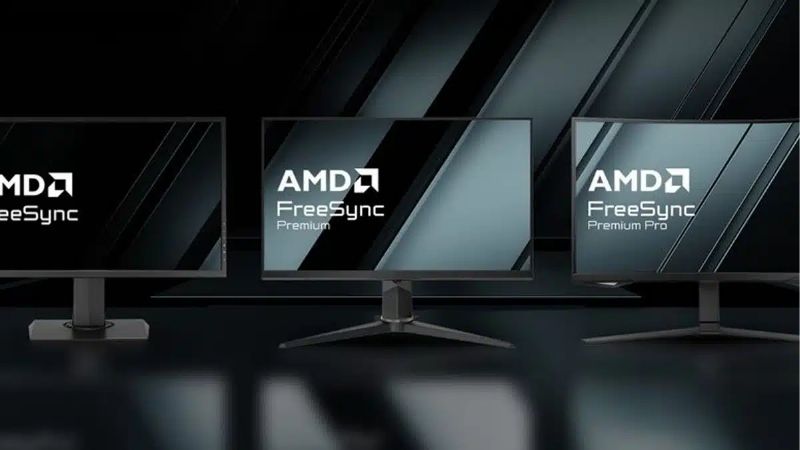
The Three Tiers: FreeSync, Premium, and Premium Pro
AMD certifies monitors at three levels, and the differences are concrete. Base FreeSync guarantees adaptive sync with low flicker — and little else; refresh ranges can be narrow. FreeSync Premium adds the two requirements that matter most: at least 120Hz at 1080p or higher, and Low Framerate Compensation (LFC), which multiplies frames when FPS falls below the panel’s minimum range so smoothness never collapses exactly when the GPU struggles hardest.
FreeSync Premium Pro extends Premium with certified HDR pipeline support and latency requirements in HDR mode. The buying translation is blunt: treat Premium as the practical floor for a gaming purchase — LFC is the tier system’s single most valuable line item — and treat Premium Pro as worthwhile only on panels whose HDR is genuinely good, since certification cannot conjure brightness a budget panel lacks. Base-tier badges on bargain monitors are the listings this review exists to warn about.
FreeSync on Nvidia: The G-Sync Compatible Reality
Since 2019, Nvidia drivers support adaptive sync on FreeSync monitors under the “G-Sync Compatible” banner — and in 2026 the cross-brand experience is mature: plug in over DisplayPort (and increasingly HDMI 2.1), enable G-Sync in the Nvidia control panel, and the variable refresh pipeline works identically to AMD’s in the overwhelming majority of panels. Nvidia maintains its own validated-monitor list, but unlisted FreeSync panels usually work fine when enabled manually.
The practical consequence reshaped the monitor market: dedicated G-Sync-module monitors retreated to a premium niche, and FreeSync panels became the default purchase for both ecosystems. For this site’s Nvidia-leaning readership the takeaway is liberating — the FreeSync section of any monitor sale is your section too, and the verification checklist later in this review applies unchanged whichever GPU brand feeds the cable.
AMD FreeSync Pros and Cons: The Honest Ledger
Aggregating a decade of owner feedback across panel types and price tiers produces a consistent verdict structure: the technology itself is a near-unqualified win, while the certification sprawl and panel-level variance generate every complaint worth knowing.
Where FreeSync Genuinely Shines
The headline strength is cost: royalty-free licensing means the feature adds effectively nothing to monitor prices, which is why it ships in $120 budget panels and $1,200 OLEDs alike. Against the dedicated-module alternative, identical-panel comparisons historically showed $100-200 premiums for differences most users could not perceive — money FreeSync returns to the GPU budget where it buys visible frames.
Ubiquity compounds the value: thousands of certified monitors, support across both GPU ecosystems and current consoles, and operation over both DisplayPort and HDMI mean the technology travels with you across upgrades and platforms. And the core experience delivers precisely where it matters — the mid-range FPS band — making it the rare feature that benefits budget builds more than flagship ones, since a 5090 pinned at its monitor cap needs VRR far less than a 5060 living at 70 FPS does.
The Honest Weaknesses and Where They Live
The complaints cluster at the certification floor. Base-tier monitors with narrow ranges — 48-75Hz is the classic offender — deliver the badge without the experience, dropping out of sync exactly when frame rates dip. Brightness flicker under fluctuating FPS affects a minority of panels, VA types disproportionately, and shows up most in loading screens and menu transitions; it is panel-specific rather than universal, which makes pre-purchase review reading genuinely load-bearing.
The remaining gaps are structural: LFC is absent below Premium tier, badge sprawl lets marginal panels wear respectable logos, and quality variance between two monitors carrying identical certifications can exceed the variance between tiers. None of this indicts the technology — it indicts shopping by badge alone, and the checklist below is the antidote.
Who Benefits Most — and Setup in Two Minutes
The maximum-benefit profile is the mainstream majority: mid-range GPU owners whose frame rates roam the 45-100 band, high-refresh esports players who hold near their cap but dip in chaos, and anyone sensitive to tearing. The minimum-benefit profile is narrow — players who lock frame rates well below low refresh ceilings, and competitive specialists who cap FPS far under their panel’s range for latency consistency.
Setup is the easiest win in this review: connect via DisplayPort, enable FreeSync in the monitor’s OSD (frequently shipped off — the single most common “it doesn’t work” cause), then enable adaptive sync in your GPU driver — Adrenalin for AMD, the G-Sync panel for Nvidia. Pair it with an in-game frame cap a few FPS under the panel’s maximum, and the pipeline stays inside its range permanently.
Buying FreeSync Well in 2026: Checklist and Market Timing
The technology is free; the monitor is not. This section compresses the purchase into a verification checklist, then reads the two market forces that make the GPU half of the VRR equation unusually time-sensitive this year.
The Pre-Purchase Checklist That Beats the Badge
Five verifications separate satisfying purchases from badge-only ones: confirm the tier is Premium or above (LFC is the non-negotiable); find the actual VRR range in the spec sheet and demand roughly 48Hz at the floor with a ceiling matching the panel’s refresh; search owner reviews for “flicker” specifically on VA panels; confirm DisplayPort 1.4 or HDMI 2.1 connectivity matching your GPU’s outputs; and on Nvidia, glance at the G-Sync Compatible list — helpful when present, not disqualifying when absent.
The sweet spot the checklist usually lands on in 2026: 27-inch 1440p IPS panels at 165-180Hz with Premium certification, routinely $200-280 on Amazon — the band where range, LFC, and panel quality converge without premium pricing. Ultrawide and OLED buyers apply the same five checks with bigger numbers attached.
How Current GPU Market News Touches the VRR Equation
Variable refresh is half a partnership — the other half is the GPU producing the frames — and two developments are moving that half’s price. First, the United States has cleared Nvidia to sell the H200, one of its most powerful AI accelerators, to China, reopening a multi-billion-dollar quarterly market and pulling industry wafer, packaging, and memory capacity toward AI silicon. The documented consumer sequence follows within a quarter or two: GPU supply tightens and street prices firm across both brands, since AMD shares the same TSMC fabrication and overlapping memory supply.
Second, laptop and component prices are trending upward industry-wide, led by memory — and graphics cards carry that inflation directly in their bills of materials. Monitors, built on mature panel supply chains, face far milder pressure. The asymmetry writes the purchase sequencing for anyone planning a full VRR setup: secure the GPU at today’s pricing first, because it is the component the market is moving against; the monitor can safely wait for a routine sale.
Pairing the Panel to the GPU You Can Buy Now
The pairing math is straightforward: match the monitor’s resolution and refresh to the frame rates your GPU tier actually produces, then let VRR smooth the remainder. An RTX 5060-class card pairs naturally with 1080p/165Hz or 1440p/144Hz Premium panels; a 5070 or 5070 Ti earns 1440p/180Hz; flagship tiers justify 4K high-refresh where VRR’s stutter insurance still pays during the heaviest scenes.
Buyers building from scratch should price the pair together on Amazon in one session — GPU first per the timing logic above, panel second — and buyers who already own either half should simply complete the partnership: a capable GPU on a fixed-refresh monitor is leaving a free experience upgrade unclaimed, and this review’s entire verdict is that the upgrade is worth claiming.
Recommended Products

PowerColor
PowerColor Twin Fan AMD Radeon RX 7800 XT 16GB GDDR6
View on Amazon
6 days ago
GIGABYTE
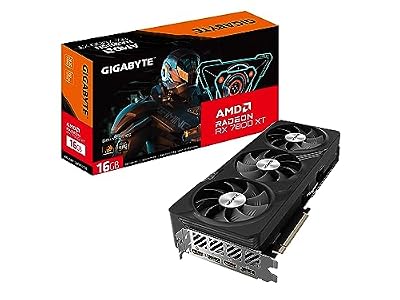
Gigabyte Radeon RX 7800 XT Gaming OC 16G Graphics Card, 3X WINDFORCE Fans 16GB 256-bit GDDR6, GV-R78XTGAMING OC-16GD Video Card
View on Amazon
1 day ago

ASUS
ASUS Dual Radeon RX 7600 EVO OC Edition 8GB GDDR6 Gaming Graphics Card
View on Amazon
6 days ago
As an Amazon Associate we earn from qualifying purchases. Product prices and availability are accurate as of the date/time indicated.
Final Verdict: Is AMD FreeSync Worth It in 2026?
AMD FreeSync earns one of the cleanest recommendations this site publishes: a royalty-free technology that eliminates tearing, smooths exactly the frame-rate band where most GPUs actually live, costs nothing at the feature level, and — through G-Sync Compatible support — serves Nvidia owners identically to AMD ones. Its only genuine hazards are certification sprawl and panel variance, both neutralized by a five-item checklist that takes ten minutes: Premium tier, real range, flicker reviews, right ports, capped frames. Shop the badge plus the checklist, favor the 1440p/165Hz Premium sweet spot, and sequence the purchase GPU-first while the H200 approval and component inflation press card prices upward. Check today’s Amazon listings on both halves of the pairing — the smoothness is free, but the window to buy its hardware well is not staying open indefinitely.
Frequently Asked Questions
What is the best amd freesync in 2026?
The best amd freesync depends on your budget and how you plan to use it. The options compared above are our top-rated picks based on real customer ratings, build quality, and overall value — start with the highest-rated model that fits your budget.
How much should I expect to spend on a amd freesync?
Prices vary by brand and features. Budget options cover the essentials, while mid-range and premium models add durability, performance, and extra features. Compare the prices in the list above to find the best value for your needs.
What should I look for when buying a amd freesync?
Focus on what matters most for your use case — build quality, compatibility, performance, warranty, and verified customer reviews. Every pick above is selected to balance these factors.
Are budget amd freesync options worth it?
Yes. For most people a well-reviewed budget or mid-range amd freesync delivers excellent value. You only need to spend more if you specifically require premium materials or top-tier performance.
How did we choose these amd freesync picks?
We compare current Amazon ratings, review counts, key features, and price to surface the options with the best real-world value. The list is refreshed as ratings and availability change.





Write Your Review
No reviews yet. Be the first to share your experience!