
Top Nvidia Super Resolution Dlss Vsr Picks for 2026
Here are our current top nvidia super resolution dlss vsr picks, compared on real Amazon owner reviews, price, and features. Live prices update below.

Dropped $10.00

Dropped $25.01

Save $179.01


Dropped $25.00
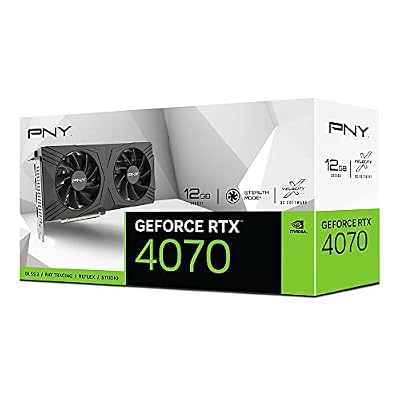
Nvidia super resolution is really two technologies wearing one name, and understanding the split is the key to getting value from either: DLSS Super Resolution upscales games in real time, letting a GPU render fewer pixels and reconstruct a sharper image with AI, while RTX Video Super Resolution (VSR) applies the same philosophy to streaming video, upscaling and de-blocking YouTube, Twitch, and browser playback on the fly. Together they have quietly become the most consequential software advantage in PC graphics — frequently worth more real-world performance than a hardware tier. This review explains how each works, measures the quality honestly against the marketing, maps which RTX cards unlock which features in 2026, and synthesizes what thousands of users report after living with both.
As an Amazon Associate we earn from qualifying purchases at no extra cost to you. Product prices and availability are accurate as of the date shown and are subject to change.




The Two Technologies Behind One Name
Nvidia’s super resolution stack splits by content: games run through DLSS, video runs through VSR, and both lean on the Tensor cores that every RTX card carries. The architectures differ enough that each deserves its own explanation — and its own honest quality verdict — before the buying guidance makes sense.
DLSS Super Resolution: How Games Get Free Frames
The mechanism in one paragraph: the game renders at a reduced internal resolution — Quality mode uses 67% per axis, Performance mode 50% — and a trained AI model reconstructs the full-resolution image using motion vectors and previous frames. The GPU does meaningfully less work per frame; the reconstruction recovers the detail. The result at 1440p and 4K Quality mode: 20–35% more frames for image quality that testing consistently rates at or near native.
The 2026 model matters: the transformer-based upscaler that shipped with the Blackwell generation replaced the older convolutional network across the RTX lineup, visibly improving fine detail, stability in motion, and the ghosting artifacts that defined earlier versions. Even five-year-old RTX cards inherited the upgrade in supported titles — among the most generous software gifts in hardware history.
RTX Video Super Resolution: The Browser Upgrade
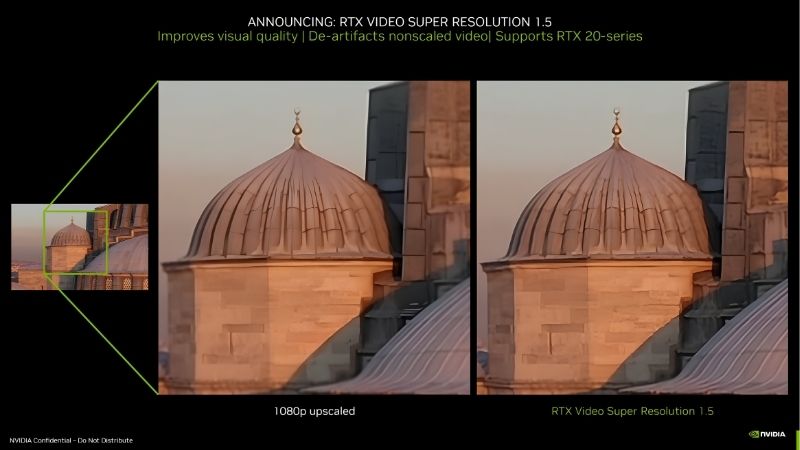
VSR targets the content most people actually watch: compressed streaming video. Enabled in the Nvidia app and supported browsers (Chrome and Edge), it upscales sub-4K streams toward your panel’s resolution while removing compression blocking — turning 1080p YouTube on a 4K monitor from soft and blocky into convincingly crisp. Quality tiers run from level 1 (light, low power) to level 4 (maximum, GPU-active).
The honest measurement: the effect on 720p–1080p content viewed on 1440p–4K panels is genuinely visible and frequently dramatic on poor sources; on already-clean 4K streams it approaches imperceptible. RTX Video HDR — the companion feature mapping SDR video into HDR — adds a second, subtler lift on capable displays.
Laptops inherit the full map with one footnote: RTX laptop GPUs run the complete stack, but VSR’s wattage cost lands directly on battery life, making the quality slider a plugged-in-versus-portable decision rather than a set-and-forget one.
What Unlocks What: The 2026 Compatibility Map
The feature ladder by hardware: every RTX card from the 20-series onward runs DLSS Super Resolution and VSR — the foundation is a decade wide. DLSS Frame Generation (2x) requires the 40-series; Multi Frame Generation (up to 4x) requires the 50-series; and the transformer upscaler runs everywhere but fastest on newer Tensor generations.
The practical translation for buyers: a $299 RTX 5060 unlocks the complete 2026 stack, while no GTX card or non-Nvidia GPU runs any of it. Super resolution is, by design, the moat — and the single strongest software argument in the brand’s favor.
The Honest Quality Review: Where It Shines, Where It Shows
Marketing claims “better than native”; the field record is more interesting. This section synthesizes formal image-quality testing with the user reports — enthusiastic and critical — that reveal how both technologies actually look in daily use, then renders the pros-and-cons ledger.
DLSS in Practice: The Quality-Mode Consensus
The testing consensus is stable across outlets and years: at 1440p and 4K, Quality mode is visually indistinguishable from native for most players in most scenes — and occasionally better, where the AI’s anti-aliasing beats the game’s own. Performance mode at 4K remains impressive; at 1080p output, all modes show their seams, since the internal resolution drops below what reconstruction fully recovers.
The five-star user themes mirror the data: “free frames,” ray tracing promoted from slideshow to playable, and aging cards revived for one more generation of releases. The critical themes are specific and fair: occasional ghosting on fast particles in older integrations, shimmer on fine fences and foliage, and a handful of titles whose implementations lag the technology — the gap between DLSS at its best and at its median is an integration gap, not a model gap.
The 2026 transformer model narrowed that median visibly: motion stability and fine-detail retention improved enough that several outlets re-ran old comparisons and moved their verdicts a notch upward.
Setup deserves its thirty seconds of documentation: DLSS lives inside each game’s graphics menu with per-title mode selection, while VSR toggles globally in the Nvidia app under video settings with its 1–4 quality slider — and both ship disabled by default, which explains the recurring owner discovery posts months after purchase. The first session after enabling them is the cheapest upgrade most RTX owners never knew they had.
VSR in Practice: The Quiet Daily Win
VSR’s user record skews quietly positive: the dominant report is forgetting it is on — old 1080p videos, sports streams, and archival content simply look better on big panels, with the effect most praised by 4K monitor owners watching sub-4K sources. The de-blocking on heavily compressed content draws specific enthusiasm.
The complaints are practical rather than qualitative: GPU power draw rises 20–50W at higher quality levels during playback — noticed on electricity-conscious setups and warm rooms — laptop users report battery cost, and level-4 processing on weak RTX cards can occasionally stutter high-framerate video. The standard advice from experienced users: level 2 or 3 as the daily setting, level 4 for special viewing.
Pros and Cons of the Super Resolution Stack
Pros: DLSS Quality mode delivers 20–35% more frames at effectively zero visual cost — the closest thing to free performance in PC gaming; the transformer upgrade reached even 2018-era RTX cards; VSR visibly improves the streaming content people watch daily; the stack compounds with every supported release; setup is minutes in the Nvidia app.
Cons: quality depends on per-title integration, and the worst implementations lag the best by a visible margin; 1080p-output gaming benefits least exactly where budget cards need it most; VSR costs real watts and battery; frame generation tiers fragment by hardware generation, complicating upgrade math; and none of it functions outside the Nvidia ecosystem — the moat cuts both ways.
Super Resolution and the 2026 Market: Why Software Moves Hardware Money
Two market stories make this software review a buying story: the United States approving Nvidia’s H200 AI chip exports to China, and the sustained rise in laptop and component prices. Both raise the price of raw hardware performance — which mechanically raises the value of performance delivered by software instead.
The H200 Effect: AI Demand Prices Up Raw Silicon
The H200 approval channels enormous demand into Nvidia’s advanced wafer and memory supply, tightening consumer GPU allocation — the recurring pattern drifts street prices 5–15% above MSRP within a quarter or two. When hardware frames cost more per dollar, the 20–35% that DLSS recovers from software becomes the cheapest performance tier on the market.
The same demand wave funds the research: the transformer upscaler and MFG are downstream of the AI investment the H200 market rewards — the rare case where the force inflating GPU prices simultaneously improves what each GPU does.
Component Inflation and the Software Dividend
Memory costs rising for consecutive quarters — laptop prices already following — push every hardware tier’s price upward, stretching upgrade cycles across the market. Super resolution is the stretch’s enabler: DLSS keeps a mid-range card serving high-refresh panels an extra year or two, and the transformer upgrade retroactively improved cards bought half a decade ago.
The quantitative framing: if inflation adds $50–$100 to your next GPU, software that defers that purchase a year — or drops the required tier by one — returns multiples of its zero cost.
The Buying Guidance, Distilled
The stack’s buying logic in three lines: any RTX card unlocks the foundation, so the floor of entry is the $299 tier; frame-generation ambitions decide the generation — 40-series for 2x, 50-series for the full 4x — and panel resolution decides how much the upscaler returns, with 1440p and 4K owners harvesting the most. Match those three inputs and the software multiplies whatever hardware you choose.
Anchor the decision to live numbers: check current RTX card prices on Amazon across the tiers your inputs allow, and let the super resolution stack tip the value math wherever two cards otherwise tie.
See More:
Conclusion
Nvidia super resolution earns its review as the most valuable software in consumer graphics: DLSS Super Resolution converts AI reconstruction into 20–35% of effectively free gaming performance at quality the testing record rates at or near native, while RTX Video Super Resolution quietly upgrades the streaming video of daily life — and the 2026 transformer model lifted both beyond their old criticisms. The honest limits remain — integration variance, 1080p’s smaller harvest, VSR’s wattage — but in a market where H200-driven demand and component inflation price raw silicon ever higher, performance delivered by software is the one tier that got cheaper. Tap through to check current RTX graphics card prices on Amazon, pick the generation your frame-generation ambitions require, and let the smartest free upgrade in PC gaming start compounding on day one.
Frequently Asked Questions
What is the best nvidia super resolution in 2026?
The best nvidia super resolution depends on your budget and how you plan to use it. The options compared above are our top-rated picks based on real customer ratings, build quality, and overall value — start with the highest-rated model that fits your budget.
How much should I expect to spend on a nvidia super resolution?
Prices vary by brand and features. Budget options cover the essentials, while mid-range and premium models add durability, performance, and extra features. Compare the prices in the list above to find the best value for your needs.
What should I look for when buying a nvidia super resolution?
Focus on what matters most for your use case — build quality, compatibility, performance, warranty, and verified customer reviews. Every pick above is selected to balance these factors.
Are budget nvidia super resolution options worth it?
Yes. For most people a well-reviewed budget or mid-range nvidia super resolution delivers excellent value. You only need to spend more if you specifically require premium materials or top-tier performance.
How did we choose these nvidia super resolution picks?
We compare current Amazon ratings, review counts, key features, and price to surface the options with the best real-world value. The list is refreshed as ratings and availability change.





Write Your Review
No reviews yet. Be the first to share your experience!