
Best way to apply thermal paste to CPU depends on which processor is in the socket, because an octagonal AM5 heat spreader, a rectangular Intel lid and a bare laptop die all behave differently. This guide covers each one and matches six compounds to the surfaces they suit.
As an Amazon Associate we earn from qualifying purchases at no extra cost to you.


As an Amazon Associate we earn from qualifying purchases at no extra cost to you.
By Ryan Cole
The Best Way to Apply Thermal Paste to CPU by Heat Spreader
Heat spreader geometry and mounting pressure vary enough between platforms to change what works, so the best way to apply thermal paste to CPU lids is not one answer. These four cases cover nearly every processor you are likely to be repasting.
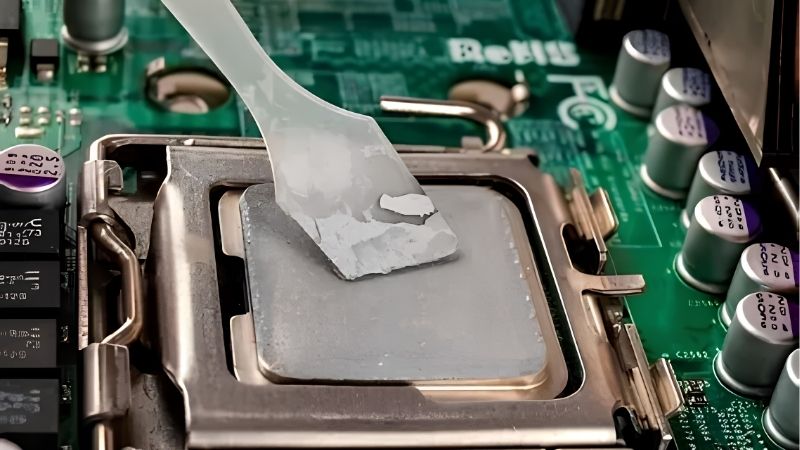
AMD AM5 and AM4: Octagonal Lids with Cutouts
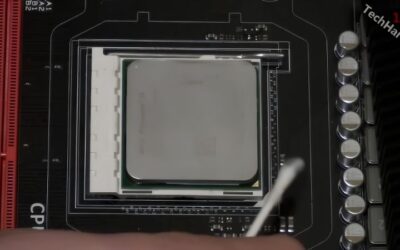
Both AMD desktop sockets use an octagonal heat spreader with notches cut into the sides. Excess compound flows into those cutouts and out toward the socket, which is messy and wastes material without improving contact, and cleaning it out later is more tedious than getting the volume right.
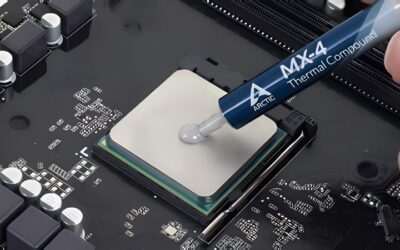
Use slightly less than instinct suggests and place it centrally. On AM5 the die area sits under the middle of the lid, so a single drop spread by mounting pressure covers what matters without reaching the edges. Compound that reaches the cutouts is wasted rather than harmful with a non-conductive product.
Intel LGA 1851 and LGA 1700: Rectangular Lids
Intel heat spreaders are noticeably longer than they are wide, and a single central drop can leave the short ends underserved on thicker compounds. A line along the long axis, or a small X, gives more even coverage.
LGA 1700 processors are also known for lid bending under stock retention hardware, which reduces contact in the centre. A contact frame is worth considering on that platform, and it changes application less than people expect. Fit the frame first, then apply compound exactly as you otherwise would.
High Core-Count Chips with Large Lids
Ryzen 9 and top-end Core Ultra parts carry more silicon under a larger spreader, so the coverage area is genuinely bigger. Scale the volume up modestly rather than doubling it, since excess still insulates rather than conducts.
A thicker compound works well here because the mounting pressure of a large air tower or AIO is high enough to spread it. Thin compounds can flow too readily off the edges of a big lid before the cooler is tightened.
Bare Die: Laptops and Delidded Processors
Without a heat spreader you are applying directly to exposed silicon, and mounting pressure is lower. A very thin manual film applied with a spatula is the only sensible approach, since a drop will not spread properly.
This is where phase change materials genuinely excel, because they re-flow with each heat cycle and never pump away from the centre. Laptop owners frequently see the largest improvement of any repaste scenario from switching to one, particularly on machines several years into service.
What the 2026 Market Means for Repasting
Three conditions have raised the profile of cooling maintenance this year, and they affect both what the best way to apply thermal paste to CPU surfaces costs in materials and when to buy them.
Improving Existing Hardware Is the Best Value Move
Graphics card pricing remains elevated, which pushes more builders toward upgrading what they already own. Fresh compound, a better cooler, extra case fans and a decent power supply all produce measurable results for modest money.
On a system four or five years old the original application has usually degraded, so a repaste alone drops temperatures noticeably. It often restores boost behaviour that had been quietly throttling for months.
Cooling Parts Still See Genuine Seasonal Discounts
Memory and pre-built systems will not fall meaningfully this November, since that stock uses components bought at this year’s elevated contract prices. Coolers, fans, power supplies and compounds are a different category entirely.
Buying compound alongside cleaning supplies during a sale is reasonable planning. The absolute savings are small, so do not postpone a repaste that a hot-running machine needs now.
Counterfeit Compound Has Become a Real Problem
Popular premium products are widely counterfeited, and fake compound performs badly or worse. That makes purchase source part of the decision rather than a separate concern.
Buy from authorised retailers, treat unusually cheap listings of premium brands as suspect, and prefer larger packaging from established suppliers. A genuine mid-tier compound beats a counterfeit flagship every single time, and there is no reliable way to spot a fake before it is on your processor.
Top Picks: Best Way to Apply Thermal Paste to CPU by Product
Each entry names the heat spreader type it suits best, because the best way to apply thermal paste to CPU lids depends on matching viscosity to mounting pressure. Verify current pricing and availability before ordering.
| Compound | Viscosity | Best Socket Match | Suggested Pattern | Conductive |
|---|---|---|---|---|
| Arctic MX-6 | Thick | AM5 and AM4 | Small central dot | No |
| Noctua NT-H1 | Medium | LGA 1851 and 1700 | Line or small X | No |
| Honeywell PTM7950 | Phase change | Bare die and laptops | Cut to die size | No |
| Thermal Grizzly Kryonaut | Thin | High-pressure mounts | Central dot | No |
| Arctic MX-4 | Medium | Older or low-pressure mounts | Central dot | No |
| Thermalright TFX | Very thick | Large high core-count lids | Dot, warmed first | No |
Arctic MX-6
MX-6 suits AMD’s octagonal lids particularly well because its thickness stops it running into the cutouts before the cooler is fitted. It is non-conductive and resists pump-out well across years of heat cycling.
Warm the syringe before dispensing or the drop will refuse to move. Under a low-pressure mount that thickness can leave uneven coverage, so it is a better match for a proper tower cooler than a light stock unit.
Noctua NT-H1
NT-H1 has a medium viscosity that spreads predictably along the long axis of an Intel heat spreader, which makes a line or small X easy to execute well. It is non-conductive with an exceptionally long shelf life.
Its cost per gram is higher than the Arctic products and the performance difference is not detectable on a normal build. NT-H2 performs slightly better if you want the newer formulation for a similar premium.
Honeywell PTM7950
For bare dies and laptops this is the clear answer. It is a phase change pad rated around 8.5 W/mK that stays solid at room temperature, liquefies from roughly 45 degrees and re-flows rather than pumping out.
It needs around ten heat cycles before temperatures stabilise, so early readings will disappoint. Cutting the pad accurately to die size takes patience, and on a stock desktop with a good cooler the day-one gain is modest.
Thermal Grizzly Kryonaut
Kryonaut is thin enough to reach the corners of any lid from a single central drop, which makes it a good match for high-pressure mounts on large air towers and AIO units where it will not squeeze out.
It is heavily counterfeited, so authorised retailers only, and its service life at sustained high temperatures is shorter than the Arctic MX line. On a machine you rarely open, that is a genuine consideration.
Arctic MX-4
MX-4 flows more readily than MX-6, which makes it the better choice under lower mounting pressure such as older stock coolers or lightweight low-profile units. The large tub also drops cost per application substantially.
It gives up a degree or two to MX-6 and resists migration slightly less well. For an older machine being refreshed rather than a system you plan to keep another five years, that trade is easy.
Thermalright TFX
TFX is denser than almost anything else here, which suits the large heat spreaders on high core-count processors under high-pressure mounts. It holds position well and resists being pushed toward the edges.
It is genuinely difficult to dispense cold, so warming the syringe is not optional. Avoid it entirely on bare dies and low-pressure mounts, where its density works directly against even coverage.
Frequently Asked Questions
These questions come up whenever builders realise their socket changes what the best way to apply thermal paste to CPU heat spreaders actually looks like in practice.
Is the application different for AMD and Intel?
Slightly. AMD’s octagonal lids have cutouts that excess compound flows into, so use a little less and keep it central. Intel’s rectangular lids are longer than they are wide, so a line or small X covers the ends more evenly.
Does an AM5 processor need less paste than Intel?
Marginally, yes. The AM5 die area sits under the middle of the lid and the cutouts around the edges catch anything excess. A small central drop spread by mounting pressure covers the area that actually matters.
How should I apply paste to a laptop CPU?
Very thinly, with a spatula, because mounting pressure is low and the die is usually bare. A phase change pad cut to die size is the better answer for most laptops, since it does not pump out under heavy thermal cycling.
Do I need a contact frame for LGA 1700?
It helps on that platform, where stock retention hardware is known to bend the lid slightly and reduce centre contact. It is an optional improvement rather than a requirement, and it does not change how you apply the compound.
See More:
- Who makes the best motherboard
- Best budget AM5 CPU for gaming
- What is the best thermal paste pattern
- Best mini ITX computer case
- Best desktop RAM for gaming
Final Thoughts
The best way to apply thermal paste to CPU comes down to reading the heat spreader in front of you. AMD’s octagonal lids want a small central drop of something thick, Intel’s rectangular lids suit a line of something medium, large high core-count lids want more volume, and bare dies want a thin manual film or a phase change pad. Match the compound’s viscosity to the mounting pressure and the pattern mostly takes care of itself. Figures reflect August 2026 and should be verified before purchase.






Write Your Review
No reviews yet. Be the first to share your experience!