
- Top Pick: AMD Ryzen 9 9950X3D 16-Core Processor
- Best Value: Micro Center AMD 9950X3D Processor with MSI MAG X870E Tomahawk Motherboard
- Premium Choice: Micro Center CPU Motherboard Memory Combo: AMD Ryzen 9 9950X3D CPU Processor with ASUS ROG Strix X870E-E R2 Gaming WiFi Motherboard and KLEVV CRAS V RGB DDR5 32GB (2x16GB) 6000MHz Ram Memory Black
Best motherboard for 9950x3d shopping is the one case where power delivery genuinely matters. This is a 16-core chip with a 170W TDP and a package limit around 230W, so unlike the eight-core X3D parts it can genuinely load a mid-range VRM during sustained all-core rendering, compilation or encoding work.
As an Amazon Associate we earn from qualifying purchases at no extra cost to you. Product prices and availability are accurate as of the date shown and are subject to change.
By Ryan Cole, PC hardware writer at NvidiaReview
How to Choose the Best Motherboard for 9950X3D
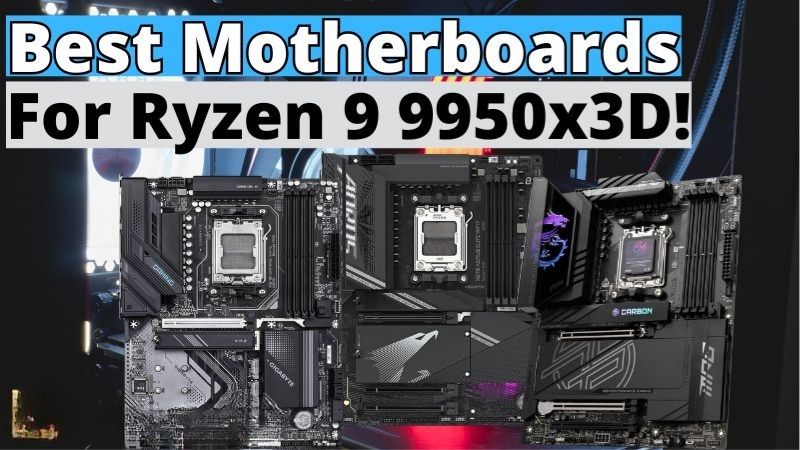
The Ryzen 9 9950X3D combines 16 Zen 5 cores with 128MB of L3 cache and boosts to 5.7GHz, with 3D V-Cache stacked on one of its two compute dies. Choosing for it means covering three things: VRM headroom, dual-die scheduling support and enough lanes for a machine that does real work.
VRM Headroom and Heatsink Mass
At roughly 230W package power under a full all-core load, this processor asks considerably more of a board than an eight-core part does. A 14-phase array with 80A stages is comfortable, and the 16 to 18-phase designs on upper-tier boards give margin even with an aggressive tuning profile.
Heatsink mass and airflow matter as much as the array itself. A board with strong power stages but thin VRM cooling will still run hot during long rendering or compile sessions, so prioritise reviews that publish VRM temperatures under sustained load rather than marketing phase counts.
Dual-Die Scheduling and BIOS Support
Only one of this chip’s two compute dies carries the stacked cache, so the scheduler must send games to the cache die and threaded production work across both. That relies on current chipset drivers and a working Game Bar installation, alongside BIOS options that expose the preferred die.
Firmware quality therefore matters more here than on a single-die chip. Look for a vendor with a consistent update record and BIOS settings that let you prefer either cache or frequency for a given workload, since the wrong setting can cost real performance in specific applications.
Lanes, Storage and Mixed Workloads
People buying 16 cores usually run more than a graphics card. Count the M.2 slots you need, then read the lane-sharing notes, because populating the third or fourth slot commonly disables SATA ports or narrows the secondary PCIe link on boards below the flagship tier.
X870E doubles the chipset for additional connectivity, which is genuinely useful if you run capture hardware, a high-speed network card or several NVMe drives simultaneously. For a machine that only games, that extra capability is money spent on ports you will probably never populate.
Top Picks: Best Motherboard for 9950X3D Builds
These five candidates for the best motherboard for 9950x3d suit a 16-core chip across budgets, from a value option to full workstation-class connectivity. All figures are vendor-published specifications and revisions differ, so confirm the exact model code before ordering. Availability was checked in August 2026.
| Board | Chipset | VRM (vendor listed) | M.2 slots | Best for |
|---|---|---|---|---|
| ASRock X870E Taichi | X870E | 27-phase class | 4 | Heavy all-core loads |
| Gigabyte X870E Aorus Master | X870E | 18+2+2 | 4 | Enthusiast builds |
| ASUS ProArt X870E-Creator WiFi | X870E | Vendor listed 16+2+2 | 4 | Content creation |
| ASUS TUF Gaming X870-Plus WiFi | X870 | DrMOS array | 3 | Balanced value |
| MSI MAG X870 Tomahawk WiFi | X870 | 14+2+1, 80A SPS | 4 | Best value overall |
MSI MAG X870 Tomahawk WiFi – Best Value
MSI specifies a 14+2+1 duet rail design with 80A smart power stages, dual 8-pin connectors and an 8-layer PCB, which handles a 230W package limit with room to spare. It adds USB4 at 40Gbps, 5G Ethernet, Wi-Fi 7, a PCIe 5.0 graphics slot and a Gen5 M.2 storage slot as well.
Rear USB port count is adequate rather than generous for a board hosting a 16-core processor, and the plain styling will not suit a show build. It is also not a flagship if you intend serious memory overclocking. For most people buying this chip, it is the sensible stopping point on price.
ASRock X870E Taichi – Best for Sustained All-Core Work
The Taichi carries one of the heaviest power delivery designs on the platform along with substantial VRM heatsinks, which is exactly what a 16-core processor wants during long rendering or compilation runs. Four M.2 slots and dual-chipset connectivity round out a genuinely capable board.
It costs a great deal more than the value options while producing identical gaming performance, and ASRock firmware updates historically arrive slightly later than the larger brands. If your machine spends hours at full load rather than minutes, the thermal headroom justifies the outlay.
Gigabyte X870E Aorus Master – Best Enthusiast Board
Gigabyte specifies an 18+2+2 phase design with heavy heatsinks, four M.2 slots including PCIe 5.0 support, dual USB4 Type-C connectivity and Wi-Fi 7. The BIOS is among the stronger options for memory tuning, with granular timing control that helps when pushing an EXPO kit further.
Pricing sits firmly in flagship territory, and the board is physically heavy with dense heatsinks that complicate cooler installation in tight cases. Audio is good but not class-leading. For someone who will actually tune memory rather than simply enable EXPO, it is a strong platform.
ASUS ProArt X870E-Creator WiFi – Best for Content Work
The ProArt is aimed at people using 16 cores for production rather than games, pairing solid power delivery with 10G Ethernet, Thunderbolt-class USB-C ports and a layout designed around multiple expansion cards rather than a single graphics card and a light show.
You pay a premium for connectivity that gaming builds never touch, and the understated styling deliberately avoids RGB. If your workload involves fast external storage, network transfers of large project files or capture hardware, that port selection saves adapters and expansion cards later.
ASUS TUF Gaming X870-Plus WiFi – Best Balanced Option
The TUF brings a DrMOS power array with dual 8-pin connectors, USB4, Wi-Fi 7 and 2.5GbE at a price well below the flagship boards. Power delivery is comfortable for this processor in gaming and mixed use, and the firmware has the same predictable behaviour the range is known for.
It offers three M.2 slots rather than four, and the VRM heatsinks are smaller than on the enthusiast boards, so sustained all-core rendering benefits from good case airflow. Networking is 2.5GbE rather than 5G. For a build that games more than it renders, it hits a sensible balance.
What the 2026 Market Means for 16-Core Builds
Specifying the best motherboard for 9950x3d in 2026 means accounting for what has happened elsewhere in the parts list, because this is an expensive build in a year of unusual pricing. Three factors should shape both the board choice and the memory decision that follows it.
AM5 Runs Through 2029
AMD confirmed at Computex 2026 that socket AM5 will receive new processors until the end of 2029, while Intel’s next generation moves to a different socket. For a workstation-class build intended to last, that removes the main risk of committing to an expensive board today.
It also changes what is worth paying for. VRM cooling, storage slots and firmware quality all remain useful across future processors, whereas paying for a chipset badge alone does not. Spend on the parts of the board that will still matter when a newer 16 or 24-core chip drops in.
Memory Pricing Hits This Build Hardest
DRAM prices have risen sharply through 2026 with further increases forecast and no meaningful new capacity before late 2027. Builds around this processor often want 64GB rather than 32GB, which makes memory one of the largest single line items in the entire parts list this year.
The practical response is to target a 6000 MT/s EXPO kit with tight timings at the capacity you genuinely need, and to check it against the board QVL before ordering. Waiting for the late-year sales is unlikely to help with memory, though board discounts in that window remain real.
Nothing New Arrives Before CES 2027
Zen 6 and Intel’s Nova Lake have both slipped to CES in January 2027, so there is no imminent launch that makes waiting sensible. This processor remains near the top of the desktop range, and its board ecosystem is mature with well-tested firmware after more than a year on sale.
That maturity is worth something on a build of this size. Early platform adopters dealt with memory compatibility quirks and scheduler issues that have since been resolved through BIOS and driver updates, so buying now means considerably fewer surprises during assembly and tuning.
Frequently Asked Questions
The questions builders ask most when choosing the best motherboard for 9950x3d: whether the flagship chipset tier is ever necessary, how the dual-die design affects games in practice, what cooling this processor requires, and how much memory a 16-core build genuinely needs.
Do I need X870E for this processor?
Not for gaming. A well-cooled X870 or even a strong B850 board handles the power draw, and frame rates are identical. X870E earns its price when you populate four NVMe drives, use high-speed external storage daily, or run expansion cards alongside the graphics card in a production machine.
How does the dual-die design affect gaming?
Games should run on the die carrying the stacked cache, which the scheduler handles using current chipset drivers and Game Bar. Keep both updated, since an out-of-date driver stack is the usual cause of games landing on the wrong die and delivering lower frame rates than expected.
What cooling does a 16-core X3D chip need?
A 360mm liquid cooler or a strong dual-tower air cooler for sustained all-core work. For gaming alone a 240mm unit copes, since games rarely load all cores. Curve Optimizer undervolting reduces temperatures meaningfully and often lets boost clocks hold longer under mixed workloads.
Is 32GB of memory enough?
For gaming, comfortably. Buyers pairing the best motherboard for 9950x3d with rendering work, virtual machines or large project files usually want 64GB, which is where 2026 memory pricing bites hardest. Buy the capacity you genuinely need in two sticks rather than filling all four slots, which often clocks lower.
See More:
- Best thermal compound paste
- Thermal paste at Best Buy
- Graphics card at Best Buy
- Best AM4 CPU for gaming
- Best motherboard for 9800x3d
Final Thoughts
The best motherboard for 9950x3d is one with real VRM cooling and firmware you trust, not the most expensive chipset. The MSI X870 Tomahawk covers most builds, the ASRock Taichi suits machines that sit at full load for hours, and the ProArt only makes sense if you use its connectivity.
As an Amazon Associate we earn from qualifying purchases at no extra cost to you. Product prices and availability are accurate as of the date shown and are subject to change.













Write Your Review
No reviews yet. Be the first to share your experience!