
- Top Pick: GIGABYTE B550M K AMD AM4 Micro-ATX Motherboard, Supports Ryzen 5000/4000/3000 Series Processors, DDR4, 3+3 Power Phase, 2X M.2, PCIe 4.0, USB 3.2 Gen 1, GbE LAN, Q-Flash
- Best Value: ASRock B550M-HDV Socket AM4 Micro-ATX Motherboard, Supports AMD Ryzen 5000/4000/3000 Series Processors, DDR4 4733+(OC), PCIe 4.0, Gigabit LAN
- Premium Choice: GIGABYTE B650 Eagle AX AM5 LGA 1718 ATX Motherboard, DDR5, Triple M.2 Slots (1x PCIe 5.0, 2X PCIe 4.0), USB 3.2 Gen2x2 Type-C, WiFi 6E, Realtek GbE LAN
Best AM5 motherboard shopping has become a longer-term decision than it used to be, because AMD has committed to supporting this socket with new processors through the end of 2029. The board you choose today will probably outlive the processor you install in it, so priorities have shifted toward connectivity and firmware support.
As an Amazon Associate we earn from qualifying purchases at no extra cost to you.
By Ryan Cole, PC hardware writer at NvidiaReview
How to Choose the Best AM5 Motherboard
Picking the best AM5 motherboard is mostly about matching chipset features to what you will actually plug in, rather than chasing phase counts. Three things decide it: which chipset tier you need, how much power delivery your processor really asks for, and what your memory and storage plans look like.
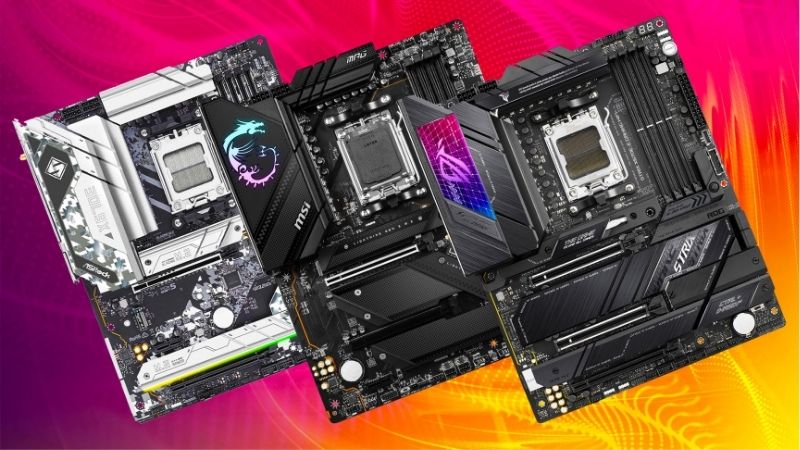
Chipset Tiers: A620, B650, B850, X870 and X870E
A620 is the entry tier and limits overclocking and PCIe 5.0 support, which makes it fine for a locked six-core chip and poor for anything ambitious. B650 and B850 cover the mainstream, keeping PCIe 5.0 for the primary M.2 slot while treating the graphics slot as optional.
X870 adds mandatory USB4 at 40Gbps and PCIe 5.0 graphics support, and X870E doubles the chipset for extra lanes and connectivity. Unless you run high-speed external storage, a docking setup or multiple expansion cards, the practical gap between a good B850 board and an X870 one is small.
VRM Design Versus Actual Processor Draw
Modern AM5 gaming chips are not power hungry. A Ryzen 7 9800X3D tops out around a 162W package limit, which any 12-phase design with 60A stages handles without breaking a sweat. A 16-core Ryzen 9 draws considerably more and benefits from the 14+2+1 arrays with 80A stages on mid-range boards.
What matters more than raw phase count is heatsink mass and dual 8-pin CPU connectors for stable delivery. Boards that skimp on VRM cooling run hot under long all-core loads even with a strong array on paper, so read reviews that publish VRM temperatures rather than trusting a marketing number.
Memory Slots, EXPO and Storage Layout
Four DIMM slots are convenient but two-slot boards generally clock higher, which matters because AM5 responds well to a 6000 MT/s EXPO kit running a 1:1 memory controller ratio. If you never plan to exceed 64GB, a two-slot layout costs you nothing and often gains stability at speed.
On storage, count the M.2 slots and read the lane-sharing notes in the manual. Populating a second or third slot frequently disables SATA ports or drops the secondary PCIe slot to a narrower link on mainstream boards, which is easy to miss until a drive vanishes after a rebuild.
Top Picks: Best AM5 Motherboard at Every Price Point
These five candidates for the best AM5 motherboard run from a compact budget board to a fully specified flagship. All figures are vendor-published specifications, and board revisions differ, so confirm the exact model code before ordering. Availability was checked in August 2026.
| Board | Chipset | VRM (vendor listed) | Networking | Form factor |
|---|---|---|---|---|
| ASUS ROG Strix X870E-E Gaming WiFi | X870E | 18+2 power stages | 5G LAN, Wi-Fi 7 | ATX |
| MSI MAG X870 Tomahawk WiFi | X870 | 14+2+1, 80A SPS | 5G LAN, Wi-Fi 7 | ATX |
| ASUS TUF Gaming B850-Plus WiFi | B850 | DrMOS array | 2.5GbE, Wi-Fi 7 | ATX |
| Gigabyte B650I AORUS Ultra | B650 | Vendor listed 8+2+1 | 2.5GbE, Wi-Fi 6E | Mini-ITX |
| ASRock B650M Pro RS | B650 | 8+2+1 | 2.5GbE, no Wi-Fi | Micro-ATX |
MSI MAG X870 Tomahawk WiFi – Best Overall
MSI specifies a 14+2+1 duet rail design with 80A smart power stages, dual 8-pin connectors and an 8-layer PCB, which covers every AM5 chip including the 16-core parts. The connectivity is the real draw: USB4 at 40Gbps, 5G LAN, Wi-Fi 7, a PCIe 5.0 graphics slot and a Gen5 M.2 socket.
It sits in the upper-middle of the market rather than the value end, and the plain black aesthetic will not suit a show build. Rear USB port count is adequate rather than generous for the tier. For a machine you intend to keep through several processor upgrades, it is the safest foundation here.
ASUS ROG Strix X870E-E Gaming WiFi – Best High-End Option
The dual-chipset X870E design gives this board the most lanes and ports of the group, with PCIe 5.0 for both graphics and storage, an 18+2 power stage array, 5G Ethernet, Wi-Fi 7 and a dense rear panel that includes multiple USB4 Type-C connections with DisplayPort passthrough.
The price is the obvious problem, since it costs roughly double a competent B850 board while delivering identical gaming frame rates. Buy it if you populate several NVMe drives, run capture or audio cards alongside a graphics card, or genuinely use high-speed external storage every day.
ASUS TUF Gaming B850-Plus WiFi – Best Mainstream Value
The TUF pairs a DrMOS power array with Wi-Fi 7, 2.5GbE and a PCIe 5.0 M.2 slot on a full ATX board, which covers everything a single graphics card gaming build needs. Nothing about the specification limits a 9800X3D or a Ryzen 9 in normal use, and the BIOS is straightforward.
You give up USB4 and the graphics slot runs at PCIe 4.0, neither of which affects frame rates today. The audio implementation is one tier below the ROG boards too. For most builders reading this, it is the sensible stopping point before the price curve gets steep.
Gigabyte B650I AORUS Ultra – Best Mini-ITX Board
This is the compact option, packing two DIMM slots, dual M.2 support, 2.5GbE and Wi-Fi 6E into a 170mm square. The two-slot memory layout is an advantage rather than a compromise, since it typically reaches higher stable EXPO transfer rates than four-slot boards at the same speed grade.
Maximum memory capacity is halved at 96GB depending on kit, the rear I/O is necessarily limited, and VRM temperatures run higher inside a confined chassis. Small form factor builds also make BIOS updates fiddlier. Plan cooling and airflow properly and it is an excellent base for a compact machine.
ASRock B650M Pro RS – Best Budget Board
ASRock lists an 8+2+1 power phase design on a Micro-ATX board with a PCIe 5.0 M.2 slot and 2.5GbE, at a price that undercuts almost everything else supporting the platform properly. For a mid-range six or eight-core chip in a value build, it delivers the essentials and skips the rest.
There is no onboard Wi-Fi on this variant, the VRM heatsinks are modest, and it is not the board for a 16-core processor under sustained all-core load. Rear USB is basic too. As the cheapest way onto a socket supported through 2029, though, it is a legitimately smart purchase.
What the 2026 Platform Market Means for AM5 Buyers
Deciding on the best AM5 motherboard in 2026 means weighing what is happening across the wider parts market, because the board is only one line on the bill and not the largest one. Three factors should shape how much you spend on it, and when you press the order button.
Socket Support Runs Through 2029
AMD confirmed at Computex 2026 that AM5 will keep receiving new processors until the end of 2029, while Intel moves to a fresh socket with its next generation. That gives a board bought today a genuine multi-generation upgrade path, which is unusual and worth factoring into the budget.
Practically, it argues for stepping up one tier rather than buying the absolute cheapest board. Better VRM cooling, an extra M.2 slot and a vendor with a good record of BIOS updates all matter more when the same board might still be running a processor released three years from now.
Entry-Level Boards Are Getting Squeezed
Motherboard sales have fallen more than 25 percent industry-wide, and manufacturers have responded by concentrating on mid-range and premium models. Promotional pricing policies were withdrawn in February 2026, so the discounts that used to make budget boards compelling are appearing less often.
The gap between a bare-bones board and a well-equipped mainstream one has therefore narrowed. Since the difference is often modest in absolute terms, the value case for the entry tier is weaker than it was, unless you are building a genuinely tight-budget machine with a locked processor.
Memory Costs Should Shape the Whole Budget
DRAM pricing has climbed sharply through 2026 with further increases forecast, and no meaningful new manufacturing capacity is expected before late 2027. A 32GB DDR5 kit now represents a much larger share of a build than it did a year ago, which changes where the remaining money goes.
The sensible response is to buy the capacity you actually need rather than overspecifying, and to prioritise a 6000 MT/s EXPO kit with tight timings over a larger, slower one. Waiting for late-year sales is unlikely to help with memory this year, though board discounts in that window remain real.
Frequently Asked Questions
The questions that come up most often when specifying a new AM5 build: which chipset tier is genuinely necessary, whether an older 600-series board still makes sense, what memory to target, and how many DIMM slots the best AM5 motherboard actually needs for a gaming machine.
Is B850 enough, or do I need X870?
B850 is enough for the vast majority of builds. It keeps PCIe 5.0 for the primary M.2 slot and supports every AM5 processor. X870 is worth the premium only if you specifically need USB4 at 40Gbps, richer rear I/O, or PCIe 5.0 on the graphics slot for a future card.
Can I still buy a 600-series board?
Yes, and it is frequently the value play. B650 and X670 boards support current processors after a BIOS update, so check the vendor support list for your exact model and prefer boards with BIOS Flashback, which lets you update the firmware without a compatible processor installed.
Does the best AM5 motherboard need four DIMM slots?
Only if you plan to exceed 64GB of memory. Two-slot boards generally reach higher stable EXPO speeds because of shorter trace lengths, and most gaming builds run two sticks anyway. Four slots mainly help workstation users who expect to add capacity later without replacing the original kit.
How important is the bundled Wi-Fi?
It depends entirely on your setup. Wired Ethernet remains better for gaming, so if the machine sits next to a router, a board without Wi-Fi saves money for nothing. Wi-Fi 7 is worth having if the PC lives away from your network hardware and your access point supports the standard.
See More:
- Best thermal compound paste
- Thermal paste at Best Buy
- Graphics card at Best Buy
- Best AM4 CPU for gaming
- Best motherboard for 9800x3d
Final Thoughts
The best AM5 motherboard for most people is a well-cooled B850 board, not a flagship. Spend on VRM heatsinks, an extra M.2 slot and a vendor with solid BIOS support, then put the savings toward memory or the graphics card. With socket support running through 2029, that board should carry you through at least one more processor generation.
As an Amazon Associate we earn from qualifying purchases at no extra cost to you.













Write Your Review
No reviews yet. Be the first to share your experience!