
Top Nvidia Tesla V100 This Budget Picks for 2026
Here are our current top nvidia tesla v100 this budget picks, compared on real Amazon owner reviews, price, and features. Live prices update below.


Dropped $1.00

Dropped $2.00


Nvidia Tesla V100 is a name that keeps surfacing in 2026 among machine learning hobbyists and budget AI builders, and for good reason. Launched back in 2017 as a data-center compute accelerator, the V100 introduced Tensor cores to the world and powered some of the first large-scale deep learning breakthroughs. Today it sells secondhand for a fraction of its original cost, making it a tempting entry into serious compute. This review examines what the Tesla V100 still offers, where it falls short, and whether it makes sense for your workload in the current market.
As an Amazon Associate we earn from qualifying purchases at no extra cost to you. Product prices and availability are accurate as of the date shown and are subject to change.



Nvidia Tesla V100 Specifications and Purpose
The V100 was never a gaming card; it was built for high-performance computing and AI training in servers. Understanding that origin is key to judging it fairly, because its strengths and quirks both stem from its data-center heritage. Its specifications reveal a card designed for raw compute rather than frames per second.
Core Specs and HBM2 Memory
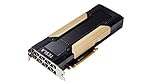
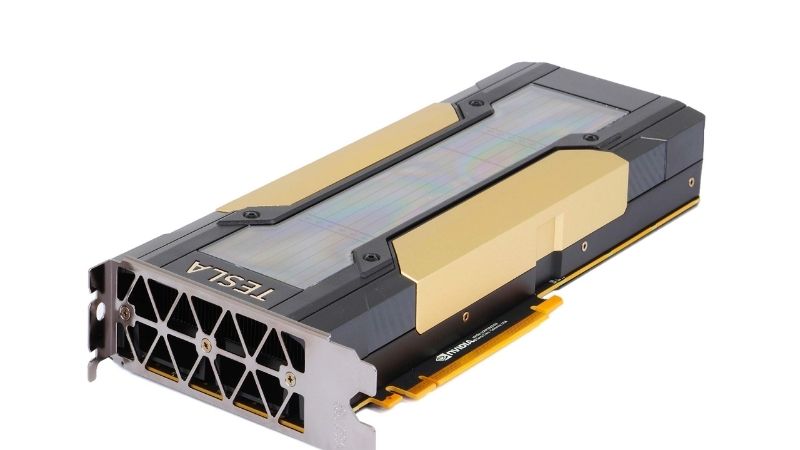
The Tesla V100 is built on Nvidia’s Volta GV100 die with 5,120 CUDA cores and 640 first-generation Tensor cores. It comes in 16GB and 32GB configurations of HBM2 memory on a wide 4,096-bit interface, delivering roughly 900 GB/s of bandwidth.
That HBM2 memory is the card’s defining feature. The enormous bandwidth and large capacity, especially on the 32GB version, make it well suited to memory-hungry compute and AI workloads even years after launch.
The V100 also offers strong double-precision (FP64) performance, a trait that matters for scientific computing and simulation work where consumer gaming cards are deliberately limited. For the right tasks, that capability remains genuinely valuable.
To put the memory in perspective, the 32GB V100 carries more VRAM than many current consumer flagships, and at a far lower used price. For AI work where fitting a model into memory is the deciding factor, that capacity can matter more than raw speed, which is precisely why the card retains a dedicated following despite its age.
That following is small but knowledgeable, and it sustains a steady secondhand market and community support and shared guides that newcomers can lean on when setting up and troubleshooting their first compute build.
Built for Compute, Not Gaming
It is essential to understand what the V100 is not. Most versions ship in passively cooled, server-oriented form factors with no display outputs, meaning they are designed to sit in data-center chassis with forced airflow, not in a desktop case.
Running one outside a server requires planning: aftermarket cooling solutions, adequate power delivery, and a system that can address the card for compute rather than display. This is a build for tinkerers, not plug-and-play users.
For pure gaming, the V100 is a poor and impractical choice. Its value lies entirely in compute, AI, and learning workloads where its memory and Tensor cores still earn their keep.
Tensor Cores and Their Legacy
The V100 introduced Tensor cores to Nvidia’s lineup, the dedicated AI math units that now define modern GPUs. That historical significance is matched by ongoing practical use, since those cores accelerate the matrix operations at the heart of deep learning.
Compared with current Tensor cores, the V100’s first-generation units are slower and lack newer data formats like FP4 found in Blackwell. They handle FP16 training well but trail far behind modern accelerators in efficiency.
Still, for learning the fundamentals of GPU-accelerated AI or running modest training jobs, the V100’s Tensor cores remain a capable and affordable introduction to the technology.
There is real educational value in that. Learning to optimize training, manage memory, and profile Tensor-core utilization on actual hardware teaches lessons that cloud abstractions hide. For a student or self-taught engineer, owning a physical V100 turns abstract concepts into hands-on practice at a cost that does not require institutional backing.
Real-World Use and Practical Considerations
Specs only matter in the context of real workloads, and the V100’s modern appeal is narrow but genuine. Drawing on the experience of researchers, homelab builders, and budget AI users, a clear picture emerges of where this aging accelerator shines and where it frustrates. Here is the honest assessment.
Where the V100 Still Excels
The V100’s strongest case is affordable VRAM for AI experimentation. The 32GB version in particular offers a large memory buffer for loading models and datasets at a price far below modern accelerators.
Researchers and students praise it as a learning platform, letting them practice training and inference on real Tensor-core hardware without data-center budgets. For educational use and small-scale projects, it delivers real capability per dollar.
Its FP64 strength also makes it useful for scientific and engineering workloads that need double precision, a niche where it can outperform far newer gaming cards that deliberately cap that capability.
Common Frustrations and Limits
The biggest frustration is cooling and setup. Because the V100 expects server airflow, desktop users must rig custom cooling, which is fiddly and a common source of complaints. This is not a card for the impatient.
Performance per watt is another limit. The V100 draws 250 to 300W while delivering far less efficiency than modern accelerators, so running it continuously costs more in electricity and heat than newer alternatives.
Software support is also aging. As frameworks move forward, older architectures like Volta see reduced optimization, so some cutting-edge AI tooling runs better, or only, on newer hardware. Buyers should verify compatibility for their specific workflow.
This is the most important caveat for prospective buyers. Before purchasing, confirm that the specific frameworks, libraries, and model formats you intend to use still support the Volta architecture. The card is a bargain only if it runs your actual workload; a cheap accelerator that cannot execute your tooling is no bargain at all, so verification up front saves disappointment later.
Pros and Cons of the Nvidia Tesla V100
Bringing the specs and practical realities together gives a clear verdict on who this card serves. Here is the balance sheet for the Nvidia Tesla V100.
- Pros: large HBM2 memory up to 32GB, strong bandwidth, capable Tensor cores, excellent FP64, very cheap on the used market, great for learning AI.
- Cons: server cooling required, no display outputs on most models, aging software support, poor efficiency, impractical for gaming, setup complexity.
The pattern is clear: as a budget compute and learning card the V100 still has a place, but only for buyers willing to handle its data-center quirks.
Pricing, the 2026 Market, and Who Should Buy
The V100’s appeal rests entirely on its low used price, and the 2026 market is shaping that value in ways worth understanding before you buy. Broader AI demand is influencing the whole compute landscape, including older cards like this one.
Current Pricing and the AI Demand Effect
On the used market, the Tesla V100 has fallen dramatically from its original cost of several thousand dollars, now trading for a small fraction of that depending on memory configuration and condition. That makes it one of the cheapest ways to get a large-VRAM Tensor-core card.
Broader market forces matter here too. In early 2026 the US approved sales of Nvidia’s H200 AI accelerator to China, prompting orders for millions of chips, and a severe memory shortage has pushed new GPU prices up across the board. As cutting-edge accelerators stay expensive and scarce, budget compute options like the V100 see renewed interest, which can firm up their used prices rather than letting them keep falling. For buyers, that means a cheap V100 today may not get much cheaper.
Modern Alternatives to Weigh
An honest review weighs the competition. For pure VRAM per dollar, a used RTX 3090 with 24GB offers a more practical, display-capable, better-supported option for many AI hobbyists.
For those who specifically want the V100’s 32GB and FP64 strengths on a tight budget, few alternatives match its price. Weigh your exact workload, your cooling setup, and software needs before deciding between the two.
Power infrastructure is part of that calculation as well. Server cards expect specific power connectors and steady delivery, so factor in any adapters, a capable power supply, and the custom cooling rig the card demands. Those add-on costs can erode the V100’s headline savings, so budget for the whole setup rather than the card alone when comparing it against a simpler consumer GPU.
Final Verdict: Is It Worth It Today
The Nvidia Tesla V100 is worth buying for the budget AI tinkerer, student, or scientific user who needs large memory and Tensor cores cheaply and is comfortable solving its cooling and setup challenges.
For anyone wanting a simple, modern, well-supported card, a used RTX 3090 or a newer GPU is the wiser choice. The V100 is a specialist’s bargain, rewarding those who understand its data-center roots and limitations.
Approached with the right expectations, the V100 can be a remarkably rewarding project card. It teaches real lessons about GPU compute, provides serious memory capacity for the money, and opens the door to AI experimentation that would otherwise demand a far larger budget, provided you embrace the hands-on work it requires.
See more:
- What graphics card do I have?
- How to tell what graphics card I have
- 5070 Ti vs 4080
- 5060 vs 3080
- RTX 2060 graphics card
Recommended Products

ZOTAC
ZOTAC Gaming GeForce RTX 4080 16GB AMP Extreme AIRO 16GB GDDR6X 256-bit 22.4 Gbps PCIE 4.0 Gaming Graphics Card, IceStorm 2.0 Advanced Cooling, Spectra 2.0 RGB Lighting, ZT-D40810B-10P
View on Amazon
1 day ago

PNY
PNY GeForce RTX™ 4080 16GB XLR8 Gaming Verto Epic-X RGB™ Triple Fan Graphics Card DLSS 3
View on Amazon
6 hours ago

msi
MSI Gaming RTX 4070 Ti Super 16G Ventus 2X White OC Graphics Card (NVIDIA RTX 4070 Ti Super, 256-Bit, Boost Clock: 2655 MHz, 16GB GDRR6X 21 Gbps, HDMI/DP, Ada Lovelace Architecture) (Renewed)
View on Amazon
5 hours ago
As an Amazon Associate we earn from qualifying purchases. Product prices and availability are accurate as of the date/time indicated.
Conclusion
The Nvidia Tesla V100 remains a fascinating budget entry into GPU compute, pairing up to 32GB of HBM2 memory, capable Tensor cores, and strong FP64 performance at a used price far below its original cost. Its server-oriented cooling, lack of display outputs, and aging software support make it a specialist’s card rather than a general-purpose one. With 2026’s AI demand and memory shortage firming up prices on budget compute hardware, a cheap V100 is unlikely to fall much further. Compare current Tesla V100 listings against alternatives like a used RTX 3090 on Amazon, weigh your workload and setup, and buy only if its compute strengths match your needs.
Frequently Asked Questions
What is the best nvidia tesla v100 in 2026?
The best nvidia tesla v100 depends on your budget and how you plan to use it. The options compared above are our top-rated picks based on real customer ratings, build quality, and overall value — start with the highest-rated model that fits your budget.
How much should I expect to spend on a nvidia tesla v100?
Prices vary by brand and features. Budget options cover the essentials, while mid-range and premium models add durability, performance, and extra features. Compare the prices in the list above to find the best value for your needs.
What should I look for when buying a nvidia tesla v100?
Focus on what matters most for your use case — build quality, compatibility, performance, warranty, and verified customer reviews. Every pick above is selected to balance these factors.
Are budget nvidia tesla v100 options worth it?
Yes. For most people a well-reviewed budget or mid-range nvidia tesla v100 delivers excellent value. You only need to spend more if you specifically require premium materials or top-tier performance.
How did we choose these nvidia tesla v100 picks?
We compare current Amazon ratings, review counts, key features, and price to surface the options with the best real-world value. The list is refreshed as ratings and availability change.



Write Your Review
No reviews yet. Be the first to share your experience!