
- Top Pick: GIGABYTE GeForce RTX 5080 Gaming OC 16G Graphics Card, WINDFORCE Cooling System, 16GB 256-bit GDDR7, GV-N5080GAMING OC-16GD Video Card
- Best Value: PNY NVIDIA GeForce RTX™ 5080 OC Triple-Fan Graphics Card
- Premium Choice: msi Gaming RTX 5080 16G Ventus 3X OC Black Graphics Card (16GB GDDR7, 256-bit, Extreme Clock 2640 MHz, DisplayPort x 3 2.1a, HDMI 2.1b, NVIDIA Blackwell Architecture)


pny nvidia geforce rtx 5080 epic-x rgb is a search almost nobody runs casually. You are about to spend roughly $1,000, the listing is open, and you want to know whether the cheaper 5080 is a smart buy or a corner-cut you will regret in eighteen months. That is a fair question and it deserves a direct answer rather than a benchmark chart — every RTX 5080 runs the same GB203 silicon and lands within a few percent of every other. What you are actually buying with a board partner is a cooler rated for 360W, an RGB implementation, a warranty, and someone to talk to when it fails. Here is how PNY’s version handles each.
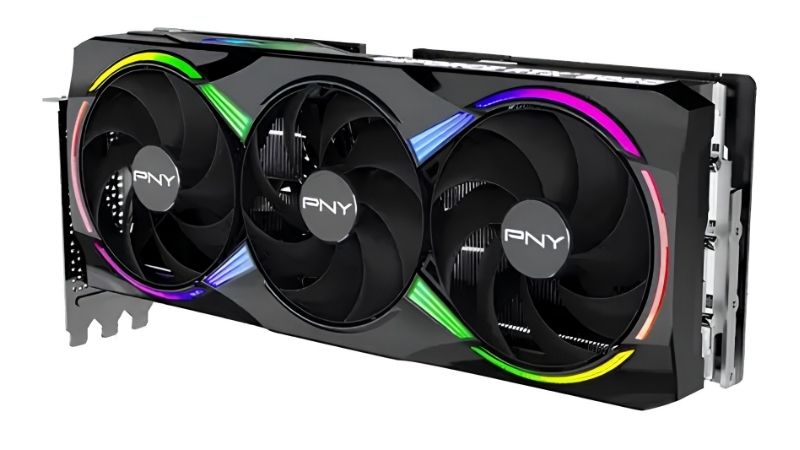
What the EPIC-X RGB Actually Is
The EPIC-X RGB sits at the top of PNY’s XLR8 Gaming consumer line — a triple-fan, triple-slot cooler with addressable RGB lighting across the shroud, aimed at exactly the person reading this: someone who has committed to a 5080 and wants the visible build without the top-tier price. Underneath, it is 10,752 CUDA cores, 16 GB of GDDR7 on a 256-bit bus, roughly 960 GB/s of bandwidth, and a 360W board power figure that defines everything else about the card.
As an Amazon Associate we earn from qualifying purchases at no extra cost to you.


Where It Sits in PNY’s Range
PNY’s 5080 line typically spans a plainer VERTO or ARGB model and this EPIC-X RGB variant at the top. The silicon is identical. The differences are the cooler’s fin stack and heat pipe count, the lighting, and whether the backplate is metal or plastic.
That matters at 360W more than it would at 145W. On a mid-range card an under-specified cooler is a noise problem. On a 5080 it is a sustained-clock problem — the card will hold its boost or it will not, and that shows up as frame rate that decays over a long session rather than in a 60-second benchmark run.
The EPIC-X is the model in PNY’s range built for that load. If you are choosing between PNY’s own variants, this is the one to take; the saving on the plainer model is not where you want to economise on a card at this power level.
Size and Case Clearance: Check This First
Triple-fan 5080 designs across all partners commonly run 320 to 360 mm long and occupy three slots or more. PNY’s EPIC-X is in that class. This is the single most common reason a $1,000 purchase gets returned unopened.
Three measurements, and take them yourself rather than trusting a forum post. First, length: measure from the rear I/O bracket to the nearest obstruction — usually the drive cage or a front radiator. Add 40 mm of clearance for the power cable’s bend radius, because the 12V-2×6 connector sits on the top edge and the cable cannot kink. Second, thickness: a card described as three-slot can be 60 to 70 mm, which fouls the side panel in some cases. Third, sag — a card this size and weight will droop, and a support bracket is not a luxury at this length.
Pull the exact figures from the listing for the specific model number you are ordering. PNY revises dimensions between SKUs and regions, and a 20 mm error at this price is an expensive lesson. If your case is tight, a GPU support bracket is cheap insurance worth adding to the same order.
Power: The 12V-2×6 Connector and Your PSU
The 5080 uses the 16-pin 12V-2×6 connector and draws roughly 360W with transient spikes well above that. Nvidia’s recommendation is 850W, and with a high-end CPU that is the sensible spec rather than a cautious one.
If your PSU is an older ATX 2.x unit, you will be running the bundled adapter off three or four 8-pin cables. That works, but the connector must be fully seated — partial seating is the documented root cause of the melting reports, and it is a user-installation failure rather than a manufacturing one. Push until it clicks, then check the gap.
If you are on an ATX 3.0 or 3.1 supply with a native 12V-2×6 cable, use it and skip the adapter entirely. If your current unit is 750W or below, that is a purchase you need to make alongside the card, not after — worth pricing a quality 850W ATX 3.1 unit with a native connector in the same order, because it removes the adapter from the equation completely.
Cooling, Noise and What Owners Report
Aggregating four and five star feedback alongside the two and three star complaints gives a clearer picture of a specific board than any synthetic test, and the pattern for PNY’s higher-tier coolers is consistent across generations.
Thermals Under a 360W Load
The recurring positive theme is that the triple-fan design handles 360W adequately — owners report load temperatures in the low-to-mid 70s Celsius in cases with reasonable airflow, with fans audible but not intrusive. That is a normal result for a card at this power, not an exceptional one.
Watch hotspot temperature rather than core temperature. A core reading in the low 70s with a hotspot above 95°C indicates uneven die contact, and on a new card that is a genuine warranty case rather than something to live with. Check it in the first week while your return window is open.
The complaints that appear almost always trace to the case rather than the card. Dumping 360W into a sealed tempered-glass enclosure with one exhaust fan will throttle this card and raise your CPU and NVMe temperatures alongside it. If your front panel is solid glass, that is the variable to fix before you blame PNY.
The Coil Whine Question
Coil whine complaints appear against PNY cards, as they do against every board partner. It would be dishonest to present this as a PNY-specific defect and equally dishonest to omit it — a meaningful minority of owners across all brands report audible whine under load, particularly at very high frame rates in menus or lightly loaded scenes.
Two useful facts. It is a physical property of inductors under load rather than a fault, and manufacturers generally will not accept a return for it alone. And it is largely fixable at your end: capping frame rate in the driver or enabling V-Sync removes the extreme frame rates that provoke it, and most reports resolve once a cap is applied.
If silence is genuinely a priority at this price, buy from a retailer with a straightforward return window rather than a marketplace seller. That gives you a route that does not depend on whether the manufacturer classifies whine as a defect.
RGB Implementation and Software
The RGB is the reason this variant exists, so it deserves scrutiny. PNY’s addressable lighting is controlled through their VelocityX utility, and the honest summary from owner feedback is that the hardware is good and the software is the weak point — a pattern that applies to nearly every board partner’s first-party tool.
The practical question is motherboard sync. If you have a coordinated lighting scheme running through your board’s ecosystem, check whether this card integrates before you buy, because a GPU that will not sync is a visible mismatch in exactly the build where you cared enough to pay for RGB. Compatibility varies by generation and by motherboard vendor.
Most owners end up setting a static colour once and never opening the software again, which is a perfectly reasonable outcome. Just do not buy this variant expecting a polished lighting suite — buy it for the cooler, and treat the RGB as a bonus.
Pros, Cons and the Warranty Reality
Here is the plain ledger, plus the part of a board partner purchase that only matters once — and matters enormously when it does.
PNY EPIC-X RGB: Pros
Pros: Typically among the more competitively priced RTX 5080 options — you get identical silicon and identical performance to premium-badged cards for less money. Triple-fan cooler genuinely rated for 360W rather than borrowed from a lower tier. Addressable RGB across the shroud. PNY is a long-standing official Nvidia partner and the primary distributor of Nvidia’s professional workstation cards across North America and Europe — this is not a fly-by-night operation, and it is the single most useful fact for anyone nervous about the brand. Full DLSS 4 stack with Multi Frame Generation. Ninth-generation NVENC with dual AV1 encoders.
The most frequent unprompted praise is exactly what you would expect: buyers describe it as the cheapest route to a 5080 that does not feel cheap, and note that performance is indistinguishable from cards costing $80 more.
PNY EPIC-X RGB: Cons
Cons: Large — 320 to 360 mm and three-plus slots, which rules out a lot of cases. Heavy enough that sag is a real consideration. VelocityX software is dated and motherboard RGB sync is inconsistent. Coil whine reports exist, as with every brand. RMA turnaround reports are mixed — some smooth, some slow. 12V-2×6 connector requires careful seating and likely a PSU upgrade. 16 GB of VRAM at a four-figure price draws legitimate criticism, though that is Nvidia’s decision rather than PNY’s.
Warranty and What Happens If It Fails
This is where a board partner earns or loses the money you saved. PNY’s XLR8 Gaming cards commonly carry a three-year limited warranty in the United States, with terms varying by region — verify what applies where you are buying rather than assuming the headline figure travels.
Keep the invoice and register the product if PNY offers registration in your region. RMA feedback in the two and three star reviews is mixed, which is unremarkable across the industry but worth weighing if downtime matters to you. The practical hedge is to buy from a retailer with its own returns process, giving you a route that does not depend solely on the manufacturer.
Run your checks in the first fortnight: hotspot temperature under load, coil whine at uncapped frame rates, and RGB sync with your board. Those three are the failure modes, and all three are far easier to resolve inside a retailer’s return window than through a warranty claim in year two.
Why This Card Costs What It Costs
Before you decide whether to wait for a better price, it is worth understanding what is actually setting the number on that listing. Three developments explain it.
The H200 Decision and GeForce Supply
The United States has cleared Nvidia to sell the H200 — among its most capable AI accelerators — into China. That reaches your listing directly. Nvidia allocates finite TSMC wafer capacity and finite GDDR7 and HBM supply across its product lines, and data centre margins dwarf GeForce margins by a wide multiple.
The 5080 is among the consumer cards most exposed to this, because it uses a large die and 16 GB of the same GDDR7 that professional parts compete for. Historically, every surge in data centre demand has tightened high-tier consumer supply and pushed street prices above MSRP.
The practical read: if you have found a 5080 at or near MSRP, the case for waiting is weaker than it feels. That is not urgency for its own sake — it is a pattern with a decade of precedent behind it.
Component Prices Are Still Trending Up
The broad direction for laptops and PC components remains upward, and memory is the driver. AI infrastructure is consuming DRAM and GDDR at a scale consumer graphics cannot outbid, and that cost lands in every board partner’s bill of materials — PNY’s included.
This is also a large part of why a $999 card ships with 16 GB rather than 24 GB. That was a cost decision made under current memory economics, not an oversight. And it affects the PSU you may need to buy alongside the card, since power supplies are not immune to component inflation either.
Budget for the whole purchase rather than the sticker. A 5080 plus an 850W ATX 3.1 supply plus a support bracket is the real number, and none of those three components are trending downward.
The Good News Is Real, But Weak
Prices have at least stopped climbing at the pace they set through late 2025. Framework, which publishes unusually candid supply commentary, has reported a stretch of relative stability while still warning that volatility has not ended. The steep climb flattened. Nothing reversed.
A plateau is not a discount. Planning a $1,000 purchase around a correction that the supply picture does not support means paying roughly the same money later, from thinner stock, with less warranty runway.
Which simplifies your decision. The question is not whether this gets cheaper. It is whether this specific card fits your case and your power supply.
See More:
Conclusion: Should You Buy It?
The honest verdict on the pny nvidia geforce rtx 5080 epic-x rgb is that the saving is real and it is not a corner-cut. Every RTX 5080 performs within a few percent of every other, so paying $80 more for a premium badge buys you a cooler you do not need at 360W and a brand you may recognise more readily. PNY is a long-standing official Nvidia partner and the primary distributor of Nvidia’s professional workstation cards across North America and Europe — the concern that it is a second-tier operation does not survive contact with that fact. The EPIC-X’s triple-fan cooler handles 360W properly, with owners reporting low-to-mid 70s under load in cases with real airflow.
The genuine risks are physical rather than reputational. This is a 320 to 360 mm three-slot card that weighs enough to sag, and it needs an 850W supply plus a fully seated 12V-2×6 connector. Measure your case from the rear bracket to the drive cage, add 40 mm for the cable bend, and check slot thickness before you order — that is where $1,000 purchases go wrong, not in the silicon. Then run three checks in your first fortnight while the return window is open: hotspot temperature under load, coil whine at uncapped frame rates, and RGB sync with your motherboard. With H200 demand pulling on the same GDDR7 supply and prices flat but high, a 5080 at or near MSRP is a buy signal rather than something to sleep on. Check the exact dimensions on the listing, price an 850W ATX 3.1 unit and a support bracket alongside it, and order the set together.
Frequently Asked Questions
What power supply does the PNY RTX 5080 EPIC-X RGB need?
Plan on a quality 850W unit. The RTX 5080 has a 360W default board power and transient spikes well above that, and the card feeds from a single 12V-2×6 connector. An ATX 3.1 supply with a native 600W cable is ideal; otherwise use the included adapter and confirm the plug clicks fully home to avoid hotspot damage.
Will this card fit in a mid-tower case?
Triple-fan EPIC-X models run roughly 330mm long and about three slots thick, so measure your case GPU clearance and check whether a front radiator or drive cage intrudes. You also need around 60mm of side clearance for the power cable bend radius, since sharp bends on 12V-2×6 are a known reliability risk.
Is 16GB of VRAM enough for 4K gaming?
For current titles at 4K with DLSS quality, yes. Very heavy path-traced games with ultra texture packs and frame generation can approach the limit, and 16GB is the one specification people criticise on a card at this price. Practically, the 960 GB/s of GDDR7 bandwidth keeps frame times smooth in everything shipping today.
How much faster is it than an RTX 4080 Super?
Expect roughly 10 to 15 percent in traditional rasterisation, which is a modest generational step. The larger gain comes from DLSS 4 multi frame generation, which can multiply displayed frame rates on supported titles, plus a newer encoder and better ray-tracing throughput. If you own a 4080 Super, this is not a compelling upgrade.
Does the RGB lighting need extra software?
Yes, PNY uses its own VelocityX utility for lighting and fan tuning, and it can also apply mild factory overclock profiles. You can leave it uninstalled and the card runs at stock with default lighting. If you want motherboard sync, verify your board software supports the card before relying on unified effects.











Write Your Review
No reviews yet. Be the first to share your experience!