
- Top Pick: Shimano Deore Xt M8250 Di2 Drivetrain Upgrade Kit Black, Long Cage, Right, Bar Clamp | Derailleur, M8250-R Shifter, Battery, Charger, Quick
- Best Value: Shimano Deore XT CS-M8200-12 Cassette – 12-Speed, 10-51t, Hyperglide+, Micro Spline, Gray/Silver | Micro Spline, Gray/Silver
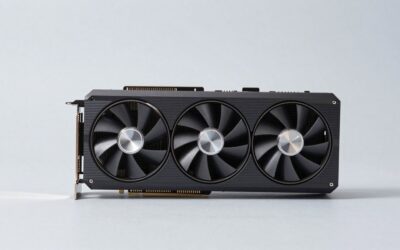
- Premium Choice: ASUS Prime AMD Radeon RX 9070 XT 16GB GDDR6 OC Edition Graphics Card, AMD (PCIe 5.0, HDMI/DP 2.1, 2.5-Slot Design, Axial-tech Fans, Ball Bearings, Dual BIOS, GPU Guard), 3 Year Warranty
9070 xt vs 3060 ti is not really a comparison — nobody is choosing between these two. It is an upgrade audit, and the honest version of it has to answer a question no benchmark chart can: will your existing system actually let the new card run? The raw answer is that the 9070 XT delivers roughly 90% to 110% more frames than a 3060 Ti, which is one of the largest generational jumps available at any price. The complicated answer is that a meaningful number of 3060 Ti owners will install one and see a fraction of that, because the bottleneck moves to their CPU or their power supply trips. Here is the full picture, including the parts of your build you need to check first.
The Quick Verdict on 9070 XT vs 3060 Ti
Yes, the upgrade is worth it — if your CPU is from 2022 or later and your PSU is 750W or above. The 9070 XT roughly doubles your frame rate, doubles your VRAM from 8 GB to 16 GB, and adds FSR 4. If your CPU is a Ryzen 5 3600 or an i5-10400 and your PSU is a 600W unit, the upgrade is still worth it but you will not see the numbers in the charts, and you should budget for more than a graphics card.
When the Upgrade Is a Clear Win
Upgrade now if you moved to a 1440p monitor and your 3060 Ti is struggling. This is the single most common trigger, and it is the scenario the 9070 XT solves outright. A 3060 Ti at 1440p high settings lands in the 45 to 70 fps range in modern titles; the 9070 XT lands at 95 to 140.
Upgrade also if you have hit the 8 GB VRAM wall. That wall does not announce itself as low frame rates — it announces itself as stutter, as frame times spiking from 14 ms to 60 ms while textures swap over PCIe. No settings tweak fixes it properly. 16 GB removes the failure mode entirely.
When You Should Wait or Buy Something Else
Do not upgrade yet if you are still on 1080p at 60 Hz. Your 3060 Ti already saturates that. The 9070 XT would produce frames your monitor discards, and the money is better spent on a 1440p 144 Hz panel — which will then make the GPU upgrade worth doing later.
Do not upgrade if your CPU is more than two generations old and you have no budget beyond the card. The section below explains exactly why, with numbers. Pairing a 9070 XT with an ageing quad or hex-core is the most common way people spend $650 and feel underwhelmed.
And reconsider if your PSU is 600W. That is adequate for a 3060 Ti’s 200W. It is not adequate for a 9070 XT’s 304W plus transient spikes, and the failure mode is an instant reboot under load that looks like a defective card.
9070 XT vs 3060 Ti Spec Comparison Table
Both cards run a 256-bit bus, which makes the bandwidth and VRAM rows a fair like-for-like read. The power row is the one that will cost you money.
| Specification | RTX 3060 Ti | Radeon RX 9070 XT |
|---|---|---|
| Architecture | Ampere (2020) | RDNA 4 (current) |
| Shader Units | 4,864 CUDA cores | 4,096 SPs (64 CUs) |
| RT Hardware | 38 RT Cores (2nd gen) | 64 Ray Accelerators (2nd gen RDNA) |
| VRAM | 8 GB GDDR6 | 16 GB GDDR6 |
| Memory Bus | 256-bit | 256-bit |
| Bandwidth | ~448 GB/s | ~645 GB/s |
| Board Power | 200W | 304W |
| Power Connector | 1x 8-pin (12-pin on FE) | 2-3x 8-pin |
| Recommended PSU | 600W | 750W |
| Typical Length | 200-240 mm | 280-330 mm |
| Upscaling | DLSS (Ampere models) | FSR 4 (ML-based) |
| Frame Generation | No | AFMF 2 / FSR 3 FG |
| Launch MSRP | $399 (2020) | $599 |
Note the shader count — the 3060 Ti actually has more CUDA cores than the 9070 XT has stream processors. Cross-vendor, cross-architecture core counts are not comparable, and this row is the clearest demonstration of why spec-sheet arithmetic misleads people.
Deep Dive Face-Off: The Gain and What Eats It
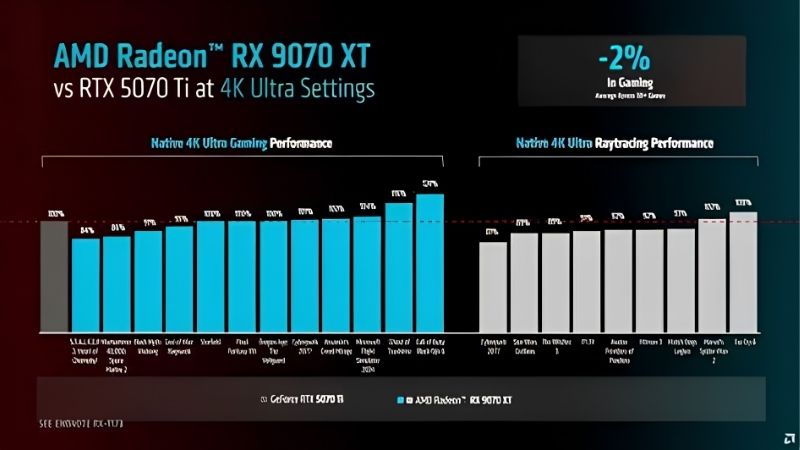
The headline number is real. Aggregated across published benchmark suites, the 9070 XT roughly doubles a 3060 Ti. Whether you personally receive that doubling depends on two components that have nothing to do with either graphics card.
Frame Rates at 1080p and 1440p
At 1440p high settings the 9070 XT leads the 3060 Ti by roughly 95% to 115% across a mixed suite. In practice a title running at 55 fps becomes 110 to 118 fps. That is the difference between a card that struggles at 1440p and one that comfortably feeds a 144 Hz panel.
At 4K the gap widens further, roughly 110% to 130%, because the 3060 Ti’s 8 GB frame buffer becomes an active constraint rather than a theoretical one. The 9070 XT is a genuine 4K-capable card with upscaling; the 3060 Ti is not, and no amount of tuning changes that.
At 1080p the gap compresses to roughly 60% to 80% — and this compression is the warning sign. It is not because the 9070 XT gets slower. It is because something else in the system starts setting the ceiling.
The CPU Bottleneck Nobody Warns You About
Here is the part that decides whether this upgrade delivers for you specifically. A typical 3060 Ti build from 2020 or 2021 pairs it with a Ryzen 5 3600, a Ryzen 5 5600, or an i5-10400. Those CPUs were correctly matched to a 3060 Ti. They are not correctly matched to a card twice as fast.
Install a 9070 XT behind a Ryzen 5 3600 at 1080p and you will commonly see 40% to 60% of the theoretical gain, because the CPU cannot issue draw calls fast enough to keep the GPU fed. The card will sit at 60% to 70% utilisation while you wonder what went wrong. At 1440p the effect shrinks because the GPU has more work per frame, and at 4K it largely disappears.
You can verify this yourself in ten minutes before spending anything. Install a monitoring overlay, run your usual game, and watch GPU utilisation. If your 3060 Ti already sits below 95% while your CPU pegs at 100%, a faster GPU will not help you — the CPU is your upgrade. If the GPU is pinned at 99% and your frames are still low, the 9070 XT will deliver.
Practical Fit: PSU, Cables and Case Clearance
Three physical checks, and each one is a genuine failure point for this specific upgrade path.
First, wattage. A 3060 Ti’s 200W lives happily on a 600W unit. The 9070 XT’s 304W with transient spikes does not. 750W is the floor, and if you have a 5800X3D or a 13th-gen Intel chip, that is the correct spec rather than a cautious one. A unit that trips its protection produces an instant reboot under load — people return perfectly good cards over this.
Second, cables. The 9070 XT needs two or three separate 8-pin PCIe connectors. Running two connectors off a single daisy-chained cable is a common shortcut and a common cause of instability. Count your discrete PCIe cables, not the connector ends.
Third, length. Your 3060 Ti is probably 200 to 240 mm. Most 9070 XT cards are 280 to 330 mm and two to three slots. Measure from the back of the drive cage to the rear bracket before ordering. If your PSU is the blocker, a quality 750W or 850W 80+ Gold unit is the component to price alongside the card — it is not optional here, and buying a card you cannot power is an expensive lesson.
Pros, Cons and the Cards Worth Comparing
Here is the plain ledger for both, followed by the alternatives that a 3060 Ti owner should genuinely price before committing.
RX 9070 XT: Pros and Cons
Pros: Roughly double the frame rate — one of the biggest jumps available from a single component swap. 16 GB of VRAM eliminates the 8 GB stutter permanently. FSR 4’s machine-learning model is close to DLSS at Quality preset. Standard 8-pin connectors with no adapter. Current architecture, so years of driver optimisation ahead. Genuine 1440p high-refresh and 4K-with-upscaling capability.
Cons: 304W needs a 750W PSU — a real cost for many 3060 Ti builds. Physically much larger. Heavy ray tracing and path tracing remain a clear loss to Nvidia. No CUDA, so any CUDA-dependent software you currently run stops working. The 1080p gain is heavily CPU-limited on older systems.
RTX 3060 Ti: Pros and Cons
Pros: Still a capable 1080p card at 200W. 256-bit bus with 448 GB/s is generous by modern mid-range standards — better than several newer cards at this tier. DLSS support. Fits a 600W PSU and a compact case. Already paid for. CUDA access.
Cons: 8 GB of VRAM is the hard limit, and it is being hit now rather than later. Struggles at 1440p in modern titles. No frame generation. Ampere driver priority will thin over time. Ray tracing is technically present, practically unusable in demanding titles.
The Alternative: RTX 5070 Ti or RX 9070
If you want the Nvidia feature stack rather than AMD’s, the RTX 5070 Ti is the direct equivalent upgrade. It carries 16 GB of GDDR7, full DLSS 4 with Multi Frame Generation, ninth-generation NVENC, and lands in similar raster territory — for more money and roughly the same 300W power requirement. If you stream or use CUDA software, this is the card, not the 9070 XT.
If your PSU is the obstacle and you would rather not replace it, the plain RX 9070 draws roughly 220W and sits about 8% to 12% behind the XT. On a 650W or 700W unit that is the difference between a one-component upgrade and a two-component one.
Both are worth pricing against the 9070 XT before you decide — the right answer depends on your PSU and your software, not on which card wins a benchmark.
Why the Timing Argues Against Waiting
Every upgrade audit ends with the same question: should I do this now or in six months? Three market developments answer it.
Component Prices Are Still Trending Up
The broad direction for laptops and PC components remains upward, and memory is the driver. AI infrastructure is consuming DRAM and GDDR at a scale consumer hardware cannot outbid, and that cost lands in every board partner’s bill of materials.
This matters doubly for this upgrade, because you may be buying two components. GPU prices and PSU prices are both exposed to the same pressure, and neither is trending down. A $650 card plus an $90 power supply today is unlikely to be a $600 card plus an $80 power supply in six months.
It also explains the 16 GB on the 9070 XT more than any marketing slide does. That capacity was specified when memory cost less. Cards at this tier are more likely to get quietly stingier than more generous.
The Good News Is Real, But Weak and Distant
Prices have at least stopped climbing at the pace they set through late 2025. Framework, which publishes unusually candid supply commentary, has reported a stretch of relative stability while still warning that volatility has not ended. The steep climb flattened. Nothing reversed.
A plateau is not a discount. If you were waiting for a correction to justify the upgrade, the supply picture does not support that plan — you would be paying roughly the same money later while playing at 55 fps in the meantime.
New Memory Supply Arrives in 2027 at the Earliest
Fresh capacity is genuinely opening up. OEMs can increasingly source DDR5 from Chinese suppliers such as CXMT, and Micron is building two fabs in Idaho. Both are real and both are substantial. Neither runs before 2027 or 2028.
So relief exists, but it is weak and years out. Waiting for the memory market to make 16 GB cards cheap means waiting through two more product generations — and your 3060 Ti’s 8 GB does not grow in the meantime.
Which reframes the audit usefully. The question is not “will this get cheaper?” It is “does my CPU and PSU let me use it, and if so, is doubling my frame rate worth today’s price?” Both are answerable this afternoon.
See More:
Final Verdict and Recommendation
The 9070 xt vs 3060 ti upgrade delivers roughly 90% to 110% more frames at 1440p and doubles your VRAM from 8 GB to 16 GB — one of the largest single-component gains available right now, and comfortably worth doing if your system can feed it. That last clause is the whole article. Before you buy anything, run your usual game with a monitoring overlay and check GPU utilisation. If your 3060 Ti is pinned at 99%, the 9070 XT will deliver the numbers above. If it sits at 65% while your CPU is at 100%, your money belongs in a CPU and platform upgrade first, and a faster GPU will disappoint you.
Then check two things inside your case: PSU wattage and how many discrete PCIe cables it has. 750W and two separate 8-pin cables is the requirement, not a suggestion — a 600W unit will reboot under load and you will blame the card. If you stream or run CUDA software, buy the 5070 Ti instead; if your PSU is fixed at 650W, buy the plain RX 9070. With component prices flat but high and no memory relief before 2027, waiting costs you frames and saves you nothing. Check today’s price on the card your build can actually support, confirm the cable count and clearance against the table above, and upgrade.
Frequently Asked Questions
How much faster is the RX 9070 XT than an RTX 3060 Ti?
It is roughly two and a half times faster in rasterised games and considerably more than that in ray-traced titles, where RDNA 4 reworked ray accelerators pull far ahead of Ampere in this class. It also moves you from 8GB to 16GB of VRAM, which removes texture stutter at 1440p and 4K.
Will my current power supply cope?
Probably not if it was sized for a 200W RTX 3060 Ti. The RX 9070 XT is rated around 304W and typically uses two or three 8-pin PCIe connectors, so plan on a quality 750W unit, or 850W with a high core count CPU. Use native cables rather than daisy-chained splitters.
Will my CPU bottleneck the new card?
At 1080p, quite possibly. A card this fast is easily held back by older six core CPUs such as a Ryzen 5 3600 or Core i5-9600K, especially in simulation and open-world games. If you cannot upgrade the CPU, target 1440p or 4K so the GPU remains the limiting factor.
Does the card physically fit most cases?
Partner RX 9070 XT models generally run 300 to 340mm long and 2.5 to 3 slots thick, which is far larger than a compact RTX 3060 Ti. Measure your case GPU clearance, check for front radiator or drive cage conflicts, and consider a support bracket to prevent sag over time.
Is this a sensible upgrade in 2026?
Yes if you game at 1440p or above and your 3060 Ti is forcing compromises on textures and ray tracing. It is less compelling if you play mainly esports titles at 1080p, where the 3060 Ti already exceeds most refresh rates and the extra cost buys frames you will never see.
As an Amazon Associate we earn from qualifying purchases at no extra cost to you.









Write Your Review
No reviews yet. Be the first to share your experience!