
- Top Pick: NVIDIA Shield Android TV Pro | 4K HDR Streaming Media Player High Performance, Dolby Vision, 3GB RAM, 2X USB, Works with Alexa, Model:945-12897-2500-101
- Best Value: Google TV Streamer 4K – Fast Streaming Entertainment on Your Device with Voice Search Remote – Watch Movies, Shows, Live, and Netflix in HDR – Smart Home Control – 32 GB of Storage – Hazel
- Premium Choice: Google TV Streamer (4K) White 4K Ultra HD 32 GB Wi-Fi, W129012026 (Ultra HD 32 GB Wi-Fi)
NVIDIA Shield TV 4K owners have been waiting for a successor since October 2019. It has not arrived. In 2026 the device still sells at close to its launch price, still receives software updates, and still performs one trick no competing streamer can match. On paper that combination looks like stagnation. This review argues it is closer to the opposite — and explains why the current component pricing climate turns “wait for the next one” into a costly gamble rather than a patient one.
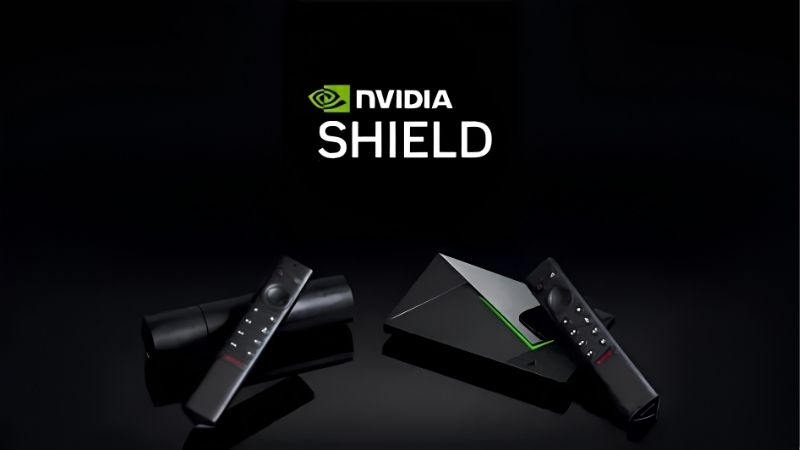
What the NVIDIA Shield TV 4K Actually Is in 2026
Before the feature list, the hardware. The Shield runs on Tegra X1+, a chip NVIDIA first shipped in 2015 and revised in 2019. Against Apple’s A15 Bionic that should be a slaughter. In practice, streaming boxes are not phones: the workload is video decode, network throughput, and upscaling — not raw compute. That distinction is the difference between buying the right box and paying for silicon you will never touch.
Tegra X1+ and the Spec Sheet That Refuses to Age
The Tegra X1+ pairs four ARM Cortex-A57 cores with a 256-core Maxwell GPU. Video decode runs on dedicated fixed-function hardware, not the CPU, and that block handles H.265 and VP9 at 4K60 without strain. This is why the chip’s age matters far less than a spec comparison suggests.
Where the GPU genuinely works is upscaling. NVIDIA allocates that Maxwell silicon to a task no competitor bothers with, and it is the single strongest argument for the hardware still existing.
The practical takeaway: benchmarks pitting the X1+ against an A15 measure a workload the box never runs. Neither drops frames on a 4K HDR stream. The gap appears only in Android games — which almost nobody buys a Shield to play.
Shield TV Tube vs Shield TV Pro: Which One You Need
Two models exist, and the difference matters more than the 50 dollar gap implies.
| Spec | Shield TV (Tube) | Shield TV Pro |
|---|---|---|
| Launch price | 149.99 | 199.99 |
| RAM | 2 GB | 3 GB |
| Internal storage | 8 GB | 16 GB |
| Expansion | microSD slot | 2× USB 3.0 |
| Plex Media Server | No | Yes |
| Form factor | Cylinder, hangs off cable | Set-top box |
| AI upscaling | Yes | Yes |
| Dolby Vision / Atmos | Yes | Yes |
The Tube is the correct call if you stream from Netflix, Disney+, and YouTube and nothing else. It performs AI upscaling identically to the Pro. It costs less. It hides behind the TV on its own cable.
The Pro earns its premium in exactly one scenario: you own media files. Those two USB 3.0 ports accept external drives, the extra gigabyte of RAM keeps background services resident, and Plex Media Server runs locally — meaning the Shield serves video to every device in the house rather than merely playing it back.
Storage, Ports and What Fits Your Setup
Practical constraints kill more purchases than specifications do. The Tube has no USB port at all. If your library lives on a 4TB external drive, the Tube is not an option regardless of what it costs.
Both models want HDMI 2.0b on the TV side for 4K60 HDR. Both ship Gigabit Ethernet — use it. Wi-Fi carries a 4K stream cleanly right up until someone else starts a download, at which point a 40 Mbps Dolby Vision stream begins buffering mid-scene.
One overlooked detail: the Pro’s 16 GB of internal storage fills faster than expected. The Tube’s microSD slot is, ironically, the more flexible expansion path for apps — just not for media.
AI Upscaling and the Features Nobody Else Has
This is where the review stops being about specifications and starts being about why this box exists. Every streamer decodes 4K. Only one reconstructs detail that was never in the source file. If your library is 1080p — old Blu-ray rips, broadcast TV, most of YouTube — this feature is not marketing garnish. It is the entire value proposition.
How Shield’s AI Upscaling Actually Works
The upscaler uses a neural network trained offline by NVIDIA, then executed on the Maxwell GPU in real time. It accepts 720p or 1080p input and outputs 4K, inferring edge detail rather than interpolating between existing pixels the way a TV’s built-in scaler does.
Three settings exist: Off, Basic, and AI-Enhanced, with a quality slider from 1 to 4. The honest assessment from long-term owners is that the effect ranges from transformative on 720p content to nearly invisible on a clean 1080p Blu-ray rip — because there is less missing detail to reconstruct.
There is a hard limitation worth stating plainly: upscaling caps at 30fps input for the AI mode. Feed it 1080p60 content and it falls back. Nobody advertises this. It matters if your source is 60fps YouTube.
Plex Media Server: The Feature That Sells the Pro
Plex Media Server on the Pro turns a 199 dollar streamer into a always-on home media server drawing roughly 10 watts. The comparison point is a low-power NAS or an old PC left running — both of which cost more to buy and considerably more to run.
The caveat is transcoding. The Tegra X1+ handles one or two simultaneous transcodes competently. Ask it for four 4K streams and it will stall. Owners who understand this and configure direct-play run for years without complaint. Owners who expect NAS-class throughput return the box.
GeForce NOW and Game Streaming in 2026
Set expectations correctly here, because outdated guides mislead constantly. GameStream — the feature that streamed games from your own PC — was discontinued in February 2023. Any video or article telling you to use it is describing software that no longer exists.
What remains is GeForce NOW, NVIDIA’s cloud service. It runs well on Shield: wired Ethernet, low-latency Bluetooth controllers, and 4K output on the Pro tier. This is the “experimental” side of the platform — the part that improves without you buying new hardware, because the compute lives in a data centre.
Pros and Cons: What Owners Say After Years of Use
Aggregating owner sentiment across several years of reviews produces a consistent split. Praise clusters around longevity and upscaling. Complaints cluster just as tightly around software, the remote, and the price that never moves. Both sides deserve stating without spin.
What 5-Star Owners Consistently Praise
Software support dominates the positive reviews. A device sold in 2019 that still receives updates in 2026 is anomalous in consumer electronics, and buyers who replaced a Fire Stick or an older Android box every two years notice the difference immediately.
Upscaling comes second, particularly among owners of large 4K panels feeding older content. The third recurring theme is codec breadth — the Shield plays file formats that make Apple TV and Fire Stick simply refuse.
The 2-Star and 3-Star Complaints Worth Knowing
The Android TV home screen carries promoted content, and owners paying a premium price find advertising on that screen genuinely irritating. It can be mitigated with launcher changes, but not cleanly removed.
The remote draws consistent criticism. The motion-activated backlight triggers unpredictably, and the CR2032 battery life disappoints relative to the Apple TV’s rechargeable design.
The third complaint is the honest one: the hardware is old and the price has not dropped. Buyers who expected 2019 hardware to cost 2019-minus-inflation money in 2026 feel the sting. Which leads directly to the timing question.
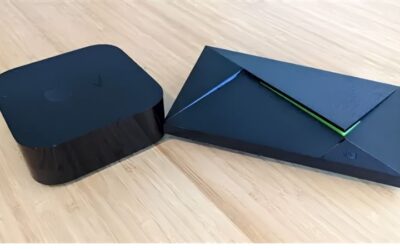
NVIDIA Shield TV 4K vs Apple TV 4K vs Fire TV Stick
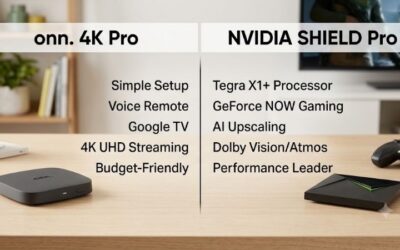
| Factor | Shield TV Pro | Apple TV 4K | Fire TV Stick 4K Max |
|---|---|---|---|
| Typical price | 199.99 | 129 – 149 | 59.99 |
| AI upscaling | Yes | No | No |
| Plex Media Server | Yes | No | No |
| Codec breadth | Widest | Limited | Limited |
| USB storage | 2 ports | None | None |
| Ad-free interface | No | Yes | No |
| Best suited to | File libraries | Apple households | Casual streaming |
Read this table as a filter, not a scoreboard. If you never touch a local file, the Fire Stick does 80 percent of the job for under a third of the money. If you own a media library, the other two are not substitutes at any price.
Should You Buy Now or Wait? The 2026 Pricing Reality
This is the question the specification sheet cannot answer, and it is where most Shield reviews stop short. The device is old. The instinct is to wait for a replacement or a discount. The component market makes that instinct expensive, and the reasoning deserves to be laid out with actual dates rather than vague optimism.
Why Component Prices Make Waiting a Bad Bet
Memory and component costs across the consumer electronics supply chain have been climbing, and laptops and PC parts continue trending upward rather than settling back to 2024 levels. A streaming box is not exempt from this. RAM, flash storage, and the SoC all draw from the same constrained pool.
The practical consequence is uncomfortable but clear: a hypothetical Shield successor designed in this cost environment would not launch at 199.99. It would launch higher. The current price is not evidence that NVIDIA is overcharging for old silicon — it is closer to evidence of what that silicon costs to keep producing.
There is real good news, and it deserves an honest hearing rather than a footnote. The steep increases that ran through the end of 2025 have slowed. Manufacturers including Framework have described a period of comparative steadiness, while cautioning outright that the swings are not behind us. Steadiness and relief are different things.
New Supply Is Coming, But Not Until 2027-2028
The picture does brighten — eventually. Micron has two new fabrication plants going up in Idaho, and Chinese supplier CXMT has become a viable DDR5 source for manufacturers who previously had few options. Neither development is speculative.
Neither helps you this year. Those Micron fabs do not begin producing until the 2027 to 2028 window. That is the earliest point at which supply expansion could translate into meaningfully lower consumer prices.
Do the arithmetic on waiting. You defer the purchase for two years to save an amount that is not guaranteed to materialise, on a device you would have used every evening across those two years. The maths does not work.
The Verdict on Timing Your Purchase
Combine the two threads. Prices have plateaued but not fallen. Real relief is a 2027-2028 event at the earliest. A successor built at today’s component costs would carry a higher sticker, not a lower one.
The rational conclusion is that the current price is close to the floor for this class of device, and the downside risk of buying today is small. If the Shield’s feature set matches your use case — local files, mixed-resolution library, codec variety — the timing argument for waiting has quietly collapsed.
Check current availability and pricing for both the Shield TV Tube and the Shield TV Pro before you commit — stock and pricing on the Pro model in particular have moved unpredictably, and the two models suit genuinely different setups.
See More:
- NVIDIA
- NVIDIA DeepStream
- NVIDIA GPU driver update
- NVIDIA GeForce NOW download
- NVIDIA RTX A2000 12GB driver
Conclusion
The NVIDIA Shield TV 4K is not the right streamer for everyone, and any review claiming otherwise is selling something. If your viewing is entirely app-based — Netflix, Disney+, YouTube — a Fire TV Stick 4K Max delivers the substance for a fraction of the outlay, and you should buy that instead.
But if you own media files, run a mixed-resolution library, or want a box that will still be receiving updates in 2030, nothing else on the market occupies this position. The AI upscaler has no equivalent. Plex Media Server on the Pro replaces a device that would cost more to buy and more to run.
The hardware is old. The price has not moved. Given that component costs are still elevated and genuine supply relief sits in the 2027-2028 window, neither of those facts is the argument against buying that it first appears to be.
Frequently Asked Questions
Is the Shield TV still worth buying in 2026?
It remains the strongest Android TV device for local media playback, with excellent codec support, Plex server capability on the Pro model and reference quality upscaling. The hardware is old now, so if you only stream Netflix and Disney, a cheap modern stick does the job. Enthusiasts still find no equal.
What is the difference between the Pro and the tube model?
The Pro has 3GB of RAM, 16GB of storage, two USB 3.0 ports and can run Plex Media Server locally. The tube shaped model has 2GB of RAM, 8GB of storage and no USB ports, relying on microSD. Both share the same Tegra X1 Plus chip and video processing quality.
Does the AI upscaling actually improve picture quality?
On 720p and 1080p sources upscaled to 4K it produces visibly sharper edges than most television scalers, with three intensity levels. It does not work on 60fps content or above 1080p input. If your TV has a strong built-in processor, the difference narrows considerably, so compare both before committing.
Can it still stream games from my PC?
NVIDIA discontinued GameStream in early 2023, so the official path is gone. The community solution is Sunshine on the PC paired with Moonlight on the Shield, which works well and often outperforms the old implementation. GeForce NOW remains supported natively for cloud streaming without any local GPU.
Does it support Dolby Vision and Atmos?
Yes, both models handle Dolby Vision and pass through Dolby Atmos and DTS-X bitstreams to a compatible receiver. Ensure the HDMI chain supports the formats end to end, and set audio to passthrough rather than letting the device decode, otherwise you get a downmixed track instead of the object-based mix.
As an Amazon Associate we earn from qualifying purchases at no extra cost to you.


![[2 Pack] Silicone Protective Cover for NVIDIA Shield TV Pro/4K HDR Remote Controller Series, Light Weight Kids-Friendly Silicone Skin Anti-Slip/Shockproof with Hand Strap (Red & Blue)](https://m.media-amazon.com/images/I/41c6ToApdgL._SL160_.jpg)
Ready to decide? Our #1 pick for 2026 is the Launch price.
Live price & availability on Amazon.


Write Your Review
No reviews yet. Be the first to share your experience!