
Nvidia 1070 drivers are still keeping one of the most beloved graphics cards ever made alive in 2026, but owners increasingly wonder whether updates still arrive, which driver to install, and how much longer the card can keep up. This review answers all three, covering the current support status of the GTX 1070, how to find and cleanly install the correct driver, the realistic performance you can expect today, and the honest point at which no driver can help anymore. If you are nursing a trusty 1070 and deciding whether to keep it or move on, this is the practical, data-first guide you need.
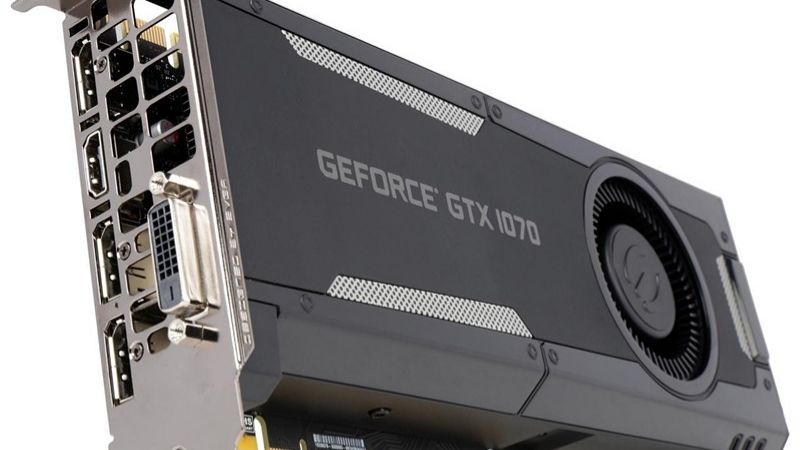
Nvidia 1070 Drivers: Support Status in 2026
The first question every 1070 owner has is whether the card still receives driver updates, and the answer shapes everything else about ownership. The GTX 1070 is a Pascal-generation card from 2016, which puts it in an interesting position: old enough that its update cadence has changed, but popular enough that it has not been abandoned. Understanding exactly what support looks like now tells you what to expect from each new driver.
As an Amazon Associate we earn from qualifying purchases at no extra cost to you.





Is the GTX 1070 Still Getting Updates?
The good news is that the 1070 continues to receive driver support, though the nature of that support has shifted from frequent game-ready optimizations toward stability, security, and compatibility maintenance. It is no longer first in line for day-one game tuning, but it is far from unsupported.
This matters because it means your card stays compatible with new versions of Windows and continues to run current games, even if it does not gain the performance boosts newer cards enjoy. For a card this age, ongoing maintenance support is exactly what keeps it usable.
Nvidia has signaled that older architectures eventually move to a longer-term support branch with less frequent updates, so 1070 owners should expect the update pace to keep slowing over time. Planning around that reality is part of owning an aging card responsibly. It also means you should not panic when updates arrive less often, because fewer releases for a mature card is normal and expected rather than a sign of abandonment, and each one you do receive still carries the fixes that keep the card compatible and stable.
Game-Ready vs Legacy Branches
The 1070 can still use the mainstream driver branch, which bundles the latest features and fixes that apply to it. For most owners, staying on the standard game-ready driver remains the right choice while the card is still officially covered.
As the card ages further, it may transition to a legacy or long-lived support branch focused purely on stability and security rather than new features. Knowing which branch your card is on helps you set realistic expectations and choose the correct download. In practice, checking which branch applies to your card takes only a moment on the download page, and it prevents the frustration of installing a package that no longer targets your specific hardware, which is an easy mistake to make as older cards transition between support tiers.
What Recent Drivers Do for an Older Card
Modern drivers for the 1070 rarely deliver dramatic frame-rate gains, because the biggest optimizations target current-generation hardware. What they do provide is bug fixes, security patches, and compatibility with the newest games and Windows updates.
That is still valuable. A well-maintained 1070 avoids the crashes and glitches that plague cards left on years-old drivers, so keeping current, even on a slower update schedule, is the difference between a smooth old card and a frustrating one.
Installing the Right Drivers for a GTX 1070
Getting the correct driver onto a 1070 cleanly is the key to squeezing reliable performance from an aging card, and the process rewards a little extra care. Because these cards have often been through several Windows versions and driver updates, a clean approach clears out years of accumulated clutter. This section covers finding the right file, installing it properly, and fixing the quirks that older cards sometimes show.
Finding the Correct Driver
The safest route is the official Nvidia website, where you select the GTX 1070, your Windows version, and the appropriate driver branch to download the exact package for your card. This avoids the wrong-version mistakes that cause instability.
Downloading manually also lets you choose a specific, known-good version rather than being pushed to the very latest, which is handy if a newer driver ever misbehaves on your setup. Keeping a note of the version that works well for you is a smart habit on older hardware. This is especially useful with a 1070, because if a newer driver ever introduces a regression, you can revert to your known-good version in minutes rather than troubleshooting blindly, turning a potential afternoon of frustration into a quick, confident fix.
Clean Install for Best Stability
For a card that has been in service for years, a clean install is strongly recommended, using the installer’s custom option and checking the clean-install box to wipe old driver files first. This resets accumulated settings and clears conflicts.
The payoff is meaningfully better stability, since much of the flakiness owners blame on the card itself actually comes from layers of old driver remnants. Starting fresh often makes a tired-feeling 1070 behave like new again, at the small cost of reconfiguring your preferences. Many owners are surprised how much smoother their card feels after this simple reset, mistaking years of software clutter for hardware decline, so a clean install is always the first thing to try before concluding the card itself is finally wearing out.
Troubleshooting Old-Card Driver Issues
If you hit black screens, crashes, or an install that fails, the usual culprits are leftover files or a mismatched version, both solved by a clean reinstall of the correct driver. Rolling back to a previous version also fixes the rare case where a new driver runs worse.
Occasionally an aging card shows artifacts or instability that no driver resolves, which can point to the hardware itself wearing down rather than a software problem. Recognizing that distinction saves you from endlessly reinstalling drivers when the real issue lies elsewhere. A useful test is to watch temperatures and check for visual artifacts during a demanding game: stable temperatures with clean visuals point to a software fix, while persistent artifacts or crashes under load hint at genuine hardware fatigue that no reinstall will cure.
Performance, Pros/Cons, and the Upgrade Question
Keeping the right nvidia 1070 drivers installed maximizes what the card can still do, but honesty about its 2026 performance is what helps you decide whether to keep it. Weighing the card’s real strengths against its growing limitations, and understanding the point where drivers can no longer bridge the gap, turns a vague feeling that it is getting slow into a clear decision. Here is the realistic picture.
Realistic Performance in 2026 Games
The GTX 1070 remains capable at 1080p in less demanding and older titles, where it can still deliver a smooth experience at moderate settings. For esports and many indie games, it holds up surprisingly well for a card of its age.
In the newest, most demanding AAA games, however, the 1070 shows its years, often requiring low settings and still struggling to hit high frame rates. It also lacks the modern upscaling and ray-tracing features that help newer cards, so the gap widens with each new release. This is the natural trajectory of any card as games grow more demanding, and it is not a flaw so much as a signal, one that tells you the 1070 has moved from a primary gaming card into a capable secondary or light-duty role rather than a front-line performer.
Pros and Cons of Sticking With It
The pros of keeping a 1070 are obvious: it is already paid for, still supported, and perfectly adequate for older games, esports, and everyday use, making it a sensible hold for budget-conscious owners. There is no shame in stretching a good card further.
The cons are the flip side: declining performance in new titles, no modern AI features, a slowing update cadence, and the eventual risk of age-related hardware issues. At some point the compromises outweigh the savings, and that is the moment worth watching for.
When Drivers Can’t Help Anymore
If you have the correct driver, done a clean install, and the card still cannot hit playable frame rates in the games you actually want to play, the bottleneck is the hardware, not the software. No driver update can add the performance the silicon simply does not have.
That is the honest signal that an upgrade, rather than another reinstall, is the real fix. A modern mid-range card would transform your experience with a huge leap in performance plus the upscaling and ray-tracing features the 1070 never had, and it is the upgrade that finally frees you from chasing settings.
See More:
- Nvidia Corporation
- download latest Nvidia drivers
- Nvidia GeForce Experience
- rx 7700 xt vs rtx 5060
- rtx 5060 triple fan
Final Verdict on Nvidia 1070 Drivers
The nvidia 1070 drivers situation in 2026 is reassuring: the card is still supported with stability, security, and compatibility updates, and a clean install of the correct driver keeps this classic running smoothly for older games, esports, and daily use. The catch is that no driver can disguise its age in the newest, most demanding titles, where it now falls short and lacks modern features entirely. If your 1070 still meets your needs, keep it maintained and enjoy it, but if a fully updated, clean-installed card can no longer keep up with the games you care about, that is the clear sign a modern GPU is the real answer, and you can compare current options through the link in this guide. Making that switch at the right moment is what keeps your gaming enjoyable rather than a constant fight against settings you can no longer win.
Frequently Asked Questions
Is the GTX 1070 still receiving driver updates?
NVIDIA moved the Pascal GTX 10-series into legacy support status, ending new Game Ready feature drivers while continuing critical security updates for a defined period. Your card still works, but it will not receive optimisation profiles for new game releases going forward.
What is the last driver I should install?
Install the final Game Ready release from the branch that still listed Pascal support, then apply security-only updates as they appear. If your current driver is stable there is little reason to change, since newer releases add nothing for this architecture.
Will games stop working on the GTX 1070?
Not immediately, but the risk grows. Some newer titles now require hardware features Pascal lacks, such as mesh shaders, and refuse to launch. Games that do run cannot use DLSS or hardware ray tracing, limiting you to native rendering at lower settings.
Is 8GB of VRAM on the 1070 still adequate?
The capacity is fine for 1080p, but it is slower GDDR5 with less bandwidth than modern equivalents, and the GPU behind it is now well short of current mid-range shader throughput. Memory is not the primary limitation on this card any more.
What is a sensible upgrade path?
An RTX 5060 Ti 16GB or a discounted 4060 Ti roughly doubles performance while adding DLSS, hardware ray tracing, and AV1 encoding, and both fit within a modest power supply. The feature gap matters as much as the raw speed increase.










Write Your Review
No reviews yet. Be the first to share your experience!