
- Top Pick: NVIDIA Certified Associate: Generative AI LLMs (NCA-GENL) (NVIDIA Certification Guides)
- Best Value: NVIDIA Certified Professional: Agentic AI (NCP-AAI) (NVIDIA Certification Guides)
- Premium Choice: NVIDIA GPU Performance Engineering: A Comprehensive Guide to PTX, SASS, CUDA Optimization, Kernel Analysis, Memory Hierarchies, Warp Execution, and High-Throughput Parallel Computing
NVIDIA SLI was once the dream of every enthusiast: link two or more graphics cards together for a massive performance boost. Today, though, the picture is very different, and anyone considering SLI in 2026 needs an honest look at where the technology stands. This guide explains what SLI is and how it worked, why it faded from mainstream gaming, whether it is still worth using now, and what smarter alternatives exist for more performance, so you can make an informed decision instead of chasing a setup whose best days have passed.
What Is NVIDIA SLI and How It Worked
Before deciding whether SLI has any place in a modern build, it helps to understand what it is and how it delivered its gains. SLI, short for Scalable Link Interface, was NVIDIA’s technology for combining multiple graphics cards to share the rendering workload. Knowing how it worked explains both its former appeal and its eventual decline.
How SLI Combined Multiple GPUs
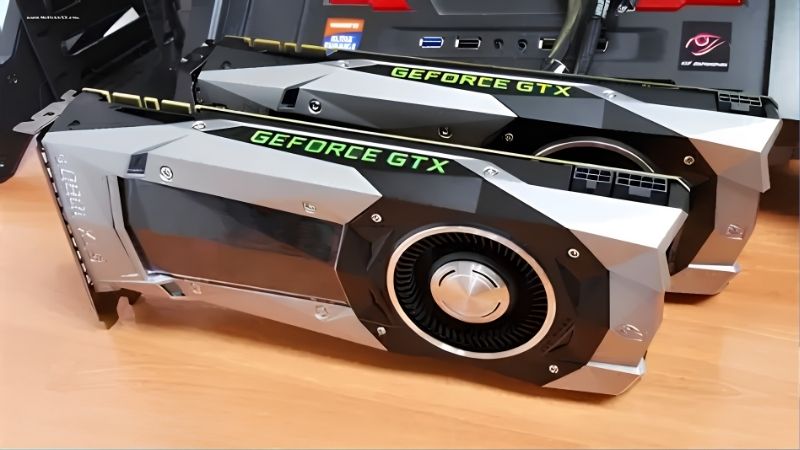
SLI let you connect two, three, or even four compatible NVIDIA graphics cards so they could work together on rendering a single game, with the workload split between them to produce higher frame rates than one card alone. A physical SLI bridge linked the cards, and the system coordinated how they shared the frames.
In its prime, a well-supported SLI setup could deliver a substantial performance uplift in games designed to take advantage of it, which made it attractive to enthusiasts chasing the highest frame rates and resolutions. The promise was simple and appealing: buy a second card and get more performance without replacing your existing one.
In practice, the gains depended heavily on game support and how well the workload could be divided, which is where the cracks in the concept eventually began to show. When it worked, it was impressive; when it did not, the second card sat largely idle.
The Requirements SLI Needed
Running SLI was never as simple as adding a card. It required two or more compatible, usually matching, NVIDIA GPUs, a motherboard that supported SLI with the right slots, a physical SLI bridge to connect the cards, and a power supply strong enough to feed multiple power-hungry GPUs at once.
On top of the hardware, you needed adequate cooling for the extra heat and a case with room for multiple cards. These demands made SLI an expensive and space-consuming proposition, suited only to enthusiasts willing to invest heavily, which already limited its audience before software issues entered the picture.
The cost angle is easy to underestimate. Beyond buying a second identical card, you often needed a higher-wattage power supply, a larger case, and better cooling, all of which added up to far more than the price of the extra GPU alone. For many, once those hidden costs were tallied, a single faster card started to look like the more sensible investment even during SLI’s peak.
Why SLI Faded Away
Several problems combined to push SLI out of the mainstream. Game support was inconsistent, since developers had to specifically optimize for multiple GPUs, and as games grew more complex many simply did not bother, leaving the second card contributing little or nothing.
Technical issues like microstutter, where frame pacing became uneven despite higher average frame rates, undermined the smoothness that gamers actually wanted. Combined with diminishing returns, high cost, and the steady rise of single cards powerful enough to handle demanding games alone, these factors led NVIDIA to gradually deprecate SLI for gaming. Modern consumer graphics cards no longer support it for that purpose, marking the effective end of the era.
Is SLI Still Worth It in 2026?
With that history in mind, the practical question is whether SLI has any place in a modern build. The short answer is that for the vast majority of gamers it does not, but understanding the nuances helps you see why and where any exceptions might lie.
The State of Multi-GPU Gaming Today
Multi-GPU gaming has effectively become a niche of the past for consumers. Modern graphics cards no longer support SLI for gaming, game developers have moved away from optimizing for multiple cards, and the technology is not part of how current high-end gaming is designed. A single powerful GPU is now the standard path to top performance.
This means that even if you own older SLI-capable cards, the lack of game support renders the setup largely pointless for modern titles. The industry has clearly moved on, and building a new gaming system around SLI today would be working against the entire direction of current hardware and software.
This shift is not a temporary trend but a settled direction. Both hardware makers and game developers have concentrated on making single GPUs faster and smarter, and the software techniques that now boost performance are built around one card, not several. That alignment across the whole industry is why multi-GPU gaming is unlikely to return in the form enthusiasts once knew.
When SLI Might Still Make Sense
There are narrow scenarios where linking multiple GPUs retains value, though they are mostly outside gaming. Certain professional and compute workloads, such as some machine learning and rendering tasks, can use multiple GPUs effectively, often through NVIDIA’s NVLink technology rather than traditional gaming SLI.
For a hobbyist experimenting with older hardware or a specific legacy application that genuinely supported SLI, there may be curiosity value, but this is a very small and specialized use case. For anyone building for modern gaming, none of these exceptions applies, and a single strong card is the clear answer.
Even in professional settings, the multi-GPU story is different from gaming SLI, relying on specialized links and software written specifically to distribute compute work. That is a world apart from dropping a second gaming card into a PC and expecting more frames. So while multiple GPUs still have real uses, they are not the consumer gaming feature SLI once was, and treating them as such would only lead to disappointment.
Pros and Cons of Using SLI
Weighing the trade-offs makes the verdict clear. Historically, SLI’s pros were the potential for higher frame rates in supported games and the ability to add performance by installing a second card rather than replacing your first. For its brief heyday, that was a genuine appeal to enthusiasts.
The cons, however, now dominate: inconsistent and vanishing game support, microstutter and frame-pacing issues, high cost and power draw, significant heat and space requirements, and the fact that modern cards no longer support it for gaming. For today’s builder, the cons are decisive, which is why SLI is no longer recommended for a gaming system and why a single capable GPU is the sensible choice.
Alternatives to SLI for More Performance
If your goal is more gaming performance, the good news is that modern options are far better than SLI ever was. Rather than chasing a deprecated multi-GPU setup, a few current approaches deliver more performance more reliably and with far less hassle.
A Single Stronger GPU
The most straightforward path to more performance is simply a more powerful single graphics card. Modern high-end GPUs deliver performance that once required multiple cards, without the game-support problems, microstutter, or extra cost and complexity that plagued SLI setups.
Upgrading to a stronger single card also keeps your system simpler, cooler, and more power-efficient, and it guarantees the performance works in every game rather than only in specifically optimized ones. For almost everyone, this is the smarter, more reliable route to the frame rates SLI once promised.
There is also a practical simplicity benefit that is easy to overlook. One card means one driver profile to manage, less heat and noise, lower power draw, and no dependence on per-game optimization to see the benefit. That reliability, where the performance simply works in every title, is exactly what SLI struggled to deliver, and it is a large part of why the single-card approach won out.
Modern Scaling and Upscaling Technology
Beyond raw hardware, technologies like DLSS have changed how performance is gained. By intelligently upscaling and generating frames, a single modern card can achieve high frame rates in demanding games with excellent image quality, effectively delivering the performance boost enthusiasts once sought from a second GPU.
These software-driven gains apply broadly across supported games and require no extra hardware, cooling, or power, making them the opposite of SLI’s demanding, inconsistent approach. Combined with a capable single GPU, modern upscaling is the practical, forward-looking way to maximize performance in current games.
The contrast with SLI could hardly be sharper. Where a second card added cost, heat, and inconsistency for gains that depended on developer support, upscaling adds performance through software that improves over time and works across a broad and growing library. For anyone weighing how to get more frames today, that makes modern upscaling the clear successor to the idea SLI once represented.
Frequently Asked Questions About NVIDIA SLI
These quick answers resolve the questions that most often come up about NVIDIA SLI today.
Do modern NVIDIA cards support SLI? No. Current consumer graphics cards no longer support SLI for gaming, as NVIDIA has moved away from the technology in favor of single powerful GPUs.
Is NVLink the same as SLI? Not quite. NVLink is a related high-bandwidth link used mainly for professional and compute workloads rather than mainstream gaming SLI.
See More:
- NVIDIA
- NVIDIA DeepStream
- NVIDIA GPU driver update
- NVIDIA GeForce NOW download
- NVIDIA RTX A2000 12GB driver
Final Thoughts on NVIDIA SLI
NVIDIA SLI was a genuinely exciting technology in its day, letting enthusiasts combine graphics cards for more performance, but its era has clearly ended. Inconsistent game support, technical issues, high cost, and the rise of powerful single cards led NVIDIA to move away from it, and modern gaming hardware no longer supports SLI for that purpose. If you want more performance today, a single stronger GPU paired with modern upscaling technology is the smarter, more reliable path. For the vast majority of builders, the sensible move is to put your budget into one strong card and lean on modern upscaling rather than chasing a multi-GPU setup the industry has left behind. Understanding where NVIDIA SLI stands lets you skip a dead end and invest in the approaches that actually deliver reliable performance in current games.
As an Amazon Associate we earn from qualifying purchases at no extra cost to you.












Write Your Review
No reviews yet. Be the first to share your experience!