
- Top Pick: ASUS TUF Gaming VG34VQL1B 34 Inch 1440p 165Hz Ultrawide HDR Gaming Monitor
- Best Value: msi PRO MP341CQ E12 34-inch VA 3440 x 1440(UWQHD) Computer Monitor, 120Hz, Adaptive-Sync, HDMI, DisplayPort, VESA Mountable, Speaker, 1ms, Black
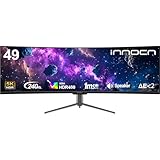
- Premium Choice: INNOCN 49" Curved DQHD 5120 x 1440P 240Hz 1800R Ultrawide Gaming Monitor
Choosing a graphics card for an ultrawide monitor is less about the screen’s diagonal measurement and more about its resolution, refresh rate, and the games you play. A 34-inch 3440 × 1440 display needs considerably more rendering power than a standard 2560 × 1440 monitor, while a 49-inch 5120 × 1440 screen is roughly as demanding as a 4K display.
The right answer also depends on whether you want high settings, ray tracing, competitive frame rates, or simply a smooth desktop experience. Use the guide below to match your GPU to the monitor’s actual pixel load and physical footprint.
As an Amazon Associate we earn from qualifying purchases at no extra cost to you.



The Short Answer
For most 34-inch 3440 × 1440 ultrawide monitors, choose a modern GPU with at least 12GB of VRAM and a performance level comparable to an upper-midrange card. A practical budget is about $400 to $700 for the graphics card alone. This class is suitable for high settings around 60 to 120 frames per second in many games, depending on the title and whether ray tracing is enabled.
- Basic 3440 × 1440 gaming: 10GB to 12GB VRAM, approximately $300 to $450, best for adjusted high settings and 60 fps targets.
- High-refresh 3440 × 1440: 12GB to 16GB VRAM, approximately $450 to $750, better for 100 to 165 fps in esports and lighter games.
- Ray tracing at 3440 × 1440: 16GB or more is preferable, especially when using high textures and frame-generation features.
- 5120 × 1440 at 240Hz: choose a high-end GPU with at least 16GB of VRAM; a $700 to $1,200-plus card may be appropriate for demanding games.
For a typical 34-inch 1440p ultrawide such as the ASUS TUF Gaming VG34VQL1B, MSI PRO MP341CQ E12, or INNOCN 34C1R, a strong midrange-to-high-end GPU is the sensible match. The monitor’s 165Hz or 180Hz maximum does not mean every game must run at that speed. It means the display can show those frame rates when the GPU and game settings allow it.
Standard Sizes
Screen dimensions below describe the approximate visible panel area, not the bezel or stand. Actual product measurements vary by model. The width and height are calculated from the stated aspect ratio, so use them as planning measurements before adding clearance for the frame, stand, and cables.
| Monitor size and format | Resolution | Approx. panel width | Approx. panel height | GPU class |
|---|---|---|---|---|
| 29-inch, 21:9 | 2560 × 1080 | 26.6 in (67.6 cm) | 11.4 in (29.0 cm) | Entry to midrange, 8GB to 12GB |
| 34-inch, 21:9 | 3440 × 1440 | 31.3 in (79.5 cm) | 13.1 in (33.3 cm) | Midrange to high-end, 12GB to 16GB |
| 38-inch, 21:9 | 3840 × 1600 | 35.0 in (88.9 cm) | 14.6 in (37.1 cm) | High-end, 12GB to 16GB |
| 45-inch, 21:9 | 3440 × 1440 | 41.4 in (105.2 cm) | 17.8 in (45.2 cm) | Similar GPU load to 34-inch 3440 × 1440 |
| 49-inch, 32:9 | 5120 × 1440 | 47.2 in (119.9 cm) | 13.3 in (33.8 cm) | High-end, usually 16GB or more |
The 34-inch category is the most straightforward recommendation because 3440 × 1440 has about 34% more pixels than standard 2560 × 1440. A 49-inch DQHD monitor, such as the 5120 × 1440 INNOCN model, has approximately 89% more pixels than 2560 × 1440. Its 240Hz refresh rate further raises the performance target, although few demanding games will reach 240 fps at maximum quality.
Also check the graphics card’s physical size. Many modern cards are between 10 and 14 inches (25.4 to 35.6 cm) long and occupy two to four expansion slots. Confirm that your computer case supports the card’s length, thickness, and power connector clearance. A high-wattage card may require a 750W to 1,000W power supply, depending on the complete system.
How to Measure Your Space
- Measure desk width. A 34-inch ultrawide needs at least 32 inches (81 cm) of clear horizontal space for the panel, and 36 to 40 inches (91 to 102 cm) is more comfortable when allowing for speakers or desk accessories.
- Measure desk depth. Allow at least 24 inches (61 cm) from the front edge of the desk to the wall. A 27- to 30-inch viewing distance works well for many 34-inch curved monitors.
- Check height. The panel itself is about 13 inches (33 cm) tall for a 34-inch 21:9 display. Add approximately 4 to 8 inches (10 to 20 cm) for a typical stand, then make sure the top of the screen is near eye level.
- Account for the curve. Curved panels need usable depth at the center and corners. A 1800R curve can extend several inches behind the center point, so do not measure only the front edge of the stand.
- Plan cable clearance. Leave 2 to 4 inches (5 to 10 cm) behind the monitor for DisplayPort, HDMI, USB, and power cables. Right-angle cables can reduce the required space.
- Measure the PC case separately. The monitor’s size does not determine GPU fit. Compare the graphics card’s listed length and slot thickness with the case’s maximum GPU clearance, particularly if front fans or a radiator are installed.
- Check the mount. If using a monitor arm, verify that it supports the display’s weight and VESA pattern. A large 49-inch monitor can weigh more than 30 pounds (13.6 kg) with its stand.
By Room or Use Case
Small office or compact bedroom desk
A 29-inch or 34-inch model is usually the best physical fit. A 34-inch 3440 × 1440 monitor provides room for two documents side by side without taking the entire desk. Pair it with a GPU in the $300 to $500 range if your goal is smooth gaming at medium-to-high settings. Keep the tower beside the desk rather than under a narrow shelf so the GPU has adequate airflow.
Dedicated gaming room
A 34-inch 165Hz or 180Hz monitor is a balanced choice for a dedicated setup. Select a GPU in the $450 to $750 range with 12GB to 16GB of VRAM if you play new AAA games, use high-resolution texture packs, or want to enable ray tracing. Competitive games may run far above 100 fps, while graphically intensive games may need upscaling or reduced settings.
Simulation, racing, and productivity setup
A 49-inch 5120 × 1440 screen creates a wide, immersive field of view and can replace two 27-inch monitors. It requires at least 47.2 inches (119.9 cm) of panel width, plus desk space for the stand and speakers. Use a high-end GPU with 16GB or more of VRAM for gaming. For office applications alone, a much less expensive GPU can drive the display, provided it supports the required resolution and refresh rate.
Creative work and mixed use
For video editing, 3D work, and gaming, prioritize VRAM as well as raw speed. A 16GB card offers more room for large timelines, high-resolution assets, and modern games. Confirm that your software benefits from your chosen GPU brand and acceleration features. If color accuracy matters, evaluate the monitor separately from its gaming specifications such as refresh rate and response-time claims.
Common Sizing Mistakes
- Buying by diagonal alone: A 49-inch 32:9 monitor is much wider than a 49-inch television and has a dramatically different GPU requirement.
- Confusing monitor size with resolution: A 45-inch 3440 × 1440 display has nearly the same rendering load as a 34-inch 3440 × 1440 model. The extra inches affect viewing distance, not pixel count.
- Matching the GPU to the maximum refresh rate only: A 240Hz specification is useful for competitive games, but demanding titles may not reach 240 fps even with an expensive GPU.
- Ignoring VRAM: High textures, ray tracing, and ultrawide resolutions can cause stuttering when memory is insufficient. For 3440 × 1440, 12GB is a reasonable floor for a new gaming build; 16GB gives more headroom.
- Forgetting the power supply: Check the card maker’s recommended wattage and the available power connectors before upgrading.
- Not checking physical clearance: A card can fit the case lengthwise but still block a lower slot or interfere with a front radiator.
FAQ
What size GPU for 1440p ultrawide?
For a 34-inch 3440 × 1440 monitor, use a midrange or high-end GPU with 12GB to 16GB of VRAM. Budget about $400 to $700 for a strong all-around choice, or more if you want intensive ray tracing and high frame rates.
Is 8GB of VRAM enough for 3440 × 1440?
It can work for older games, esports, and reduced texture settings, but 8GB leaves limited room for new AAA games. A 12GB card is a safer minimum for a new 3440 × 1440 gaming system in 2026.
Do I need a stronger GPU for a 49-inch ultrawide?
Only if the 49-inch monitor uses 5120 × 1440. A 49-inch display with 3440 × 1440 has the same basic GPU load as any other 3440 × 1440 monitor. For 5120 × 1440, move up to a high-end card with 16GB or more of VRAM.
Can a laptop GPU run a 1440p ultrawide?
Yes, provided the laptop supports the monitor’s resolution and refresh rate through USB-C, DisplayPort, HDMI, or a compatible dock. Expect more compromises in demanding games because laptop GPUs generally have lower power limits than desktop cards.











Write Your Review
No reviews yet. Be the first to share your experience!