
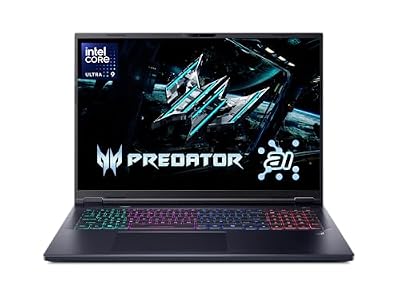
- Top Pick: Acer Predator Helios Neo 18 AI Gaming Laptop | Intel Core Ultra 9 Processor 275HX | NVIDIA GeForce RTX 5070 Ti | 18" WQXGA 240Hz G-SYNC | 32GB DDR5 | 2TB Gen 4 SSD | Killer Wi-Fi 6E | PHN18-72-9474
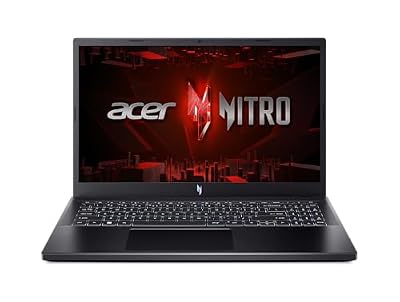
- Best Value: ASUS ROG Strix G16 (2025) Gaming Laptop, 16” ROG Nebula 16:10 2.5K 240Hz/3ms, NVIDIA® GeForce RTX™ 5070 Ti, Intel® Core™ Ultra 9 Processor 275HX, 32GB DDR5, 1TB SSD, Wi-Fi 7, Win11 Home, G615LR-AS96
- Premium Choice: msi Vector 16 HX AI 16” 144Hz FHD+ Gaming Laptop: Intel Core Ultra 7-255HX, NVIDIA Geforce RTX 5070Ti, 16GB DDR5, 512GB NVMe SSD, Thunderbolt 5, Wi-Fi 6E, Win 11 Home: Cosmo Gray A2XWHG-212US


Dropped $60.01

RTX 5070 Ti laptop may be the most sensible high-performance pick in Nvidia’s Blackwell mobile range. With 5,888 CUDA cores, a generous 12GB of GDDR7, and full DLSS 4 support, it fixes the VRAM concern that limits the standard 5070. This review draws on owner feedback and benchmark data to explain why many reviewers consider it the smart 1440p buy for 2026.
What The RTX 5070 Ti Laptop Delivers
This chip’s appeal lies in a well-judged combination of cores, memory, and features. Examining the specifications shows why it threads the needle between the value-focused 5070 and the premium 5080.
As an Amazon Associate we earn from qualifying purchases at no extra cost to you. Product prices and availability are accurate as of the date shown and are subject to change.





Specifications And The Crucial 12GB Buffer
The RTX 5070 Ti laptop features 5,888 CUDA cores, 12GB of GDDR7, 992 AI TOPS, and a TGP from 60W to 115W. The standout figure is the 12GB buffer, a 50 percent increase over the 5070 that directly resolves the 8GB ceiling holding back lower tiers at 1440p.
Combined with GDDR7 bandwidth and Blackwell’s fifth-generation Tensor cores, this configuration is built for durable 1440p performance with real headroom. It is the point in the stack where compromises start to disappear.
1440p Benchmarks And DLSS 4 Performance
At 1440p maxed, a well-powered RTX 5070 Ti laptop frequently exceeds 90 FPS in AAA titles before upscaling, and DLSS 4 with Multi Frame Generation pushes demanding ray-traced games well beyond that. The 12GB buffer keeps texture-heavy titles smooth where 8GB cards stutter.
It even dabbles in 4K. Owners report comfortable 4K60 in many games with DLSS, giving the chip a versatility that the standard 5070 cannot match.
Thermals And Sustained Performance
Drawing up to 115W, the 5070 Ti needs decent cooling but is not as demanding as the 5080 or 5090. Reviews praise well-built chassis for holding clocks through long sessions without excessive noise.
The practical check stands: verify the rated TGP, since a 115W version clearly outperforms a power-limited build. At this tier, a solid thermal design is well worth prioritizing.
The Real-World RTX 5070 Ti Laptop Experience
Beyond raw output, daily ownership determines whether a GPU fits your life, and the 5070 Ti balances power with reasonable practicality. It targets serious gamers and creators who want longevity.
Available Laptops And Recommended Pairings
The 5070 Ti appears in upper-tier machines like the Acer Predator Helios Neo 16, Lenovo Legion Pro, and ASUS ROG, with configurations starting around $1,599. That price buys a meaningful step up in durability over the 5070.
Owners recommend a strong Core i7 or Ryzen 7, or better, with 32GB of RAM to match the GPU’s capabilities. Balanced pairings ensure the 12GB buffer and core count are fully utilized.
Battery, Heat And Portability
Efficiency remains decent for the performance on offer, with light-use battery life around 4 to 6 hours via Advanced Optimus. It is not an ultraportable, but it stays manageable for regular transport.
Most 5070 Ti laptops live in the 16-inch class with robust cooling. The slight bulk is a fair trade for the sustained performance and longevity the chip provides.
Who Should Choose This GPU
The RTX 5070 Ti laptop suits the gamer who wants maxed 1440p with real future-proofing and occasional 4K, plus creators who benefit from 12GB of VRAM. Reviewers frequently call it the value sweet spot of the high-end Blackwell range.
If your budget is tight, the 5070 saves money at the cost of VRAM. If you demand uncompromising 4K, the 5080 is the next logical step.
Pros, Cons And Buying In 2026
Even a well-balanced chip deserves scrutiny. Weighing the 5070 Ti’s strengths against its modest drawbacks, and against today’s market, confirms whether it is the right high-end choice.
The Pros And Cons That Define It
The pros are compelling: a 12GB GDDR7 buffer that future-proofs 1440p, strong DLSS 4 performance, solid efficiency, and credible 4K capability. Owners repeatedly highlight how the larger memory removes the stutter that frustrates 8GB cards.
The cons are minor by comparison: a higher price than the 5070, the usual Multi Frame Generation latency tradeoff, and chassis that lean toward larger and heavier. A few owners note lower-TGP versions sacrifice some of the advantage, so wattage still matters. None of these undermine its core value.
How Memory Prices Affect Your Decision
Pricing trends reinforce buying with intent. Gaming laptops have kept trending more expensive amid a tight memory supply, and high-end machines absorb that pressure quickly. Encouragingly, the steep late-2025 climb has eased, and some makers report a stretch of relative stability, though they still warn that prices may move again.
Genuine relief, however, is years away. Additional DDR5 capacity is coming from suppliers like CXMT and from two Micron plants under construction in Idaho, but those will not ramp until 2027 to 2028. The practical reading is that prices have stabilized rather than fallen, so waiting through 2026 is unlikely to make an RTX 5070 Ti laptop cheaper.
Future-Proofing And The Verdict
Between its 12GB buffer and growing DLSS 4 support, the 5070 Ti has some of the strongest longevity in the mobile range. It is well positioned to handle demanding games for years without forcing painful compromises.
If you want maxed 1440p with real headroom, this GPU is the smart pick. Ready to buy while prices hold steady? Compare current RTX 5070 Ti laptop configurations through the links on this page and choose a well-cooled, higher-TGP build.
Frequently Asked Questions
The RTX 5070 Ti laptop is often called the value sweet spot of Blackwell, and these questions explain why buyers consider it.
Is the RTX 5070 Ti laptop good for 1440p and 4K?
Yes, the RTX 5070 Ti laptop excels at high-refresh 1440p and can reach entry 4K, supported by 5,888 cores and 12GB of GDDR7.
With DLSS 4 Multi Frame Generation, it stretches further into demanding titles than its raw specs alone suggest.
How much VRAM does the RTX 5070 Ti laptop have?
It carries 12GB of GDDR7, a meaningful step beyond the 8GB found in the 5070 and 5060.
That larger, faster buffer removes the memory ceiling those cards face, improving 1440p and 4K longevity.
Does the RTX 5070 Ti laptop support DLSS 4?
Yes, it fully supports DLSS 4, including Multi Frame Generation that can multiply frame rates in compatible games.
Combined with its 12GB buffer, this makes it one of the most future-ready options below the flagship tier.
Is the RTX 5070 Ti laptop worth it over the 5070?
If you want more VRAM and stronger 1440p or 4K headroom, the 5070 Ti’s 12GB buffer justifies the step up.
For pure 1080p or lighter 1440p play, the standard 5070 offers better value, so it depends on your resolution goals.
Is the RTX 5070 Ti laptop good for ray tracing?
Yes, the RTX 5070 Ti laptop handles ray tracing comfortably at 1440p, with its 12GB buffer and DLSS 4 keeping demanding titles smooth. The larger memory helps in heavy scenes.
Pairing ray tracing with DLSS 4 Multi Frame Generation lets the card deliver both fidelity and high frame rates.
Real-World Performance Expectations
Understanding what the RTX 5070 Ti laptop delivers shows why many call it the Blackwell value sweet spot. This breakdown sets expectations across resolutions and workloads.
High-Refresh 1440p Gaming
At 1440p the 5070 Ti pushes well past 100 frames per second in most AAA titles at high settings, supported by its 12GB of GDDR7. The larger buffer removes the ceiling that constrains 8GB cards.
With DLSS 4 Multi Frame Generation active, even ray-traced titles run smoothly, making it an excellent match for high-refresh 1440p panels.
Entry 4K Capability
The 5070 Ti can step into 4K gaming, holding playable frame rates in many titles when paired with DLSS upscaling. Its 12GB buffer and GDDR7 bandwidth give it credible headroom at the resolution.
For buyers who occasionally game at 4K, the card offers a capable experience well below flagship pricing.
Creative Work And Future Optimization
The 5070 Ti’s 12GB buffer suits demanding creative tasks, from 1440p and entry 4K editing to GPU rendering. It comfortably exceeds the mainstream tier for content work.
As a current-generation Blackwell card, it benefits most from Nvidia’s newest driver and DLSS 4 advances, reinforcing its strong long-term value.
Smart Buying Tips For The RTX 5070 Ti Laptop
Getting the most from an RTX 5070 Ti laptop means surrounding its 12GB of GDDR7 with the right components. These practical tips help you build a balanced high-performance machine.
Pair It With A Strong CPU
Pair the 5070 Ti with a high-tier Core i7, Core i9, or Ryzen 9 processor so the capable GPU stays fed in demanding titles. A weaker chip can cap performance in CPU-bound scenes.
This balance is most important at 1440p and in creative work, where both the processor and GPU share the load.
Choose A High-Refresh 1440p Display
A 1440p panel at 165Hz or higher is the natural partner, letting the 12GB buffer and DLSS 4 deliver smooth, high-fidelity motion. For occasional 4K use, a premium panel showcases the card.
Matching the display to the GPU ensures the Blackwell features you paid for translate into a visibly better experience.
Prioritize Cooling And Memory
Favor a chassis with strong cooling and a higher TGP rating, since sustained clocks depend on thermal headroom and separate otherwise identical machines.
Pair the card with at least 16GB of RAM, ideally 32GB for creators, to complement its generous VRAM and keep the whole system responsive.
See More:
The Bottom Line
The RTX 5070 Ti laptop is the high-end Blackwell value champion: a 12GB GDDR7 buffer that future-proofs 1440p, strong DLSS 4 performance, and credible 4K ability. It costs more than the 5070 and runs in larger chassis, but for buyers who want maxed 1440p with genuine longevity, it is one of the smartest mobile GPUs to buy in 2026, especially while prices remain flat.










Write Your Review
No reviews yet. Be the first to share your experience!