
Previous NVIDIA drivers are harder to find than they should be, because every path NVIDIA offers you leads to the newest release. The archive exists, it is official, and it holds years of builds — it is simply not where the download button points. This article shows you where it is, explains what the version numbers actually mean, and answers the question the archive itself will not: which old build is the right one for your card. For a large number of readers in 2026, that answer is now a specific number rather than a guess.
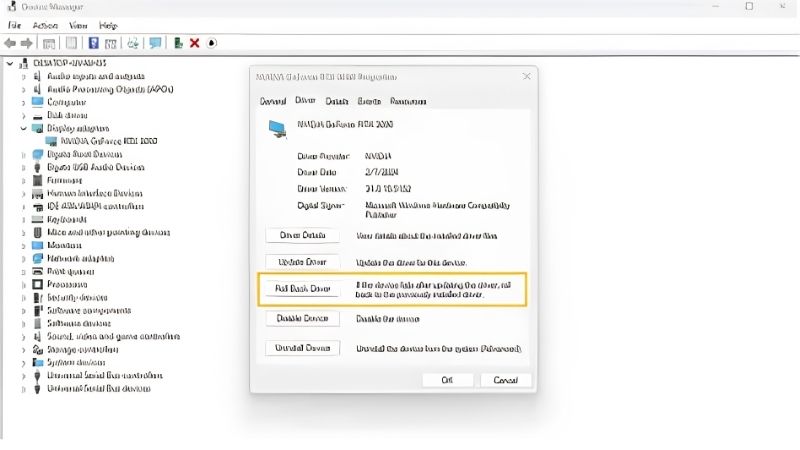
Where to Find Previous NVIDIA Drivers
The archive is not hidden, but it is not signposted either. NVIDIA’s front page, the app, and Windows Update all push the current release. Getting an older build means deliberately stepping off that path — and knowing what you are looking at once you do.
The Official NVIDIA Driver Archive
Use the Advanced Driver Search on NVIDIA’s driver page. This is the official archive and it is the only source you should use.
The form asks for product type, series, model, OS, and download type. Fill those in and it returns a list of builds rather than a single recommendation — that list is what you came for.
One warning matters more than any other advice here. Driver files are among the most heavily impersonated downloads on the internet, because people search for them urgently and click the first result. If the domain is not nvidia.com, close the tab. A driver installs with deep system privileges, which makes a malicious one far worse than a bad app.
How to Read a Driver Version Number
Version numbers look arbitrary and are not. A release like 580.88 splits into two meaningful parts.
The first number — 580 — is the branch, and it is the significant one. It tells you which feature generation the driver belongs to and, critically, which GPU architectures it supports.
The second — .88 — is the build within that branch. Higher is newer, usually carrying bug fixes rather than new capabilities. Moving from 580.88 to 580.97 is a small step; moving from 576 to 580 is a generational one. This is why “just install the latest” is bad advice for some cards.
Game Ready vs Studio: Two Different Archives
The download type dropdown offers more than one answer, and picking wrong is a common source of confusion.
Game Ready Drivers (GRD) ship fast with day-one optimisation for new games. This is the default and the right pick if you game.
Studio Drivers (SD) move slower, validated against creative applications — Adobe, Autodesk, DaVinci Resolve. Fewer releases, longer testing. If stability outranks day-one game support, search this branch instead.
They are not interchangeable and carry different version numbers. Note which one you run before hunting an older build — the version you remember may not exist in the other branch.
Which Previous Version Should You Actually Install?
The archive gives you a list and no guidance. For most people the answer is simply “the release before the one that broke things.” But for a large share of readers in 2026, there is now a specific branch that matters more than any other, and if you own an older card you need to know its number.
The 580 Branch: The Last Stop for Maxwell, Pascal and Volta
This is the most important paragraph on this page for anyone running a GTX 900 or GTX 10 series card.
NVIDIA shipped a final Game Ready Driver for Maxwell, Pascal, and Volta GPUs in October 2025. Those architectures then moved to quarterly security updates only, running through October 2028. The 580/581 family is documented as their last full-feature branch. Support reaches roughly eleven years for Maxwell — beyond industry norms — but it has an end, and the end has arrived.
What this means practically: if you own a GTX 970, GTX 1060, GTX 1070, or GTX 1080 Ti, the 580 branch is your ceiling for game optimisations. Newer branches will not add anything for your card. Security updates continue quarterly until 2028; day-one game tuning does not.
Note the exception, because it surprises people. The GTX 16 series is Turing, not Pascal, and continues receiving updates beyond 580. A GTX 1660 owner is not affected by any of this. A GTX 1080 Ti owner — a faster card — is.
NVIDIA’s own guidance for affected users is worth following: find the build in that final branch that runs well on your system, and archive the installer. It is the last one you will get.
Windows 10 and the October 2026 Cutoff
A second deadline affects a different group. NVIDIA extended Game Ready Driver support for RTX GPUs on Windows 10 to October 2026 — a year past Microsoft’s own end-of-life date for the OS.
If you are on Windows 10 with an RTX card, that is your horizon. Beyond it, new drivers target Windows 11 only, and the archive becomes your permanent source rather than an occasional one.
Anyone planning to stay on Windows 10 past that date should treat this the same way Pascal owners treat the 580 branch: identify the last build that works, download it, keep it.
How to Find Out Which Version You Were On
If you are rolling back and cannot remember your previous version, check before you guess.
Open the NVIDIA Control Panel and click System Information bottom-left. The version appears at the top. Or run dxdiag from the Start menu and check the Display tab.
If the machine will not boot that far, Windows keeps a record: Settings → Windows Update → Update history lists previously installed driver versions with dates. Match the date to when things broke and you have your target.
Pros and Cons of Running an Older Driver
Staying on an older build is a legitimate decision, and for some cards in 2026 it is not a decision at all — it is where the road ends. Either way the trade-offs deserve stating plainly rather than being discovered later.
Where an Older Driver Genuinely Wins
Stability on a known-good build is the strongest case. A system solid on one version for a year is real information; a newer release is a change with unknown consequences.
Regression avoidance is the second. Updates occasionally break one game while improving others. If your workflow depends on a single title, the newest release is a gamble you need not take.
For Maxwell and Pascal owners a third reason overrides preference: 580 is the last full-feature build available. Staying on it is not conservatism — it is the only option that gets you the final optimisations.
The Risks Nobody Puts on the Download Page
Security is the serious one and it gets glossed over constantly. Graphics drivers run with kernel-level access, known vulnerabilities get patched, and an old build keeps the holes. Maxwell and Pascal owners are covered — quarterly security updates run through October 2028 even though feature updates stopped. For someone deliberately staying back on a supported card, it is a genuine cost.
Missing day-one support is the second. New releases increasingly assume driver-level workarounds, and an older build can produce crashes in games that run fine for everyone else.
Anti-cheat is the underrated third. Some anti-cheat systems increasingly gate on modern driver behaviour, and an old driver can eventually lock you out of a game entirely — with an error message that never mentions drivers.
How to Archive a Driver That Works
Do this now rather than during the next emergency, because your memory will not hold the version number.
When you find a build that is solid, keep the installer. Rename it to something recognisable — NVIDIA-580.88-GTX1080Ti-KNOWN-GOOD.exe beats a filename you will not recognise in a year. Store it where it survives a Windows reinstall: USB stick, external drive, cloud.
Note the version number somewhere separate too. When your PC is the broken thing, reading “580.88” off your phone beats reconstructing it from memory.
Why More People Need Old Drivers in 2026
Searches for previous NVIDIA drivers carry a context this year that they did not a few years ago, and it is not only about broken updates. Two forces are pushing people toward the archive at once, and both explain why this page will matter to you longer than you expect.
Old Cards Are Staying in Service Longer Than Planned
Look at what is installed rather than what is being sold. Valve’s Steam hardware survey has kept the GTX 1060 and GTX 1050 Ti in the top-25 most-used GPUs — Pascal cards, in everyday use by millions, on an architecture that just left the Game Ready stream.
That is the collision. Hardware being moved onto a legacy path is hardware people still game on daily, which turns the archive from an occasional troubleshooting stop into the permanent source of the last good driver — for a large, active population who mostly do not know the branch number yet.
What Replacing Your Card Actually Costs Now
The obvious response to a legacy card is to replace it. That has become considerably more expensive.
Component costs never drifted back toward 2024 levels — they kept climbing, memory driving most of it. The clearest illustration landed this month: NVIDIA restarted production of the five-year-old RTX 3060 12GB and returned it to shelves near its original 2021 price, because rebuilding a 2021 design on an idle Samsung node had become cheaper than building something new.
Read what that implies if you own a GTX 1080 Ti. When a manufacturer’s most economical move is resurrecting a five-year-old product, your planned replacement is not about to get cheaper. Archiving the final driver stops looking like stubbornness and starts looking like arithmetic.
Relief Waits Until Late 2027
There is real capacity coming, and the dates are public. Micron has two fabrication plants going up in Idaho, and Chinese memory maker CXMT has widened the set of DDR5 suppliers that manufacturers can buy from. Both additions are substantive.
Neither lands this year. The Idaho plants are not scheduled to produce until the 2027 to 2028 window, and industry forecasts do not anticipate meaningful consumer price relief before late 2027 at the earliest.
For a Pascal owner that timeline lines up almost exactly with the October 2028 end of security updates. You have a runway. Use it deliberately: archive the final driver now, keep the card running, and plan the replacement for a market that has actually loosened.
See More:
- NVIDIA
- NVIDIA DeepStream
- NVIDIA GPU driver update
- NVIDIA GeForce NOW download
- NVIDIA RTX A2000 12GB driver
Conclusion
Finding previous NVIDIA drivers comes down to one page — the Advanced Driver Search — and one habit: keeping the installer once you find a build that works. Read the branch number, not just the version. Know whether you are on Game Ready or Studio before you search.
And if your card is a GTX 900 or GTX 10 series, the number to remember is 580. That branch is the last full-feature driver your card will receive, security updates continue quarterly through October 2028, and no newer release will add anything for you. GTX 16 series owners are unaffected — Turing continues past 580.
Download the last build that runs well on your system. Rename it so you will recognise it. Put it somewhere that survives a reinstall. With replacement hardware unlikely to get cheaper before late 2027, that file is worth more than it looks.
Frequently Asked Questions
Where can I download older NVIDIA drivers officially?
Use the Advanced Driver Search on NVIDIA’s website, which lets you filter by product series, operating system and Windows Driver Type, then lists every archived release including beta and hotfix builds. Always download from that page rather than mirror sites, since repackaged installers are a common malware vector.
How far back do the archives go?
NVIDIA keeps releases going back many years for each product line, though only branches that supported your specific GPU appear in the results. Pascal owners, for example, will see nothing newer than the final R580 feature builds, since support for that architecture has moved to security updates only.
Do I need DDU to install an older version?
Strongly recommended. Installing an older package over a newer one frequently leaves stale files behind and produces odd behavior. Boot into Safe Mode, run Display Driver Uninstaller with the clean and restart option, then install the archived build offline so Windows Update cannot push the newer driver back.
How do I stop Windows reinstalling the latest driver?
Disable automatic device driver downloads under system advanced settings, or use the Show or Hide Updates troubleshooter to block the specific driver package. Some users set the network connection to metered as a temporary measure. Re-enable updates once you have confirmed the older build is stable.
Is running an old driver a security risk?
It can be. Graphics drivers run in kernel space and have received patches for genuine privilege escalation vulnerabilities. Staying one or two branches behind for stability is fine, but sitting on a driver several years old on an internet connected machine is a real exposure worth weighing against the stability benefit.
As an Amazon Associate we earn from qualifying purchases at no extra cost to you.













Write Your Review
No reviews yet. Be the first to share your experience!