
Top Nvidia Smooth Motion Driver Frame Picks for 2026
Here are our current top nvidia smooth motion driver frame picks, compared on real Amazon owner reviews, price, and features. Live prices update below.


Nvidia Smooth Motion is the driver-level frame generation feature that quietly changed the value math of RTX graphics cards: flip one toggle in the Nvidia App, and games with no DLSS support at all can roughly double their displayed frame rate through AI frame interpolation. No game patches, no developer integration, no waiting. This review explains exactly how the technology works, measures where it shines and where it stumbles, identifies which GPUs unlock it, and — because the feature is hardware-gated — examines why current market conditions affect when you should buy the card that enables it.
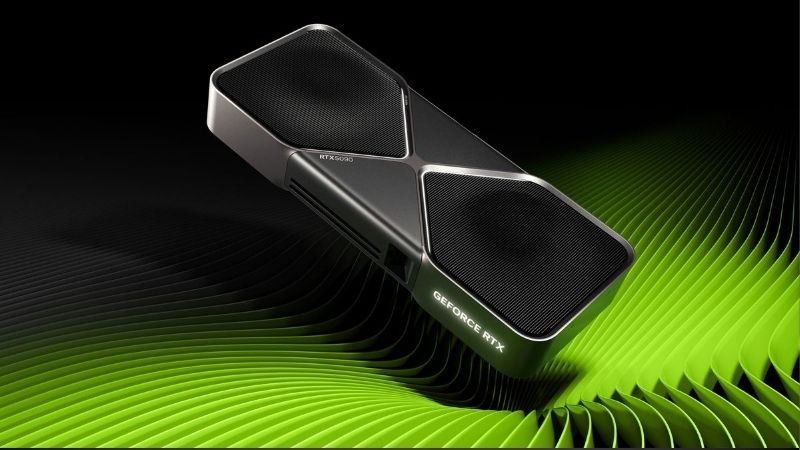
What Is Nvidia Smooth Motion and How Does It Work?
Before judging the feature, it helps to understand precisely what it does and how it differs from the DLSS Frame Generation it superficially resembles. The distinction determines which games benefit, what hardware you need, and what trade-offs you accept.
Driver-Level Frame Generation, Explained Simply
Smooth Motion operates inside Nvidia’s display driver rather than inside the game engine. The driver analyzes two consecutive rendered frames, uses AI running on the GPU’s optical flow and Tensor hardware to predict the intermediate image, and inserts that generated frame between them — effectively converting 60 rendered FPS into roughly 110-120 displayed FPS.
Because the work happens at the driver layer, it requires zero developer support: the feature applies per-game through the Nvidia App or control panel profile, covering thousands of titles that will never receive DLSS integration — older games, indie releases, simulation titles, and emulators. That universality is the entire point, and it is what separates Smooth Motion from the engine-integrated DLSS Frame Generation found in supported AAA releases.
The trade-off is information access. Engine-level DLSS Frame Generation reads motion vectors directly from the game, producing cleaner generated frames; Smooth Motion infers motion purely from pixels, which is computationally harder and occasionally guesses wrong. Expect the quality hierarchy to follow that logic everywhere in this review.
Supported GPUs and Hardware Requirements
Smooth Motion launched alongside the RTX 50-series and is built around Blackwell’s hardware flow accelerator, with Nvidia later extending support to RTX 40-series cards via driver update. RTX 30-series and older GPUs are excluded — the feature leans on optical-flow and Tensor throughput those generations lack at the required latency budget.
Practical requirements beyond the GPU tier: enable the feature per-game in the Nvidia App, pair it with a variable refresh rate monitor (G-Sync or G-Sync Compatible) for clean frame pacing, and start from a healthy base frame rate — 50-60 FPS minimum is the consistent community recommendation. Feed it a 30 FPS base and you get smooth-looking 60 with noticeably elastic input response; feed it 70-80 and the result genuinely transforms a 144Hz monitor’s experience.
Smooth Motion vs DLSS Frame Generation vs AMD AFMF
Against DLSS Frame Generation, the comparison is complementary rather than competitive: where a game supports DLSS FG, use that — better image quality, lower added latency. Smooth Motion exists for everything else, which numerically is most of your game library. The two features cover opposite halves of the catalog.
Against AMD’s equivalent, Fluid Motion Frames (AFMF), Smooth Motion benchmarks as the more conservative implementation: testers consistently report fewer interpolation artifacts in fast camera motion and better frame-pacing discipline, at the cost of supporting fewer GPU generations. Both deliver the same headline arithmetic — roughly 2x displayed frames — so the quality of those frames is where the comparison is actually decided, and the current consensus gives Nvidia the edge in stability.
Nvidia Smooth Motion Pros and Cons: Tested Reality
Aggregating hands-on reports, community testing, and verified owner feedback on RTX 40 and 50-series cards produces a consistent map of where this feature earns its keep and where its limits show. The pattern is clear enough to state as a rule: the less twitch-sensitive the game, the better Smooth Motion looks.
Where Smooth Motion Genuinely Shines
The strongest results come from exactly the titles DLSS never reached: older open-world games locked to modest engine frame rates, simulation and strategy titles, MMOs, and emulated classics. Owners describe revisiting ten-year-old games on 144Hz monitors as the feature’s killer application — fluidity those engines were never built to produce, achieved with one toggle and no mods.
The second win is efficiency on capped games. Titles with hard 60 FPS engine caps — a notoriously stubborn category — display at near-120 FPS with the GPU barely working harder, since generating a frame costs far less power than rendering one. Reviewers also consistently praise the per-game profile approach: enable it for the single-player catalog, leave it off for competitive titles, and the feature stays out of your way.
Honest Weaknesses and Limitations
The complaints concentrate in three areas. First, input latency: interpolation requires holding a frame, adding measurable milliseconds that competitive shooter players reliably notice — the community consensus is simply to keep the feature off in ranked play. Second, artifacts: fast camera pans, HUD elements, and fine repeating patterns occasionally shimmer or smear, more visibly than with engine-level DLSS Frame Generation, because the driver lacks motion-vector data.
Third, the base-frame-rate dependency: the feature amplifies smoothness, it does not create performance. Owners who enabled it expecting to rescue a struggling 35 FPS experience report disappointment; those who fed it a solid 60+ report delight. Calibrating expectations to that rule resolves most of the negative feedback — and it is also the reason the GPU underneath still matters enormously.
Who Benefits Most — and Who Should Skip It
The profile that gains the most: single-player gamers with large back catalogs, high-refresh monitor owners, simulation and RPG players, and anyone running engine-capped titles. For them, Smooth Motion functions as a free performance multiplier across hundreds of games — arguably the best zero-cost feature Nvidia has shipped in years.
The profile that should skip the toggle: competitive FPS and fighting game players, latency-sensitive rhythm gamers, and anyone whose base frame rates sit below 50. None of those cases are failures of the technology; they are simply outside its design envelope, and Nvidia’s per-game profile system makes opting out frictionless.
The Hardware Question: Getting Smooth Motion in 2026
Smooth Motion is free software — but it is gated to RTX 40 and 50-series hardware, which turns this feature review into a GPU buying question. Two current market developments are moving the price of that admission ticket, and both point the same direction.
Which GPU Tier Unlocks the Best Experience
Because the feature doubles a base frame rate you must first produce, the GPU recommendation follows your resolution: an RTX 5060 Ti 16GB comfortably feeds 1440p with a 60-90 FPS base across most titles, while an RTX 5070 or 5070 Ti gives the headroom that turns a 165Hz monitor into the feature’s natural habitat. RTX 40-series cards on the used and clearance market offer a budget path to the same toggle.
The pairing advice from owner reviews is consistent: budget for a G-Sync Compatible monitor if you do not own one, because variable refresh smooths the frame pacing that interpolation occasionally disturbs. A capable card plus a VRR display is the complete recipe — and both halves are stocked deep on Amazon at time of writing.
How Current Market News Affects the Upgrade Math
Development one: the United States has approved Nvidia to sell the H200 — one of its most powerful AI chips — to China, reopening a multi-billion-dollar market and pulling Nvidia’s wafer, packaging, and memory allocation toward data-center products whose margins dwarf GeForce. Previous demand surges of this shape tightened consumer GPU supply within a quarter or two, with current-generation GDDR7 cards — exactly the 50-series that runs Smooth Motion best — feeling it first.
Development two: laptop and component prices are trending upward industry-wide, led by memory costs as AI build-outs consume fab output. VRAM is among the largest line items on a GPU’s bill of materials, and board partners have already nudged SKU pricing higher this cycle. Both forces compress the same conclusion: the hardware that unlocks this feature is likelier to cost more next quarter than it does today.
Buy Now or Wait: The Practical Read
If you already own an RTX 40 or 50-series card, there is nothing to buy — update the driver, open the Nvidia App, and enable the feature on your back catalog tonight. The entire value arrives free, which is the easiest recommendation in this review.
If you are on RTX 30-series or older, treat Smooth Motion as one more weight on the upgrade scale — a feature that improves hundreds of existing games, not just new releases — and note that the market is moving against patience. Check current Amazon pricing on the RTX 50-series tier that matches your resolution, and lock in today’s price while supply at current levels lasts.
Recommended Products

ASUS Dual GeForce RTX™ 4060 V2 OC Edition (PCIe 4.0, 8GB GDDR6, DLSS 3, HDMI 2.1a, DisplayPort 1.4a, 2-Slot Design, Axial-tech Fan Design, 0dB Technology, and More) (Renewed)

Prime Sapphire Pulse 11324-01-20G Graphics Card AMD Radeon RX 7600 8 GB GDDR6

Gigabyte NVIDIA GeForce RTX 4060 Eagle OC Graphics Card - 8GB GDDR6, 128-bit, PCI-E 4.0, 2505MHz Core Clock, 2X DP 1.4, 2X HDMI 2.1a, NVIDIA DLSS 3 - GV-N4060EAGLE OC-8GD
As an Amazon Associate we earn from qualifying purchases. Product prices and availability are accurate as of the date/time indicated.
Final Verdict: Is Nvidia Smooth Motion Worth Using in 2026?
Nvidia Smooth Motion earns a strong recommendation as exactly what it claims to be: a free, driver-level frame doubler that transforms the thousands of games DLSS Frame Generation will never touch. Feed it a 60+ FPS base on a variable refresh monitor and it delivers conspicuous fluidity with manageable trade-offs; ask it to rescue 35 FPS or sharpen your ranked aim and you are outside its envelope. For RTX 40 and 50-series owners it costs nothing to try this evening. For everyone else, it is one more measurable reason the upgrade column keeps winning — and with H200 exports tightening supply and component prices climbing, the card that unlocks it is unlikely to get cheaper. Check today’s Amazon listings for the RTX tier your monitor deserves, and let Smooth Motion multiply everything you already own.
Frequently Asked Questions
What is the best nvidia smooth motion in 2026?
The best nvidia smooth motion depends on your budget and how you plan to use it. The options compared above are our top-rated picks based on real customer ratings, build quality, and overall value — start with the highest-rated model that fits your budget.
How much should I expect to spend on a nvidia smooth motion?
Prices vary by brand and features. Budget options cover the essentials, while mid-range and premium models add durability, performance, and extra features. Compare the prices in the list above to find the best value for your needs.
What should I look for when buying a nvidia smooth motion?
Focus on what matters most for your use case — build quality, compatibility, performance, warranty, and verified customer reviews. Every pick above is selected to balance these factors.
Are budget nvidia smooth motion options worth it?
Yes. For most people a well-reviewed budget or mid-range nvidia smooth motion delivers excellent value. You only need to spend more if you specifically require premium materials or top-tier performance.
How did we choose these nvidia smooth motion picks?
We compare current Amazon ratings, review counts, key features, and price to surface the options with the best real-world value. The list is refreshed as ratings and availability change.
Top picks from this guide
Amazon RenewedASUS Dual GeForce RTX™ 4060 V2 OC Edition (PCIe 4.0,…$330 \xc2\xb7 98/100Sapphire&ref_=dp_csx_lgbl_s_premium-eligibleSapphire Pulse 11324-01-20G Graphics Card AMD Radeon RX 7600 8…$415 \xc2\xb7 98/100Gigabyte NVIDIA GeForce RTX 4060 Eagle OC Graphics Card -…$675 \xc2\xb7 98/100 WaveshareWaveshare UGV Beast ROS 2 Open-Source Off-Road Tracked AI Robot,…$659 \xc2\xb7 79/100

Write Your Review
No reviews yet. Be the first to share your experience!