
- Top Pick: ASUS Dual NVIDIA GeForce RTX 3050 6GB GDDR6 OC Edition Gaming Graphics Card – PCIe 4.0, HDMI 2.1, DisplayPort 1.4a, 2-Slot Design, Axial-tech Fan Design, Steel Bracket, 3 Year Warranty
- Best Value: ASUS TUF Gaming NVIDIA GeForce RTX 5060 Ti 8GB GDDR7 OC Edition Graphics Card,(PCIe 5.0, HDMI/DP 2.1, 3.1-Slot, Military-Grade Components, Protective PCB Coating, Axial-tech Fans), 3 Year Warranty
- Premium Choice: ZOTAC Gaming GeForce RTX 5070 Solid OC DLSS 4 12GB GDDR7 192-bit 28 Gbps PCIE 5.0 Gaming Graphics Card, IceStorm 2.0 Cooling, Spectra RGB Lighting, ZT-B50700J-10P
Nvidia gaming drivers arrive every three to five weeks with a headline saying they are Game Ready for whatever launched that week, and almost nobody knows what that phrase means. Is it a real optimisation or a marketing stamp? Does skipping one cost you frames? This is about what is actually inside a Game Ready release, how much of it you will notice, and why the answer changed once Nvidia started shipping performance through software rather than silicon.
What a Game Ready Driver Actually Contains
The phrase suggests something was tuned for a specific game, and that is broadly accurate. What it does not tell you is how much of the release applies to you, which is usually less than the announcement implies.
The Game Profile Is a Real Thing
Nvidia’s driver carries a profile database — per-application settings that control how the driver behaves for that executable. Threading behaviour, shader cache handling, memory allocation patterns, and which optimisations are safe to apply.
When a title launches, Nvidia works with the developer ahead of release and ships a profile alongside it. That is the Game Ready part, and it is genuine engineering rather than a version bump.
The scope is narrow, though. A Game Ready release for one title contains a profile for that title. If you do not play it, that portion of the release does nothing for you.
How Much It Is Worth
Be specific rather than enthusiastic. For the title in question, a day-zero profile against a six-month-old driver frequently accounts for 10–20%, occasionally more. Modern engines lean on driver-side optimisation heavily enough that launching without one is a real handicap.
For everything else in the release, close to nothing. The general improvements between adjacent drivers are usually small, and you will not perceive them.
So the honest framing: Game Ready drivers matter enormously for new titles and marginally for old ones. If you play a two-year-old game exclusively, the release cadence is irrelevant to you.
The Part That Is Not About Games at All
Here is what changed. Nvidia now ships a substantial share of its performance story through drivers rather than hardware, and that is not game-specific.
DLSS 4.5 landed at CES 2026 — Nvidia’s own figure is that it draws 23 of every 24 pixels on screen. MFG 6x followed within months. DLSS 5 arrives this autumn with real-time neural rendering, and its early plumbing is already visible in the 610.47 release as DLSS-NR profile entries that are not yet usable in any game.
That is the argument for staying current, and it is stronger than the day-zero profile argument. Your card gets measurably better over time without you spending anything — but only if you take the updates.
Game Ready or Studio for a Gamer?
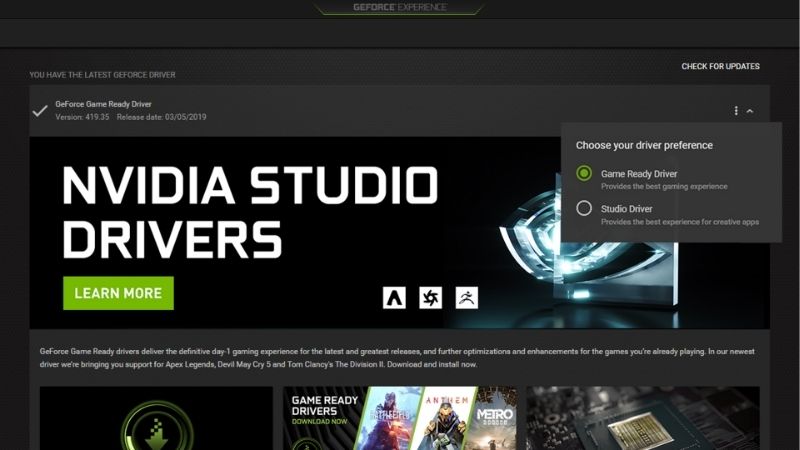
The two branches are built from largely the same code. What separates them is what was validated before shipping, and the naming pushes gamers toward one without explaining the trade.
What Actually Differs
Game Ready ships every three to five weeks, timed to major launches, with day-zero profiles and the newest DLSS revisions. Studio ships every six to eight weeks, prioritising validated stability in Adobe, Blackmagic, and Autodesk applications.
Studio is not slower in games. This is the most persistent misunderstanding about it. Same code, same DLSS, same performance — it simply lags on launch-day profiles.
| Branch | Cadence | Day-zero profiles | Game performance | Best for |
|---|---|---|---|---|
| Game Ready | 3–5 weeks | Yes | Full | New releases |
| Studio | 6–8 weeks | Lags | Full | Stability priority |
| Hotfix | On demand | — | Full | One named bug |
The Decision Rule
It is about downside, not upside. If a broken driver costs you an evening, run Game Ready — you get day-zero profiles and you can absorb an occasional bad week.
If your machine earns money — streaming, editing, client work — run Studio. You give up launch-day optimisation for titles you probably are not playing on deadline anyway.
The case that decides it for many people is encoder stability. Streamers regularly find an NVENC configuration that worked for months starts dropping frames after a Game Ready update. Studio’s slower cadence means someone else has usually found that first.
Should You Install Every Release?
No, and the reflex to do so is not obviously correct. Nvidia introduces regressions in specific titles several times a year, and the fix arrives in the next release three to five weeks later. If your current driver runs everything you play, updating trades certainty for possibility.
The sensible policy: update when a release names a fix you need, when a game you want to play just launched, or when a DLSS revision lands that your hardware can use. Not because a notification appeared.
Whatever you decide, note your current version before installing anything. Recovering a known-good state without that number means guessing through an archive in exactly the mood where you have no patience for it.
Two Deadlines That Affect Gamers Now
Beyond the branch question, two dates are worth planning around, and one of them is close.
The Windows 10 Cutoff Is October 2026
Nvidia extended Windows 10 Game Ready driver support for RTX GPUs to October 2026 — a year beyond Microsoft’s own end-of-life for the operating system. That extension expires in roughly three months.
After it lapses, RTX cards on Windows 10 stop receiving day-zero optimisations and new features. The card keeps working. It stops improving.
Note the extension was announced for RTX GPUs specifically. If you run a GTX card on Windows 10, you are outside it.
The Control Panel Is Already Gone
Nvidia retired the Nvidia Control Panel with the 610.47 driver release in May 2026, after twenty years. With driver 610.62 the installer offers either the GPU driver alone or the driver plus the Nvidia App — neither installs the Control Panel.
Existing installs survive until a clean driver installation removes them. Anyone who genuinely needs it can still get it from the Microsoft Store, though Nvidia will add no further features or fixes.
The practical effect: most tuning guides on the internet now describe menus you may not have. Translate to the Nvidia App rather than assuming your install is broken.
Pros and Cons of Chasing Every Driver
The case for and against staying current has genuinely shifted, and it has shifted because of the market rather than the software.
Why Updating Matters More Than It Used To
Component pricing has continued trending upward, memory foremost. The positive news is real but weak: the steep late-2025 climb has flattened, and Framework has reported a stretch of relative stability while still warning of volatility. New supply is opening — OEMs can source DDR5 from Chinese suppliers such as CXMT, and Micron is building two Idaho fabs — but neither produces until 2027–2028.
When the upgrade path costs more every year, the free performance arriving through DLSS revisions stops being a nice extra and becomes the main way your card improves. Staying current is no longer housekeeping. It is the cheapest performance available.
Where the Ceiling Sits
Driver optimisation has a limit, and it is at the feature boundary rather than at a performance number.
No update gives a GTX 16-series card DLSS — the hardware has no Tensor cores. No update gives an RTX 30-series card Frame Generation, which needs RTX 40. No update gives an RTX 40 card Multi Frame Generation, which is RTX 50 only. And DLSS 5 this autumn is expected to require RTX 50 silicon.
Those are hardware requirements wearing software clothing. If you are outside them, the release cadence is a spectator sport.
The Arithmetic Worth Running
If your 1% lows sit above 55 FPS and you are chasing smoothness, driver work is exactly the right tool. If they sit below 40 at your settings, it is not — a 10% recovery on 35 FPS is 38.5 FPS.
For that second group the market has one useful piece of guidance: waiting is not being rewarded. Prices flattened rather than fell, and at CES 2026 board partners reported the RTX 5070 Ti and RTX 5060 Ti 16GB as end of life while Nvidia disputed it. The tiers still in normal supply are the RTX 5060 and RTX 5070 — and the 5060 has held nearest to list of anything in the lineup, trading around $339 against a $299 MSRP. It is worth checking those before assuming another driver will close the gap.
Installing Without Inheriting Problems
The procedure is short and the steps are not optional, because most driver complaints are installation complaints wearing a disguise.
Take a restore point. Disconnect from the network before uninstalling the old driver — this stops Windows Update from racing you to fill the gap, which is the single most common cause of “the update broke my PC” reports that turn out not to be the driver’s fault.
Run the installer, choose Custom (Advanced), tick Perform a clean installation. That wipes existing profiles, which is the point: a clean install is how you find out whether the driver is actually the problem. Reboot fully rather than trusting the installer’s prompt, then reconnect.
If something breaks, Device Manager gives you the undo: Display adapters, right-click the GPU, Properties, Driver tab, Roll Back Driver. Three minutes and it covers most cases — unless a clean install already wiped the previous package, which is the trade-off for the step above.
See More:
- Nvidia beta
- Nvidia CUDA 11.8
- Check CUDA version
- Nvidia GPU for gaming
- PNY GeForce RTX 5080 16GB OC review
Final Verdict on Nvidia Gaming Drivers
Nvidia gaming drivers deliver two different things and the announcements only talk about one. The Game Ready profile is real engineering — worth 10–20% on the title it targets, and close to nothing on everything else in your library. That is the half everyone discusses.
The half that matters more is DLSS. Nvidia now ships a large share of its performance story through drivers rather than through silicon: DLSS 4.5 at CES 2026, MFG 6x a few months later, and DLSS 5 this autumn with its plumbing already sitting in the 610.47 release. In a market where hardware prices have stopped falling, that free performance is the best return your card will see — and you only get it by taking the updates.
So: run Game Ready if a bad driver costs you an evening, Studio if it costs you a deadline, and update when a release names something you actually need rather than simply when a notification appears on screen. Move to Windows 11 before October if you are running Windows 10 with an RTX card. And use the Nvidia App, because the Control Panel is gone as of driver 610.47 and the guides pointing you there are describing software that a clean install no longer gives you at all.
Frequently Asked Questions
What is the difference between the Game Ready and Studio branches?
Both come from the same underlying code base. Game Ready ships on a faster cadence tied to major game launches and carries fresh per-title profiles. Studio releases less often and is validated against professional creative applications for stability. You can switch between them freely, and switching does not require a clean wipe, though a clean install is still good practice.
Do driver updates really improve frame rates?
Sometimes, and mostly at launch. A day one driver for a new engine can deliver a double digit percentage gain against a driver that predates the game. For titles that have been out for a year, expect no measurable change. The more reliable benefits of updating are crash fixes, new DLSS versions, and support for new display features.
How do I stop Windows Update from replacing my driver?
Windows will occasionally push its own WHQL package over yours. Disabling the automatic device driver setting in advanced system properties, or using the group policy that excludes drivers from Windows Update, keeps your chosen version in place. This matters most on systems where a specific driver version is known to be stable for your particular game or workload.
Is it safe to skip several driver versions?
Yes. The installer does not require an incremental path, so jumping from a release six months old straight to the newest one is fine. Use the clean installation option when making a large jump, because stale control panel entries and leftover components are the usual source of odd behaviour after a big version gap.
Which driver should I use for competitive shooters?
Use a recent Game Ready driver and enable Nvidia Reflex in the game if it is supported, since Reflex reduces render queue latency far more than any driver version choice will. Avoid frame generation in competitive titles, because it raises latency slightly even while it makes the displayed frame rate look higher.
As an Amazon Associate we earn from qualifying purchases at no extra cost to you.


Ready to decide? Our #1 pick for 2026 is the Game Ready.
Live price & availability on Amazon.











Write Your Review
No reviews yet. Be the first to share your experience!