
- Top Pick: Cable Matters 8-Pin GPU Power Cable, 6+2Pin PCIe/GPU, 2ft
- Best Value: PCIe Cable for Corsair, 25 Inch 8 Pin PSU Male to 6+2 Pin GPU Male Power Cable for Thermaltake, ARESGAME Modular Power Supply (Black)
- Premium Choice: Bangfun PCIE 5.0 16Pin GPU Power 12VHPWR Extension Cable, 16Pin(12+4) Male to 2X8Pin Female GPU Adapter Extender Cord Designed for Geforce RTX 4070 4070Ti Super 5090 5080 5070Ti-13Inch Black
Planning a graphics-card upgrade involves more than checking the card’s length. The connector, power cable, side-panel clearance, and bend radius can determine whether a GPU fits safely in a case. This GPU dimensions including power cable bend size guide explains how to measure the complete installation, including the space needed behind the card and around its power plug.
The Short Answer
Measure a graphics card in three directions: length, height, and thickness. Then add room for the power connector and cable bend. A typical modern GPU is approximately 9.5 to 14 inches (24 to 35.6 cm) long, 4.3 to 5.9 inches (10.9 to 15 cm) tall, and two to four slots thick. Larger flagship cards may exceed 14 inches in length and occupy four slots.
As an Amazon Associate we earn from qualifying purchases at no extra cost to you.


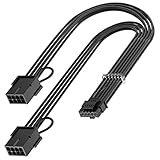

For a conventional 6-pin, 8-pin, or 6+2-pin PCIe cable, allow at least 1.5 inches (3.8 cm) beyond the connector for a gentle bend. For a newer 12VHPWR or 12V-2×6 cable, plan on approximately 1.4 inches (3.5 cm) of straight cable before bending, unless the graphics-card or cable manufacturer specifies more. Never force a cable sharply against the side panel.
A practical case check is:
- GPU length: card body plus front radiator, drive cage, or bracket interference.
- GPU height: card edge to the side panel, including the plugged-in cable.
- GPU thickness: occupied expansion slots plus airflow space.
- Cable path: connector depth, bend space, and room for cable management.
Standard Sizes
The following ranges cover common desktop graphics cards and the cable lengths shoppers frequently encounter. Manufacturer specifications take priority because cooler shrouds, backplates, and connector locations vary.
| Item or measurement | Typical size in inches | Approximate size in centimeters | Planning note |
|---|---|---|---|
| Compact, low-profile GPU length | 6.3–8.3 in | 16–21.1 cm | Often designed for small-form-factor or office cases |
| Standard GPU length | 9.5–12.5 in | 24.1–31.8 cm | Common two- and three-fan format |
| Large GPU length | 12.6–15.0 in | 32–38.1 cm | Check radiator and drive-cage clearance carefully |
| GPU height | 4.3–6.0 in | 10.9–15.2 cm | Include the cable plug if it sits above the card edge |
| Two-slot card thickness | 1.4–1.8 in | 3.6–4.6 cm | Usually occupies two rear expansion openings |
| Three-slot card thickness | 2.1–2.7 in | 5.3–6.9 cm | May block neighboring PCIe slots |
| Four-slot card thickness | 2.8–3.6 in | 7.1–9.1 cm | Common on some high-power flagship coolers |
| Typical 6+2-pin cable length | 24–25 in | 61–63.5 cm | Usually enough for a mid-tower when routed behind the motherboard tray |
| Short extension cable | 11.8 in | 30 cm | Useful when the original lead is too short or difficult to route |
| 12VHPWR extension example | 13 in | 33 cm | Provides added reach, but not extra safe bend space by itself |
| Recommended straight section for 12VHPWR or 12V-2×6 | At least 1.4 in | At least 3.5 cm | Measure from the connector housing before changing direction |
Power requirements also affect cable planning. Entry-level GPUs may use no auxiliary connector or one 6-pin plug. Midrange cards commonly use one 8-pin or two 8-pin connectors and may draw roughly 150 to 250 watts from the complete system’s graphics subsystem. High-performance models can require two or three 8-pin connectors or a single 12VHPWR/12V-2×6 connector, with board power commonly ranging from about 250 to 450 watts. Always use the recommended power supply and the cables supplied for that specific power supply. Modular PSU cables are not universally interchangeable.
For price planning, basic 6+2-pin replacement leads commonly range from about $8 to $15. Longer or brand-specific modular cables often cost $10 to $25. Sleeved extensions and newer 16-pin adapters generally range from $18 to $35. The example products span approximately $10 to under $30: a 2-foot Cable Matters 8-pin cable is listed for under $10, a 25-inch compatible cable for under $10, a 13-inch Bangfun 16-pin extension for under $20, and a 30-centimeter AsiaHorse sleeved extension for under $30. These prices are useful budgeting references, not guarantees of compatibility.
How to Measure Your Space
- Find the card’s official dimensions. Record the published length, height, and thickness. Do not measure only the circuit board; include the cooler, shroud, rear bracket, and backplate.
- Measure the case’s GPU length limit. Measure from the rear expansion-slot area to the nearest obstruction. Check both the manufacturer’s maximum GPU length and the actual space with front fans, a radiator, or a drive cage installed.
- Measure vertical clearance. From the motherboard’s PCIe slot area, measure toward the side panel. Include the card’s height and the power connector. A top-mounted connector can need at least 1.5 inches (3.8 cm) of additional room for a conventional cable bend.
- Check connector orientation. A side-facing plug may route toward the side panel, while a top-facing plug may require space above the card. Look at photographs of the exact model rather than assuming all cards use the same connector position.
- Measure the thickness in slots. A three-slot card needs approximately 2.1 to 2.7 inches (5.3 to 6.9 cm) of width, plus room for airflow. Confirm that the card will not cover a needed expansion slot or interfere with a capture card, sound card, or Wi-Fi adapter.
- Plan the cable route. Measure from the PSU outlet or cable-management opening to the GPU connector. Add several inches for a relaxed route instead of pulling the cable tight across the motherboard.
- Inspect the final bend. The plug should be fully seated, with no visible gap or exposed portion caused by tension. Keep the first bend smooth. For 12VHPWR and 12V-2×6 connections, maintain at least 1.4 inches (3.5 cm) of straight cable unless the maker requires a larger distance.
By Room or Use Case
Small-form-factor office or living-room PC
Prioritize cards under 8.5 inches (21.6 cm) long and no more than two slots thick. Low-profile cards may require a replacement rear bracket. Because compact cases leave little side-panel space, measure the connector bend before buying. A short extension can make routing easier, but it also adds another connection that must be fully seated.
Mid-tower gaming desktop
A mid-tower commonly accommodates a 10- to 13-inch (25.4- to 33 cm) card, although front radiators can reduce that clearance significantly. Leave approximately 1 inch (2.5 cm) between the card fans and a major obstruction when possible. A 24- or 25-inch cable is often long enough to route behind the motherboard tray without crossing the front of the board.
Full-tower or high-performance workstation
Full-tower cases are better suited to 13- to 15-inch cards and four-slot coolers. Confirm motherboard slot spacing, horizontal support brackets, and vertical mounting hardware. Heavy cards can weigh roughly 2.5 to 5 pounds (1.1 to 2.3 kg), so use a support bracket when recommended. Leave open slots around the card where possible for intake airflow.
Clean, visible cable-managed build
Sleeved extensions can improve appearance and provide a controlled route, but measure their added length and connector bulk. A 30-centimeter extension is about 11.8 inches, while a 13-inch 16-pin extension is about 33 cm. Avoid stacking multiple extensions unless the manufacturers specifically permit it and the resulting connection remains easy to inspect.
Common Sizing Mistakes
- Using the card length alone: Front fans, radiators, drive cages, and cable plugs all consume space.
- Ignoring side-panel clearance: A card may fit its length limit but fail when the power cable is connected.
- Bending a 16-pin cable immediately: A tight bend near the housing can place stress on the connector and may prevent full insertion.
- Confusing cable length with compatibility: A cable that physically reaches the GPU may use the wrong PSU pinout.
- Counting only rear openings: A “three-slot” card can be thicker than the case’s available space beside the motherboard.
- Pulling the cable tight: Tension can angle the plug or partially unseat it. Route extra length behind the tray instead.
- Skipping weight support: Long, heavy cards can sag and place stress on the slot.
FAQ
How much extra room does a GPU power cable need?
Allow at least 1.5 inches (3.8 cm) beyond a conventional 6+2-pin connector for a gradual bend. For 12VHPWR or 12V-2×6, keep at least 1.4 inches (3.5 cm) straight before bending, or follow the card and cable manufacturer’s larger recommendation.
Does GPU length include the power connector?
Usually, the published GPU length describes the card itself, including its cooler and rear bracket, but not the cable bend. Treat the listed length as the hardware footprint and calculate connector clearance separately.
Is a longer GPU cable always better?
No. Extra length helps cable management, but excessive slack can block airflow or create sharp loops. Choose the shortest compatible cable that reaches comfortably, then route the excess behind the motherboard tray.
Can I use any modular PCIe cable with my power supply?
No. Modular PSU cables can have different pinouts even when their plugs look identical. Use the cable supplied with the PSU or a replacement explicitly listed as compatible with that exact PSU family and model.











Write Your Review
No reviews yet. Be the first to share your experience!