
Quick answer: the best RTX 5070 prebuilt PC for most gamers is the MSI Codex Z2 (Ryzen 7 8700F, 32GB DDR5, 2TB SSD), because it pairs NVIDIA’s 1440p sweet-spot card with enough memory and storage that you will not be upgrading anything in year one. The runner-up is the Skytech Ryzen 5 7600 + RTX 5070, which puts the same graphics card on the upgrade-friendly AM5 platform with a full desktop Ryzen chip for noticeably less money, at the cost of 16GB of RAM instead of 32GB.
- Top Picks at a Glance
- RTX 5070 Prebuilt PC Comparison Table
- 1. MSI Codex Z2 – Best Overall RTX 5070 Prebuilt
- 2. Skytech Ryzen 5 7600 – Best Value RTX 5070 PC
- 3. KOTIN Ryzen 7 9700X – Best for High-Refresh Gaming and Streaming
- 4. iBUYPOWER Element – Best for Gaming and Creative Work
- 5. MSI Codex R2 – Best Intel RTX 5070 PC
- 6. Skytech Core i5-14400F – Best Budget RTX 5070 PC
- Also Consider
- More RTX 5070 Prebuilts Worth Considering
- More RTX 5070 Prebuilt PCs From HP, Thermaltake, CLX and Skytech
- How We Chose
- RTX 5070 Prebuilt Buying Guide
- Best RTX 5070 Prebuilt PC by Budget Tier
- Prebuilt vs Building Your Own RTX 5070 PC
- First-Day Setup Checklist for a New RTX 5070 Prebuilt
- Frequently Asked Questions
- Which RTX 5070 Prebuilt Should You Buy?
- Sources
Every main pick in this guide uses the GeForce RTX 5070 with 12GB of GDDR7, so the differences come down to the parts around it: the CPU, the memory, the power supply, the cooling and how easy each box is to upgrade later. We read each spec sheet the way a PC builder would and flag the corners each brand cut to hit its price. Two RTX 5070 Ti step-up systems are covered in Also Consider for buyers who want more VRAM.
Disclosure: we earn a commission if you buy through links on this page, at no extra cost to you. It never decides which systems make the list.
Updated October 2026 — the best RTX 5070 prebuilt PC for most gamers is the MSI Codex Z2, followed by the Skytech Ryzen 5 7600 RTX 5070 and the KOTIN Ryzen 7 9700X RTX 5070. All three pair the GeForce RTX 5070 (12GB GDDR7) with a current desktop CPU, and all three are built for 1440p gaming.
Top 3 in one paragraph: The MSI Codex Z2 wins on memory and storage (32GB DDR5 and a 2TB SSD). The Skytech Ryzen 5 7600 wins on price per frame and keeps the AM5 upgrade path open. The KOTIN Ryzen 7 9700X wins for high-refresh and streaming setups because it uses a newer Zen 5 eight-core chip. Later in this guide we also add four more RTX 5070 prebuilt PCs from HP, Thermaltake, CLX and Skytech for readers who want a different brand or CPU.
Top Picks at a Glance
- Best Overall: MSI Codex Z2 (Ryzen 7 8700F / RTX 5070), 32GB DDR5 and 2TB storage out of the box.
- Best Value: Skytech Ryzen 5 7600 / RTX 5070, a true desktop Ryzen on AM5 for less.
- Best for High-Refresh and Streaming: KOTIN Ryzen 7 9700X / RTX 5070, a current Zen 5 eight-core with 32GB.
- Best for Gaming and Creative Work: iBUYPOWER Element (Ryzen 9 7900X / RTX 5070), 12 cores and a 240mm liquid cooler.
- Best Intel Pick: MSI Codex R2 (Core i5-14400F / RTX 5070), 32GB DDR5 and Wi-Fi 6E.
- Best Budget RTX 5070 PC: Skytech Core i5-14400F / RTX 5070, the lowest-cost route to this GPU.
RTX 5070 Prebuilt PC Comparison Table
| Product | Best For | CPU | RAM / Storage | Cooling / PSU | Watch For | Price Tier | Link |
|---|---|---|---|---|---|---|---|
| MSI Codex Z2 | All-round 1440p | Ryzen 7 8700F (8C/16T) | 32GB DDR5 / 2TB | Air; 80 Plus Gold | 8700F has 16MB L3 cache | Upper-mid | See details |
| Skytech R5 7600 | Value 1440p | Ryzen 5 7600 (6C/12T) | 16GB DDR5 / 1TB | Air; Gold PSU (850W listed) | Only 16GB RAM | Mid-range | See details |
| KOTIN R7 9700X | High refresh, streaming | Ryzen 7 9700X (8C/16T) | 32GB DDR5 / 1TB | Not fully listed | Smaller brand, check PSU | Upper-mid | See details |
| iBUYPOWER Element | Gaming + creative | Ryzen 9 7900X (12C/24T) | 32GB DDR5-4800 / 1TB | 240mm AIO; 750W Gold | Slower DDR5-4800 kit | Upper-mid | See details |
| MSI Codex R2 | Intel buyers | Core i5-14400F (10C/16T) | 32GB DDR5 / 1TB | Air; 80 Plus Gold | H610 board, dead-end socket | Mid-range | See details |
| Skytech i5-14400F | Lowest-cost RTX 5070 | Core i5-14400F (10C/16T) | 16GB / 1TB | Air; PSU not fully listed | 16GB RAM, LGA1700 | Budget | See details |
1. MSI Codex Z2 – Best Overall RTX 5070 Prebuilt
As an Amazon Associate we earn from qualifying purchases at no extra cost to you.

- CPU: AMD Ryzen 7 8700F (8 cores, 16 threads, Zen 4, 16MB L3)
- GPU: NVIDIA GeForce RTX 5070, 12GB GDDR7
- Memory / storage: 32GB DDR5, 2TB NVMe SSD
- Power supply: 80 Plus Gold; MSI lists 650W or 750W depending on the exact SKU
- Platform: AM5 socket, Wi-Fi, Windows 11
Best for: gamers who want a finished 1440p machine where nothing needs topping up on day one. Skip if: you mainly play CPU-bound esports titles at very high frame rates, where a cache-rich chip pulls ahead.
The Codex Z2 earns the top spot because it gets the unglamorous parts right. Most RTX 5070 prebuilts hit their price by trimming RAM to 16GB or storage to 1TB; MSI ships 32GB of DDR5 and a 2TB drive, which is what a builder would spec for a 2026 gaming rig. With memory prices still elevated, buying those two upgrades separately would add a real chunk to the total, so the bundle is genuine value rather than a padded spec sheet. A 2TB drive also matters more than it used to: several current AAA games exceed 100GB each.
Based on its spec class, the RTX 5070 should run most current games at high settings at 1440p comfortably above 60 fps, with DLSS 4 and multi frame generation pushing well beyond that in supported titles. Treat those as estimates from the GPU tier, not measurements. The one compromise is the Ryzen 7 8700F, a desktop chip derived from AMD’s mobile-oriented Zen 4 design with 16MB of L3 cache, half that of a Ryzen 5 7600 or Ryzen 7 9700X. In GPU-bound 1440p play you will rarely notice; in competitive shooters chasing 200+ fps you might.
The long-term win is the AM5 socket. A drop-in CPU upgrade to a Ryzen 9000 or 9000X3D chip later should need only a BIOS update. Before planning a GPU upgrade, check which PSU your unit shipped with: a 750W supply leaves room for an RTX 5070 Ti-class card, while a 650W unit is best kept at the current tier. Our 1440p NVIDIA GPU guide explains where the 5070 sits against its siblings.
Pros
- 32GB DDR5 and 2TB SSD, so no immediate upgrades needed
- AM5 platform with a clear CPU upgrade path
- Gold-rated power supply from a major brand
- Clean, mainstream MSI case and parts
Cons
- Ryzen 7 8700F has half the L3 cache of full desktop Ryzen chips
- PSU wattage varies by SKU, so check before a GPU upgrade
2. Skytech Ryzen 5 7600 – Best Value RTX 5070 PC

- CPU: AMD Ryzen 5 7600 (6 cores, 12 threads, Zen 4, 32MB L3, up to 5.1GHz)
- GPU: NVIDIA GeForce RTX 5070, 12GB GDDR7
- Memory / storage: 16GB DDR5-6000, 1TB Gen4 NVMe SSD
- Power supply: 80 Plus Gold; Skytech’s Azure 3 listings show 850W, one listing says 750W
- Platform: AM5, Wi-Fi, air cooling, Windows 11
Best for: value-focused 1440p gamers who are happy to add RAM later and want a strong upgrade path. Skip if: you keep a browser, Discord and a stream running alongside heavy games, where 16GB gets tight.
This is the same RTX 5070 as our top pick, on a platform that is arguably better for the long haul. The Ryzen 5 7600 is a full desktop Zen 4 chip with 32MB of L3 cache, twice the cache of the 8700F, which helps in CPU-sensitive games even though it has two fewer cores. For pure gaming the two CPUs are close, and the 7600 can pull ahead in titles that like cache. The DDR5-6000 memory is the speed AMD recommends for Ryzen 7000, so Skytech has not cut corners there.
The trade-off is 16GB of RAM and a 1TB drive. Sixteen gigabytes is still workable for most games in 2026, but it is the floor, not the comfortable middle, and several big releases recommend 32GB for high settings. The fix is easy: add a matching 2x8GB or swap to a 2x16GB kit later. Storage is equally simple to expand with a second M.2 drive. If you want to see when memory or VRAM is running out, our guide to checking VRAM usage walks through the overlays.
The power supply is the pleasant surprise. Most listings for this Skytech configuration show an 850W Gold unit, which is generous for an RTX 5070 system (NVIDIA recommends 650W). That leaves real room to move up to an RTX 5070 Ti or 5080-class card later without replacing the PSU. Confirm the label on your unit, since one listing mentions 750W. Combined with AM5’s CPU upgrade path, this is the most upgradeable box in the list.
Pros
- Full desktop Ryzen 5 7600 with 32MB L3 cache
- DDR5-6000, the sweet-spot speed for AM5
- Gold PSU with plenty of headroom on most listings
- Strong upgrade path for CPU, GPU, RAM and storage
Cons
- 16GB RAM is the minimum for modern AAA games
- 1TB SSD fills up quickly with large game installs
3. KOTIN Ryzen 7 9700X – Best for High-Refresh Gaming and Streaming

- CPU: AMD Ryzen 7 9700X (8 cores, 16 threads, Zen 5, 32MB L3, up to 5.5GHz)
- GPU: NVIDIA GeForce RTX 5070, 12GB GDDR7
- Memory / storage: 32GB DDR5, 1TB SSD
- Power supply / cooling: not fully listed; confirm before buying
- Platform: AM5
Best for: players who stream, record or run high-refresh 1440p monitors and want the newest CPU architecture in this group. Skip if: you want a big-brand warranty and support network.
KOTIN is a smaller system builder, but this configuration is the most modern CPU-and-memory combination on the list. The Ryzen 7 9700X is a current-generation Zen 5 eight-core with 32MB of L3 cache and a 5.5GHz boost, which makes it faster per core than the Zen 4 chips in our top two picks. That matters most when the GPU is not the limit: 1440p at 165Hz or 240Hz with DLSS enabled, or esports titles where frame rates climb high enough for the CPU to set the pace. Pair that with 32GB of DDR5 and this machine handles a game, a streaming encoder and a browser full of tabs at the same time.
The RTX 5070’s NVENC encoder does the heavy lifting for streaming, so the extra CPU headroom mostly helps keep frame times smooth while everything else runs. For esports players, this is the system we would choose from the 5070 group. As always, expected performance is an estimate from the hardware tier; the real result depends on game, settings and monitor.
The caveat is documentation. KOTIN’s listing does not spell out the power supply model or exact cooler, so check the product page or ask the seller before you buy if you plan a GPU upgrade. The 9700X runs at a 65W default TDP, so it is easy to cool and does not need a big liquid cooler. Like every AM5 system here, it has a path to later Ryzen chips. If you want to make the most of high refresh rates, our DLSS frame generation guide shows when frame generation helps and when it adds too much latency.
Pros
- Current Zen 5 Ryzen 7 9700X, the fastest per-core CPU among the six main picks
- 32GB DDR5 for gaming plus streaming
- Efficient 65W CPU that is easy to keep quiet
Cons
- PSU and cooler details are not fully listed
- Smaller brand with a less established support network
- Only 1TB of storage at this tier
4. iBUYPOWER Element – Best for Gaming and Creative Work

- CPU: AMD Ryzen 9 7900X (12 cores, 24 threads, Zen 4, 64MB L3)
- GPU: NVIDIA GeForce RTX 5070, 12GB GDDR7
- Memory / storage: 32GB DDR5-4800, 1TB NVMe SSD
- Cooling / PSU: 240mm ARGB liquid cooler; 750W 80 Plus Gold
- Extras: B650 Wi-Fi motherboard, white Element 9 case, keyboard and mouse included
Best for: gamers who also edit video, compile code or render, where 12 cores pay off. Skip if: you only game, since the 9700X or 7600 systems give similar gaming results for less.
The iBUYPOWER Element stands out for its CPU. The Ryzen 9 7900X has 12 cores and 24 threads, half again as many as the eight-core chips elsewhere in the list, plus 64MB of L3 cache. In games that does not buy much extra, because the RTX 5070 usually sets the limit at 1440p. In Premiere Pro, DaVinci Resolve exports, Blender CPU renders or big code builds, it can cut wait times considerably. If your PC doubles as a work machine, this is the one to pick. Our multi-core CPU guide explains which workloads scale with cores.
iBUYPOWER’s support page confirms a 750W 80 Plus Gold power supply and a 240mm liquid cooler, both sensible choices for a 170W-class CPU. The 750W unit also leaves room for an RTX 5070 Ti-class GPU later. The B650 Wi-Fi board keeps you on AM5 for future Ryzen upgrades.
The corner iBUYPOWER cut is memory speed. The official spec lists DDR5-4800, slower than the DDR5-6000 that suits Ryzen 7000 best. The gaming impact is small but real in CPU-bound titles, and if the kit supports EXPO you may be able to raise it in the BIOS; otherwise a faster 2x16GB kit is a cheap later upgrade. The white case and included keyboard and mouse make it a good gift-ready system, though most gamers will soon replace the bundled peripherals.
Pros
- 12-core Ryzen 9 7900X for creative and productivity work
- 750W Gold PSU and 240mm liquid cooler confirmed by the maker
- AM5 platform with Wi-Fi
- Keyboard and mouse included
Cons
- DDR5-4800 memory is slower than ideal for Ryzen
- Extra cores add little in pure gaming
- 1TB SSD at an upper-mid price
5. MSI Codex R2 – Best Intel RTX 5070 PC

- CPU: Intel Core i5-14400F (10 cores: 6P + 4E, 16 threads, up to 4.7GHz)
- GPU: NVIDIA GeForce RTX 5070, 12GB GDDR7
- Memory / storage: 32GB DDR5-6000 (2x16GB), 1TB Gen4 NVMe SSD
- Board / PSU: H610 chipset; 750W 80 Plus Gold PSU on this exact model (other Codex R2 configurations use 650W)
- Connectivity: Wi-Fi 6E, Bluetooth 5.3, HDMI 2.1 and three DisplayPort 1.4a on the GPU
Best for: buyers who prefer Intel or want a big-brand system with 32GB of RAM at a mid-range price. Skip if: you plan to upgrade the CPU later, since this platform is at the end of its line.
The Codex R2 is MSI’s more affordable RTX 5070 desktop, and its strongest feature is the memory: 32GB of DDR5-6000 in dual channel, the same capacity as our top pick, in a lower price tier. The Core i5-14400F is a capable gaming CPU with six performance cores and four efficiency cores; at 1440p with an RTX 5070 it should keep the GPU well fed in most titles. Air cooling with an RGB tower cooler and four case fans (three front, one rear) is ample for a 65W-base chip.
Wi-Fi 6E and Bluetooth 5.3 are built in, and the system ships with an MSI keyboard and mouse. MSI’s one-year warranty and wide service network are an advantage over smaller builders.
The weak spot is longevity. The i5-14400F sits on Intel’s LGA1700 socket, which will not take newer Core Ultra chips, and the H610 board is a basic chipset with limited expansion (two M.2 slots, one Gen4 and one Gen3). Think of the CPU as what you will keep for the life of the machine; the GPU, RAM and storage remain upgradeable. MSI lists a 750W supply for this exact model, but other Codex R2 configurations ship with 650W, so check the PSU label before a GPU swap. If you are deciding between this and the AM5 picks, our DLSS 4 upgrade guide covers what matters most for long-term value.
Pros
- 32GB DDR5-6000 in a mid-range system
- Wi-Fi 6E and Bluetooth 5.3 built in
- Big-brand build quality and support
- Good airflow with four case fans
Cons
- LGA1700 socket offers no meaningful CPU upgrade path
- Basic H610 board limits expansion
- PSU wattage varies between Codex R2 configurations
6. Skytech Core i5-14400F – Best Budget RTX 5070 PC
- CPU: Intel Core i5-14400F (10 cores, 16 threads)
- GPU: NVIDIA GeForce RTX 5070, 12GB GDDR7
- Memory / storage: 16GB RAM, 1TB SSD
- Power supply / cooling: not fully listed in the product title; confirm wattage before upgrading
- Platform: LGA1700, Windows 11
Best for: buyers who want RTX 5070 performance at the lowest entry price and mainly game. Skip if: you want 32GB of RAM out of the box or a CPU upgrade path.
This is the cheapest way into the RTX 5070 tier in our list. You get the same graphics card as every other pick, which means the same 1440p capability, the same 12GB of VRAM and the same DLSS 4 support. Because most games at 1440p are limited by the GPU rather than the CPU, the gaming gap between this machine and the more expensive picks is smaller than the price gap. Expect broadly similar frame rates in GPU-heavy games, with the bigger CPUs pulling ahead mainly in strategy, simulation and esports titles. Those are estimates based on hardware tier, not measurements.
The savings come from three places: 16GB of RAM instead of 32GB, a 1TB SSD, and Intel’s LGA1700 platform, which is mature and inexpensive but has no future CPU upgrade path. RAM and storage are easy to upgrade later, so a sensible plan is to buy this, game on it immediately and add a 2x16GB kit or a second SSD when prices are right.
Compared with the Skytech Ryzen 5 7600 above, this machine is the better buy if the price gap matters most right now; the Ryzen version is the better buy if you keep PCs for five years or more and want a CPU swap in the middle. The power supply wattage is not stated in this listing’s title, so check the full spec sheet. For more on matching power to a GPU, see our power supply guide for RTX 5080 upgrades.
Pros
- Lowest-cost route to an RTX 5070 in this guide
- Same GPU performance class as pricier systems
- Easy RAM and storage upgrades later
Cons
- 16GB RAM is the floor for modern games
- No CPU upgrade path on LGA1700
- PSU details need checking before a GPU upgrade
Also Consider
ZOTAC MEK (Ryzen 7 9700X / RTX 5070 Ti)

Best for: buyers who want to step up from the RTX 5070 to 16GB of VRAM for 1440p ultra settings and light 4K. ZOTAC pairs the Zen 5 Ryzen 7 9700X with an RTX 5070 Ti, 32GB of DDR5-6000, a 1TB SSD, a 750W 80 Plus Gold PSU and a 360mm liquid cooler in a glass-panel case. Trade-off: it sits a full price tier above the RTX 5070 systems, and 1TB of storage is light for the money.
Panorama XL (Core i9-14900KF / RTX 5070 Ti)

Best for: buyers who want a 24-core Intel CPU for heavy multitasking alongside an RTX 5070 Ti. The listing includes 32GB of DDR5, a 2TB Gen4 SSD, a 360mm liquid cooler, Wi-Fi 6E, Windows 11 Pro and a three-year warranty. Trade-off: the i9-14900KF draws a lot of power and runs hot, and LGA1700 is a dead-end platform, so it is a premium spend without a CPU upgrade path.
More RTX 5070 Prebuilts Worth Considering
The six main picks cover most budgets, but six more RTX 5070 systems deserve a look if you want a big-brand tower, Intel’s newer Core Ultra chips or one of AMD’s X3D or 12-core Zen 5 processors. All six keep the same 12GB RTX 5070, so the differences again come down to the CPU, the platform and the support behind the box.
Lenovo Legion Tower 5 (Ryzen 7 7800X3D) — Best Big-Brand X3D Pick
As an Amazon Associate we earn from qualifying purchases at no extra cost to you.
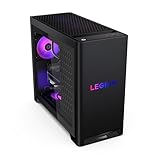
The 2026 Legion Tower 5 pairs the RTX 5070 with a Ryzen 7 7800X3D, 32GB of memory and a 1TB SSD. The 7800X3D is an eight-core, 16-thread Zen 4 chip with 96MB of L3 cache thanks to AMD’s 3D V-Cache, which is why it has been a favourite gaming CPU since launch. That extra cache helps most in CPU-sensitive games such as strategy, simulation and high-frame-rate esports titles, where it can lift minimum frame rates noticeably over a standard eight-core chip.
It suits buyers who want a gaming-first CPU from a brand with a large support network. The AM5 socket keeps a later upgrade open, although the 7800X3D is already near the top of the gaming ladder. Storage is the obvious limit at 1TB, and the power supply wattage is worth confirming on the spec sheet before you plan a bigger GPU. It usually sits in the upper-mid to premium tier.
Pros
- 7800X3D with 96MB of L3 cache, one of the best gaming CPUs on AM5
- 32GB of memory and big-brand warranty support
- AM5 platform
Cons
- 1TB SSD is light for a large game library
- Costs more than equally fast GPU-bound options at 1440p
KOTIN Ryzen 7 9800X3D — Best for Esports and CPU-Heavy Games
If the goal is the highest possible frame rate in competitive shooters and CPU-bound games, this KOTIN configuration puts the Ryzen 7 9800X3D next to the RTX 5070, with 32GB of DDR5 and a 1TB SSD. The 9800X3D is AMD’s Zen 5 eight-core X3D chip with 96MB of L3 cache, and it has been widely rated the fastest gaming CPU of its generation. At 1440p with an RTX 5070 the graphics card is usually the limit in AAA games, so the gains show up mostly at 1080p or 1440p in esports titles running at 240Hz and above.
This is the right box for a player who will keep the CPU for many years and swap in a stronger graphics card later, because the 9800X3D will still have headroom after a GPU upgrade. As with the KOTIN 9700X pick above, check the power supply model and cooler details before buying, and expect to add storage fairly soon.
Pros
- Ryzen 7 9800X3D, a top gaming CPU with a long useful life
- 32GB of DDR5 for gaming and streaming
- Leaves room for a much faster GPU later
Cons
- CPU is overkill for GPU-bound 1440p and 4K play
- PSU and cooler details need checking with the seller
- 1TB of storage at a premium price tier
Alienware Aurora (Core Ultra 7 265F) — Best Big-Brand Intel Alternative

Alienware’s redesigned Aurora pairs the RTX 5070 with Intel’s Core Ultra 7 265F, 32GB of DDR5 and a 1TB SSD, and the listing adds Wi-Fi 7, Bluetooth and Killer 2.5Gb Ethernet. The 265F has 20 cores (8 performance and 12 efficiency), so it is a strong all-rounder for gaming plus multitasking, video exports and background apps. It also runs on Intel’s newer LGA1851 platform rather than the end-of-line LGA1700 socket used by the Core i5-14400F picks.
The Aurora suits buyers who value polished design, quiet operation and Dell’s support network over squeezing the last dollar out of the spec sheet. In games, the Core Ultra 7 265F is not a cache monster like the X3D chips, so the Ryzen picks can pull ahead in CPU-bound titles. LGA1851 also offers only a limited upgrade path. It typically sits in the upper-mid to premium tier, and storage is the first thing most owners will want to expand.
Pros
- 20-core Core Ultra 7 265F for gaming and productivity
- Wi-Fi 7 and 2.5Gb Ethernet
- Big-brand support and a refined case design
Cons
- Slower than X3D chips in CPU-bound games
- Limited CPU upgrade path on LGA1851
- Premium price for a 1TB drive
iBUYPOWER Element (Core i7-14700F / RTX 5070) – Best Intel Pick for Multitasking

- CPU: Intel Core i7-14700F (20 cores: 8 performance + 12 efficiency, 28 threads)
- GPU: NVIDIA GeForce RTX 5070, 12GB GDDR7
- Memory / storage: 32GB DDR5 (2x16GB), 1TB NVMe SSD
- Board / cooling / PSU: B760 Wi-Fi board, RGB tower air cooler, 750W 80 Plus Gold per iBUYPOWER’s support page
- Extras: Element 9 tempered-glass case, keyboard and mouse included
This is the Intel counterpart to the Ryzen 9 iBUYPOWER Element above. The Core i7-14700F has 12 more threads than the Core i5-14400F systems in our list, which helps when a game, a stream encoder, Discord and a browser all run together, and it still keeps the RTX 5070 fed at 1440p. Like every LGA1700 box, it has no future CPU upgrade path, so treat the processor as permanent and plan upgrades around RAM, storage and the GPU. The maker lists DDR5-4800 on its support page while some retail titles quote a higher speed, so check the exact listing and enable the memory profile in the BIOS if the kit allows it.
Pros
- 20-core i7-14700F with strong multitasking headroom
- 750W Gold power supply leaves room for a larger GPU later
- 32GB of DDR5 in two sticks (dual channel)
- Keyboard and mouse included
Cons
- LGA1700 is a dead-end socket
- Memory speed is listed below the ideal for fast DDR5 platforms
- Only 1TB of storage
Skip it if you want a CPU upgrade path (choose an AM5 pick) or you only game and would rather spend less on the Skytech or MSI Intel systems.
Acer Nitro 85 (Core Ultra 7 265F / RTX 5070) – Best Acer Option With Wi-Fi 7

- CPU: Intel Core Ultra 7 265F (20 cores: 8 performance + 12 efficiency), LGA1851 socket
- GPU: NVIDIA GeForce RTX 5070, 12GB GDDR7
- Memory / storage: 16GB DDR5, 1TB PCIe 4.0 NVMe SSD
- Cooling: 240mm liquid cooler
- Connectivity: Wi-Fi 7, Bluetooth 5.4, 2.5GbE, HDMI 2.1 and DisplayPort 2.1 on the GPU
The Acer Nitro 85 is the mainstream, big-brand route into the RTX 5070 tier. It uses the same Core Ultra 7 265F as the Alienware Aurora above, but at a lower tier because it ships with 16GB of RAM instead of 32GB. Acer fits a 240mm liquid cooler and Wi-Fi 7, and the LGA1851 platform is newer than the LGA1700 boxes in this guide. The catch is the power supply: retailer and press listings disagree between roughly 600W and 850W, so read the exact SKU label before planning a GPU upgrade. Plan on a 2x16GB memory kit soon after purchase.
Pros
- Core Ultra 7 265F on the newer LGA1851 platform
- 240mm liquid cooler and Wi-Fi 7 included
- Acer’s one-year parts-and-labor warranty and support line
Cons
- 16GB of RAM is the minimum for modern games
- PSU wattage differs between listings
- Core Ultra 7 265F trails X3D chips in CPU-bound games
Skip it if you want 32GB of memory in the box or a confirmed power supply rating.
CyberPowerPC Gamer Xtreme (Ryzen 9 9900X / RTX 5070) – Best 12-Core Zen 5 Pick

- CPU: AMD Ryzen 9 9900X (12 cores, 24 threads, Zen 5, 4.4GHz base)
- GPU: NVIDIA GeForce RTX 5070, 12GB GDDR7
- Memory / storage: 32GB DDR5, 1TB PCIe 4.0 NVMe SSD (some retail versions list 2TB)
- Platform: AMD B850 chipset, liquid-cooled CPU, Wi-Fi, Windows 11 Home
- Extras: tempered-glass side panel, keyboard and mouse
The CyberPowerPC Gamer Xtreme is the 12-core alternative to the iBUYPOWER Element with the Ryzen 9 7900X. The Ryzen 9 9900X is a newer Zen 5 chip on AM5, so it keeps the CPU upgrade path that the Intel systems lack, and the extra cores pay off in video editing, 3D rendering and code builds. For pure gaming at 1440p the RTX 5070 sets the limit, so a cheaper eight-core system will play almost as well. The listing does not state the power supply wattage, so confirm it before you plan a GPU swap, and check whether your version has the 1TB or 2TB drive.
Pros
- 12-core Zen 5 Ryzen 9 9900X for creative and productivity work
- AM5 platform with a CPU upgrade path
- 32GB of DDR5 and a liquid-cooled CPU
- Keyboard and mouse included
Cons
- PSU model and wattage are not listed
- Many gamers will not use all 12 cores
- Storage differs by retailer version
Skip it if you only game, where the KOTIN Ryzen 7 9700X or the Skytech Ryzen 5 7600 give similar frame rates for less.
More RTX 5070 Prebuilt PCs From HP, Thermaltake, CLX and Skytech
These four systems show up repeatedly in other RTX 5070 prebuilt roundups but are not covered above. Each uses the same GeForce RTX 5070 with 12GB of GDDR7, so the choice comes down to CPU, memory, cooling and brand support. Specs below follow the maker listings; always re-check RAM and storage on the current listing before you buy, because these brands change configurations often.
Skytech Azure 3 (Ryzen 7 7700X / RTX 5070) — Best Mid-Priced AM5 Pick With 32GB

Spec line: Ryzen 7 7700X · GeForce RTX 5070 12GB · 32GB DDR5-6000 · 1TB Gen4 NVMe SSD · 850W power supply · Windows 11
The Skytech Azure 3 with the Ryzen 7 7700X is the natural step up from the Ryzen 5 7600 model in our list. You get eight Zen 4 cores, 32GB of DDR5-6000 and the same AM5 socket, so a future Ryzen upgrade is possible without replacing the board. The trade-off is a single 1TB drive, which fills quickly with modern games.
Pros: 32GB of fast DDR5 in the box; AM5 upgrade path; 850W supply leaves room for a larger GPU later. Cons: only 1TB of storage; Zen 4 is a generation behind the Ryzen 7 9700X. Skip it if you want 2TB of storage included (look at the MSI Codex Z2).
HP OMEN 45L (Core Ultra 7 265K / RTX 5070) — Best Brand-Name Tower for Gaming and Work

Spec line: Core Ultra 7 265K · GeForce RTX 5070 · 16GB RAM · 1TB SSD · Windows 11 Pro
The HP OMEN 45L is the pick for buyers who want a large-brand warranty and a Windows 11 Pro license for work from home. The Core Ultra 7 265K is an unlocked 20-core Intel chip that handles streaming and creative apps well. The listed 16GB of RAM is the weak spot: plan to add a second 16GB kit, since 32GB is the practical target for a 2026 gaming PC.
Pros: unlocked 20-core CPU; Windows 11 Pro; large-brand support network. Cons: 16GB of RAM is on the low side; Intel LGA1851 has a shorter upgrade runway than AM5. Skip it if you only game and want more RAM and storage for the money.
Thermaltake LCGS View u2770-380 (Core Ultra 7 270K Plus / RTX 5070) — Best Showcase Build for Intel Fans
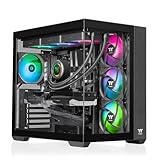
Spec line: Core Ultra 7 270K Plus · GeForce RTX 5070 · 32GB DDR5 · tempered-glass View case · Windows 11
The Thermaltake LCGS View u2770-380 uses one of the newest Intel desktop chips on this list, the Core Ultra 7 270K Plus, with 32GB of DDR5. Thermaltake sells the View line as a display-style build, so it suits buyers who want a visible, RGB-friendly case. It sits in the premium tier, so compare it with the Alienware Aurora and Acer Nitro 85 above before you decide.
Pros: newest Intel CPU in this guide; 32GB of DDR5; glass-panel showcase case. Cons: premium tier for the same RTX 5070; storage size and PSU wattage vary by listing, so verify them. Skip it if budget matters more than looks.
CLX Set (Ryzen 7 7800X3D / RTX 5070) — Best X3D Build With 2TB and a 360mm Cooler

Spec line: Ryzen 7 7800X3D · GeForce RTX 5070 · 32GB DDR5 · 2TB NVMe SSD · 360mm liquid cooler · Wi-Fi
The CLX Set pairs the Ryzen 7 7800X3D, one of the strongest gaming CPUs thanks to its large 3D V-Cache, with 2TB of NVMe storage and a 360mm AIO. It matches the X3D approach of the Lenovo Legion Tower 5 and KOTIN 9800X3D picks above and adds a 2TB drive and a large radiator. Expect the highest price in this group, so it makes sense mainly for high-refresh esports and simulation games that depend on CPU cache.
Pros: X3D gaming cache; 2TB SSD; 360mm AIO. Cons: premium tier; CPU upgrades beyond the X3D chips are limited. Skip it if you play mostly at 4K, where the GPU, not the CPU, is the limit.
What to Expect From an RTX 5070 Prebuilt at Each Price Tier
- At every tier, the GPU performance is the same RTX 5070, so spend extra on RAM, storage and platform life rather than on RGB.
How We Chose
We limited the list to systems that ship with a GeForce RTX 5070 and are currently available, and moved two RTX 5070 Ti systems into Also Consider as step-ups. Because the GPU is the same across the main picks, we ranked them on what surrounds it:
- CPU class and platform: current architectures and AM5 upgrade paths scored higher than end-of-line sockets.
- Memory and storage: 32GB of DDR5 and 2TB of storage scored highest; 16GB and 1TB were acceptable at lower tiers.
- Power supply: 80 Plus Gold units with headroom above NVIDIA’s 650W recommendation scored better.
- Cooling and build: sensible cooling for the CPU’s power draw, and standard parts that can be replaced.
- Brand support and documentation: clear spec sheets and established warranties.
Our sources were manufacturer spec sheets and support pages (MSI, iBUYPOWER, ZOTAC), NVIDIA, AMD and Intel product pages, retailer spec listings and independent reviews. These picks are research-based; we did not benchmark these systems ourselves. Any performance figure in this guide is an estimate based on the hardware tier, not a measurement.
RTX 5070 Prebuilt Buying Guide
What resolution is the RTX 5070 for?
The RTX 5070 is a 1440p card first. With 12GB of GDDR7 on a 192-bit bus, it is comfortable at 2560×1440 with high settings and can manage 4K in lighter games or with DLSS Performance mode. At 1080p it is overkill unless you run a 240Hz or faster monitor. If you play at 4K regularly or love maxed-out textures, look at the RTX 5070 Ti systems with 16GB of VRAM. Our 1440p 144Hz GPU guide covers the trade-offs in more detail.
Which CPU should you pair with an RTX 5070?
For gaming, a six-core Ryzen 5 7600 or Core i5-14400F is enough to keep the RTX 5070 busy at 1440p in most games. An eight-core Ryzen 7 9700X adds headroom for streaming and high-refresh play. A 12-core Ryzen 9 7900X is worth it only if you also do creative work. Here is a quick decision matrix:
| Your main use | CPU class to look for | Pick in this guide |
|---|---|---|
| 1440p gaming only | 6-core Zen 4 / 14th-gen i5 | Skytech R5 7600 or Skytech i5-14400F |
| 1440p high refresh (165Hz+) | 8-core Zen 5 | KOTIN R7 9700X |
| Gaming + streaming | 8-core with 32GB RAM | KOTIN R7 9700X or MSI Codex Z2 |
| Gaming + video editing / 3D | 12-core | iBUYPOWER Element R9 7900X |
| Keep for 5+ years with CPU upgrade | Any AM5 chip | MSI Codex Z2 or Skytech R5 7600 |
Is an X3D processor worth it with an RTX 5070?
AMD’s X3D chips, such as the Ryzen 7 7800X3D and Ryzen 7 9800X3D, stack extra cache on top of the processor for 96MB of L3 in total. Games that constantly fetch data from memory, such as large strategy titles, city builders, simulators, MMOs and fast esports shooters, benefit the most, mainly through higher minimum frame rates and smoother frame pacing.
With an RTX 5070, how much you gain depends on resolution and refresh rate:
- 1440p at 60 to 144Hz in AAA games: the graphics card is usually the limit, so an X3D chip adds little over a Ryzen 5 7600 or Ryzen 7 9700X.
- 1080p or 1440p at 240Hz in esports titles: the CPU sets the pace, and an X3D chip is the strongest option available.
- Planning a big GPU upgrade later: an X3D chip will keep up with a much faster card, which makes it a sensible long-term buy.
If your budget is fixed, putting money into 32GB of RAM and a 2TB SSD first usually brings more everyday benefit at 1440p than moving from a standard eight-core chip to an X3D model.
How much RAM and storage do you need?
Treat 16GB as the minimum and 32GB as the comfortable target for 2026. Dual-channel memory (two sticks) matters more than raw speed; on AM5, DDR5-6000 is the sweet spot. For storage, 1TB holds only a handful of modern AAA games once Windows and updates are installed, so 2TB is the better baseline. Every system here has a spare M.2 slot or can take one, so storage is the cheapest thing to fix later.
RTX 5060 Ti vs RTX 5070 vs RTX 5070 Ti vs RTX 5080: is the 5070 the right tier?
Before committing to an RTX 5070 system, it helps to see where the card sits in NVIDIA’s lineup. Prebuilts are often priced so that the step to the next GPU tier looks small, so the table below shows what each step actually buys.
| GPU | VRAM | Memory bus | CUDA cores | Graphics power | Best fit |
|---|---|---|---|---|---|
| RTX 5060 Ti | 8GB or 16GB GDDR7 | 128-bit | 4,608 | 180W | 1080p high refresh, entry 1440p |
| RTX 5070 | 12GB GDDR7 | 192-bit | 6,144 | 250W | 1440p high settings |
| RTX 5070 Ti | 16GB GDDR7 | 256-bit | 8,960 | 300W | 1440p ultra, entry 4K |
| RTX 5080 | 16GB GDDR7 | 256-bit | 10,752 | 360W | 4K with DLSS |
The practical takeaways are simple. Step down to an RTX 5060 Ti only if you play at 1080p, and choose the 16GB version if you do; the 8GB card is the one to avoid for new AAA games. Step up to an RTX 5070 Ti if you play at 4K or want maximum texture settings for years, since the extra 4GB of VRAM and wider memory bus are what separate the two cards. For 1440p at high settings, the RTX 5070 remains the sweet spot, and the money saved is often better spent on 32GB of RAM or a larger SSD.
What power supply does an RTX 5070 PC need?
NVIDIA recommends a 650W system power supply for the RTX 5070, which has a 250W graphics power rating. Look for 80 Plus Gold. A 750W or 850W unit gives headroom for a future RTX 5070 Ti or 5080-class card. The worked example: a 250W GPU plus a 65W to 170W CPU plus roughly 75W for the board, RAM, drives and fans comes to about 390W to 495W under gaming load, so 650W leaves roughly 25% to 40% headroom and 850W leaves room to upgrade.
AM5 or LGA1700: does the platform matter?
Yes, if you keep PCs for years. AMD’s AM5 socket supports Ryzen 7000, 8000 and 9000 series chips, including the 9000X3D gaming processors, so a CPU upgrade later is a drop-in job. Intel’s LGA1700 socket (12th to 14th gen Core) is at the end of its line; newer Core Ultra 200S chips use a different socket. An LGA1700 prebuilt is fine if you will never change the CPU.
Cooling, noise and case airflow
A 65W-class CPU such as the Ryzen 5 7600, 8700F or 9700X runs happily on a good tower air cooler. Hotter chips like the Ryzen 9 7900X benefit from a 240mm liquid cooler, and the Core i9-14900KF needs a 360mm unit. Look for at least three intake fans and a mesh or vented front panel; glass-front cases with tiny vents run hotter and louder.
Best RTX 5070 Prebuilt PC by Budget Tier
How much does an RTX 5070 prebuilt cost in 2026?
Best RTX 5070 prebuilt under $1,900
- Skytech Ryzen 5 7600 / RTX 5070: Ryzen 5 7600 (6 cores) · 16GB DDR5-6000 · 1TB Gen4 · AM5 upgrade path
- MSI Codex R2 (Core i5-14400F): 10 cores · 32GB DDR5-6000 · 1TB Gen4 · Wi-Fi 6E · LGA1700
- Skytech Core i5-14400F / RTX 5070: 10 cores · 16GB · 1TB · lowest entry price · LGA1700
Best RTX 5070 prebuilt from $1,900 to $2,300
- MSI Codex Z2 (Ryzen 7 8700F): 8 cores · 32GB DDR5 · 2TB SSD · AM5 · 80 Plus Gold PSU
- KOTIN Ryzen 7 9700X / RTX 5070: Zen 5 8 cores · 32GB DDR5 · 1TB · 65W CPU · PSU not fully listed
- iBUYPOWER Element (Core i7-14700F): 20 cores · 32GB DDR5 · 1TB · 750W Gold · LGA1700
- Acer Nitro 85 (Core Ultra 7 265F): 20 cores · 16GB DDR5 · 1TB Gen4 · 240mm liquid cooler · Wi-Fi 7
- Lenovo Legion Tower 5 (Ryzen 7 7800X3D): 96MB L3 cache · 32GB · 1TB · AM5 · big-brand warranty
- Alienware Aurora (Core Ultra 7 265F): 20 cores · 32GB DDR5 · 1TB · Wi-Fi 7 · LGA1851
Best RTX 5070 prebuilt above $2,300
- iBUYPOWER Element (Ryzen 9 7900X): 12 cores · 32GB DDR5-4800 · 1TB · 240mm liquid cooler · 750W Gold
- CyberPowerPC Gamer Xtreme (Ryzen 9 9900X): 12 Zen 5 cores · 32GB DDR5 · B850 board · liquid-cooled
- KOTIN Ryzen 7 9800X3D / RTX 5070: 96MB L3 cache · 32GB DDR5 · 1TB · best for 240Hz esports
If you only shortlist three systems, start with the MSI Codex Z2 (Ryzen 7 8700F, RTX 5070, 32GB DDR5, 2TB SSD) for the most complete spec, the Skytech Ryzen 5 7600 (RTX 5070, DDR5-6000, AM5) for value and upgrades, and the KOTIN Ryzen 7 9700X (RTX 5070, 32GB DDR5) for high-refresh play and streaming. The RTX 5070 Ti systems in Also Consider belong in a higher budget class and are worth the step only if you play at 4K or want 16GB of VRAM.
Prebuilt vs Building Your Own RTX 5070 PC
Two years ago, building your own PC almost always saved money. In 2026 the gap has narrowed sharply. Memory prices rose through 2025 and 2026, and system builders buy RAM, SSDs and GPUs in volume at prices individuals cannot match. For an RTX 5070 system with 32GB of DDR5 and a 2TB SSD, a prebuilt such as the MSI Codex Z2 is often within a modest margin of the same parts bought separately, and it comes with Windows, a warranty covering the whole system and no assembly time.
Building still wins on part quality and choice. You pick the exact power supply model, the motherboard with the features you want, a quieter cooler and a case with better airflow, and you avoid proprietary parts. If you enjoy building, have an existing case or PSU to reuse, or want a specific motherboard feature, DIY remains worthwhile.
A practical middle path is to buy a prebuilt with standard parts on a good platform, then upgrade over time. Systems like the Skytech Ryzen 5 7600 with a large Gold PSU and AM5 socket give you that flexibility. Avoid systems with unlabeled power supplies or proprietary motherboards if you intend to upgrade, and always check the PSU label before planning a GPU swap.
First-Day Setup Checklist for a New RTX 5070 Prebuilt
A prebuilt is ready to play out of the box, but a few minutes of setup makes sure you actually get the performance you paid for. These steps apply to every system in this guide.
- Remove the shipping packing. Many builders pack foam or air cushions inside the case to protect the graphics card in transit. Open the side panel and take it out before the first power-on, because it blocks airflow.
- Plug the monitor into the graphics card. Use the HDMI or DisplayPort outputs on the RTX 5070, not the ports on the motherboard’s rear panel. Several CPUs in this guide, including the “F” models, have no integrated graphics at all.
- Set your monitor’s refresh rate. Windows often defaults to 60Hz. Open Settings, then Display, then Advanced display, and choose the highest refresh rate your monitor supports.
- Check the memory speed. Open Task Manager, go to Performance, then Memory, and look at the speed. If DDR5 rated for 6000 shows a much lower figure, enable the EXPO (AMD) or XMP (Intel) profile in the BIOS. Also confirm that two memory modules are installed, since dual-channel memory matters more than raw speed.
- Update drivers and Windows. Install the latest GeForce driver through the NVIDIA App, run Windows Update, and check the motherboard maker’s site for chipset drivers. Only update the BIOS if the maker recommends it for your model.
- Photograph the power supply label. The label lists the wattage and efficiency rating. Having it on file saves time when you plan a GPU upgrade or contact support.
- Remove trial software. Uninstall preloaded trials and utilities you do not need; they add startup time and background load.
- Run a short stress check. Play a demanding game for an hour with a monitoring overlay showing temperatures and clock speeds. Steady clocks and stable temperatures during the return window are a good sign the cooling is working as intended.
- Keep the box and register the warranty. Store the packaging until the return period ends, and register the system with the maker so warranty claims go smoothly.
If anything looks wrong, such as memory stuck at a low speed, a missing second memory stick or temperatures that keep climbing, contact the seller during the return window rather than living with it.
Frequently Asked Questions
Is an RTX 5070 prebuilt good for 1440p gaming?
Yes. An RTX 5070 prebuilt is well suited to 1440p gaming at high settings, with DLSS 4 and frame generation adding headroom in supported games. Pair it with at least a six-core current CPU and 16GB of RAM, ideally 32GB, and a 144Hz to 165Hz 1440p monitor to make the most of it.
Is 12GB of VRAM enough in 2026?
For 1440p, 12GB of VRAM is enough in nearly all current games at high settings, though a few titles with ultra textures and path tracing can push beyond it. At 4K with maximum textures it can become a limit. If 4K is your main goal, an RTX 5070 Ti system with 16GB is the safer buy.
Can an RTX 5070 PC run games at 4K?
Yes, an RTX 5070 PC can run many games at 4K using DLSS in Performance or Balanced mode, and lighter or older games run well at native 4K. Demanding new releases at native 4K with ray tracing will usually need lower settings. For regular 4K play, consider an RTX 5070 Ti or 5080 system.
What is the difference between the RTX 5070 and RTX 5070 Ti?
The RTX 5070 Ti has 16GB of GDDR7 on a 256-bit bus and noticeably more CUDA cores than the RTX 5070’s 12GB on a 192-bit bus. In practice the Ti is a stronger 1440p ultra and entry 4K card. It also needs more power, with NVIDIA recommending a 750W supply.
Should I buy an Intel or AMD RTX 5070 prebuilt?
For most buyers, AMD is the better choice in 2026 because AM5 offers a CPU upgrade path and current Ryzen chips are efficient. Intel LGA1700 systems like the Core i5-14400F builds are good value for pure gaming but have no future CPU upgrades. Choose Intel if the price is right and you will not change the CPU.
How long will an RTX 5070 gaming PC last?
An RTX 5070 gaming PC should handle new games at 1440p for around four to five years, with settings gradually lowered toward the end of that span. DLSS support extends its useful life. Systems with 32GB of RAM, a Gold PSU with headroom and an AM5 board can be refreshed with a GPU or CPU upgrade to last longer.
Do RTX 5070 prebuilts support DLSS 4 and frame generation?
Yes. Every RTX 5070 supports DLSS 4, including multi frame generation in supported games, plus NVIDIA Reflex to reduce latency. These features work the same in a prebuilt as in a self-built PC. Keep NVIDIA drivers updated and see our DLSS setup guide for the best settings.
Does upgrading the RAM or adding an SSD void a prebuilt’s warranty?
In most cases, adding memory or a second M.2 drive to a prebuilt with standard parts does not void the warranty, but policies differ by brand and some exclude damage caused during an upgrade. Read the warranty terms first, keep the original parts, and avoid breaking any seals the maker marks as warranty-protected.
What monitor should I pair with an RTX 5070 prebuilt?
A 1440p monitor running at 144Hz to 180Hz is the natural match for an RTX 5070, since the card can drive high settings at that resolution with DLSS adding extra headroom. A 1080p monitor at 240Hz or faster suits competitive players, especially with an X3D processor. A 4K monitor works for lighter games or with DLSS Performance mode, but if 4K is your main goal, an RTX 5070 Ti system is the better fit.
Why does my new prebuilt show a lower RAM speed than advertised?
Many prebuilts ship with memory running at the default JEDEC speed rather than the rated profile, so DDR5-6000 can show up as 4800 or lower in Task Manager. Turning on EXPO or XMP in the BIOS usually fixes it in a minute. If the kit’s rated speed is itself low, such as DDR5-4800, the reading is expected and only a memory upgrade will raise it.
What is the best RTX 5070 prebuilt gaming PC right now?
The MSI Codex Z2 is the best RTX 5070 prebuilt PC for most buyers because it includes 32GB of DDR5 and a 2TB SSD. The Skytech Ryzen 5 7600 is the better value pick if you can add RAM later.
Is an RTX 5070 prebuilt with 16GB of RAM enough?
Yes for most games today, but 32GB is the safer target. Systems like the HP OMEN 45L list 16GB, so budget for a second 16GB kit or choose a model that ships with 32GB.
Which RTX 5070 prebuilt has the best CPU for gaming?
The Ryzen 7 7800X3D in the CLX Set and the X3D chips in our earlier picks have the strongest gaming cache. At 1440p and above the difference is smaller, because the RTX 5070 becomes the limit.
Which RTX 5070 Prebuilt Should You Buy?
- Most 1440p gamers: the MSI Codex Z2 for 32GB of RAM, 2TB of storage and AM5.
- Best value with upgrade headroom: the Skytech Ryzen 5 7600, then add RAM later.
- High-refresh gamers and streamers: the KOTIN Ryzen 7 9700X.
- Gaming plus video editing or 3D: the iBUYPOWER Element with Ryzen 9 7900X.
- Intel fans wanting 32GB at a mid price: the MSI Codex R2.
- Lowest entry price: the Skytech Core i5-14400F.
Whichever you choose, check the power supply label and plan your first upgrade before you buy. For more help choosing the right card for your games, see our ARC Raiders GPU guide and 1080p 144Hz GPU guide.
Sources
- NVIDIA GeForce RTX 5070 family specifications
- AMD Ryzen 7 9700X specifications
- MSI Codex R2 14th product page
- iBUYPOWER EWA9N5702 support specifications
- ZOTAC GAMING MEK 5070 Ti gaming PC
Last updated: October 9, 2026

Write Your Review
No reviews yet. Be the first to share your experience!