
Data analysis rewards a machine that can chew through large tables, run models and keep several tools open at once, and a mini workstation can now do that work from a box the size of a paperback. The real decision is not about size but about balance: enough processor cores for parallel work, enough memory to hold a dataset in play, fast storage, and ports for the monitors and drives your workflow needs. A machine that skimps on memory will stall on the same job a bigger one finishes quietly.
This guide is for analysts, students, researchers and small-business owners who clean data, build dashboards, run notebooks and prepare reports from a home office or a shared desk. The four below were chosen from the names and specifications on their Amazon product pages, with attention to processor strength, memory, storage and connectivity. Use the buying criteria to match a machine to your datasets and the tools you run every day.
Quick Picks
As an Amazon Associate we earn from qualifying purchases
| Product | Best for | Key spec from title |
|---|---|---|
| Apple Mac mini M4 | Everyday analysis in a quiet, tiny desktop | M4 chip with 10-core CPU and 16GB memory |
| Apple Mac mini M4 Pro | Heavier datasets and parallel workloads | M4 Pro chip with 12-core CPU and 24GB memory |
| MINISFORUM UM790 Pro | Windows analysis with upgradeable memory | Ryzen 9 7940HS and 32GB DDR5 |
| Beelink SER8 | A flexible Windows mini PC for notebooks and dashboards | Ryzen 7 8845HS and 32GB DDR5 |
How to Choose
Processor Cores for Parallel Work
Data work splits naturally across cores: cleaning one table while a model trains on another, or refreshing a dashboard while a query runs. A chip with more cores finishes those overlapping jobs faster, so count cores against the tools you use. The M4 Pro and the Ryzen 9 7940HS in this guide suit heavier parallel workloads, while the standard M4 and Ryzen 7 8845HS cover everyday spreadsheets, notebooks and reporting. If your day is mostly one tool at a time, fewer cores will still feel quick.
Memory for Large Datasets
Memory is the most common bottleneck in data analysis, because a dataset that fits in RAM is far faster to filter, join and reshape than one that must be read from disk again and again. A 16GB machine handles spreadsheets and modest tables well, while 24GB or 32GB gives larger datasets and several open applications room to breathe. Check whether the memory is soldered or upgradeable before you buy, since a machine you cannot expand locks in its limits on day one. That single detail decides whether a future upgrade is a quick swap or a whole new purchase.
Storage Speed and Room to Grow
Fast storage shortens every part of an analysis workflow, from loading a raw file to writing out cleaned results. All four machines in this guide use solid-state storage, but the capacity and the number of drive slots still matter: a 512GB drive fills quickly when projects keep raw and processed copies side by side. Look for a second drive slot or a fast external port so you can archive finished projects without deleting the working files you still need. A second slot or a fast USB4 port turns archiving into a quick copy instead of a chore.
Ventilation, Power and Safe Handling
A mini workstation packs a full processor into a small case, so it needs clear airflow to hold its speed through a long job. Keep the vents free, set the machine on a hard flat surface rather than on soft fabric, and leave a gap around it instead of wedging it between books or inside a closed cabinet. Use the supplied power adapter and cable, and let the machine finish shutting down before you unplug it or carry it. These small habits protect both the hardware and the work stored on it.
The 4 Best Options
Apple Mac mini M4
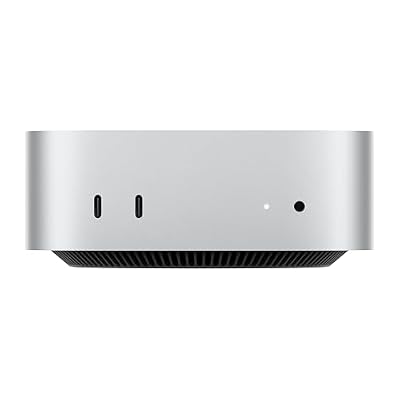
The Mac mini M4 is the quiet starting point for analysts who work in spreadsheets, notebooks and dashboard tools and want a machine that disappears on the desk. Its M4 chip with a 10-core CPU handles everyday cleaning, filtering and charting with ease, and the 16GB of unified memory keeps several applications open at once. The 512GB solid-state drive loads projects quickly, and Gigabit Ethernet gives a stable wired connection for pulling data from a local server or network drive.
Specs
- Apple M4 chip with 10-core CPU and 10-core GPU
- 16GB unified memory
- 512GB SSD storage
- Gigabit Ethernet
- Works with iPhone and iPad
Best for: Everyday analysis, reporting and dashboard work in a quiet home office.
Watch out for: The 16GB of unified memory and 512GB of storage are fixed, so confirm they fit your largest projects.
ASIN: B0DLBX4B1K — https://www.amazon.com/dp/B0DLBX4B1K
Apple Mac mini M4 Pro
The Mac mini M4 Pro is the step up for analysts whose datasets and models outgrow the base model. Its M4 Pro chip adds two more CPU cores and a stronger graphics processor, and the 24GB of unified memory holds larger tables in play while notebooks, browsers and database tools run side by side. The same compact case and 512GB of fast storage keep it desk-friendly, while the extra memory headroom makes long-running jobs feel calmer and more predictable.
Specs
- Apple M4 Pro chip with 12-core CPU and 16-core GPU
- 24GB unified memory
- 512GB SSD storage
- Gigabit Ethernet
- Works with iPhone and iPad
Best for: Heavier datasets, parallel workloads and analysts who keep many tools open at once.
Watch out for: Storage stays at 512GB, so plan an external drive for archiving finished projects.
ASIN: B0DLBVHSLD — https://www.amazon.com/dp/B0DLBVHSLD
MINISFORUM UM790 Pro

The MINISFORUM UM790 Pro is the strongest Windows option here for analysts who want generous memory and room to expand. Its Ryzen 9 7940HS processor reaches up to 5.2 GHz, and the 32GB of DDR5 memory plus 1TB solid-state drive give large datasets and long notebook sessions plenty of space. Dual USB4 ports, dual HDMI 2.1 outputs and a 2.5G Ethernet port make it easy to run several monitors and a fast wired network at the same time.
Specs
- AMD Ryzen 9 7940HS processor, up to 5.2 GHz
- 32GB DDR5 memory
- 1TB SSD storage
- AMD Radeon 780M graphics
- 2x USB4 ports and 2x HDMI 2.1 outputs
- 2.5G Ethernet, Wi-Fi 6E and Bluetooth 5.3
Best for: Windows-based analysis with large datasets, multiple monitors and a wired network.
Watch out for: Check the memory and drive upgrade options for your exact configuration, since mini PC variants differ.
ASIN: B0CJM9JDNM — https://www.amazon.com/dp/B0CJM9JDNM
Beelink SER8

The Beelink SER8 is a flexible Windows mini PC for analysts who juggle notebooks, dashboards and video calls from one small box. Its Ryzen 7 8845HS processor reaches up to 5.1 GHz, and the 32GB of DDR5 memory with a 1TB PCIe 4.0 solid-state drive keeps medium-sized datasets responsive. Triple-display support, WiFi 6 and a 2.5Gbps Ethernet port cover the usual home-office setup, and Windows 11 Pro fits workplaces that need domain and management features.
Specs
- AMD Ryzen 7 8845HS processor, up to 5.1 GHz
- 32GB DDR5 RAM
- 1TB M.2 PCIe 4.0 SSD
- AMD Radeon 780M graphics
- Triple display support
- WiFi 6, Bluetooth 5.2 and 2.5Gbps Ethernet
- Windows 11 Pro
Best for: Notebook and dashboard work on Windows with three monitors and a wired connection.
Watch out for: Confirm the exact memory and storage configuration in the listing, since the SER8 is sold in several variants.
ASIN: B0D49PCZYX — https://www.amazon.com/dp/B0D49PCZYX
Which One Fits Your Situation
You Analyse Spreadsheets and Build Reports
Choose the Apple Mac mini M4. Spreadsheets, reporting tools and dashboard apps run comfortably on its 10-core CPU and 16GB of unified memory, and the silent operation suits a shared room or a quiet home office. The 512GB drive holds a working set of projects, and the compact case leaves your desk clear for notebooks and a second monitor.
Your Datasets Keep Growing
Choose the MINISFORUM UM790 Pro. The 32GB of DDR5 memory and 1TB drive give large tables room to load and reshape without constant disk access, and the Ryzen 9 processor handles parallel cleaning and modelling jobs. Dual USB4 ports and a 2.5G Ethernet connection also make it easy to attach fast external storage when a project outgrows the internal drive.
You Run Models While Other Tools Stay Open
Choose the Apple Mac mini M4 Pro. The extra CPU cores and 24GB of unified memory keep a training run going while a notebook, a database client and a browser stay open beside it. That headroom matters most on long workdays when closing tools to free memory would break your flow and slow the analysis down.
You Need Windows with Three Monitors
Choose the Beelink SER8. Triple-display support lets you keep a notebook on one screen, a dashboard on another and reference material on a third, while the 32GB of memory and 1TB drive handle medium-sized datasets. Windows 11 Pro also fits office environments that expect standard management and sign-in features. The wired Ethernet port keeps large file transfers steady while video calls run.
Common Mistakes
- Buying the smallest memory option for datasets that will only grow over the next few years.
- Judging a mini PC by its size instead of checking its ports, drive slots and upgrade options.
- Storing every project on one small internal drive instead of archiving finished work externally.
- Blocking the vents by tucking the machine into a drawer or behind a stack of books.
- Choosing an operating system that does not run a tool your team or course already depends on.
Frequently Asked Questions
Is 16GB of memory enough for data analysis?
For spreadsheets, reporting and modest datasets, 16GB is enough and keeps everyday tools responsive. Larger tables, several open applications and long notebook sessions benefit from 24GB or 32GB, since data held in memory is faster to reshape than data read from disk. If your datasets are growing, choose the larger memory option now rather than replacing the machine later.
Can a mini PC handle Python and R workloads?
Yes, a modern mini workstation handles Python and R well, including notebooks, data cleaning and visualisation. The processors in this guide cover everyday analysis, and the models with more cores and memory suit heavier jobs. For very large training runs, a cloud service or a larger desktop still makes sense, but most daily analysis fits comfortably on these machines.
How much storage do I need for data analysis?
A 512GB drive covers a working set of projects, but raw files, processed copies and exports add up quickly, so 1TB gives more breathing room. Keep finished projects on an external drive or network storage and leave free space on the internal drive for active work. Fast external ports make archiving painless when a project is done.
Do mini workstations overheat during long jobs?
They can throttle if the vents are blocked or the machine sits on a soft surface, but clear airflow keeps them running at full speed. Place the unit on a hard flat surface, leave a gap around it and keep the vents clean. The compact designs in this guide are built for sustained office workloads when they can breathe.

Write Your Review
No reviews yet. Be the first to share your experience!