
A sim racing handbrake is the lever that turns rally hairpins and drift transitions from guesswork into control. A wheel button can only switch the rear brakes on or off, while a proper lever reads how far it is pulled and locks the rear wheels in proportion, letting a driver flick a car sideways, hold a slide, or tuck into a tight hairpin.
The five handbrakes below cover the range a PC racer is likely to meet: a machined aluminum lever for a permanent rig, a clamp-mounted pick for a desk, a dual-interface lever with a console mode, and two steel budget levers with mounting hardware. Most are PC-only over USB, so check platform support first.
As an Amazon Associate, we earn from qualifying purchases.
Quick Answer
For most PC drift and rally drivers, buy the Moza HBP: a CNC aluminum lever with a 16-bit non-contact sensor, adjustable springs and a mount that fits horizontal or vertical rigs. Choose the aikeec for a desk setup, the CXCESNS when a G29 console mode matters, and the CNRAQR or ZHSYMX when a steel lever with a plate suits a tight budget.
Table of Contents
- Quick Answer
- 1. Moza HBP Handbrake
- 2. aikeec 64-Bit USB Handbrake
- 3. CXCESNS USB Handbrake
- 4. CNRAQR 16-Bit USB Handbrake
- 5. ZHSYMX 64-Bit USB Handbrake
- How to Choose a Sim Racing Handbrake
- Who Should Skip a Sim Racing Handbrake
- Frequently Asked Questions
- Final Verdict
- Product and ASIN Reference
1. Moza HBP Handbrake
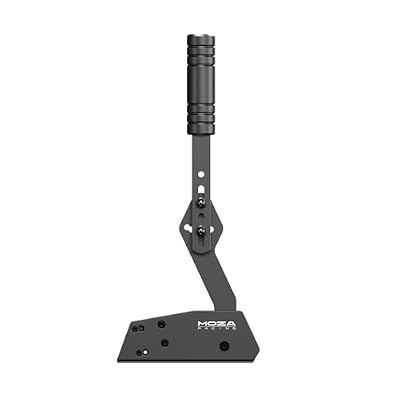
Best overall pick for most PC drift and rally drivers
The Moza HBP is the most complete lever here: a CNC-machined aluminum body with an anodized finish, a non-contact 16-bit angle sensor, and parts that change how the pull feels. The sensor reads lever position without a wiper dragging on a track, so nothing wears and nothing drifts out of calibration. A spare spring, damper, and spacers come in the box, and moving the stop changes travel. It mounts horizontally or vertically, and connects over USB to the PC or into a Moza wheelbase with a handbrake port. Desk mounting hardware is a separate purchase, and the unit is PC-only.
Specs
- Brand: Moza
- Sensor: 16-bit non-contact angle sensor
- Body: CNC-machined aviation-grade aluminum, anodized finish
- Mounting: Horizontal or vertical, adjustable lever angle
- Connection: USB to PC, or cable to a Moza wheelbase with a handbrake port
- Compatibility: PC; Moza wheelbases with a handbrake port
- In the box: Base and lever, spare spring, damper, spacers, tools
- Dimensions: 6.02 x 2.68 x 14.39 inches
- Tier: Premium
2. aikeec 64-Bit USB Handbrake

Best pick for a desk setup
The aikeec is the easiest lever here to get driving, which is why it suits a desk rig. Its non-contact Hall sensor calibrates itself, so the pull reads the same every session with no driver install: plug in the cable and Windows sees a controller. Handle height and angle adjust, and four buttons map alongside the axis. A desk clamp comes in the box, which sets it apart at this tier, since most levers here expect a rig to bolt onto. The trade is the dead zone some units show at the start of the pull, and it is PC-only, with no console support.
Specs
- Brand: aikeec
- Sensor: 64-bit Hall sensor, self-calibrating
- Body: Aluminum construction
- Mounting: Desk clamp included
- Connection: USB, plug-and-play on Windows, no drivers
- Compatibility: PC Windows only
- Cable: 2 m nylon cable
- Extra controls: 4 buttons
- Dimensions: 8 x 7 x 5 inches
- Tier: Budget
3. CXCESNS USB Handbrake

Best pick when a console mode matters
The CXCESNS is the only lever here with a console route in its manual: a USB interface that connects to a Logitech steering wheel and a Type-C interface that connects to a PS4 or PS5 host, with a red button to switch it on. The manual states that the console mode works with a G29 steering wheel, and the PC side sets up through the standard Windows game-controller settings. The body is mostly metal with high-rigidity compression springs, the foam grip fills the hand better than bare steel, and the nylon USB cable measures 63 inches. The catch is that the console story is not consistent across sources: roundups list this lever as PC-first, so confirm the console setup for the exact wheel and game before buying for console.
Specs
- Brand: CXCESNS
- Sensor: 16-bit Hall sensor, auto-calibrating
- Body: Mostly metal with high-rigidity compression springs, foam grip
- Mounting: Bolt-down base
- Connection: USB and Type-C interfaces
- Compatibility: PC Windows; console mode listed for PS4/PS5 with a G29 wheel
- Cable: 63-inch nylon USB cable
- Tier: Mid-range
4. CNRAQR 16-Bit USB Handbrake

Best budget pick with mounting hardware included
The CNRAQR wins the budget group on completeness: the fixing clip and mounting plate come in the box, so there is no hardware-store trip the week it arrives. The body is low-carbon steel with a solid feel, and the sensor is a 16-bit non-contact unit, the same class as the pricier handbrakes here. The lever has a mechanical weight to the pull and a quick return, and the listed cable reaches 2 m. It is built for a rig rather than a desk: the plate bolts to aluminum profile, and the lever height adjusts to match the seat. It runs plug-and-play on Windows. The trade is finish: a steel lever will start talking eventually, a dab of grease on the pivot quiets the squeak, and the bolts arrive hand-tight and need going over in the first week.
Specs
- Brand: CNRAQR
- Sensor: 16-bit non-contact sensor
- Body: Low-carbon steel, curved handle
- Mounting: Fixing clip and plate included
- Connection: USB, plug-and-play on Windows
- Compatibility: PC Windows only
- Cable: 2 m USB cable
- Tier: Budget
5. ZHSYMX 64-Bit USB Handbrake

Best budget pick for an adjustable handle
The ZHSYMX is the quiet one of the group: plug the cable in, bind the axis in the game, and drive. Its body mixes CNC-machined aluminum with mild steel, the fixing clip and plate come in the box, and the handle height adjusts while the lever direction flips forward or back to suit where it is mounted. That direction adjustment lets one lever sit in front of the wheel or off to the side. The listed sensor is a 64-bit non-contact Hall unit, a number that matters less than the spec sheet suggests, since a 16-bit sensor already splits a lever’s travel into far more positions than a hand can tell apart. The listing names PS4 and PS5 support with a G29 wheel in one place and limits use to PC Windows in another, so treat it as a PC lever and confirm before buying for console.
Specs
- Brand: ZHSYMX
- Sensor: 64-bit non-contact Hall sensor
- Body: CNC-machined aluminum and mild steel
- Mounting: Fixing clip and plate included
- Connection: USB, plug-and-play on Windows
- Compatibility: PC Windows; console support unconfirmed
- Cable: 2 m USB cable
- Tier: Budget
How to Choose a Sim Racing Handbrake
Mounting decides whether the lever gets used. Most handbrakes here attach by a clamp on a desk edge or a plate bolted to an aluminum-profile rig. The clamp is the faster route and the weaker one: a hard pull sends force into the desk edge, so a thin desk flexes and the lever feels vague. On a rig, buy for the plate and check hole spacing against the extrusion. On a desk, measure the thickness where the clamp will close.
The sensor decides how the pull holds up over time. A non-contact Hall or angle sensor reads lever position without a wiper wearing on a track, so it keeps its calibration and does not develop a flat spot. The bit count on the box is the least useful number in the guide: a 16-bit sensor already resolves far more positions than a hand can distinguish. Platform support is the check people skip and regret. Most USB handbrakes are PC-only, and a console needs a handbrake that connects through a licensed wheelbase, which in practice means Thrustmaster or Fanatec hardware. The CXCESNS manual describes a console mode with a G29 wheel, and the ZHSYMX listing names console support in one place, but both are inconsistent enough that a console buyer should confirm the exact wheel, game, and connection before ordering. On PC, check that the game accepts a separate USB controller and offers a handbrake binding.
Who Should Skip a Sim Racing Handbrake
Skip a handbrake when the racing is mostly circuit, GT, or formula cars, since those cars never use one and the lever will sit unused beside the wheel. Skip it too when the rig has nowhere solid to mount it: a lever clamped to a thin desk flexes under a hard pull and feels worse than a wheel button. Console drivers should skip the USB-only picks unless the setup already runs a compatible licensed base. And when the budget only stretches to one upgrade, a better wheel or load-cell pedal set changes lap times more than a handbrake does, so buy that first and add the lever when rally or drift becomes the regular diet.
Frequently Asked Questions
Do I need a handbrake for sim racing?
Only for rally and drift. Hairpins, drift initiations, and tight rally corners use the lever constantly, while circuit racing, GT cars, and formula cars never touch one. Buy it when a game makes you want it.
Will a USB handbrake work on PS5 or Xbox?
A standalone USB handbrake is PC-only in almost every case. On console it must connect through a compatible licensed wheelbase, which today means Thrustmaster or Fanatec hardware. The CXCESNS manual describes a console mode with a G29 wheel, so confirm that exact setup before buying for console.
What sensor type should I look for?
A non-contact Hall or angle sensor is the pick: it reads lever position without a wearing part and holds calibration. Every lever in this guide uses one. The bit count matters less: a 16-bit sensor already resolves more positions than a hand can feel.
How do I mount a handbrake to a desk or a rig?
On a desk, use a clamp-mounted lever such as the aikeec and measure the desk edge thickness where the jaw will close. On a rig, use a plate-mounted lever such as the CNRAQR or ZHSYMX and check the hole spacing against the profile. A solid mount matters more than the sensor, since a lever that shifts under a pull feels vague.
Final Verdict
For most PC drift and rally drivers, buy the Moza HBP: the machined aluminum body, non-contact sensor, and tunable springs make it the lever that survives a rig kept for years. Take the aikeec when the setup is a desk, the CXCESNS when a G29 console mode is part of the plan, the CNRAQR when the mounting plate in the box matters most, and the ZHSYMX when the handle direction needs to flip. Match mount and platform first, and the lever follows.
Product and ASIN Reference
| Product | ASIN |
|---|---|
| Moza HBP Handbrake | B0DHHJXRLH |
| aikeec 64-Bit USB Handbrake | B07V79MXF2 |
| CXCESNS USB Handbrake | B095JJHH3R |
| CNRAQR 16-Bit USB Handbrake | B09J8DD3RK |
| ZHSYMX 64-Bit USB Handbrake | B0CQR1MGVM |


Write Your Review
No reviews yet. Be the first to share your experience!