
Simulation games reward a desktop that can stay cool for hours, because a flight across a detailed map or a long session building a city keeps the processor and graphics card working without a break. Liquid cooling moves heat away from the processor more effectively than a small air cooler, which helps a system hold its speed instead of slowing down as temperatures climb. For simulation players, that steady performance matters more than a brief burst of speed at the start of a session.
This guide is for players who run flight simulators, racing simulators, city builders and farming games for long stretches and want a desktop that stays quiet and consistent while doing it. It compares four liquid-cooled desktops using the names and specifications shown on their Amazon product pages, focusing on the cooling design, processor, graphics card and memory that decide how a simulation feels after the first hour.
Quick Picks
As an Amazon Associate we earn from qualifying purchases
| Product | Best for | Key spec from title |
|---|---|---|
| HP OMEN 45L GT22-1072 | Balanced liquid cooling with a strong GPU | RTX 4070 Ti, Cryo Chamber |
| iBUYPOWER Y60 | High-end simulation with a 240mm cooler | RTX 4070 Ti Super, 32GB DDR5 |
| CyberPowerPC Gamer Supreme i9 | Powerful CPU and GPU for large worlds | RTX 4070, 32GB RAM |
| CyberPowerPC Gamer Supreme Ryzen 7 | Fast simulation with a modern AMD CPU | RTX 4070 Ti Super, 32GB DDR5 |
How to Choose
Understand what liquid cooling actually cools
Liquid cooling in these desktops usually cools the processor, not every component, so read the listing carefully before assuming the whole system is liquid cooled. A liquid-cooled processor stays cooler under the sustained load of a simulation, which helps it hold its speed through a long session, while the graphics card may still rely on its own fans. Some models, such as the Corsair ONE range, liquid-cool both parts, but most prebuilt desktops in this guide cool the CPU with liquid and the GPU with air. Knowing which parts are cooled tells you where the benefit lies and where airflow still matters.
Match the processor and graphics card to your simulator
Different simulators stress different parts of a system, so match the build to the games you actually play. Flight simulators lean on both a strong processor for scenery loading and a capable graphics card for detailed terrain, while city builders and strategy simulators lean harder on the processor for AI and population calculations. Racing simulators reward a fast graphics card for smooth frame delivery at high refresh rates. Look at the processor and graphics card together in each listing, and favour a balanced pairing over a machine that is strong in one area and thin in the other.
Check memory, storage and the power supply
Long simulation sessions with mods, add-ons and background apps use more memory than a short match in another genre, so 32GB is a comfortable target for the most demanding titles, while 16GB suits lighter simulators. Storage matters too: a 2TB SSD holds several large simulators and their expansions without forcing you to uninstall games, and a fast NVMe drive shortens loading times for large maps. The power supply deserves a check as well, since a liquid-cooled desktop with a high-end graphics card draws serious power under load, so confirm the listed supply is adequate for the components and leave headroom for future upgrades.
Handle liquid cooling, ventilation and power safely
A liquid-cooled desktop needs the same care as any powerful electrical device, plus attention to its cooling loop. Keep the case vents clear and leave space around the intake and exhaust so air can move freely, since the radiator still depends on airflow to shed heat. Place the tower on a stable surface, keep liquids away from the top vents, and plug it into a grounded outlet with a surge protector. Never open the case while it is running, let the machine cool before moving it, and listen for changes in fan or pump noise, which can signal that dust has built up or airflow is blocked.
The 4 Best Options
HP OMEN 45L GT22-1072

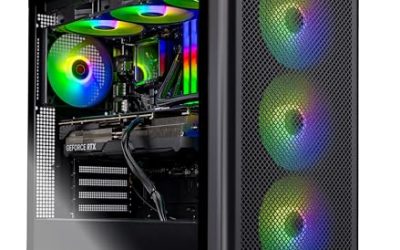
The HP OMEN 45L GT22-1072 suits a simulation player who wants a proven liquid-cooled design without stepping up to the most expensive configuration. Its patented OMEN Cryo Chamber cooling system channels cool air to the liquid cooler, helping the Core i7-13700KF processor hold its speed during long sessions, while the RTX 4070 Ti graphics card renders detailed scenery. Sixteen gigabytes of RAM and a 1TB SSD keep the system responsive for popular simulators, and Windows 11 Home is ready out of the box. It is a balanced choice for players who want liquid cooling and strong graphics in one package.
Specs
- Processor: Intel Core i7-13700KF
- Graphics: NVIDIA GeForce RTX 4070 Ti
- Memory: 16 GB RAM
- Storage: 1 TB Solid State Drive
- Cooling: liquid-cooled OMEN Cryo Chamber system
- Operating system: Windows 11 Home
Best for: Simulation players who want a balanced liquid-cooled desktop for current titles at strong settings.
Watch out for: The 16GB of memory may feel tight for heavily modded simulators, so check your games and mods before deciding.
ASIN: B0BZ3131MX
HP OMEN 45L GT22-1072 on Amazon
iBUYPOWER Y60

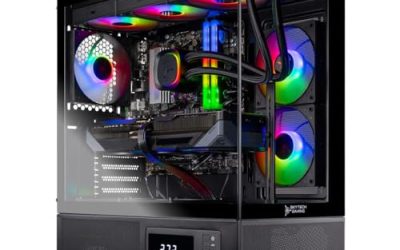
The iBUYPOWER Y60 suits a simulation player who wants high-end hardware and a clear view of it, since its HYTE Y60 case pairs a 240mm liquid CPU cooling system with a glass-sided design. A Ryzen 9 7900X processor and an RTX 4070 Ti Super graphics card handle demanding flight and racing simulators, while 32GB of DDR5 RGB memory and a 2TB NVMe drive give large worlds and mod collections room to breathe. WiFi readiness and Windows 11 Home make setup straightforward. Choose it when your simulation library is large and you want a desktop that stays capable as new titles arrive.
Specs
- Processor: AMD Ryzen 9 7900X
- Graphics: NVIDIA GeForce RTX 4070 Ti Super 16GB
- Memory: 32GB DDR5 RGB 5200MHz RAM
- Storage: 2TB NVMe SSD
- Cooling: 240mm liquid CPU cooling system
- Operating system: Windows 11 Home
Best for: Demanding simulators with large worlds, heavy mods and long sessions.
Watch out for: The glass case looks striking but needs clear space around it for airflow, so measure your desk before placing it in a tight corner.
ASIN: B0DDZ92PD5
iBUYPOWER Y60 on Amazon
CyberPowerPC Gamer Supreme i9-13900KF

The CyberPowerPC Gamer Supreme with a Core i9-13900KF suits a simulation player who wants a powerful processor for the calculations that keep a simulated world alive. Its RTX 4070 graphics card, 32GB of memory and 2TB SSD handle detailed scenery and large maps, while liquid cooling helps the processor sustain its speed through long sessions. Windows 11 Home is included, and the black tower fits a standard desk setup without demanding a special layout. Pick this model when your simulators lean on processor power for traffic, AI and physics as much as on graphics.
Specs
- Processor: Intel Core i9-13900KF
- Graphics: NVIDIA GeForce RTX 4070 12GB
- Memory: 32GB RAM
- Storage: 2TB SSD
- Cooling: liquid cooled
- Operating system: Windows 11 Home
Best for: Processor-heavy simulators such as city builders and large-scale flight titles.
Watch out for: Confirm the exact liquid-cooling setup in the listing, since the cooled component and radiator size vary between Gamer Supreme configurations.
ASIN: B0C39VL7W8
CyberPowerPC Gamer Supreme i9-13900KF on Amazon
CyberPowerPC Gamer Supreme Ryzen 7 7800X3D

The CyberPowerPC Gamer Supreme with a Ryzen 7 7800X3D suits a simulation player who wants a modern AMD processor known for strong gaming performance, paired with an RTX 4070 Ti Super graphics card. Its 32GB of DDR5 memory and 2TB PCIe Gen4 SSD keep large simulation worlds loading quickly, and the liquid-cool design helps the system stay steady during extended play. WiFi readiness and Windows 11 Home round out a desktop that is ready for a long evening of simulation without extra setup. Choose it when you want current-generation parts and generous storage in one liquid-cooled build.
Specs
- Processor: AMD Ryzen 7 7800X3D
- Graphics: NVIDIA GeForce RTX 4070 Ti Super 16GB
- Memory: 32GB DDR5
- Storage: 2TB PCIe Gen4 SSD
- Cooling: liquid cool
- Operating system: Windows 11 Home
Best for: Current simulation titles that benefit from a fast AMD processor and a strong graphics card.
Watch out for: Check the listed ports and connectivity against your headset, wheel and controller setup, since simulation rigs often need more USB connections than a standard desk.
ASIN: B0CSMKTXDQ
CyberPowerPC Gamer Supreme Ryzen 7 7800X3D on Amazon
Which One Fits Your Situation
You play flight simulators for hours at a time
Choose the iBUYPOWER Y60 when long flight sessions demand steady performance and plenty of storage. Its Ryzen 9 processor and RTX 4070 Ti Super handle detailed terrain and weather, while 32GB of memory and a 2TB drive leave room for scenery packs and add-ons. The 240mm liquid cooler helps the processor hold its speed through a full evening of flying.
You want liquid cooling without the top-tier build
Choose the HP OMEN 45L GT22-1072 when you want the benefits of liquid cooling in a balanced, mid-range package. Its Cryo Chamber system keeps the Core i7 processor cool, and the RTX 4070 Ti handles current simulators well. It is the right pick when your games are demanding but your budget does not stretch to the highest configuration.
Your simulators lean on processor power
Choose the CyberPowerPC Gamer Supreme with the Core i9-13900KF when your games are city builders, strategy simulators or large-scale flight titles that calculate constantly. Its powerful processor and 32GB of memory handle AI, traffic and physics, while liquid cooling helps it sustain that work. The 2TB SSD also leaves room for several large titles at once.
You want current parts and generous storage
Choose the CyberPowerPC Gamer Supreme with the Ryzen 7 7800X3D when you want a modern AMD processor, a strong RTX 4070 Ti Super and a 2TB Gen4 SSD in one liquid-cooled desktop for long sessions. It suits players who keep several simulators installed and play the newest titles, where fast loading and steady frame delivery both matter.
Common Mistakes
- Assuming liquid cooling covers every component, when most of these desktops liquid-cool the processor only.
- Buying 16GB of memory for heavily modded simulators that really need 32GB to run smoothly.
- Placing a liquid-cooled tower in a tight corner with blocked vents, so the radiator cannot shed heat.
- Choosing a 1TB drive for a library of large simulators, then uninstalling games to make room.
- Ignoring the processor, even though simulation physics, AI and traffic depend on it as much as graphics.
Frequently Asked Questions
Does liquid cooling make a simulation desktop faster?
Liquid cooling does not add speed by itself, but it helps a processor hold its speed longer by moving heat away more effectively than a small air cooler. That matters in simulation games, where the processor works hard for hours rather than in bursts. A well-cooled system stays consistent, while a hot system may slow down as temperatures climb.
Is liquid cooling safe for a desktop that runs for hours?
Yes, factory-fitted liquid cooling in a prebuilt desktop is designed for sustained use, provided vents stay clear and the tower sits on a stable surface. Keep radiator airflow open, clean dust from the filters, and listen for changes in fan or pump noise. Never open the case while it is running, and let the machine cool before moving it.
How much memory do simulation games need?
Sixteen gigabytes is enough for many popular simulators, especially lighter farming, trucking and management titles. Heavily modded flight simulators and large city builders benefit from 32GB, which leaves room for mods, background apps and bigger worlds. If you plan to add mods or stream while playing, treat 32GB as the safer choice.
Do I need a 2TB drive for simulation games?
A 2TB drive is comfortable rather than essential, but simulation games and their expansions are large, so a 1TB drive fills quickly with two or three titles installed. Players who keep several simulators plus scenery packs and mods installed will find 2TB much more convenient. A fast NVMe SSD also shortens loading times for large maps.





Write Your Review
No reviews yet. Be the first to share your experience!