
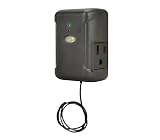
- Top Pick: Unique Lighting Systems SMRT-T SMRT Logic System – Internet Gateway Only
- Best Value: Unique Lighting Systems LPCU-A Repeater SMRT Logic System – Interior Control Module Only
- Premium Choice: SMART HOME AUTOMATION WITH RASPBERRY PI: Build Intelligent DIY Systems for Lighting, Security, Voice Control, Energy Savings, and Whole-Home Automation from Scratch
Lutron Caseta is the usual pick for reliable, no-fuss dimming, Philips Hue suits colour and entertainment lighting, Leviton Decora Smart fits Matter-first homes, and Lutron RadioRA 3 or Control4 serve whole-home projects that go through an installer. Which one fits depends on whether you want to control the bulbs or the switches, how big the house is, and which smart home platform you already use.
As an Amazon Associate we earn from qualifying purchases at no extra cost to you.


Two ways to control lights
Smart bulbs put the intelligence in the lamp, so the wall switch must stay on. Smart switches and dimmers sit in the wall and control any bulb that the dimmer supports. Bulbs are cheaper to start and flexible for colour. Switches suit rooms where guests, kids and old habits mean people will keep flipping the wall plate. Many homes mix both.
At a glance
| System | Control approach | Best for | Notable limits |
|---|---|---|---|
| Lutron Caseta | Wireless dimmers and switches with a Smart Bridge hub, per the maker | Reliable dimming, simple setup, works with major voice assistants | Dimmers only, no colour bulbs |
| Lutron RadioRA 3 and Homeworks | Professional-grade lighting and shade control | Large homes, designed with an installer | Premium tier, usually dealer installed |
| Philips Hue | Smart bulbs and lights using Bridge and Zigbee, with Bluetooth for small setups | Colour scenes, entertainment sync, outdoor lights | Wall switch must stay on for bulbs |
| Leviton Decora Smart | Wi-Fi and Matter-ready switches and dimmers | Replacing switches, Matter users | Check which models need a neutral wire in the maker’s guide |
| Control4 | Whole-home automation with a controller | Integrated lighting, audio, video and security | Professionally installed, premium |
| Inovelli, Aqara and similar | Zigbee, Z-Wave or Matter devices for Home Assistant users | Customisable setups | Requires some technical comfort |
What to check before buying
Neutral wire
Many smart switches need a neutral wire in the wall box. Lutron states that Caseta dimmers can work without a neutral in many cases, which is a reason older homes often choose them. Other makers list neutral requirements per model, so read the product guide. If you are not comfortable with wall wiring, hire a licensed electrician, since mistakes can cause fire or shock.
Bulb compatibility
Dimmers must match the bulb type. LED bulbs vary widely, and some flicker or buzz on mismatched dimmers. Lutron and other makers publish compatibility lists and recommend minimum load settings. Follow those lists, and set low-end trim in the app if the maker offers it.
Hub, protocol and ecosystem
Caseta uses its own radio protocol with a Smart Bridge, Hue uses Zigbee with a Bridge, and Matter is aiming to give cross-platform control. Matter support is growing, but not every feature of each system is exposed through it, and reviewers often note that native apps still offer the most options. If you already use Apple Home, Google Home or Alexa, confirm each platform is listed by the maker.
Number of devices and range
Large homes need a system that scales. Makers list how many devices a hub supports, and wireless range depends on walls and materials. Mesh protocols such as Zigbee extend range as more mains-powered devices are added.
Local control and outages
Prefer systems that keep working when the internet drops. Hub-based systems usually handle local schedules and scenes, while pure cloud Wi-Fi devices may lose features.
Picks by buyer type
Lutron Caseta
Lutron’s Caseta line includes in-wall dimmers, plug-in dimmers, Pico remotes and shade controls. Reviewers frequently describe the system as dependable for everyday scenes and schedules. It is mid-range and focuses on dimming rather than colour.
Philips Hue
Hue offers white and colour bulbs, light strips, lamps and outdoor fixtures. It is the best known choice for colour and for syncing lights to media. The cost climbs quickly as you add lights, so many people start with a few rooms.
Leviton Decora Smart
Leviton’s switches match standard Decora wall plates, so they blend with existing decor. Several models support Matter, per the maker. They suit people who want wall control and an open standard.
Lutron RadioRA 3 and Control4
These systems are designed with an integrator. They are premium, but they handle large houses, multiple zones and links to other home technology.
Pick X if…
| If you… | Pick | Why |
|---|---|---|
| Want dependable dimming without much setup | Lutron Caseta | Works with many existing wall boxes and bulbs |
| Want colour and scenes | Philips Hue | Wide range of colour bulbs and fixtures |
| Want Matter and standard wall plates | Leviton Decora Smart | Switch-based, open-standard support listed by the maker |
| Are building a large custom home | Lutron RadioRA 3 or Control4 | Professional design, scalable |
| Enjoy tinkering | Zigbee or Z-Wave devices with Home Assistant | Local control and flexibility |
Common mistakes
- Putting smart bulbs on a wall switch that people keep turning off.
- Buying dimmers without checking the bulb compatibility list.
- Ignoring neutral wire requirements until the box is open.
- Mixing many ecosystems and ending up with several apps.
- Skipping a plan for multi-way (three-way) switches, which often need special companion devices.
Alternatives
- Kasa and TP-Link Wi-Fi switches: budget-friendly, no hub.
- WiZ bulbs: inexpensive Wi-Fi bulbs without a bridge.
- Nanoleaf and Govee: decorative and gaming-oriented lighting.
- Lutron Serena shades: a natural companion for Caseta if you want integrated window control.
Budget tiers and planning
At the budget tier, Wi-Fi bulbs and plug-in dimmers give smart control for a single room with no hub. At the mid-range, Lutron Caseta, Hue and Leviton cover most homes with solid app support and voice assistant integration. At the premium tier, RadioRA 3, Homeworks and Control4 are specified by an integrator and priced as part of a larger project. Start with the rooms you use most, such as the living room and kitchen, learn how scenes and schedules suit your routine, and expand once you know which ecosystem you like. Keeping to one main system avoids juggling multiple apps and makes automations simpler.
Frequently Asked Questions
Are smart switches better than smart bulbs?
It depends on use. Switches work with standard bulbs and survive guests flipping the wall plate, while bulbs offer colour and require no wiring. Many homes use switches for main rooms and bulbs for accent lamps.
Do I need a neutral wire?
Some smart switches need one and some do not. Read the maker’s installation guide for your model, and call a licensed electrician if you are unsure about your wiring.
Does Matter replace brand hubs?
Matter lets devices work across platforms, but brand hubs often still provide the full feature set. Check what each maker lists as supported through Matter.
Will lights work without internet?
Hub-based systems from Lutron and Hue usually keep local control, schedules and scenes running. Cloud-only Wi-Fi devices may lose functions during an outage.
Can I control three-way circuits?
Yes, but it often needs a main switch plus an accessory or companion device from the same brand. Follow the maker’s wiring diagram.
Which is easiest for renters?
Smart bulbs, plug-in dimmers and Pico-style remotes need no wiring, so they are easier in a rental. Always follow your lease terms.





Write Your Review
No reviews yet. Be the first to share your experience!