
Simulation games ask a desktop to do two things at once: render a detailed world and keep calculating the systems running inside it. Flight simulators, city builders, farming games and racing simulators all lean on the processor for physics and AI, while the graphics card handles scenery, weather and draw distance. A small-form-factor desktop must deliver both in a case that fits on or beside a desk, which makes cooling and component balance more important than raw size.
This guide is for simulation players who want a compact PC that sits neatly in a small room, a dorm or a shared living space without giving up the performance their games need. It compares four small desktops using the names and specifications shown on their Amazon product pages, focusing on the processor, graphics card, memory and storage that decide how smoothly a simulation runs over a long session.
Quick Picks
As an Amazon Associate we earn from qualifying purchases
| Product | Best for | Key spec from title |
|---|---|---|
| Corsair ONE i500 | High-end simulation in a compact tower | RTX 4080 Super, 32GB DDR5 |
| ASUS ROG G22CH DB779 | Strong 1440p simulation in 10 litres | RTX 4070, 32GB DDR5 |
| MSI Trident AS i7 | Mid-range simulation on a smaller budget | RTX 3060 Ti, 16GB memory |
| MSI Trident AS i5 | Entry-level simulation and lighter titles | RTX 3050, 512GB NVMe SSD |
How to Choose
Balance the processor and the graphics card
Simulation games split their work between the processor and the graphics card, so a lopsided build wastes money either way. The processor handles traffic, physics, weather systems and the AI routines that keep a simulated world alive, while the graphics card renders terrain, vehicles and lighting. A strong graphics card paired with a weak processor will stutter in a busy city or crowded airport, and a fast processor cannot rescue a graphics card that struggles with draw distance. Look for a balanced pairing, such as a modern Core i7 with an RTX 4070, and treat the two components as a team rather than shopping for one headline part.
Check memory and storage for large simulation worlds
Simulation titles load large maps, texture packs and mod collections, so memory and storage shape loading times and smoothness as much as the graphics card does. Sixteen gigabytes of memory is the practical minimum for modern simulation games, while 32GB gives headroom for mods, background apps and the larger worlds in flight and city simulators. Storage matters too: a fast NVMe SSD cuts loading times and keeps scenery streaming smoothly, and a one-terabyte drive fills quickly once a few simulation titles and their add-ons are installed. Plan for the games you will own in a year, not just the one you play today.
Measure the case against your desk and airflow
A small-form-factor case earns its place by fitting where a full tower cannot, but the same compact size makes airflow harder, so measure before you buy. Check the width, height and depth in the listing, then measure the shelf, desk corner or cabinet where the PC will live, leaving clearance on the intake and exhaust sides. A case crammed against a wall will run hotter and louder, which matters during the long sessions simulation games encourage. Also check the front and rear ports, since a compact case has fewer of them and you will want easy access for a headset, a controller and external storage.
Handle power, ventilation and heat safely
A compact gaming desktop packs high-power parts into a small case, so treat it like any powerful electrical device. Place it on a stable surface with clear space around its vents, keep books, fabric and paper away from the air intakes, and never block the exhaust with a wall or a curtain. Plug it into a grounded outlet and use a surge protector, since a sudden power cut during a long simulation session can corrupt a save or damage a drive. Let the machine cool before moving it, keep liquids away from the top vents, and clean dust from the intake filters regularly so airflow stays open.
The 4 Best Options
Corsair ONE i500

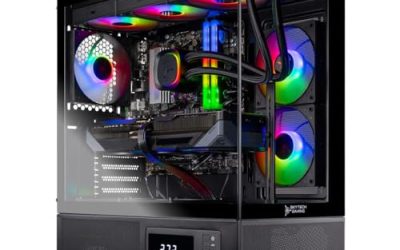
The Corsair ONE i500 suits a simulation player who wants high-end performance from a compact tower that still looks at home in a living room. Its liquid-cooled Core i9-14900K processor and liquid-cooled RTX 4080 Super graphics card handle demanding flight and racing simulators, while 32GB of DDR5 memory and a 2TB M.2 SSD give large worlds room to load and breathe. The wood-fronted design keeps the footprint small without the industrial look of a full tower. Choose it when your simulation library includes the most demanding titles and you want a compact PC that will stay capable for years.
Specs
- Processor: Intel Core i9-14900K, liquid cooled
- Graphics: NVIDIA GeForce RTX 4080 Super, liquid cooled
- Memory: 32GB Vengeance DDR5
- Storage: 2TB M.2 SSD
- Model: CS-9020038-NA
Best for: Demanding flight, racing and city simulation at high settings from a compact tower.
Watch out for: Confirm the exact configuration and finish, since ONE i500 models vary by processor, graphics card and wood colour.
ASIN: B0D1549LCD
Corsair ONE i500 on Amazon
ASUS ROG G22CH DB779

The ASUS ROG G22CH DB779 fits a simulation player who needs real power in a genuinely small case, since its 10-litre chassis is only 4.53 inches wide and 11.3 inches tall. Inside, a Core i7-13700KF processor and an RTX 4070 graphics card handle modern simulation games well, with 32GB of DDR5 memory and a 1TB Gen 4 SSD keeping worlds loading quickly. Its custom liquid cooler for the processor helps the compact case stay quiet during long sessions. Pick this model when desk space is the limiting factor and you still want a current-generation graphics card for detailed scenery.
Specs
- Processor: Intel Core i7-13700KF
- Graphics: NVIDIA GeForce RTX 4070
- Memory: 32GB DDR5 RAM
- Storage: 1TB SSD Gen 4
- Chassis: small form factor, 10 litres
- Operating system: Windows 11
Best for: Small rooms and desks where a 10-litre case matters as much as the graphics card.
Watch out for: Check the available ports and upgrade room, since a 10-litre case leaves less space for extra drives and expansion than a larger tower.
ASIN: B0C4Y9SXX4
ASUS ROG G22CH DB779 on Amazon
MSI Trident AS i7-12700F

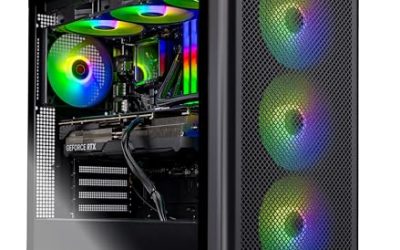
The MSI Trident AS with a Core i7-12700F and an RTX 3060 Ti suits a simulation player who wants solid mid-range performance without paying for the newest graphics card. Its 16GB of memory and 1TB SSD handle popular simulation titles and their mods, while WiFi 6E and a USB Type-C port keep connectivity current for headsets and peripherals. The small-form-factor design fits a desk that cannot take a full tower, and the VR-ready specification opens the door to virtual-reality simulation for players who want it later. It is a sensible middle ground for established simulation games at sensible settings.
Specs
- Processor: Intel Core i7-12700F
- Graphics: NVIDIA GeForce RTX 3060 Ti
- Memory: 16GB dual-channel
- Storage: 1TB SSD
- Connectivity: WiFi 6E, USB Type-C
- Operating system: Windows 11 Home
Best for: Mid-range simulation gaming, including older flight and farming titles at good settings.
Watch out for: The 16GB memory and RTX 3060 Ti will feel the strain in the newest large-scale simulators with heavy mods, so check your games’ demands first.
ASIN: B09QRBCQ82
MSI Trident AS i7-12700F on Amazon
MSI Trident AS i5-13400F

The MSI Trident AS with a Core i5-13400F and an RTX 3050 fits a simulation player starting out or playing lighter titles such as farming, truck and management simulators. Its 16GB of DDR4 memory and 512GB M.2 NVMe drive keep the system responsive, while WiFi 6E, a keyboard and mouse in the box, and a DIY-friendly design make setup straightforward for a first gaming desktop. The small-form-factor case suits a bedroom desk or a shared space. Choose it when your simulation library is modest and you would rather upgrade the graphics card later than overspend now.
Specs
- Processor: Intel Core i5-13400F
- Graphics: NVIDIA GeForce RTX 3050
- Memory: 16GB DDR4
- Storage: 512GB M.2 NVMe SSD
- Connectivity: WiFi 6E
- Operating system: Windows 11 Home
Best for: Lighter simulation titles and first-time buyers who want a compact, ready-to-use desktop.
Watch out for: The 512GB drive fills quickly with large simulation games, so plan for extra storage or a larger drive before your library grows.
ASIN: B0BRTLKKSM
MSI Trident AS i5-13400F on Amazon
Which One Fits Your Situation
You play demanding flight and racing simulators
Choose the Corsair ONE i500 when your games push both processor and graphics card hard for hours at a time. Its liquid-cooled Core i9 and RTX 4080 Super handle dense scenery, weather and traffic without the compromises of a smaller build, and 32GB of memory plus a 2TB drive leave room for mods and add-ons. It suits players whose simulation library is the centrepiece of their setup.
Your desk is small but your games are current
Choose the ASUS ROG G22CH DB779 when space is tight and you still want a modern graphics card. Its 10-litre case fits where a tower cannot, while the Core i7-13700KF and RTX 4070 keep current simulation titles running well. The liquid-cooled processor also helps keep noise down during long evening sessions in a shared room.
You want solid simulation without the newest hardware
Choose the MSI Trident AS with the Core i7-12700F when your games are established titles and your budget is moderate. Its RTX 3060 Ti and 16GB of memory handle popular simulators at good settings, and the VR-ready design leaves room to try virtual reality later. It is a balanced choice for players who value steady performance over headline specifications.
You are starting out with lighter simulation games
Choose the MSI Trident AS with the Core i5-13400F when your library leans towards farming, trucking, management and city-building simulators rather than the most demanding flight titles. Its compact case, included keyboard and mouse, and straightforward setup suit a first gaming desktop, and the 512GB NVMe drive keeps loading times short for a modest collection.
Common Mistakes
- Buying the strongest graphics card available and pairing it with too little memory for large simulation worlds.
- Choosing a case that fits the desk but leaves no clearance for airflow, so the PC runs hot and loud.
- Filling a 512GB drive with two large simulators and their mods, then running out of space mid-install.
- Ignoring the processor, even though simulation physics and AI depend on it as much as graphics.
- Forgetting to check ports and WiFi, then discovering the headset, controller and external drive compete for too few connections.
Frequently Asked Questions
Do simulation games need a stronger processor than other games?
Yes, simulation games usually lean harder on the processor, because it calculates physics, traffic, weather and AI behaviour while the graphics card renders the scene. A balanced build with a modern multi-core processor and a capable graphics card runs more smoothly than a machine that spends everything on graphics alone. Check both components in the listing before deciding.
Is 16GB of memory enough for simulation games?
Sixteen gigabytes is enough for many popular simulation titles, especially lighter farming, trucking and management games. Heavier flight simulators, large city builders and heavily modded games benefit from 32GB, which leaves room for background apps and larger worlds. If you plan to run mods or stream while playing, treat 32GB as the safer choice.
Can a small-form-factor PC handle long simulation sessions?
Yes, provided the case has room to breathe and its cooling is designed for sustained loads. Keep vents clear, leave space around the intake and exhaust, and clean dust filters regularly so airflow stays open. Liquid-cooled models such as the Corsair ONE i500 and the ASUS ROG G22CH help here, but every compact PC still needs clear air around it.
Should I choose a bigger SSD for simulation games?
Yes, simulation games and their add-ons are large, and a 512GB drive fills quickly once two or three titles are installed. A 1TB drive is a practical minimum for a growing library, and 2TB is comfortable for players who keep several simulators plus mods installed at once. A fast NVMe SSD also shortens loading times for large maps.


Write Your Review
No reviews yet. Be the first to share your experience!