
An active M.2 SSD cooler is not the same thing as a passive M.2 heatsink, and this guide keeps that line strict. Every pick below includes a small powered fan as part of the cooling assembly. A passive heatsink is only metal and a thermal pad, relying on case airflow to carry heat away. An active cooler adds forced airflow of its own, which matters most on hot PCIe Gen 5 drives, on Gen 4 drives in poorly ventilated cases, and in slots trapped under a graphics card where ambient air barely moves.
That fan brings trade-offs: a fan header or SATA power lead, fan noise, a cable to route, a moving part that can wear out, and more vertical clearance. In return, sustained transfers and exports are less likely to end in thermal throttling, where the controller slows itself to stay within a safe temperature. All five coolers fit desktop M.2 2280 drives; none fits a laptop or console bay.
As an Amazon Associate, we earn from qualifying purchases.
Quick Answer
For most desktop builders, the Thermalright HR10 2280 PRO Black is the strongest all-round active pick, with four heat pipes, double-sided cooling, and a PWM fan. The EZDIY-FAB Shield ARGB suits builders who want a shorter cooler with lighting sync. The Thermalright HR10 2280 PRO Digital White adds a display, while the WAVLINK 880F and ineo Rocket cover simpler fan-cooled layouts for older-style builds.
How to Choose
Start with the drive and workload. A Gen 3 or mainstream Gen 4 drive rarely needs a fan, and a passive plate or motherboard shield is usually enough. Active cooling earns its place when a Gen 5 or high-end Gen 4 drive sustains long writes, sits in a dead-air zone, or regularly climbs toward throttling during normal use.
Measure clearance first: free height above the slot, distance to the graphics card, and any CPU cooler overhang. Tall active coolers need generous vertical room and can overhang the end of the drive, so check total length too. Low-profile fan coolers fit in more places but move less air and use smaller, faster fans.
Check the power connection next. PWM models plug into a motherboard fan header and let the board control speed, the cleanest setup. Simpler designs draw power from a SATA lead instead, adding a cable run. Confirm a free header or lead reaches the slot, routed clear of graphics card fans.
Consider noise honestly. A tiny fan spins fast to move useful air, so active coolers are audible in a quiet room under load. PWM control helps, because the fan can idle slowly and ramp only during transfers. Fixed-speed designs run at one note all the time.
Look at how the cooler contacts the drive. Double-sided assemblies suit double-sided SSDs and spread pressure evenly, while top-only designs are quicker to fit. Follow the included pad layout, never overtighten the small screws, and remember that fans collect dust, so an accessible fan is easier to clean over several years.
Thermalright HR10 2280 PRO Black

The HR10 2280 PRO Black is the heavyweight option here, built around four heat pipes, a dense aluminum fin stack, and a small high-speed PWM fan set into the body. It is a double-sided design, so the drive is sandwiched between the main heatsink and a lower cover with thermal pads on both sides. That suits single-sided and double-sided 2280 drives and is aimed at Gen 5 SSDs that throttle under sustained load in a standard passive shield.
PWM control lets a motherboard header vary fan speed instead of running flat out, easing noise during light work while keeping forced airflow for long installs and exports. The black finish suits dark motherboards.
Height is the main compromise. At roughly forty-four millimeters tall, it needs a genuinely open slot, will not suit back-mounted small-form-factor slots, which the maker excludes, and can clash with a thick graphics card. Choose it when cooling headroom is the priority and space is spare, and align pads carefully during fitting.
Specs
| Item | Detail |
|---|---|
| Drive size | M.2 2280, single-sided and double-sided |
| Fan | 30 mm PWM fan, variable high-speed range |
| Heat pipes | Four 5 mm AGHP heat pipes |
| Cooling layout | Double-sided heatsink with top and bottom pads |
| Dimensions | About 90.3 x 23.7 x 43.8 mm |
| Power connection | 4-pin PWM fan header |
| Best fit | Open desktop slot with generous height clearance |
Thermalright HR10 2280 PRO Digital White
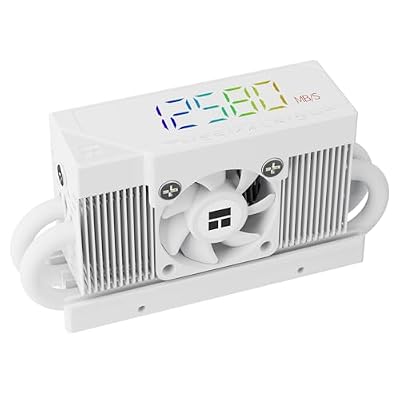
The HR10 2280 PRO Digital White takes the same active formula as the black PRO model and adds an ARGB digital display on top. The display can show drive information such as temperature and activity when connected through a motherboard USB header and used with the maker’s control software. It is a monitoring and styling feature layered over a fan-cooled heatsink, not a different class of cooler.
Under the display sit four heat pipes, a finned aluminum body, double-sided pads, and a small PWM fan that adjusts speed with temperature. The white finish matches white motherboard and case themes.
This is also the tallest cooler here, at about fifty-one millimeters, and the extra USB cable makes slot selection critical. A slot squeezed between graphics card and CPU cooler is a poor candidate; an open top slot in a spacious case is its home. In a windowed, white-themed build with abundant clearance, it earns that space.
Specs
| Item | Detail |
|---|---|
| Drive size | M.2 2280, single-sided and double-sided |
| Fan | 30 x 30 x 10 mm PWM fan |
| Heat pipes | Four 5 mm AGHP heat pipes |
| Display | ARGB digital display via USB header and software |
| Dimensions | About 90.3 x 26 x 51 mm |
| Power connection | 4-pin PWM header plus USB header for display |
| Best fit | Windowed white-themed desktop with tall clearance |
EZDIY-FAB Shield ARGB M.2 SSD Heatsink with Built-in Fan

The EZDIY-FAB Shield ARGB uses a shorter aluminum heatsink with a built-in twenty-millimeter PWM fan and addressable RGB lighting. Instead of a tall fin tower, it keeps a lower profile that stands a better chance of clearing nearby components, while still adding the forced airflow that separates an active cooler from a passive plate.
Lighting is central: motherboard ARGB sync through a standard three-pin connection lets its illumination follow the rest of the build. Without lighting it is still a compact fan cooler, but the hardware is clearly aimed at visible gaming systems with a case window.
The listing covers several M.2 lengths as well as 2280, which can help if the cooler later moves to a shorter drive. The usual warnings apply: confirm height against the graphics card, a free fan header, and a lighting header if you want sync to work. Keep the small fan intake clean and use motherboard control to avoid unnecessary speed at idle. Choose the Shield ARGB when a tall tower will not fit or when the build already uses ARGB lighting.
Specs
| Item | Detail |
|---|---|
| Drive size | M.2 2280, with shorter M.2 lengths also listed |
| Fan | Built-in 20 mm PWM fan |
| Lighting | 5V 3-pin ARGB sync |
| Body | Aluminum heatsink design |
| Model reference | EZDPI236-2 |
| Power connection | PWM fan header plus ARGB header for lighting |
| Best fit | Crowded desktop slot in a visible ARGB build |
WAVLINK Heatsink 880F

The WAVLINK Heatsink 880F is the simplest design here: an aluminum casing with a small rotating fan powered through a SATA fifteen-pin interface rather than a motherboard fan header. That power choice dates the design, but it makes the cooler independent of fan-header availability and fan curves. When the system is on, the fan runs, at a stated speed in the region of seven thousand revolutions per minute.
The casing wraps the 2280 drive with a thermal pad, and support covers NVMe PCIe and SATA M.2 drives in desktop builds. The SATA lead must reach the M.2 area, which can be the hardest part of fitting it in a tidy case. There is no PWM subtlety here: no speed control, no temperature ramping, and no monitoring signal, so expect a small fixed-speed fan to be noticeable in a quiet system.
Check the current listing carefully before ordering, including the connector, dimensions, and the fan and SATA-powered arrangement. Choose the 880F only when its simple layout solves a specific problem in an older build; for a new system with free fan headers, a PWM model gives control this design cannot match.
Specs
| Item | Detail |
|---|---|
| Drive size | M.2 2280 NVMe PCIe and SATA SSDs |
| Fan | Small rotating fan, fixed speed around 7000 RPM |
| Body | Aluminum casing |
| Thermal interface | Thermal silicone pad included |
| Power connection | SATA 15-pin interface |
| Fan control | None, fixed-speed operation |
| Best fit | Older desktop build with a spare SATA power lead |
ineo Rocket Heatsink with Built-in Cooling Fan

The ineo Rocket Heatsink is an earlier active design: an aluminum heatsink with a fan integrated into the assembly, from the first wave of fan-equipped M.2 coolers that appeared when fast NVMe drives began outrunning thin passive motherboard plates. The concept is the one newer models refine: move air directly across the heatsink instead of waiting for case airflow.
As an older design, it lacks the polish of the current Thermalright and EZDIY-FAB models: expect simpler mounting, less refined fan control, and less certain spare-part support, which matters for a product whose defining feature is a moving part. Availability is the biggest caveat, because older active heatsinks appear and disappear from listings and similar-looking models get mixed together. Verify the fan, connector type, and drive-length support on the exact listing before buying. Choose the Rocket for a straightforward fan heatsink without lighting or a display, when a confirmed listing is available.
Specs
| Item | Detail |
|---|---|
| Drive size | M.2 2280 |
| Fan | Built-in cooling fan integrated in heatsink |
| Body | Aluminum heatsink assembly |
| Power connection | Fan power lead, confirm type on current listing |
| Fan control | Basic control, confirm header type before purchase |
| Availability note | Older model, verify current listing details carefully |
| Best fit | Desktop 2280 slot needing a simple fan heatsink |
Who Should Skip It
Skip active cooling entirely if your drive is a modest Gen 3 or Gen 4 model that stays comfortable under the motherboard shield, because a fan adds noise, wiring, and a failure point without solving a real problem. Skip it if the PC must stay near-silent for recording, office calls, or bedroom use. Skip tall models if your M.2 slot sits under a graphics card, behind a large CPU cooler, or on the back of a small form factor board. Skip every model here for laptops, handhelds, and consoles, where there is neither the clearance nor the power connection these coolers expect.
FAQ
Do active M.2 coolers really stop throttling?
They can help a hot drive sustain transfers longer by moving air across the heatsink continuously. The benefit is largest on Gen 5 drives and drives in low-airflow slots. A cooler cannot fix a faulty drive or severe heat problems elsewhere in the case.
Are active SSD coolers loud?
Small fans spin fast, so some noise is normal, especially at full speed during long transfers. PWM models are easier to live with because the motherboard can slow the fan during light use. Fixed-speed models run at one level whenever the system is on, which suits a gaming room better than a quiet studio.
Will an active cooler fit under a graphics card?
Often it will not. Tall tower-style coolers need an open slot with generous vertical clearance, and even shorter fan models are thicker than a passive plate. Measure the space above your exact M.2 slot, check the cooler dimensions, and review the motherboard layout before ordering any model in this guide.
Can I use an active M.2 cooler in a PS5 or laptop?
No. These desktop coolers need clearance and a fan or SATA power connection that consoles and laptops do not provide in their drive bays. Use only a low-profile passive heatsink rated for the console bay in a PS5, and the cooling the laptop maker designed for its chassis.
Final Verdict
Active M.2 cooling is a targeted fix, not a default upgrade. When a Gen 5 or hard-working Gen 4 drive throttles in a desktop with space and a free header, a fan-equipped cooler is the most direct remedy. The HR10 2280 PRO Black is the default pick for maximum cooling in an open slot, the EZDIY-FAB Shield ARGB suits tighter, lit builds, and the HR10 PRO Digital White suits showcase builds that can use its display. The WAVLINK 880F and ineo Rocket remain niche, older-style options needing extra listing checks. Measure first, and only add a fan when the drive has shown it needs one.
Product and ASIN Reference
| Product | ASIN |
|---|---|
| Thermalright HR10 2280 PRO Black | B0C65HHF3M |
| Thermalright HR10 2280 PRO Digital White | B0FQ292ZL5 |
| EZDIY-FAB Shield ARGB M.2 SSD Heatsink with Built-in Fan | B0DL9SJ6D4 |
| WAVLINK Heatsink 880F | B0088N7LE4 |
| ineo Rocket Heatsink with Built-in Cooling Fan | B08FX7JZ7H |



Write Your Review
No reviews yet. Be the first to share your experience!