
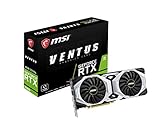
- Top Pick: msi Gaming GeForce RTX 2080 8GB GDRR6 256-bit HDMI/DP/USB Ray Tracing Turing Architecture Graphics Card (RTX 2080 Ventus 8G)
- Best Value: NVIDIA GeForce RTX 3060 Ti Founders Edition 8GB GDDR6 PCI Express 4.0 Graphics Card (Renewed)
- Premium Choice: Dell Gaming OEM Nvidia GeForce RTX 3060 Ti 8GB GDDR6 256-bit 14Gbps PCIe 4.0 x16 Graphics Video Card 0MTVG8 08GXMM (Renewed)
No, upgrading from an RTX 2080 to an RTX 3060 Ti is not worth it: the 3060 Ti is only about 5-10% faster, has the same 8 GB of VRAM and offers the same DLSS feature set, so it is a sideways move rather than a real upgrade. The RTX 3060 Ti is the better buy only if you are choosing between the two from scratch at similar used prices, where its lower power draw and newer architecture give it a slight edge.
As an Amazon Associate we earn from qualifying purchases at no extra cost to you.


Why the Newer Card Is Barely Faster
The RTX 2080 launched in September 2018 at $699 as Turing’s upper high-end card. The RTX 3060 Ti followed in December 2020 at $399, and its selling point was delivering RTX 2080 Super-class performance for far less money. That was a big deal for new buyers in 2020, but for someone who already owns an RTX 2080, it means the 3060 Ti lands in nearly the same place. The progress happened in price, not in performance at the top of the old range.
Specs Side by Side
| Spec | RTX 2080 | RTX 3060 Ti |
|---|---|---|
| Architecture | Turing | Ampere |
| Release date | 20 September 2018 | 1 December 2020 |
| Launch MSRP | $699 | $399 |
| CUDA cores | 2,944 | 4,864 |
| Boost clock | 1,710 MHz | 1,665 MHz |
| Process | 12 nm | 8 nm |
| Board power | 215 W | 200 W |
| Memory | 8 GB GDDR6 | 8 GB GDDR6 |
| Memory bus | 256-bit | 256-bit |
| Bandwidth | 448.0 GB/s | 448.0 GB/s |
| L2 cache | 4 MB | 4 MB |
| Interface | PCIe 3.0 x16 | PCIe 4.0 x16 |
| Power connectors | 1x 6-pin + 1x 8-pin | 12-pin on Founders Edition; most retail cards use a single 8-pin |
| Length / width | 267 mm, 2-slot | 242 mm, 2-slot |
| Outputs | 1x HDMI 2.0, 3x DP 1.4a, 1x USB-C | 1x HDMI, 3x DisplayPort |
Memory capacity, bus width, bandwidth and L2 cache are identical. The 3060 Ti’s higher CUDA core count reflects Ampere’s different way of counting FP32 units rather than a proportional performance jump.
Performance: A Single-Digit Gain
TechPowerUp’s RTX 3060 Ti review found the 3060 Ti about 3% faster than the RTX 2080 Super at 1440p and around 12% slower than the RTX 2080 Ti. Since the regular RTX 2080 sits a bit below the 2080 Super, that places the 3060 Ti roughly 5-10% ahead of the RTX 2080. Comparison databases show a similar margin, around 7-9% on average.
- 1080p: roughly 5% or less; often within the margin of run-to-run variation in CPU-limited games.
- 1440p: roughly 5-10%. A game at 70 fps on the 2080 tends to run around 75 fps on the 3060 Ti, with results varying by settings, CPU and patch.
- 4K: similar single-digit difference, with both cards limited by 8 GB in modern titles.
A gain this small is not something most players would notice without an on-screen frame counter.
Ray tracing
The 3060 Ti’s second-generation RT cores give it a slightly larger edge with ray tracing enabled than in raster, but both cards still land in the same class: playable ray tracing at 1080p, and at 1440p only with DLSS. Since ray tracing also increases memory use, both cards run into the same 8 GB ceiling in heavier titles.
Features: What Stays the Same
| Feature | RTX 2080 | RTX 3060 Ti |
|---|---|---|
| DLSS Super Resolution (DLSS 4 transformer) | Yes | Yes |
| DLSS 4.5 second-gen model | Runs, with a larger fps cost (no FP8) | Runs, with a larger fps cost (no FP8) |
| DLSS Frame Generation | No (RTX 40/50 only) | No (RTX 40/50 only) |
| FSR 3 frame generation | Yes, in supported games | Yes, in supported games |
| Resizable BAR | No | Yes |
| Driver branch in 2026 | Current Game Ready | Current Game Ready |
The only practical additions are Resizable BAR support, which helps a few percent in some titles on compatible platforms, and PCIe 4.0, which makes no meaningful difference for an 8 GB card of this class. Community testing reported by Tom’s Hardware showed DLSS 4.5’s newer model costing RTX 20 and 30 cards roughly 14-24% versus DLSS 4, so on either card the DLSS 4 preset is usually the better choice for frame rate.
Power and Physical Fit
The 3060 Ti is slightly more efficient. Using GPU power plus CPU power plus about 150 W of headroom:
- RTX 2080: 215 W + 125 W + 150 W = about 490 W, so a quality 550-650 W unit.
- RTX 3060 Ti: 200 W + 125 W + 150 W = about 475 W, so a quality 550 W unit.
The facts list a 12-pin for the 3060 Ti, but that is the Founders Edition with an adapter; most retail RTX 3060 Ti cards use a single 8-pin, compared with the RTX 2080’s 6-pin plus 8-pin. The reference 3060 Ti is 242 mm against 267 mm for the 2080. Neither difference justifies a swap on its own. If you rely on the 2080’s USB-C VirtualLink port, note that the 3060 Ti drops it.
The Money Side
At launch MSRP the 3060 Ti was a dramatic value improvement. Indexing the 2080 at 100 and the 3060 Ti at about 107:
- RTX 2080: $699 / 100 = about $7.00 per point
- RTX 3060 Ti: $399 / 107 = about $3.70 per point
For an existing 2080 owner the relevant math is different. In late 2026, a used RTX 3060 Ti usually sells for roughly $180-$230, while a used RTX 2080 tends to sell for roughly $160-$210. Selling the 2080 and buying a 3060 Ti would cost a small net amount, plus the effort and risk of buying used, for about 5-10% more performance. That is spending money to stand still.
Better Upgrade Paths From an RTX 2080
A worthwhile upgrade should offer at least 40-50% more performance and ideally more VRAM. Options that meet that bar:
| Target | Approximate gain over RTX 2080 | VRAM | Notes |
|---|---|---|---|
| Used RTX 3080 / 3080 12GB | Large, often 50%+ | 10-12 GB | Needs a 650-750 W PSU |
| RTX 5060 Ti 16 GB | Moderate to large | 16 GB | Adds DLSS Frame Generation and multi-frame generation |
| RX 9060 XT 16 GB | Moderate to large | 16 GB | FSR 4 support |
| RTX 5070 / RX 9070 | Very large | 12-16 GB | Proper 1440p high-refresh and entry 4K |
Exact gains depend on the game and resolution; the point is that each of these is a different performance class, unlike the 3060 Ti.
Getting More From an RTX 2080 Instead
If the goal is smoother play without spending money, a few changes deliver gains in the same range as the 3060 Ti swap. Switching games to DLSS Quality with the DLSS 4 transformer model often adds 30% or more at 1440p with image quality close to native. Lowering texture quality one step in VRAM-heavy releases removes most stutter on an 8 GB card. Replacing dried thermal paste on an older card can also restore boost clocks lost to heat.
When the RTX 3060 Ti Does Make Sense
- You are building a new PC and can find a 3060 Ti for the same price as a 2080: take the 3060 Ti for its slightly better speed, lower power and simpler single 8-pin connector.
- Your RTX 2080 has failed and you need a cheap like-for-like replacement.
- You have a compact case where the shorter 3060 Ti fits better.
Frequently Asked Questions
Is the RTX 3060 Ti faster than the RTX 2080?
Yes, but only by about 5-10% on average. TechPowerUp measured the 3060 Ti slightly ahead of the faster RTX 2080 Super at 1440p. In real-world play the difference is barely noticeable.
Should I upgrade from an RTX 2080 to an RTX 3060 Ti?
No. The performance gain is small, VRAM stays at 8 GB, and the DLSS feature set is the same. A card that offers 40-50% more performance and more memory is a far better use of money.
Does the RTX 3060 Ti support DLSS Frame Generation?
No. DLSS Frame Generation requires an RTX 40 or RTX 50 card. Both the RTX 2080 and RTX 3060 Ti support DLSS Super Resolution and can use FSR 3 frame generation where available.
What is a good upgrade from an RTX 2080 in 2026?
Cards like the RTX 5060 Ti 16 GB, RX 9060 XT 16 GB, RTX 5070 or RX 9070 offer a real step up along with more VRAM. A used RTX 3080 is another option if your power supply can handle it. Each delivers a noticeably different experience from the 2080.
Is the RTX 2080 still good for gaming in 2026?
It remains capable at 1080p with high settings in most games and at 1440p with DLSS and moderate textures. Its 8 GB of VRAM is the main limitation in new releases. It still receives NVIDIA Game Ready drivers.
Ready to decide? Our #1 pick for 2026 is the Architecture.
Live price & availability on Amazon.








Write Your Review
No reviews yet. Be the first to share your experience!