
What is the best thermal paste pattern is one of the oldest arguments in PC building, and independent testing has answered it more clearly than the forum threads suggest. The short version is that the shape barely matters and the amount matters a great deal.
As an Amazon Associate we earn from qualifying purchases at no extra cost to you.


As an Amazon Associate we earn from qualifying purchases at no extra cost to you.
By Ryan Cole
The Direct Answer What Is the Best Thermal Paste Pattern?
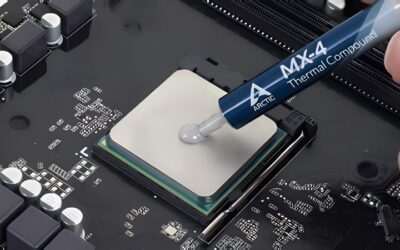
For a standard desktop processor, a single pea-sized dot in the centre of the heat spreader is the best thermal paste pattern. Mounting pressure spreads it outward from one point as the cooler tightens, which produces even coverage and traps no air.
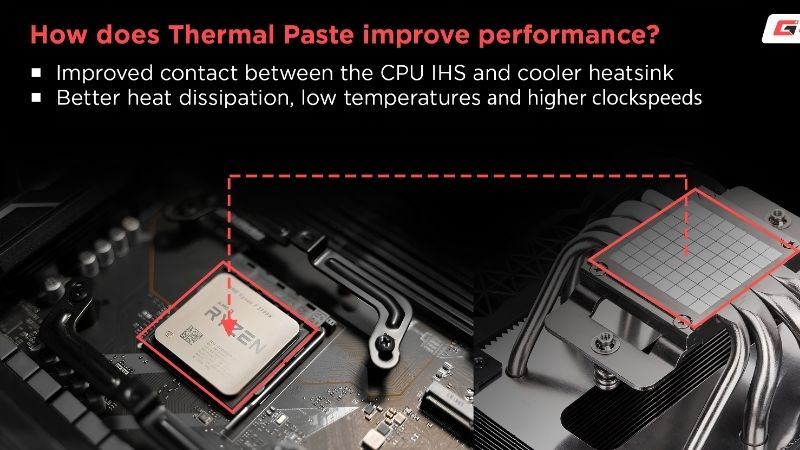
Every credible comparison between the dot, the line, the X and a manual spread lands them within a degree or two of each other. Whatever the best thermal paste pattern turns out to be on your particular chip, the variables that genuinely change temperatures are the volume of compound, the cleanliness of both surfaces and how evenly the cooler is mounted.
Why Testing Keeps Reaching the Same Conclusion
Reviewers who compare patterns on the same processor with the same compound consistently find the spread between them falls inside run-to-run variance. Repeat the same application twice and you will see a similar difference.
That is why the question of what is the best thermal paste pattern has stayed unsettled for two decades: there is no large effect to find. The debate persists because the answer is unsatisfying rather than because it is unclear.
When a Different Pattern Makes Sense
Intel’s rectangular heat spreaders on LGA 1851 and LGA 1700 are noticeably longer than they are wide, so a thin line along the long axis reaches the ends more reliably than a central dot when using a thick compound.
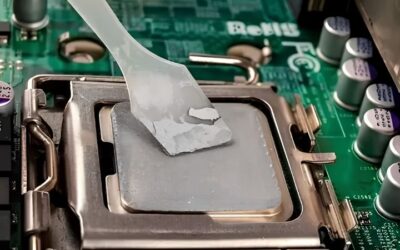
A bare die, whether on a delidded processor or a laptop, needs a thin manual film applied with a spatula. Mounting pressure there is too low to spread a drop, and the exposed silicon is far smaller than a heat spreader.
Why the Dot Wins on Desktops
A single central drop expands outward in a circle as pressure builds, pushing air ahead of it rather than trapping pockets. That behaviour is exactly what you want, and it happens automatically without any skill on your part.
Patterns with multiple strokes can leave a small void where the strokes meet. In practice the void is tiny and the temperature difference is within measurement noise, but there is no benefit to accepting it either.
What Actually Changes Your Temperatures
If the answer to what is the best thermal paste pattern is worth a degree or two, three other factors are worth considerably more than that. These are where your attention actually belongs.
Using the Right Amount
Too little compound leaves dry patches over the hottest part of the die. Too much creates a thick layer that insulates rather than conducts, and squeezes out around the edges of the heat spreader.
A drop roughly the size of a small pea suits a standard processor. Large heat spreaders on high core-count chips want slightly more, and a bare die wants considerably less. If compound is visibly escaping after mounting, you used too much.
Cleaning Both Surfaces Properly
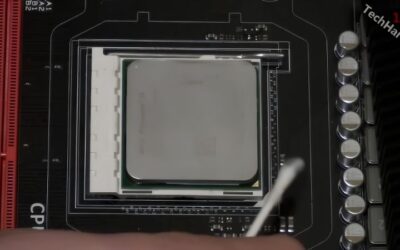
Old compound has to come off completely, from the processor lid and the cooler coldplate alike. Isopropyl alcohol at 90 percent or higher removes it without leaving residue, and anything weaker carries too much water.
Use lint-free cloths, coffee filters or dedicated wipes rather than paper towel. Fibres left behind sit directly in the contact area and cost real temperature, which undoes everything else you did carefully.
Mounting the Cooler Evenly
Tighten in a diagonal sequence, a couple of turns per corner at a time, so pressure builds evenly across the heat spreader. Uneven mounting is one of the most common reasons a repaste disappoints.
Stop when the screws reach their stops or the springs are fully compressed. Overtightening bows the board around the socket without improving contact and can crack retention hardware on some coolers.
Common Mistakes to Avoid
These are the errors that turn a routine repaste into a disappointing one, and all four are easy to avoid once you know about them. None of them have anything to do with the best thermal paste pattern.
Applying Compound Straight From a Cold Tube
Thicker compounds are stubborn at room temperature and will sit exactly where you put them rather than spreading under pressure. Holding the syringe in a closed hand for a couple of minutes solves this completely.
This is the single most overlooked step, and it costs nothing. A warmed tube of a mid-range compound produces a more even result than a cold tube of something far more expensive.
Removing the Cooler While the System Is Cold
Cured compound grips hard when cold, and on AMD boards the retention arm holds the processor rather than the heat spreader. Pulling a cold cooler can lift an unlatched chip out of the socket with it.
Run the machine for around ten minutes first to soften the compound, then twist the cooler gently to break the seal before lifting. Never lever it off in a single movement.
Reusing Old Compound or Skipping the Clean
Once a cooler has been removed, the existing application is broken and cannot be reseated properly. Mixing fresh compound over old material produces inconsistent contact and traps air.
Always clean both surfaces and apply fresh compound, even if the old application looks intact. This applies just as much when you remove a cooler for a memory change and put it straight back.
Chasing the Pattern Instead of the Basics
Spending an hour researching what is the best thermal paste pattern and then applying a cold, oversized blob to a lid you wiped with a paper towel is a remarkably common outcome. The pattern was never the problem.
Get the volume right, clean properly, warm the tube and tighten evenly. Do those four things and the shape you drew becomes genuinely irrelevant to the result.
Choosing a Compound to Go With It
The question of what is the best thermal paste pattern is usually followed straight away by a compound question, and the two interact more than most people expect.
Match Viscosity to Mounting Pressure
A thin compound spreads readily from a central dot under any cooler. A thick one needs the higher pressure of a large air tower or an AIO, and can leave outer regions of a big heat spreader underserved on a light mount.
If a compound resists being pushed around with an applicator, it will resist being pushed around by the cooler too. That is the practical test, and it takes two seconds.
Non-Conductive Is the Sensible Default
A non-conductive compound causes no harm if a small amount touches socket pins or nearby components. That margin for error matters more than a degree of performance on a build you will open again.
For a full comparison of compounds ranked on durability rather than launch-day temperatures, see our guide to the best quality thermal paste, and for the complete step-by-step process our guide to the best way to apply thermal paste.
Phase Change Materials Remove the Question
A pre-cut phase change pad is solid at room temperature and liquefies around 45 degrees, re-flowing with every heat cycle. There is no pattern to choose and no pump-out over time.
The trade is a break-in period of roughly ten heat cycles before performance stabilises, plus a higher cost per application. On laptops in particular that trade is usually worth making.
See More:
- Who makes the best motherboard
- Best budget AM5 CPU for gaming
- Best mini ITX computer case
- Best desktop RAM for gaming
Final Thoughts
Asking what is the best thermal paste pattern produces a less interesting answer than the question deserves: a pea-sized dot in the centre, spread by the cooler, works for essentially every desktop processor. Use a line on long Intel heat spreaders with a thick compound, and a thin manual film on a bare die. Then forget the pattern entirely and put the effort into volume, cleaning and even mounting, because those three are where the degrees actually live. Figures reflect August 2026 and should be verified before purchase.





Write Your Review
No reviews yet. Be the first to share your experience!