
Best way to put thermal paste on CPU arguments have consumed more forum threads than the topic deserves, because mounting pressure does most of the work regardless of the shape you draw. What actually matters is how much you use and how easily the compound spreads. Here are six that make it easy.
As an Amazon Associate we earn from qualifying purchases at no extra cost to you. Product prices and availability are accurate as of the date shown and are subject to change.


As an Amazon Associate we earn from qualifying purchases at no extra cost to you. Product prices and availability are accurate as of the date shown and are subject to change.
By Ryan Cole
How to Find the Best Way to Put Thermal Paste on CPU
The pattern you use matters far less than the volume and the compound’s viscosity. These four points cover everything that measurably changes the result once the cooler is bolted down, and together they are the whole of the best way to put thermal paste on CPU surfaces.
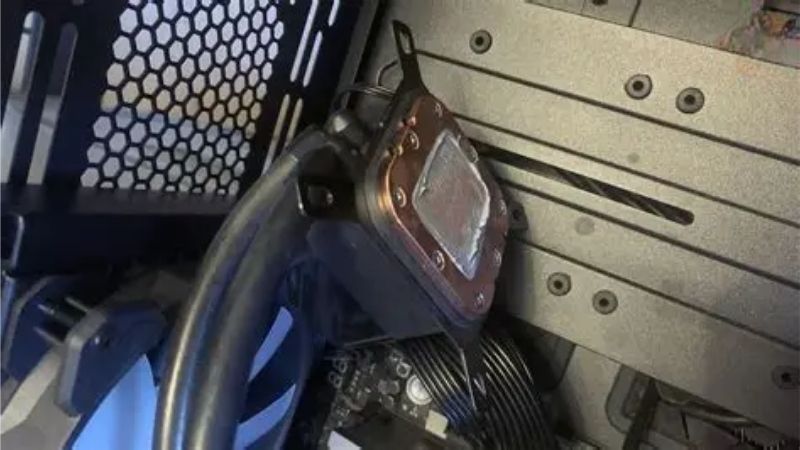
Volume Beats Pattern Every Time
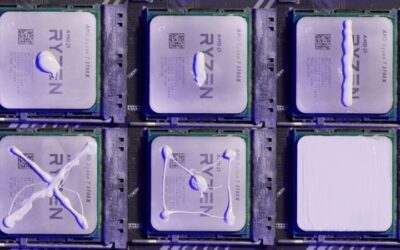
Too little paste leaves dry patches over the hottest part of the die; too much creates a thick layer that insulates rather than conducts. Both cost more temperature than any choice between a dot, a line or an X ever will.
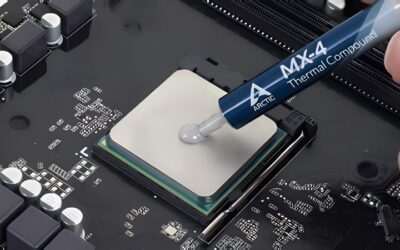
A rough guide is a drop about the size of a small pea for a standard desktop processor. Larger heat spreaders on high core-count chips want slightly more, and bare-die applications want considerably less, spread manually. If compound is visibly squeezing out around the edges after mounting, you used too much.
Viscosity Decides Which Pattern Works
Thin, low-viscosity compounds flow readily and spread themselves well from a single central drop. Thicker compounds resist flowing and benefit from a line, an X or a light manual spread to reach the corners of the heat spreader.
Match the technique to the tube rather than following a rule you read once. If a compound resists being pushed around with the applicator, it will resist being pushed around by the cooler too.
Warm the Syringe Before Applying
Most compounds become noticeably easier to dispense at body temperature. Holding the syringe in a closed hand for a couple of minutes, or resting it somewhere warm, makes a thick paste behave like a much more expensive one.
This matters most in a cold room and with the denser ceramic-filled products. It is a free improvement to application consistency, which is the variable that actually separates a good result from a mediocre one. Thirty seconds of preparation buys more than upgrading two tiers of compound.
Clean the Surfaces Properly First
Old compound has to come off completely. Isopropyl alcohol at 90 percent or higher with a lint-free cloth removes it without leaving residue, and both the processor lid and the cooler coldplate need the same treatment.
Residual fibres from paper towels sit between the two surfaces and cost real temperature. Coffee filters or dedicated cleaning wipes work far better, and several compounds now ship with suitable wipes in the box. Give both surfaces a second pass once the first has dried, since a faint film usually remains.
What the 2026 Market Means for Repasting
Three market conditions have pushed repasting up most builders’ priority lists this year, and they change both what the best way to put thermal paste on CPU costs in supplies and when to buy them.
Cheap Upgrades Are Where the Returns Are
With graphics card pricing elevated, improving an existing machine has become the practical route to better performance. Fresh thermal compound, a better CPU cooler, extra case fans and a decent power supply all deliver measurable results for modest money.
On a system four or five years old, the original application has usually degraded enough that a repaste alone drops temperatures noticeably. That single job frequently restores boost clocks that had quietly been throttling for months.
The Budget Component Tier Has Thinned Out
Component vendors shifted their ranges upward through 2026 and promotional pricing policies ended in February. That affects boards and coolers more than compounds, but it changes what a full cooling refresh costs.
Thermal compound remains one of the few categories where a few dollars still buys a genuine improvement. It is the cheapest meaningful upgrade in a PC, which is why it keeps resurfacing whenever an ageing machine starts running hot.
Cooling Parts Still See Real Seasonal Discounts
Memory and pre-built systems will not fall meaningfully this November, because that stock uses components purchased at this year’s elevated contract prices. Coolers, fans, power supplies and thermal compounds are a different category.
Buying compound alongside cleaning supplies and any replacement fans during a sale is sensible planning. The absolute savings are small, so do not postpone a repaste a hot-running system needs now.
Top Picks: Best Way to Put Thermal Paste on CPU Made Easy
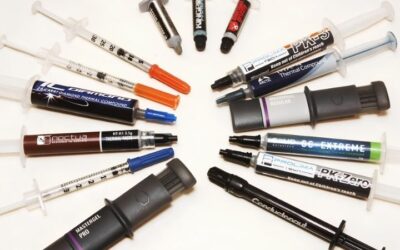
These are ranked by how forgiving they are during application rather than by peak conductivity, because the best way to put thermal paste on CPU lids is with a compound that cooperates. A well-applied mid-tier product beats a badly applied premium one. Verify pricing and availability before ordering.
| Compound | Viscosity | Suggested Pattern | Applicator Included | Best For |
|---|---|---|---|---|
| Arctic MX-6 | Thick | Central dot | No | Most desktop builds |
| Arctic MX-4 | Medium | Central dot | No | Bulk repasting |
| Noctua NT-H2 | Medium | Dot or light spread | Yes, with wipes | First-time builders |
| Thermal Grizzly Kryonaut | Thin | Dot or thin spread | Yes | Peak performance |
| Cooler Master MasterGel Maker | Medium | Line, flat nozzle | Flat nozzle | Rectangular Intel lids |
| Thermalright TF7 | Medium | Central dot | Spatula | Value option |
Arctic MX-6
MX-6 is the default recommendation for a desktop repaste. It is non-conductive, performs within a couple of degrees of anything more expensive, and its thickness resists pump-out well over years of heat cycling.
That thickness is also its one application quirk. Warm the syringe before use and give it a firm central drop, because a cold tube of MX-6 fights back and produces an uneven spread under lower-pressure mounts.
Arctic MX-4
MX-4 flows more readily than MX-6 and is available in a large tub that drops the cost per application dramatically. For anyone maintaining several machines, that packaging is the whole argument.
It gives up a degree or two to MX-6 in measured performance and slightly less resistance to migration. Neither matters next to correct application, which is precisely the point this whole guide is making.
Noctua NT-H2
NT-H2 is the most forgiving compound here for a first attempt. It spreads predictably under normal mounting pressure, has an exceptionally long shelf life, and most retail packages include cleaning wipes so the whole job is covered.
Its cost per gram sits well above the Arctic products for a difference that is hard to detect on a normal build. You are paying for consistency and packaging rather than measurable degrees.
Thermal Grizzly Kryonaut
Kryonaut is thin enough that a single central drop reaches the corners of a heat spreader without help, which makes it easy to apply well. It also sits at the top of the non-conductive performance range.
Two caveats matter. It is among the most counterfeited compounds on the market, so buy from authorised retailers only, and its service life at sustained high temperatures is shorter than the Arctic MX line.
Cooler Master MasterGel Maker
The flat nozzle is the reason to choose this one. It dispenses a wide ribbon rather than a bead, which suits the rectangular heat spreaders on Intel LGA processors and removes most of the guesswork about coverage.
Performance is competitive rather than class-leading, and the tube sizes are small, so cost per application is higher than a tub of MX-4. The nozzle earns its place for anyone who dislikes eyeballing a dot.
Thermalright TF7
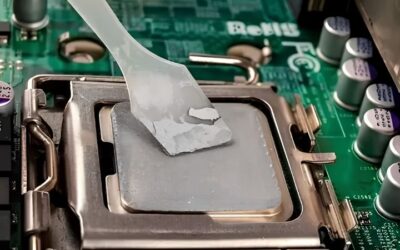
TF7 is the value pick, undercutting the better-known compounds while performing within the same narrow band. It ships with a small spatula, which is genuinely useful if you prefer a manual spread to a central drop.
Long-term field data is thinner than for the Arctic and Noctua products, so its multi-year behaviour is less well documented. For a build you expect to open again within a few years, that is a minor concern.
Frequently Asked Questions
These questions come up constantly whenever someone opens a cooler for the first time and starts wondering about the best way to put thermal paste on CPU surfaces without making things worse.
How much thermal paste should I use?
Roughly a small pea for a standard desktop processor. Large heat spreaders on high core-count chips want a little more, and bare-die applications want considerably less spread manually. Volume affects temperatures far more than the pattern you choose.
Does the dot method beat spreading manually?
For most desktop builds, yes, because mounting pressure spreads it evenly and no air is trapped. Manual spreading suits bare dies and low-pressure mounts, but it introduces the risk of bubbles if you work the compound too much.
Do I need to clean off the old paste?
Always. Use isopropyl alcohol at 90 percent or higher with a lint-free cloth on both the processor lid and the cooler coldplate. Mixing old and new compound produces inconsistent contact, and leftover fibres cost real temperature.
Can I use too much thermal paste?
Yes. Excess forms a thick insulating layer between the surfaces and can squeeze out onto the socket area. On AMD processors it can flow into the cutouts around the heat spreader, which is messy but not usually harmful with non-conductive compound.
See More:
- Who makes the best motherboard
- Best budget AM5 CPU for gaming
- What is the best thermal paste pattern
- Best mini ITX computer case
- Best desktop RAM for gaming
Final Thoughts
The best way to put thermal paste on CPU comes down to using the right amount of a compound that spreads easily, then letting the cooler do the rest. MX-6 is the sensible default, NT-H2 is the most forgiving first attempt, and the flat-nozzle products help if you prefer visible coverage. Clean both surfaces properly and warm the syringe, because those two habits change results more than the pattern debate ever will. Figures reflect August 2026 and should be verified before purchase.



Write Your Review
No reviews yet. Be the first to share your experience!