
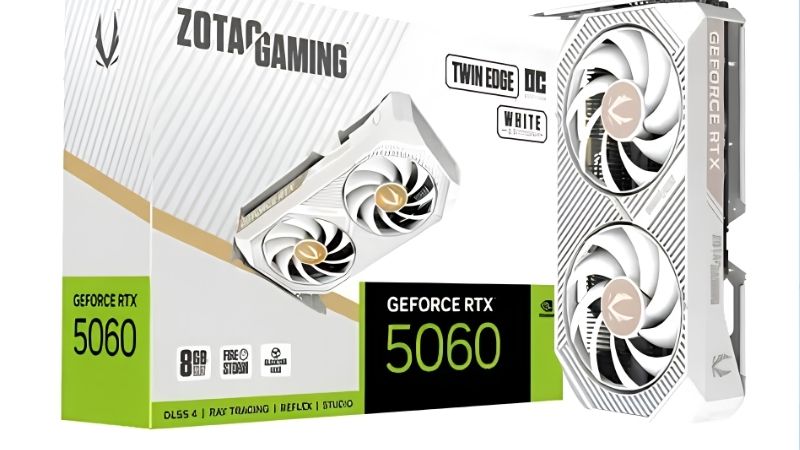
- Top Pick: ZOTAC Gaming GeForce RTX 5060 Twin Edge OC DLSS 4 8GB GDDR7 128-bit 28 Gbps PCIE 5.0 Gaming Graphics Card, SFF-Ready Compact Card, ZT-B50600H-10A
- Best Value: ZOTAC Gaming GeForce RTX 5060 Solo DLSS 4 8GB GDDR7 128-bit 28 Gbps PCIE 5.0 Gaming Graphics Card, SFF-Ready Ultra Compact Card, ZT-B50600G-10A
- Premium Choice: ZOTAC Gaming GeForce RTX 5060 Ti 8GB Twin Edge OC DLSS 4 8GB GDDR7 128-bit 28 Gbps PCIE 5.0 Gaming Graphics Card, IceStorm 2.0 Cooling, SFF-Ready, ZT-B50610H-10A


zotac gaming geforce rtx 5060 is the search you run after the hard decision is already made. You picked the chip. Now you are choosing between board partners on a listing page, and the questions that matter have nothing to do with benchmarks — every RTX 5060 runs the same GB206 silicon within a few percent of every other. What separates them is whether it fits your case, how loud it gets, whether it whines, and what happens if it fails in month fourteen. This review covers exactly those things, including one Zotac warranty detail that costs people three years of coverage because they did not read it in time.
What You Are Actually Buying
Zotac’s RTX 5060 line follows the pattern the company has used for years: a compact dual-fan Twin Edge model, an OC-binned version of the same board, and a single-fan Solo aimed squarely at small-form-factor builds. All three carry the same 3,840 CUDA cores, 8 GB of GDDR7 on a 128-bit bus, and roughly 448 GB/s of bandwidth. The differences are physical, not electrical.
As an Amazon Associate we earn from qualifying purchases at no extra cost to you.



Which Variant Are You Actually Buying?
This matters more than it should, because the model names are similar and the listings are careless. The Twin Edge is the standard dual-fan card. The Twin Edge OC ships with a modest factory clock bump — typically worth 1% to 3%, which is inside run-to-run variance and should not influence your decision. The Solo is single-fan and shorter.
The OC premium is not worth paying for performance. It is sometimes worth paying because OC models occasionally carry a slightly better cooler or a metal backplate rather than plastic. Check the specific listing’s photos rather than assuming — that is the actual difference, not the megahertz.
The Solo deserves a note of caution. A single fan on a 145W card works, but it works by spinning faster. If quiet operation is a priority and your case has room, the Twin Edge is the better choice by a clear margin.
Dimensions and Case Clearance
Zotac’s Twin Edge designs have historically sat in the 200 to 230 mm range at two slots, which puts them among the more compact cards at this tier. The Solo is shorter still. Both are realistic candidates for mini-ITX and small mid-tower builds where a 300 mm partner card is simply not an option.
Do not take that as a specification. Board partners revise dimensions between generations and between regional SKUs, and a 15 mm difference decides whether a card clears your drive cage. Pull the exact length, width, and slot count from the listing for the specific model number you are about to order, and measure your case from the rear bracket to the nearest obstruction before you click.
Slot height is the check people forget. A card described as dual-slot can still be 41 to 45 mm thick, which fouls the side panel in slim cases or blocks the PCIe slot below it. If you have an expansion card in that slot, verify the thickness figure and not just the slot count.
Power, Connector and PSU Requirements
The RTX 5060 draws roughly 145W and Zotac’s designs use a single standard 8-pin PCIe connector rather than the 16-pin 12V-2×6. That is a genuine advantage at this tier — no adapter, no seating anxiety, no melting-connector discourse. If your PSU has one spare 8-pin PCIe cable, you are done.
Nvidia’s recommendation is a 550W supply, and with a mid-range CPU that is comfortable rather than marginal. A quality 550W or 650W unit handles this card without ceremony, which makes the 5060 a genuine single-component upgrade for most existing builds.
The one caveat applies to prebuilt machines. A Dell or HP tower with a 300W to 400W proprietary supply and no spare PCIe cable will not run this card, regardless of the wattage arithmetic. If that describes your machine, the power supply is your first purchase and it is not optional — worth pricing a quality 550W 80+ Bronze unit alongside the card rather than discovering the problem on installation day.
Thermals, Noise and What Owners Report
Aggregating buyer feedback across four and five star reviews alongside the two and three star complaints produces a consistent picture, and it is more useful than any benchmark chart for a card this far down the stack.
Temperatures and the IceStorm Cooler
The recurring positive theme is that the cooler is comfortably over-specified for 145W. Owners report load temperatures in the 60s to low 70s Celsius in typical cases, with fans well below maximum. That is unsurprising — Zotac’s IceStorm designs were built for higher-power cards, and a 145W part gives them an easy job.
The FREEZE fan-stop feature draws consistent praise. Below roughly 55°C the fans stop entirely, which means the card is silent at desktop, during video playback, and in light workloads. For a machine that lives in a bedroom or a shared office, that is a real quality-of-life feature rather than a marketing bullet.
The complaints that do appear about temperature almost always trace back to case airflow rather than the card. A 5060 in a sealed tempered-glass case with one exhaust fan will run hot; the same card in a mesh-front case with two intakes will not. If your case has a solid front panel, that is the variable to fix.
The Coil Whine Reports
This is the most common substantive complaint against Zotac cards across generations, and it would be dishonest to leave it out. A meaningful minority of owners report audible coil whine under load, particularly at very high frame rates in menus or lightly loaded scenes where the card is producing hundreds of frames per second.
Two things are worth knowing. First, coil whine is not a defect in the warranty sense — it is a physical property of inductors under load, it affects every brand, and manufacturers generally will not accept a return for it alone. Second, it is largely fixable at your end: capping your frame rate in the driver or in-game, or enabling V-Sync, removes the extreme frame rates that provoke it. Most reports resolve once a frame cap is applied.
The honest read is that this is a lottery rather than a certainty, and it is not specific to Zotac despite being most discussed there. If silence matters enormously to you, buy from a retailer with a straightforward return window rather than a marketplace seller.
The Warranty Registration Trap
This is the detail that justifies reading a review of a specific board partner rather than the chip. Zotac’s standard warranty is two years. In supported regions it extends to five years — but only if you register the product within 30 days of purchase, keeping your invoice.
Miss the window and you keep two years. There is no retroactive registration, and the complaints from people who discovered this in year three are entirely avoidable. Register the day the card arrives, before you install it, while the invoice is still in your inbox.
Coverage terms and duration vary by region, so verify what applies where you bought it rather than assuming the headline number. RMA experiences in the two and three star reviews are mixed — some describe smooth replacements, others describe slow turnaround — which is unremarkable for the tier but worth factoring in if downtime matters to you. Buying from a retailer with its own returns process gives you a second route that does not depend on the manufacturer.
Pros, Cons and the 8GB Question
Here is the plain ledger from aggregated owner feedback, followed by the one specification that deserves more scrutiny than the marketing gives it.
Zotac Gaming GeForce RTX 5060: Pros
Pros: Compact designs that fit small cases where most partner cards do not — this is Zotac’s genuine differentiator at this tier. Single standard 8-pin connector, no 12V-2×6 adapter. Cooler is over-specified for 145W and runs in the 60s to low 70s. FREEZE fan-stop means silence at idle and during video. 550W PSU requirement fits most existing builds without any other purchase. Full DLSS 4 stack including Multi Frame Generation. Ninth-generation NVENC with dual AV1 encoders. Typically among the more competitively priced RTX 5060 options. Five-year warranty available in supported regions.
The most frequent unprompted praise is size. Buyers with ITX or slim cases repeatedly describe it as the card that actually fit after another brand’s did not — which is exactly the problem a board-partner review should be solving for you.
Zotac Gaming GeForce RTX 5060: Cons
Cons: Coil whine reports are more common than average, though they respond to a frame cap. The Firestorm tuning software is dated and clunky — most owners use MSI Afterburner instead, which works fine. Lower-tier models use a plastic backplate rather than metal. The five-year warranty requires registration within 30 days or you silently keep two. RMA turnaround reports are mixed. The Solo single-fan variant is louder under load than the Twin Edge. OC models offer 1% to 3% for a real price premium — not worth it. And 8 GB of VRAM on a 128-bit bus is a limitation of the chip rather than the card, but you inherit it regardless.
Is 8GB Enough in 2026?
This is the question the spec sheet dodges and it deserves a straight answer: at 1080p, yes, with caveats. At 1440p, increasingly not. The failure mode is what makes it serious — when a game exceeds available VRAM it does not slow down gracefully, it stutters. Frame times spike from 12 ms to 60 ms as textures swap over PCIe, and the average fps number barely moves while the experience falls apart.
Several modern titles already push past 8 GB at 1080p with high textures and ray tracing on. The 448 GB/s that GDDR7 provides helps with throughput but does nothing for capacity — bandwidth and capacity are different problems.
If you game at 1080p with sensible texture settings and use DLSS, this card will serve you well for years. If you have a 1440p panel or you refuse to touch texture sliders, look hard at the RTX 5060 Ti 16GB before you commit. That is not an upsell — it is the honest boundary of what 8 GB does.
Why 8GB and Why This Price
The 8 GB frame buffer is not a Zotac decision and it is not an oversight. Three market forces explain both the capacity and the number on the listing.
Component Prices Are Still Trending Up
The broad direction for laptops and PC components remains upward, and memory is the driver. AI infrastructure is consuming DRAM and GDDR at a scale consumer graphics cannot outbid, and that cost lands directly in every board partner’s bill of materials — Zotac’s included.
Mainstream cards absorb this worst. On a $999 card a memory cost increase disappears into margin. On a $299 card it is a large share of the price, which is precisely why 8 GB on a 128-bit bus keeps appearing at this tier. Board partners are not choosing between 8 GB and 16 GB; they are choosing between 8 GB and a price that will not sell.
The practical read: cards at this price are more likely to get stingier than more generous. The 8 GB you are looking at is the market’s answer, not Zotac’s.
The Good News Is Real, But Weak and Distant
Prices have at least stopped climbing at the pace they set through late 2025. Framework, which publishes unusually candid supply commentary, has reported a stretch of relative stability while still warning that volatility has not ended. The steep climb flattened. Nothing reversed.
For someone about to buy, that is genuinely useful: you are not being penalised for buying this week rather than last. It also means waiting a quarter is unlikely to reward you with a lower price — only with thinner stock of whichever variant fits your case.
New Memory Supply Arrives in 2027 at the Earliest
Fresh capacity is genuinely opening up. OEMs can increasingly source DDR5 from Chinese suppliers such as CXMT, and Micron is building two fabs in Idaho. Both are real and both are large. Neither runs before 2027 or 2028.
So relief exists, but it is weak and years away. Waiting for 16 GB to become standard at $299 means waiting through two more product generations.
Which settles the timing question for you. The card you are looking at is priced at roughly what it will be priced at. The decision is whether it fits your case and whether 8 GB fits your resolution — not whether to wait.
See More:
Conclusion: Should You Buy It?
The honest verdict on the zotac gaming geforce rtx 5060 is that it is a well-executed version of a card whose limits are set by the chip rather than the board. Every RTX 5060 performs within a few percent of every other, so you are choosing on the things this review covered: Zotac’s compact designs genuinely fit cases where other partners’ cards do not, the single 8-pin connector avoids the 12V-2×6 entirely, the cooler is over-specified for 145W and runs in the 60s to low 70s, and FREEZE fan-stop makes it silent at idle. Against that, coil whine reports are more common than average — fixable with a frame cap — and the Firestorm software is best ignored in favour of Afterburner.
Two things to do before you click. Pull the exact length and slot thickness for the specific model number on the listing and measure your case, because Zotac’s size advantage is the whole reason to pick it and a 15 mm error wastes it. Then, the moment it arrives, register it — the five-year warranty in supported regions requires registration within 30 days, and missing that window silently leaves you with two. Buy it if you game at 1080p with DLSS; look at the RTX 5060 Ti 16GB instead if you have a 1440p panel, because 8 GB is where this card ends and no cooler design changes that. With prices flat but high and no memory relief before 2027, check the current listing for the Twin Edge variant that fits your case, confirm your PSU has a spare 8-pin, and buy it.
Frequently Asked Questions
Will the Zotac RTX 5060 fit in a small form factor build?
Usually yes. Zotac dual-fan RTX 5060 models sit around 200 to 220mm long and two slots thick, which suits most mini tower and many ITX cases. Still measure your case GPU clearance and confirm the single 8-pin connector has room at the end of the card or along the top edge.
What power supply is required?
The RTX 5060 has a 145W board power and needs one 8-pin PCIe connector, so a good quality 500 to 550W unit is plenty even with a mid-range CPU. There is no 12V-2×6 requirement, which makes this an easy drop-in upgrade for older systems with existing ATX 2.x supplies.
Is 8GB of VRAM a problem in 2026?
It is the card weakest point. At 1080p with sensible settings it is fine, but 1440p ultra textures, ray tracing and frame generation can exceed 8GB and cause stutter or automatic texture downgrades. If your budget stretches, the 16GB RTX 5060 Ti or RX 9060 XT 16GB removes that ceiling entirely.
What frame rates should I expect at 1080p?
In esports titles such as Counter-Strike 2, Valorant and Rocket League you will comfortably exceed 144fps. Modern single-player games generally land between 60 and 90fps at high settings, and DLSS 4 quality upscaling plus frame generation pushes demanding titles like Cyberpunk 2077 into smooth territory with ray tracing on medium.
Does it need a PCIe 5.0 motherboard?
No, but it benefits from a modern one. The card uses a PCIe 5.0 x8 interface, so on an older PCIe 3.0 board it effectively runs at PCIe 3.0 x8 bandwidth. That costs only a few percent normally, but the penalty grows sharply in games that already exhaust the 8GB frame buffer.











Write Your Review
No reviews yet. Be the first to share your experience!