
- Top Pick: msi Gaming GeForce GT 1030 4GB DDR4 64-bit HDCP Support DirectX 12 DP/HDMI Single Fan OC Graphics Card (GT 1030 4GD4 LP OC)
- Best Value: msi Gaming GeForce RTX 3060 12GB 15 Gbps GDRR6 192-Bit HDMI/DP PCIe 4 Torx Twin Fan Ampere OC Graphics Card
- Premium Choice: msi Gaming GeForce RTX 4070 Ti 12GB GDRR6X 192-Bit Extreme Clock: 2760 MHz HDMI/DP Nvlink Tri-Frozr 3 Ada Lovelace Architecture Graphics Card (RTX 4070 Ti Gaming X Trio 12G)
msi afterburner overclocking is the last free performance you will ever get out of a graphics card, and with new GPU prices where they are, that matters more than it did two years ago. The software is free, it has been the community standard for over a decade, and on a typical card it returns 5% to 12% more frames for zero cost. It will also cook a poorly ventilated case, produce crashes that look like driver bugs, and reward undervolting more than overclocking. This review covers what Afterburner actually does, what the gains really are, where it fails, and the hardware that determines whether any of it holds.
What MSI Afterburner Actually Does
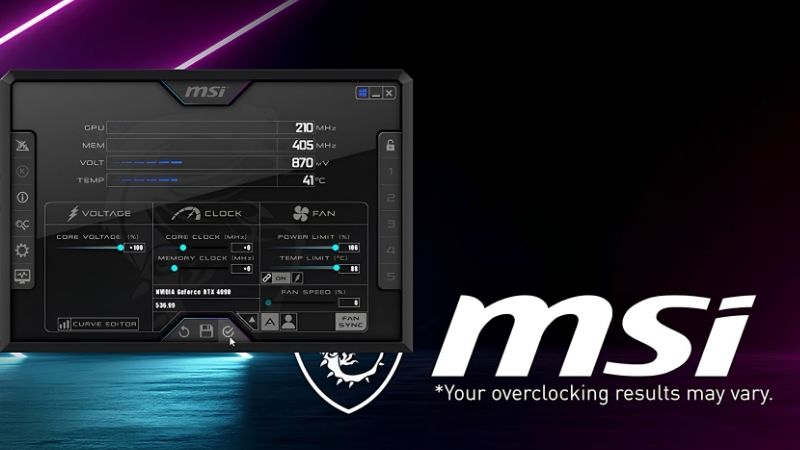
Afterburner is a GPU tuning and monitoring utility built on RivaTuner. It works on any modern Nvidia or AMD card regardless of who made it — the MSI branding is sponsorship, not a restriction. It exposes core clock, memory clock, power limit, temperature limit, voltage, and fan curve, plus an on-screen display that overlays live telemetry on any game.
The Core Controls and What Each One Costs You
Power limit is the first slider and the highest-value one. Modern GPUs are power-limited long before they are silicon-limited, so raising the cap from 100% to the maximum your card allows — typically 110% to 133% — often delivers most of the available gain on its own. It costs watts and heat, nothing else.
Core clock offset adds megahertz to the boost curve. Realistic offsets land at +75 to +150 MHz on most Nvidia cards; anything beyond that is silicon lottery. Memory clock offset is where the surprise sits — GDDR6X and GDDR7 tolerate large offsets, and +800 to +1500 MHz is common. Memory-bound titles at 4K respond to this more than to core clock.
The one control people misuse is voltage. Raising it buys marginal stability at a disproportionate thermal cost. Most experienced users leave it alone or go the other direction entirely.
The Curve Editor and Why Undervolting Beats Overclocking
Pressing Ctrl+F opens the voltage/frequency curve editor, and this is the feature that separates Afterburner from every simpler alternative. Instead of adding a flat offset, you reshape the entire boost curve — pinning a specific clock to a specific voltage.
The result most people actually want is an undervolt, not an overclock. Setting, for example, 2,700 MHz at 950 mV instead of the stock 1,050 mV typically drops board power by 40W to 80W, drops temperatures by 6°C to 12°C, drops fan noise noticeably — and frequently increases sustained frame rates, because the card stops hitting its power limit and throttling mid-session.
That is the counter-intuitive core of the whole exercise. On a thermally constrained card, less voltage produces more performance. Benchmark runs of 60 seconds hide this; a two-hour session does not.
The On-Screen Display Nobody Uses Properly
The RivaTuner OSD is arguably more valuable than the tuning sliders. It overlays core clock, memory clock, temperature, hotspot temperature, power draw, VRAM usage, GPU utilisation, and frame times on top of any game.
Enable frame time graphing and 1% low frame rates rather than just average fps. Average fps is a marketing number. Frame time consistency is what you actually perceive as smoothness, and it is the metric that exposes a bad overclock — a card can hold a high average while producing stutter that makes a game feel worse than it did at stock.
The GPU utilisation readout also settles the most common question in PC building: if your card sits at 60% while you are getting poor frame rates, no amount of overclocking will help you, because your CPU is the bottleneck.
What the Gains Actually Are, and What Limits Them
Community reports over the past several years are remarkably consistent about the size of the gain and about what stops people from reaching it. The ceiling is almost never the GPU.
Realistic Performance Numbers
On a well-cooled card, a full tune — power limit maxed, core +100 to +150 MHz, memory +1000 MHz — typically yields 5% to 12% more frames. In a title running at 80 fps, that is roughly 4 to 10 additional frames. It is real and it is free. It is not transformative.
An undervolt-focused tune usually delivers a smaller average gain, 0% to 5%, but meaningfully improves 1% lows and sustained performance during long sessions while cutting 40W to 80W and several degrees. For most people this is the better outcome.
What Afterburner cannot do is bridge a tier. A 3060 will not become a 3070. If you need 30% more performance, tuning is not the answer and no configuration will make it one.
Thermal and Airflow Limits Are the Real Ceiling
Here is what community feedback shows over and over: the overclock is limited by the case, not the card. A GPU that hits 83°C and thermal-throttles at stock will gain nothing from a higher power limit — you have simply given it permission to throttle harder.
Check the hotspot temperature in the OSD, not just the core temperature. A core reading of 70°C with a hotspot of 95°C indicates uneven die contact, degraded thermal paste, or dried-out thermal pads on the memory. On any card more than three years old this is common, and it is the single most likely reason your tuning attempt produces nothing.
The fix is usually intake airflow. Two or three good static-pressure case fans at the front, and a mesh panel rather than sealed glass, will do more for your frame rate than any slider in the software. If you are serious about tuning an older card, budgeting for a decent fan set and a tube of quality thermal paste is the prerequisite, not an accessory — and it is worth pricing those before you spend an evening on offsets that your airflow will not let you keep.
Power Supply Stability and Transient Spikes
The second failure mode is the PSU, and it is widely misdiagnosed. Raising a power limit raises transient spikes, which on modern cards can momentarily exceed twice the rated board power for microseconds. A PSU with inadequate headroom or poor transient response trips its protection and the system reboots instantly.
People blame the driver. It is not the driver. If your machine hard-resets under load only after you raise the power limit, and the temperatures were fine, your power supply is the suspect. This is why the standard advice is roughly 150W of headroom above your total system draw before you tune anything.
A quality 80+ Gold unit with proper transient handling is the foundation the entire exercise sits on. If yours is an unbranded unit that came with the case, tuning is not your next purchase — the PSU is.
Pros, Cons and Whether It Is Worth Your Evening
Feedback on Afterburner is consistent enough to summarise fairly, and the criticisms are as specific as the praise — usually a sign the tool is genuinely used rather than merely downloaded.
MSI Afterburner: Pros
Pros: Free, with no licence and no upsell. Works on any vendor’s card, AMD or Nvidia. The curve editor is the most capable undervolting interface available anywhere. The RivaTuner OSD with frame time graphing is best in class and worth installing even if you never touch a slider. Profiles apply automatically at startup. Custom fan curves fix the loud-and-hot behaviour of most reference coolers. A decade of community documentation means any error you hit has already been answered.
The most frequent unprompted praise is for undervolting specifically. Users report quieter, cooler cards with equal or better sustained frame rates, and describe it as the change that made an ageing GPU tolerable again.
MSI Afterburner: Cons
Cons: The interface is dated and the default skin is genuinely hard to read. Update cadence has been slow and inconsistent, with long gaps and beta builds required for new hardware support. Some anti-cheat systems flag the OSD hook, which can cost you a session or trigger a false positive. Instability from a bad overclock presents as random crashes that look exactly like driver faults, and new users lose hours chasing the wrong cause. Gains on modern cards are smaller than on older generations because factory boost algorithms already extract most of the headroom.
The recurring structural complaint is that the tool cannot overcome hardware limits it did not create. On a card in a hot case with a weak PSU, Afterburner does nothing except surface the problem — which is useful, but it is not what people downloaded it for.
Who Should Actually Bother
Bother if you own a card you intend to keep for another two years and you want it quieter, cooler, and marginally faster. Undervolt rather than overclock, spend an hour, and keep the result.
Bother if you have never seen your own frame times. Install it for the OSD alone, run your usual game, and look at the 1% lows and the hotspot temperature. That data will tell you whether your next purchase should be a GPU, a CPU, case fans, or a power supply — which is worth considerably more than 8% more frames.
Do not bother if you expect a tier jump, or if your case has one exhaust fan and a sealed front panel. In the second case, fix the airflow first; the software will still be free afterwards.
Why Tuning Matters More in 2026 Than It Did Before
The case for spending an evening on a free utility is stronger now than at any point in the last decade, and the reason is entirely economic.
Component Prices Are Still Trending Up
The broad direction for laptops and PC components remains upward, and memory is driving it. AI infrastructure is absorbing DRAM and GDDR at a scale consumer hardware cannot outbid, and that cost lands in the price of every graphics card on the shelf.
That changes the maths on tuning. When a replacement GPU cost $300, spending an evening for 8% more frames was a hobby. When the replacement costs $600 and is frequently out of stock, 8% for free plus a 10°C temperature drop is a rational decision about extending the life of an asset.
It also reframes what you should spend on. If a new card is out of reach, $60 on case fans and thermal paste that unlocks your existing card’s throttled headroom is the highest return per dollar available in PC hardware right now.
The Good News Is Real, But Weak and Distant
Prices have at least stopped climbing at the pace they set through late 2025. Framework, which publishes unusually candid supply commentary, has reported a stretch of relative stability while still warning that volatility has not ended. The spike flattened. It did not reverse.
A plateau is not a discount. If you were holding out for a correction before replacing your card, the supply picture does not support that plan — which makes getting the most out of what you already own the practical response rather than the consolation prize.
New Memory Supply Arrives in 2027 at the Earliest
Fresh capacity is genuinely opening up. OEMs can increasingly source DDR5 from Chinese suppliers such as CXMT, and Micron is building two fabs in Idaho. Both are real and substantial. Neither runs before 2027 or 2028.
So relief exists, but it is weak and years out. Planning to replace your GPU when memory gets cheap means planning for 2028 — two more product generations away.
Which makes the conclusion straightforward. The card in your machine is likely the card you will have for a while. Making it run cooler, quieter, and slightly faster is free, and the supporting hardware that lets you keep those gains costs a fraction of a replacement.
See More:
Conclusion: Is It Worth Installing?
Yes — but tune it for the outcome that actually helps you. The honest verdict on msi afterburner overclocking is that the overclocking half is the less valuable half. Maxing the power limit and pushing offsets returns 5% to 12%, which is real and free but will not change what your card can play. The curve editor used for undervolting returns something better: 40W to 80W less power, 6°C to 12°C lower temperatures, quieter fans, and often stronger 1% lows because the card stops throttling in long sessions. That is the tune worth keeping.
Install it for the OSD if nothing else, and look at your hotspot temperature and frame times before you touch a single slider — that data tells you what your machine actually needs. If the hotspot is above 90°C or the system reboots when you raise the power limit, the software has done its job by identifying the real problem: airflow or your power supply. With GPU prices flat but high and no meaningful memory relief before 2027, the cheapest performance available to you is unlocking the headroom your case is currently smothering. Check current pricing on a decent set of case fans, a quality thermal paste, and a PSU with proper transient headroom — those three components are what turn a free download into frames you get to keep.
Frequently Asked Questions
Does Afterburner support the newest GPUs?
Support arrives through beta builds rather than the stable release, so newer NVIDIA Blackwell and AMD RDNA 4 cards often need the latest beta version to expose voltage and clock control. If your card shows greyed-out sliders, you are almost certainly running an older stable build that predates that architecture.
Is undervolting better than overclocking an old GPU?
Usually yes. Using the curve editor with Ctrl and F, you can lock a lower voltage at a given clock, which cuts temperature and fan noise while often maintaining or slightly improving sustained clocks. Older cards with degraded thermal paste benefit far more from reduced heat than from a small frequency bump.
How much free performance can I realistically gain?
Expect five to ten percent from a combination of raising the power limit, a modest core offset and a memory overclock. Anything advertised as dramatically more usually involves the card already being thermally throttled. Raising the power limit slider to maximum is typically the single largest and safest contributor.
Can memory overclocking silently reduce performance?
Yes, and this catches many people out. GDDR6 and GDDR6X use error correction that retries failed transfers rather than crashing, so pushing memory too far produces stable but slower results. Always benchmark after each memory step and back off if the score drops even though the system remains stable.
Will overclocking void my warranty or damage the card?
Modern GPUs enforce hard voltage and thermal limits, so damage from Afterburner alone is very unlikely, and settings reset on reboot unless you apply them at startup. Warranty policies vary by manufacturer, and while overclocking is hard to detect, a custom fan curve that keeps temperatures lower is the genuinely protective change.
As an Amazon Associate we earn from qualifying purchases at no extra cost to you.













Write Your Review
No reviews yet. Be the first to share your experience!