
nvidia dynamo github is what most engineers type after reading a benchmark claim that sounds too good to check — 2x throughput on Hopper, 30x on GB200 NVL72 — and wanting to see the code before believing it. The repository lives at ai-dynamo/dynamo, it is Apache-2.0, and the Rust core is genuinely doing something Triton never did. This review covers what Dynamo actually is, what the disaggregated serving architecture buys you, the hardware you need underneath it, what practitioners report after running it in anger, and the honest answer to whether it beats a plain vLLM deployment.
- What the Nvidia Dynamo GitHub Repository Actually Contains
- Hardware Requirements: What You Actually Need Underneath It
- Pros, Cons and How Dynamo Compares to Plain vLLM
- What the H200 Export Decision Means for Dynamo Users
- Conclusion: Should You Deploy It?
- Related Guides
- Frequently Asked Questions
- Related Articles
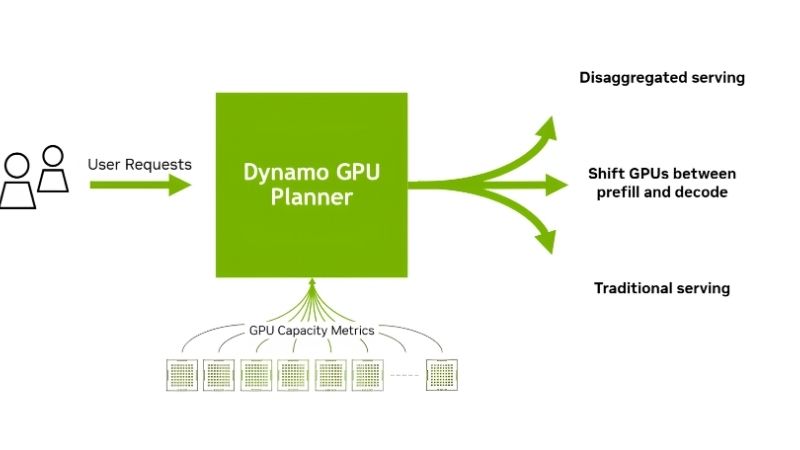
What the Nvidia Dynamo GitHub Repository Actually Contains
Dynamo is an open-source, low-latency, modular inference framework for serving generative AI and reasoning models across distributed GPU fleets. It is inference-engine agnostic, sitting above TensorRT-LLM, vLLM, and SGLang rather than replacing them. Nvidia positions it as the successor to Triton Inference Server, and the architectural break is real rather than cosmetic.
Disaggregated Prefill and Decode Serving
The central idea is that LLM inference is two different workloads wearing one costume. Prefill — processing the input prompt — is compute-bound and parallel. Decode — generating tokens one at a time — is memory-bandwidth-bound and sequential. Running both on the same GPU means one phase is always starving the other.
Dynamo separates them onto different GPUs or different GPU pools, each tuned for its own bottleneck. That is where the throughput multiplier comes from. It is not a compiler trick; it is a scheduling and topology decision, and it only pays off when you have enough GPUs to split across.
The practical threshold matters here. On a single GPU, disaggregation buys you nothing — you have nothing to disaggregate onto. The published gains assume multi-node deployments. If you are serving one model on one card, this is the wrong tool and the repository README will not stop you from finding that out the expensive way.
The KV Cache Manager and Memory Offloading
The second pillar is KVBM, the KV Block Manager. It offloads KV cache from GPU HBM to system RAM, local NVMe, or networked storage, then pulls blocks back when a conversation resumes. For chat and agentic workloads where the same context is revisited repeatedly, this is the difference between recomputing a 30,000-token prefill and reading it back off disk.
This is also where Dynamo quietly changes your hardware shopping list. HBM is fixed at purchase. System DRAM and NVMe are not. A node with 1 TB of DDR5 and a fast Gen5 NVMe array can hold vastly more cached context than the GPUs alone, and that capacity is cheap by comparison.
If you are specifying a build around this, the RAM and storage tiers deserve as much attention as the accelerator. High-capacity registered DDR5 modules and a PCIe Gen5 NVMe drive with sustained write endurance are the components that make KVBM worth enabling — links to current server-grade RAM kits and Gen5 drives are worth checking before you finalise the parts list.
Smart Router and NIXL Data Transfer
The LLM-aware smart router inspects incoming requests and routes them to whichever worker already holds the relevant KV blocks. It is a cache-hit optimiser at the fleet level, and on workloads with shared system prompts or repeated context it removes a large fraction of redundant prefill compute.
NIXL — the NVIDIA Inference Transfer Library — handles the actual movement of KV blocks between GPUs, nodes, and storage tiers. It abstracts over NVLink, InfiniBand, RoCE, and standard TCP, choosing the fastest available path.
The practical consequence: your interconnect becomes a first-class performance variable. On plain gigabit Ethernet, cross-node KV transfer will eat the gains disaggregation was supposed to deliver. This is a framework that assumes you have real networking underneath it.
Hardware Requirements: What You Actually Need Underneath It
The repository documentation is thorough on software and thin on the physical realities. Here is what the deployment actually demands, based on what practitioners report when they move past the single-node quickstart.
GPU and Interconnect Requirements
Dynamo targets datacentre silicon — H100, H200, B200, GB200 NVL72. It runs on consumer RTX cards for development and evaluation, and people do exactly that, but the headline numbers are not reproducible there. An RTX 5090 with 32 GB will host a quantised 30B model comfortably for prototyping the routing logic. It will not demonstrate a 30x anything.
For multi-node work, InfiniBand or high-speed RoCE is effectively mandatory. NIXL will fall back to TCP and the deployment will function, but the KV transfer latency will dominate your token generation time and you will have built a slower system than a single well-tuned vLLM instance.
System Memory and Storage
This is the component most people under-specify. KVBM’s value scales directly with how much RAM and NVMe you give it. Teams running production Dynamo deployments commonly report 512 GB to 2 TB of system memory per node, with Gen5 NVMe underneath as the second offload tier.
Storage endurance matters more than raw sequential speed. KV blocks are written and evicted continuously, so a consumer QLC drive will hit its write cliff and then its endurance rating in an unpleasantly short time. A DWPD-rated enterprise or prosumer Gen5 drive is the correct part, and it is worth pricing the right one before you commit rather than replacing it in six months.
The Development Workstation Path
Plenty of engineers evaluate Dynamo locally before requesting cluster budget, and that is a sensible sequence. A workstation with a 24 GB or 32 GB RTX card, 128 GB of DDR5, and a Gen5 NVMe drive is enough to run the containers, exercise the router, validate your Kubernetes manifests, and produce a credible internal demo.
That configuration is also the one that gets approved without a procurement cycle. If you are assembling it, the RAM capacity is the part to overspecify — 128 GB is the floor, and the modules are the cheapest way to make KV offloading demonstrable on a single box.
Pros, Cons and How Dynamo Compares to Plain vLLM
Community feedback since launch has been consistent enough to summarise fairly. The praise is specific and the complaints are equally specific, which is usually a sign the project is real.
What Practitioners Consistently Praise
Pros: The disaggregation gains are reproducible at scale — teams with multi-node H100 and H200 fleets report throughput improvements in the range Nvidia advertises. The engine-agnostic design means you keep your existing vLLM or TensorRT-LLM investment. The Rust core is fast and the Kubernetes operator is competent. Apache-2.0 with no licensing trap. The smart router delivers outsized wins on shared-prefix workloads such as agentic pipelines and RAG.
The KV offloading is the feature people mention unprompted. Being able to serve far more concurrent conversations than HBM should allow, by spilling to DRAM and NVMe, changes the cost structure of long-context serving in a way that is easy to measure on a bill.
What Practitioners Consistently Complain About
Cons: The learning curve is steep and the documentation assumes fluency in Kubernetes, etcd, and NATS. Single-node deployments see little or no benefit while inheriting all the operational complexity. Debugging a misrouted KV block across nodes is genuinely difficult. Version churn has been rapid, and configurations break between releases. The gap between the quickstart working and a production deployment working is measured in weeks, not hours.
The most common criticism is proportionality. If you serve one model to modest traffic, Dynamo adds a distributed control plane to solve a problem you do not have. A single vLLM container with continuous batching will serve you better and you will sleep more.
Dynamo vs vLLM: The Honest Comparison
| Factor | Plain vLLM | Nvidia Dynamo |
|---|---|---|
| Setup time | Minutes | Days to weeks |
| Single GPU | Excellent | No advantage |
| Multi-node scaling | Manual | Native, automated |
| Prefill/decode split | No | Yes |
| KV offload to RAM/NVMe | Limited | Yes (KVBM) |
| Cache-aware routing | No | Yes |
| Ops complexity | Low | High |
| Best fit | 1-4 GPUs, one model | 8+ GPUs, fleet serving |
The dividing line is roughly eight GPUs and more than one model. Below it, vLLM. Above it, Dynamo starts paying for its own complexity.
What the H200 Export Decision Means for Dynamo Users
Two market developments bear directly on anyone planning a Dynamo deployment this year, and both affect what hardware you can get and what it will cost.
H200 Sales to China Are Now Permitted
The United States has cleared Nvidia to sell the H200 — among its most capable AI accelerators — into China. Dynamo’s disaggregated architecture is tuned precisely for H200-class hardware and its 141 GB of HBM3e, so this is not adjacent news. It is the same silicon this framework was designed around.
The consequence is demand. A market of that scale reopening pulls H200 allocation toward it, and every H200 shipped to Shenzhen is one not shipped to your cloud provider’s next capacity expansion. Expect H200 instance availability to tighten and reserved pricing to firm rather than soften.
The practical response for a Dynamo deployment is to design for heterogeneity now. The framework is engine-agnostic and topology-aware by design — use that. A cluster that assumes uniform H200 nodes is a cluster with a procurement dependency you cannot control.
Memory Supply Is Opening Up — But Not Until 2027
Because KVBM makes system DRAM a performance component rather than a checkbox, the memory market is now your problem too. New supply is genuinely arriving: OEMs can increasingly source DDR5 from Chinese suppliers such as CXMT, and Micron is building two fabs in Idaho.
Neither helps this fiscal year. Those plants are not scheduled to run until 2027 or 2028. Prices have stopped climbing at the pace they set in late 2025, but a plateau is not a decline, and DDR5 remains expensive.
For deployment planning that means one thing: buy the RAM capacity you need for KV offloading now, at today’s flat-but-high price, rather than scaling into a market that has no relief scheduled. If you are specifying nodes, over-provision system memory in this generation — it is the single component that most directly converts into Dynamo throughput, and it is not getting cheaper before 2027.
See More:
Conclusion: Should You Deploy It?
The nvidia dynamo github repository is a serious piece of infrastructure, and the benchmark claims hold up — under the conditions they were measured in. Deploy it if you are serving multiple models across eight or more GPUs, if your workload has repeated context that cache-aware routing can exploit, and if you have InfiniBand or fast RoCE between nodes. In that shape, the disaggregated prefill and decode split and the KVBM offload tier deliver throughput gains that justify the operational burden.
Skip it if you are serving one model on one to four GPUs. You will inherit etcd, NATS, a Kubernetes operator, and a distributed debugging surface to solve a problem a single vLLM container already solves. Clone the repo, run it on a workstation, and see for yourself before you request cluster budget. If you are building that evaluation box, put the money into system memory and a Gen5 NVMe drive — with H200 supply tightening and no new DRAM capacity online before 2027, those are the parts that determine what your deployment can actually do, and they are worth ordering while current pricing holds.
Frequently Asked Questions
Is Dynamo a replacement for vLLM?
No, and that is the most common misunderstanding. Dynamo is a distributed inference serving framework that orchestrates workers, routing and KV cache movement, while vLLM, TensorRT-LLM and SGLang act as the actual execution engines underneath it. You typically run vLLM inside Dynamo rather than choosing one over the other.
Does it help if I only have one GPU?
Very little. Dynamo main advantages are disaggregated prefill and decode across separate workers, KV cache aware request routing, and multi-node scaling, all of which assume several GPUs or several nodes. On a single card the added orchestration overhead usually makes plain vLLM the faster and far simpler option.
What infrastructure does it require?
Expect a container-oriented setup. Production deployments generally run on Kubernetes with etcd and NATS for coordination and discovery, plus the NIXL transfer library for moving KV cache between workers and storage tiers. Local development is possible, but the project is clearly designed for datacenter-scale operation rather than desktop use.
What performance improvement should I realistically expect?
NVIDIA publishes large gains in tokens per second per GPU for large mixture-of-experts models under high concurrency, and independent reports confirm meaningful improvements when prefill and decode are separated. Gains shrink sharply with small models, low concurrency, or short prompts, so benchmark against your own traffic pattern before committing.
Is it tied to NVIDIA hardware?
The project is open source and engine agnostic in design, but it is developed by NVIDIA and optimised around CUDA-based backends and NVIDIA networking. Treat non-NVIDIA accelerator support as experimental, and verify current status in the repository rather than assuming parity with the primary supported path.
As an Amazon Associate we earn from qualifying purchases at no extra cost to you.


Ready to decide? Our #1 pick for 2026 is the Setup time.
Live price & availability on Amazon.










Write Your Review
No reviews yet. Be the first to share your experience!