


Installing Linux Mint Nvidia Drivers can completely transform your open-source desktop into a powerhouse for gaming and productivity. While Linux has historically had a rocky relationship with proprietary green-team hardware, modern distributions have worked tirelessly to deliver a seamless, plug-and-play experience.
How Linux Mint Nvidia Drivers Perform in 2026
Evaluating the compatibility and day-to-day performance of Nvidia hardware on a Debian/Ubuntu-based distribution requires looking closely at how the operating system interacts with proprietary code. In 2026, Linux Mint has solidified its position as one of the most user-friendly entry points for gamers making the switch from Windows. Below, we break down the functional reality of utilizing these driver systems on modern hardware setups.
As an Amazon Associate we earn from qualifying purchases at no extra cost to you.


![Linux Mint [32-bit] 3-disc set includes Mint 12, Mint 12 LXDE, and Mint 13 Cinnamon](https://m.media-amazon.com/images/I/51HT3ER31hL._SL160_.jpg)


Out-of-the-Box Driver Installation Experience
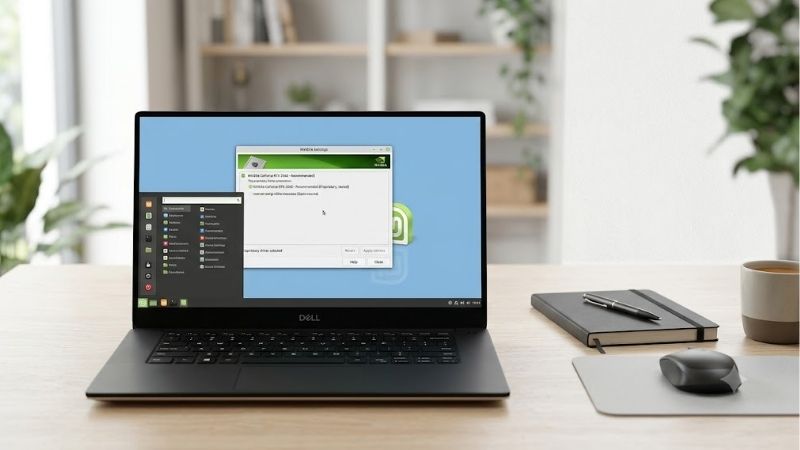
The process of setting up your graphics hardware on Linux Mint has evolved into a highly streamlined operation. When booting into a fresh installation, the system defaults to the open-source Nouveau driver, which is fine for basic display output but lacks any real 3D acceleration capabilities. Fortunately, the built-in Driver Manager utility quickly detects your exact GPU model and presents a clean graphical interface to select the latest recommended proprietary driver.
For most users, this process requires nothing more than a single click, entering an administrator password, and restarting the computer. The system automatically pulls the verified driver packages directly from official repositories, reducing the risk of a broken Xorg server or a black screen on boot. This automated pipeline stands as a massive achievement for open-source accessibility, removing the need for newcomers to navigate complex terminal commands or manual package compilations.
Gaming Performance and Ray Tracing on Linux
Gaming on Linux Mint has reached parity with Windows in several major titles, thanks largely to rapid developments in Proton and Valve’s continuous optimization of translation layers. When running native Vulkan games or DX12 titles through VKD3D, high-end cards deliver exceptional frame rates and minimal micro-stuttering. The proprietary driver ensures that advanced pipeline state caching is fully utilized, meaning games load quickly and render smoothly after initial shaders are compiled.
However, advanced features like real-time ray tracing and Deep Learning Super Sampling require minor manual tweaks to function correctly under Wine or Proton. While the underlying drivers support these features natively, you may need to add specific launch options in Steam to force DLSS or Ray Tracing configurations in demanding games. Once enabled, the performance of cards like the GeForce RTX 4070 Super remains highly competitive, showing only a negligible performance penalty compared to a standard Windows environment.
Power Management and Battery Life on Laptops
Laptop users running dual-graphics setups—commonly referred to as Nvidia Optimus—face a different set of challenges when managing system power. The driver integration includes a dedicated system tray applet that allows you to switch between different power profiles: Intel/AMD Only, NVIDIA Only, or On-Demand mode. In On-Demand mode, the system dynamically assigns rendering tasks to the dedicated GPU only when running demanding applications like blender or modern 3D games.
While this hybrid approach saves considerable battery life during casual web browsing or document editing, the standby power draw of Nvidia GPUs under Linux remains slightly higher than under Windows. Users frequently report that leaving the GPU in active mode can drain a standard laptop battery within two to three hours. Therefore, managing your power profiles through the built-in applet is absolutely essential if you plan to use your machine on the go.
Hardware Market Trends and the Best GPUs for Linux Mint
The graphics card market is currently navigating a complex landscape of shifting manufacturing priorities and evolving global trade policies. Understanding these macroeconomic trends is vital before making a purchasing decision, as they directly influence retail prices and the long-term availability of desktop components. Here is how the broader tech sector is shaping your upgrade options in 2026.
Global Supply Chains and the Nvidia H200 AI Chip Shift
The global hardware market is experiencing a massive realignment as silicon manufacturers prioritize enterprise AI computing over traditional consumer graphics cards. Recently, the United States government allowed Nvidia to sell its highly advanced H200 AI chips to the Chinese market under specific regulatory guidelines. This development has widespread implications for everyday PC builders and Linux enthusiasts looking to secure a new desktop GPU.
Because the production of enterprise-grade silicon like the H200 yields exceptionally high profit margins, major semiconductor foundries are dedicating a massive portion of their fabrication capacity to these enterprise accelerators. Consequently, wafer allocation for consumer Geforce RTX graphics cards has tightened. This supply-side constraint means that mid-range and high-end consumer GPUs may see spotty availability throughout the year, keeping retail prices stubborn and making it harder to find deals on popular graphics cards.
Check the latest price on Amazon:
Rising PC Hardware Costs and Why You Should Buy Now
Adding to the supply constraints is a persistent upward trend in the cost of raw materials, memory chips, and international shipping. Desktop components, particularly graphics cards and premium gaming laptops, are seeing steady price increases across all major retail platforms. Inflationary pressures combined with high demand for GDDR6 VRAM have forced manufacturers to adjust their MSRPs upward, making budget-friendly builds increasingly difficult to plan.
For Linux Mint users, this upward price pressure creates a strong incentive to upgrade sooner rather than later. Waiting for a massive price drop on graphics cards in the current economic climate is a risky strategy that could result in paying more for the exact same hardware a few months down the line. If you are planning to build a reliable Linux workstation or a dedicated gaming rig, purchasing your hardware now protects your budget from future inflationary hikes.
If you are ready to secure your hardware before prices climb further, you can explore the best deals available today:
- Check the latest price on Amazon
Top Recommended Nvidia GPUs to Buy Today
When selecting a graphics card specifically for a Linux Mint system, balancing price, raw performance, and driver compatibility is key. The GeForce RTX 4060 remains the undisputed champion for budget-conscious users targeting high-performance 1080p gaming and moderate creative work. It operates within a modest power envelope, meaning it runs cool and quiet even in compact PC cases with basic cooling setups.
For enthusiasts seeking a more future-proof system, the GeForce RTX 4070 Super offers an incredible sweet spot for 1440p gaming and AI development. It features 12GB of fast VRAM, which provides plenty of headroom for modern gaming textures and local large language models. This card integrates perfectly with the proprietary Linux Mint drivers, delivering stable frame rates and robust hardware encoding capabilities for streaming or video editing.
To see the current market options and find the perfect fit for your setup:
- Check the latest price on Amazon
The Pros and Cons of Linux Mint Nvidia Drivers
No software solution is entirely flawless, and running proprietary graphics software on an open-source operating system always involves a series of trade-offs. To give you an objective view of what to expect, we have compiled the real-world experiences of the Linux community, drawing from both glowing praise and common technical troubleshooting reports.
Why Users Praise the Proprietary Driver Experience
For the vast majority of users, the proprietary driver package provides an incredibly stable and high-performing desktop experience. Community members frequently highlight how simple it is to get up and running without touching the command line, contrasting it sharply with more complex distributions like Arch or Gentoo. The system’s ability to automatically handle kernel module updates during system upgrades is a major selling point that prevents the desktop from breaking after standard system updates.
Additionally, hardware acceleration for web browsers, video editing applications like DaVinci Resolve, and 3D modeling programs like Blender works seamlessly right out of the box. Users who rely on their computers for professional production work praise the driver’s reliable CUDA support, which allows them to run local machine learning models and high-end rendering tasks with maximum hardware utilization and zero configuration hassle.
Common Roadblocks and Community Complaints
Despite the overall positive reception, certain hardware configurations can still run into annoying bugs and configuration hurdles. One of the most common complaints stems from Wayland compositor support. While Linux Mint has made great strides in implementing Wayland, the proprietary Nvidia driver can still cause window flickering, mouse cursor lag, or minor visual artifacts in certain desktop environments compared to their AMD Radeon counterparts.
Another frequent pain point involves multi-monitor setups with mismatched refresh rates. Users running a high-refresh-rate gaming monitor alongside a standard 60Hz secondary display occasionally report stuttering or frame rate locking issues under X11. While these issues can usually be resolved by editing configuration files or switching display backends, they represent the kind of friction that can frustrate users transitioning from a highly polished commercial operating system.
Final Verdict: Is Linux Mint Ready for Nvidia Users?
The short answer is a resounding yes. While AMD graphics cards still enjoy a slight reputation advantage in the Linux community due to their open-source driver stack, the modern implementation of Linux Mint Nvidia Drivers is incredibly mature, stable, and simple to maintain. The automated installer, combined with robust performance in modern games and professional applications, makes it a top-tier choice for any desktop user.
If you are willing to spend a few minutes adjusting display settings or applying launch options for specific games, you will be rewarded with a remarkably stable and powerful workstation. The combination of Linux Mint’s clean user interface and Nvidia’s powerful hardware acceleration provides an excellent environment for both work and play, proving that proprietary hardware can thrive in an open-source world.
Conclusion
Maximizing your system’s capabilities with Linux Mint Nvidia Drivers has never been easier than it is right now. While macroeconomic factors and enterprise AI demands continue to push hardware prices upward, securing a reliable GPU today ensures your Linux desktop remains fast, responsive, and ready for future software demands. Whether you choose a budget-friendly option or a high-end powerhouse, the modern Linux Mint ecosystem provides all the tools you need to enjoy a flawless computing experience.
Frequently Asked Questions
What is the easiest way to install NVIDIA drivers on Linux Mint?
Use Driver Manager from the menu. It detects your card, lists available packages, and marks a recommended version. Select it, apply, and reboot. This installs the DKMS modules so the driver rebuilds automatically after kernel updates, which avoids the broken graphics that manual runfile installs commonly cause.
Why do I get a black screen after installing?
Secure Boot is the usual cause. When enabled, the newly built kernel module is unsigned and refuses to load, leaving you without acceleration. During installation Mint prompts you to set a MOK password, and you must complete the blue MOK enrolment screen at the next boot for the driver to work.
Should I use the open kernel modules or the proprietary ones?
NVIDIA open kernel modules are supported on Turing and newer GPUs and are now the default recommendation for those cards. Older Maxwell and Pascal hardware still requires the proprietary modules. If a package is offered as open in Driver Manager and your card is recent, it is a safe choice.
Does Wayland work properly with NVIDIA on Mint?
Cinnamon on Mint defaults to X11, which remains the most reliable path with NVIDIA drivers. Wayland sessions have improved considerably with explicit sync support in recent driver branches, but X11 avoids the remaining edge cases around screen sharing and some applications. Stay on X11 unless you specifically need Wayland.
How do I remove a broken driver and start over?
Boot to a text console with Ctrl, Alt and F2, log in, then purge the packages with sudo apt purge nvidia-* followed by sudo apt install –reinstall xserver-xorg-video-nouveau and a reboot. From the working desktop, reinstall through Driver Manager rather than a downloaded runfile.











Write Your Review
No reviews yet. Be the first to share your experience!