
NVIDIA GTX 1080 drivers reached their terminus in October 2025, and the card did not notice. That is the strange position Pascal flagship owners occupy in 2026: hardware that still posts numbers a current entry card would recognise as peers, running on a driver branch that will never be updated again. This article covers which build to keep, what your card can genuinely still do — including one specification that has aged better than it had any right to — and whether the money in your pocket should move now or later.
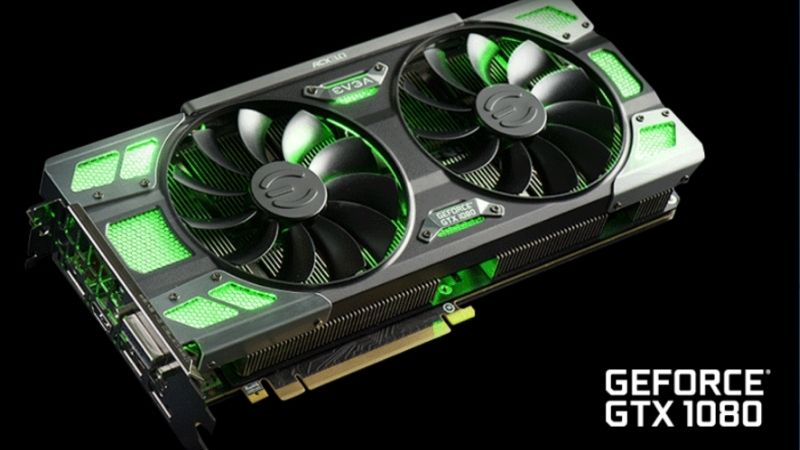
The Last GTX 1080 Drivers: Which Build to Keep
Unlike most driver articles, this one has a definite answer rather than “install the newest.” Your card has a final release, it has a number, and after that number there is nothing. What follows is how to identify it, which branch to search, and why the file deserves a permanent home rather than a Downloads folder.
Why 580 Is the End of the Line for Pascal
NVIDIA shipped its final Game Ready Driver for Maxwell, Pascal, and Volta in October 2025. The 580/581 family was the last full-feature branch those architectures received, and the current release notes now state it plainly: driver support for the GeForce 10, 900, and 700 series is discontinued.
The GTX 1080 is Pascal GP104. It sits inside that boundary, as does the GTX 1080 Ti and the entire GTX 10 series. The mainstream branch is now 610, and it does not include your card at all.
But there is a second track that almost every article about this misses. Security updates continue through October 2028 under their own version numbers, and the last supported build for your card is the Game Ready Security Driver 582.66, released June 2026. Pascal received roughly nine years of Game Ready support — generous by any industry measure, and finite.
One clarification that catches people out. The GTX 16 series is Turing, not Pascal, and continues receiving updates past 580. Your GTX 1080 outperforms a GTX 1660 in raw terms and lost support first. That is architecture, not merit.
Game Ready vs Studio for a GTX 1080
Check which branch you are actually on before you go hunting, because they carry different version numbers.
Game Ready is the default and the right choice if the card games. Its final Pascal build is the one most owners want.
Studio drivers move slower and are validated against Adobe, Autodesk, and DaVinci Resolve. A significant share of GTX 1080s ended up in workstations rather than gaming rigs, and if yours is one of them, the Studio branch is the archive to search. Its release cadence was always slower, so its final Pascal build carries a different number.
Neither branch will gain anything further. The decision is only about which final build suits your workload.
How to Archive Your Final Driver Properly
This is the actionable part and it takes three minutes.
Download your chosen build from NVIDIA’s Advanced Driver Search — GeForce, GTX 10 Series, GTX 1080, your Windows version, your branch. For most owners that means 582.66 or the final 580-branch Game Ready release, depending on whether you want the last optimisations or the latest security patches. Install it, confirm it is stable across a week of normal use, then keep the installer.
Rename the file so it means something in two years. Store it where a Windows reinstall cannot touch it: a USB stick, an external drive, cloud storage. Note the version number somewhere you can read from your phone, because the moment you need it is the moment your PC will not display anything.
This is not paranoia. It is the standard advice for hardware in maintenance mode, and NVIDIA’s own guidance for affected owners amounts to the same thing: find the last build that works well, and keep it.
What a GTX 1080 Can Still Do in 2026
Here is where the Pascal flagship story gets interesting, because the honest assessment is neither “it is obsolete” nor “it is still great.” It is both, depending on which specification you look at — and one of those specifications should not still be competitive but is.
The Bandwidth Number That Should Not Still Be True
The GTX 1080 moves 320 GB/s across a 256-bit bus of GDDR5X. Hold that figure.
NVIDIA’s RTX 5050, released in 2025 as the entry point to the Blackwell generation, moves 320 GB/s. Identical. Nine years apart, and the memory subsystems are level.
| GTX 1080 (2016) | RTX 5050 (2025) | |
|---|---|---|
| VRAM | 8 GB GDDR5X | 8 GB GDDR6 |
| Memory bus | 256-bit | 128-bit |
| Bandwidth | 320 GB/s | 320 GB/s |
| FP32 compute | ~8.9 TFLOPS | ~13.2 TFLOPS |
| TDP | 180 W | 130 W |
| DLSS 4 | No | Yes |
| Multi Frame Gen | No | Yes |
Read the table honestly in both directions. It says the GTX 1080 was an exceptional piece of engineering — a 2016 card matching a 2025 one on memory throughput and capacity. It also says the entry tier has barely moved in nine years, which is a comment on the market rather than a compliment to your card.
Where the newer card wins is compute, efficiency, and software. That last one turns out to matter most.
The 8GB Frame Buffer and Where It Breaks
8 GB was extravagant in 2016 and is adequate in 2026. That is a remarkable run, and it is also the end of it.
At 1080p your frame buffer is fine in most titles. At 1440p — which is where a 1080 owner probably sits, because this was a flagship — modern releases at high settings will exceed 8 GB and produce the hitching that no settings slider fully removes.
The GTX 1080 Ti owners reading this have a genuine advantage worth naming: 11 GB and 484 GB/s. That card has aged better than any Pascal part and remains competitive in ways the standard 1080 does not.
No DLSS: The Gap That Cannot Be Closed
This is the wall, and it is architectural rather than temporal.
Pascal has no Tensor Cores. DLSS requires them. Your card will never run DLSS — not with a driver update, not with a patch, not ever. NVIDIA has extended newer DLSS models to increasingly old RTX hardware, including cards from 2018, but the requirement is hardware that Pascal does not contain.
Understand what this costs. Modern entry cards do not brute-force modern games; they render at lower internal resolution and reconstruct. Your card must render everything natively. A 13.2 TFLOPS card using DLSS outruns an 8.9 TFLOPS card by far more than the 48 percent the raw numbers suggest.
FSR is the partial answer. AMD’s upscaler is not hardware-gated, it works on Pascal, and a growing number of titles offer it. It is worse than DLSS and it exists on your card, which counts for something.
Pros and Cons of Holding On to a Pascal Flagship
The GTX 1080 occupies an awkward position that a straight benchmark chart does not capture. It is fast enough that replacing it feels wasteful and old enough that keeping it costs you access to the features that define modern rendering. Both readings are correct.
Where the GTX 1080 Still Wins
Raster performance at 1080p is genuinely fine. This card handles the overwhelming majority of games at high settings, and it will continue to.
Memory capacity and bandwidth remain competitive with current entry hardware, as the table above makes uncomfortably clear. You are not short on VRAM relative to what 250 buys today.
No ongoing cost is the third and least discussed advantage. The card is paid for. In a market where replacement pricing has been unkind, an asset you already own has value that a spec sheet does not measure.
The Costs of Staying Past the Cutoff
No day-one optimisation is the immediate cost. New releases increasingly rely on driver-level workarounds, and you no longer receive them. Expect a higher incidence of crashes and visual bugs in launch-week titles.
No DLSS is the compounding cost. It does not hurt today and it hurts more every year, because game design increasingly assumes upscaling is available.
Anti-cheat is the sleeper risk. Some systems gate on modern driver behaviour, and a permanently frozen branch could eventually lock you out of a title with an error message that never mentions drivers.
Settings That Buy You Another Year
Drop from 1440p to 1080p before dropping settings. On a card with this much bandwidth, resolution is the cheapest lever and the least visually destructive.
Enable FSR wherever a game offers it. Quality mode costs little and returns real frames on hardware without a hardware upscaler.
Cap your frame rate. A 1080 running uncapped at 180 W generates heat and noise for frames beyond your monitor’s refresh. Capping to your panel drops power draw and temperature at zero visual cost — worth doing on a nine-year-old cooler.
The Enthusiast’s Timing Question: Upgrade Now?
Unlike most people reading driver articles, GTX 1080 owners can generally afford to replace the card. You bought a flagship once. The question is not affordability — it is whether this is a sensible moment to spend, and 2026 has an unusually specific answer.
What Your Money Actually Buys Today
Be clear-eyed about the target. Replacing a GTX 1080 with something that is unambiguously better means clearing 8 GB and 320 GB/s while adding DLSS. An entry card does not do that — as the comparison table shows, it draws level rather than pulling ahead.
The tier that genuinely upgrades you sits higher, and higher has been expensive. Component costs never returned to 2024 levels; they continued upward, with memory driving the increase. That pressure is precisely why the entry tier has stagnated at 8 GB and why your replacement costs what it does.
The most telling evidence arrived this month. NVIDIA restarted production of the five-year-old RTX 3060 12GB and returned it to shelves near its 2021 price, because rebuilding old silicon on an idle node had become cheaper than building new. When that is a manufacturer’s most economical move, the market is telling you something about the near term.
Prices Plateaued, But Did Not Fall
There is genuine good news and it deserves accurate reporting rather than either spin or gloom. The sharp escalation that characterised late 2025 has levelled off. Framework and other manufacturers have described a stretch of relative steadiness — while stating explicitly that they do not regard the volatility as finished.
The distinction is the whole point for someone deciding when to spend. A plateau removes the penalty for deliberating. It does not create a reward for waiting. Prices stopped climbing; nobody has reported them coming down.
For an enthusiast with the money already set aside, that changes the calculation from urgent to unhurried — but not from unhurried to deferred.
The Case for Moving Now vs Waiting for Late 2027
Capacity is genuinely being added on a public schedule. Micron has two fabrication plants going up in Idaho. CXMT in China has widened the DDR5 supplier pool available to manufacturers. Both are real.
Neither arrives soon. The Idaho facilities are not scheduled to produce until the 2027 to 2028 window, and forecasts do not anticipate meaningful consumer price relief before late 2027.
So the honest framing. Move now if your 1440p experience is already compromised — eighteen months of stuttering to chase an unpromised discount is a bad trade for someone who can afford not to make it. Wait if the card still delivers what you want at 1080p, because your driver is secure until October 2028 and price relief is forecast for late 2027. Those two dates give you a runway most people do not have.
Compare what a genuine upgrade tier costs today against what your GTX 1080 still delivers at your resolution — the honest answer for many owners is that dropping to 1080p buys another year for nothing.
See More:
- NVIDIA
- NVIDIA DeepStream
- NVIDIA GPU driver update
- NVIDIA GeForce NOW download
- NVIDIA RTX A2000 12GB driver
Conclusion
The story of NVIDIA GTX 1080 drivers ends at two numbers. Branch 580 carried the final Game Ready release in October 2025. 582.66 is the current Game Ready Security Driver and your last supported build, with quarterly security updates continuing through October 2028. Download whichever suits you, confirm it over a week, and archive the installer somewhere permanent. That is the whole maintenance plan for the rest of this card’s life.
What you should take from the specification table is more useful than the driver advice. Your 2016 flagship matches a 2025 entry card on memory bandwidth and capacity. It loses on compute, efficiency, and — decisively — on DLSS, which is a hardware absence no update will remedy.
With prices flat rather than falling and relief not forecast before late 2027, there is no urgency in either direction. If 1440p has become a fight, upgrade. If 1080p still satisfies you, archive that driver and enjoy one of the best-aged cards NVIDIA has ever shipped for another two years.
Frequently Asked Questions
What is the final driver branch for the GTX 1080?
Pascal reached end of Game Ready feature support with the R580 branch. Those builds are the last to receive new game optimizations, while critical security patches continue into late 2028. Anything released after that window will not support the card, so the 580 series is the effective final destination.
Which build is the most stable for daily use?
The last hotfix release within the 580 branch is the safest choice, since it carries all accumulated Pascal fixes. Some users prefer late 550 series builds for lower installer overhead on older Windows installations. Either is fine; what matters more is doing a clean install rather than layering upgrades.
Can the GTX 1080 still handle modern games?
At 1080p with medium to high settings, yes in many titles, helped by its 8GB frame buffer which has aged better than the 6GB on smaller Pascal cards. It struggles with anything requiring hardware ray tracing or mesh shaders, and a few recent releases refuse to run on the architecture at all.
Does it support FSR or XeSS as a DLSS alternative?
Yes. Both FSR and XeSS in its DP4a compatibility path run on standard shaders, so they work on Pascal. Image quality is softer than DLSS on RTX hardware, but at 1080p with the Quality preset the frame rate gain often makes the difference between playable and not.
What power supply does it need?
The reference GTX 1080 is a 180W board with a single 8-pin connector and a 500W system recommendation. Partner cards with dual 8-pin inputs and factory overclocks push closer to 220W. If the unit powering it is now eight or more years old, capacitor aging is a more likely failure cause than capacity.
As an Amazon Associate we earn from qualifying purchases at no extra cost to you.





Ready to decide? Our #1 pick for 2026 is the VRAM.
Live price & availability on Amazon.











Write Your Review
No reviews yet. Be the first to share your experience!