
- Top Pick: GeForce GT 740 4G DDR3 Low Profile Graphics Card, PCI Express 3.0 x16, HDMI/VGA/DVI, Entry Level GPU for PC, SFF and HTPC, Compatible with Win11
- Best Value: PNY Nvidia Quadro P2000 5GB DDR5 160 BIT 4X DP Graphics Card
- Premium Choice: PNY NVIDIA Quadro T600 Graphic Card – 4 GB GDDR6 – Low-Profile


Prime
Limited Time
QTHREE GeForce GT 210 Graphics Card,1024 MB DDR3 64 Bit,HDMI,VGA,Low Profile Video Card for PC,GPU,PCI Express 2.0 x16,SFF,Low Power
Nvidia graphics driver download sounds simple, yet getting it right protects your PC from fake installers, mismatched drivers and frustrating errors. The difference between a smooth download and a broken system often comes down to using the correct source and choosing the right driver for your card. This review walks through where to download Nvidia drivers safely, the best methods available, how to pick the correct version, and the pitfalls to avoid so your download turns into a clean, working install. The core message is reassuringly simple: stick to official sources, match the driver to your card, and the rest falls into place.
Where to Download Nvidia Graphics Drivers Safely
The single most important part of any driver download is the source. Getting this right avoids the vast majority of problems, so it deserves attention before anything else.
As an Amazon Associate we earn from qualifying purchases at no extra cost to you.





Official Sources Only
You should only ever download Nvidia graphics drivers from official sources, meaning the NVIDIA app or Nvidia’s own website. These are the only places guaranteed to provide genuine, unmodified drivers that are safe to install. Anything else introduces the risk of a tampered file, which is never worth taking for software with this much system access.
Unofficial download sites are a real risk, as they can bundle unwanted software or malware alongside the driver. There is nothing they offer that you cannot get free and safely from Nvidia directly.
Sticking to official sources is the golden rule of driver downloads. It removes almost all the security risk in one simple decision. Follow this rule and most of the scary stories about driver downloads simply never apply to you.
The NVIDIA App vs Website Download
There are two official routes: the NVIDIA app, which manages downloads automatically, and the website, where you select and download drivers manually. Both deliver the same genuine drivers, so the choice is about convenience and control. Neither route is more official than the other; they are just two doors into the same trusted source.
The NVIDIA app is the easiest option for most people, detecting your card and offering the correct driver with minimal effort. It also notifies you when new drivers are available, making updates effortless. Those prompts mean you rarely fall behind, since the app effectively reminds you to stay current.
The website suits those who prefer to choose a specific version or who cannot use the app for some reason. It gives you full manual control over exactly which driver you download. That control is handy when you want to roll back to a known-good version rather than always taking the newest one.
Choosing the Right Driver for Your GPU
Downloading the correct driver means matching it precisely to your graphics card model and operating system. Installing a driver meant for a different card can cause crashes, errors or a black screen. Because the mismatch is not always obvious at first, it can lead to confusing problems that are hard to trace back to the driver.
If you are unsure which GPU you have, the NVIDIA app can detect it automatically, removing the guesswork entirely. This is the safest route for anyone not completely certain of their hardware. Rather than guessing at a model number, you let the app read your system and pick the match for you.
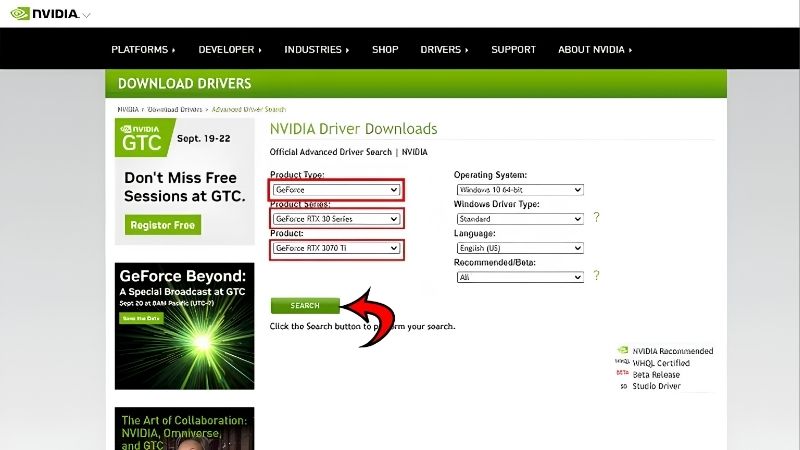
On the website, you select your exact GPU series, model and operating system from clear menus before downloading. Taking a moment to get this right prevents one of the most common download mistakes. A few seconds spent confirming the model and operating system saves a great deal of troubleshooting later.
The Download and Install Process
Once you know the source, the actual process is quick and predictable. Here is how each method works, step by step, so your download leads to a clean install.
Downloading via the NVIDIA App
Using the NVIDIA app is the simplest path from download to installed driver. You open the app, go to the drivers section, and it shows the latest driver for your detected card ready to download.
After selecting download, the app fetches the correct driver automatically, then offers to install it for you. Choosing the Express installation option handles the whole process with no further decisions needed. For the vast majority of people this default is exactly right, with no reason to dig into advanced options.
This approach removes almost every chance of downloading the wrong file, since the app does the matching for you. For most users, it is the fastest and safest way to get a driver onto their PC. From opening the app to a finished install is usually just a couple of minutes of mostly hands-off waiting.
Manual Download From the Website
If you prefer manual control, Nvidia’s official drivers page lets you download exactly the driver you want. You select your GPU details and operating system, then download the recommended driver file directly. The site clearly flags the recommended Game Ready or Studio option, so the correct choice is easy to spot.
Once the file has downloaded, you run it and follow the installer, choosing Express installation for a straightforward setup. This route guarantees you get the precise driver you intended. It is the method to use when you know exactly which version you want and would rather not rely on automatic selection.
Manual downloading is a dependable fallback whenever the app is unavailable or you need a specific version. It also lets you keep an installer file for reinstalling later if needed. Holding on to a known-good installer can be a lifesaver if a future update ever misbehaves.
Verifying and Installing Safely
Before installing, a quick check that the file came from an official source and matches your card gives peace of mind. Genuine Nvidia downloads never require third-party download managers or extra bundled software.
During installation the screen may flicker or briefly go black, which is completely normal as the driver loads. Closing important programs first ensures nothing is lost during that moment. Saving your work beforehand means the brief screen flicker is a non-event rather than a source of lost progress.
Letting the installer finish fully, then restarting if prompted, ensures the new driver loads cleanly. Rushing or interrupting the process is the main way an otherwise safe download turns into a problem. Giving the installer the minute it needs to finish is a small patience that avoids a lot of trouble.
Safety, Pitfalls and What Users Report
Knowing the risks and how others handle them helps you download with confidence. Here is how the methods compare, the traps to avoid, and what experienced users advise.
Pros and Cons of Each Download Method
Here is the honest ledger for the two official ways to handle an Nvidia graphics driver download.
NVIDIA app — Pros: automatic detection, easy updates, minimal chance of the wrong file. Cons: less control over specific versions. Website — Pros: full manual control, easy to grab a specific version, keeps an installer file. Cons: you must select the correct details yourself, with a small risk of error.
The pattern is clear: the app suits most people for its simplicity, while the website is ideal for those who want precise control. Both are safe as long as you stay on official sources. The method you pick matters far less than the source you pick it from.
Avoiding Fake Sites and Malware
The biggest danger in any driver download is unofficial websites posing as helpful sources. These can deliver drivers bundled with adware or malware, or outdated files that cause problems.
A reliable rule is that if a site is not the NVIDIA app or Nvidia’s official domain, you should not download drivers from it. Search results can surface convincing fakes, so check the source carefully. A quick look at the web address before downloading is usually enough to tell a genuine page from an impostor.
Legitimate Nvidia downloads are always free and never require extra tools or payment. Anything asking for those is a clear warning sign to walk away. Treat any payment prompt or mandatory download manager as proof you are in the wrong place.
What Users and Experts Recommend
Experienced users almost universally recommend the NVIDIA app for its convenience and safety, especially for those who are not confident identifying their exact GPU. It removes the main source of download errors. For anyone who has ever installed the wrong driver by mistake, that automatic matching alone makes the app worthwhile.
For more advanced users, the official website is the trusted route for grabbing specific versions or keeping installers on hand. The shared theme is that both official options are reliable, and everything else should be avoided.
The most repeated advice is simply to never stray from official sources, as that one habit prevents the overwhelming majority of driver download problems. It is the single most valuable rule to follow. Internalise it once and safe downloading becomes second nature rather than something you have to think about.
See more:
- Nvidia gear store
- Nvidia number of employees
- Nvidia Jetson Xavier Developer Kit
- GeForce graphics driver
Final Verdict: The Safe Way to Download Nvidia Drivers
A safe Nvidia graphics driver download really comes down to two rules: use only official sources, and match the driver to your exact card and operating system. The NVIDIA app is the easiest and safest choice for most people, handling detection and installation automatically, while the official website gives advanced users precise manual control. Avoid unofficial sites entirely, verify your download, and let the installer finish cleanly for a trouble-free result. If your drivers are current and games still underperform, the bottleneck may be your hardware, so check current-generation Nvidia GPUs through the link below to see whether an upgrade is worthwhile.
Frequently Asked Questions
Where should I download Nvidia drivers from?
Use only the official Nvidia driver page or the Nvidia app, which detects your GPU and offers the correct package automatically. Windows Update also distributes validated drivers. Avoid third-party driver aggregator sites and driver updater utilities, since these are a common vector for bundled adware and outdated or tampered installers.
What is the difference between Game Ready and Studio drivers?
Game Ready drivers ship quickly to add day-one optimizations and profiles for new game releases. Studio drivers use a slower cadence and receive extended validation against creative applications such as Adobe, Blender, DaVinci Resolve and Autodesk. Both come from the same code base, so choose based on your primary workload.
Do I need to uninstall the old driver first?
Usually not. The installer offers a clean installation checkbox that removes previous settings and profiles, which is sufficient for routine updates. Use Display Driver Uninstaller in safe mode only when troubleshooting persistent crashes, black screens, or when switching between Nvidia and AMD hardware in the same system.
Which driver do I need for an older GeForce card?
Nvidia moves older architectures into legacy branches that stop receiving new features and eventually stop receiving security fixes. Kepler and Maxwell cards are already in that state. The download page filters by product family, so selecting your exact model will show the newest branch that still supports it.
How do I verify a driver package is genuine?
Check that the download URL is on the nvidia.com domain, confirm the file is signed by NVIDIA Corporation in the file properties digital signatures tab, and compare the version number with the one listed on the official release notes page. Genuine installers never require disabling antivirus to run.





Write Your Review
No reviews yet. Be the first to share your experience!