
3DMark Fire Strike benchmark remains one of the most widely referenced GPU tests, and if you are trying to compare your graphics card against others or verify a new build, you want to know what the score actually means and whether the test still matters in 2026. Rather than sit through a video, you want the interpretation, the reference points, and the honest limitations laid out clearly. This review explains how Fire Strike works, how to read your result, and where it still delivers value for gamers and PC builders today.

What the 3DMark Fire Strike Benchmark Actually Tests
Fire Strike has been a staple of PC benchmarking for years, but understanding what it measures is essential before you trust your score. This section explains the DirectX 11 workload it runs, how the scoring system works, and what the graphics, physics, and combined tests each reveal about your hardware.
As an Amazon Associate we earn from qualifying purchases at no extra cost to you.


The DirectX 11 Workload Explained
Fire Strike is a DirectX 11 benchmark designed to stress a gaming PC with demanding real-time graphics scenes. It renders complex environments to push the GPU hard, simulating the kind of load a heavy game would generate.
Because it targets DirectX 11, it reflects a well-established graphics standard rather than the newest APIs. That makes it consistent and comparable across a huge range of hardware tested over many years.
The practical value is a stable, repeatable workload. Everyone running Fire Strike runs the same scenes, so scores are directly comparable in a way real games rarely allow.
Fire Strike also comes in heavier variants aimed at more powerful hardware, which extend its useful range to high-end systems. Knowing which variant a score came from matters, because comparing results across different presets is meaningless.
How the Scoring System Works
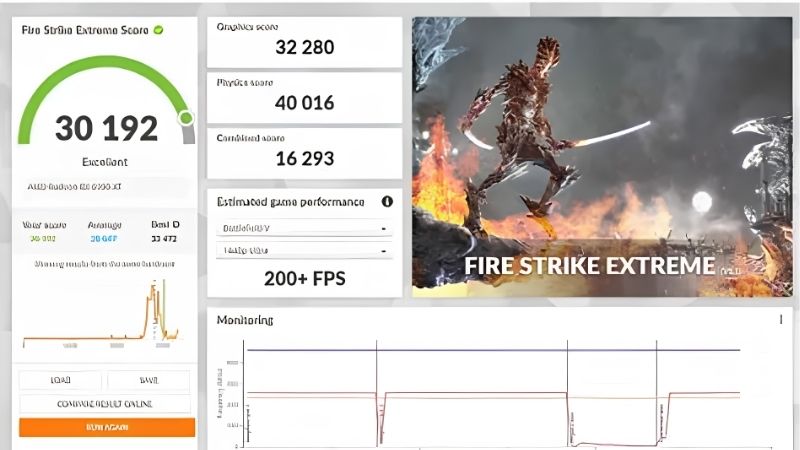
Fire Strike produces an overall score built from several sub-tests, with the graphics score weighted most heavily since GPU performance dominates the result. A higher score means stronger performance under the benchmark’s specific load.
The score is a unitless number meant for comparison, not a direct frame-rate reading. You interpret it by comparing against other systems or against your own baseline after changes.
For most users, the overall score is the headline figure, but looking at the individual sub-scores reveals whether the GPU, the CPU, or their interaction is the limiting factor.
This weighting toward graphics is deliberate, since gaming performance is overwhelmingly GPU-bound. It means your Fire Strike result tracks graphics-card strength closely, which is exactly what most people want when comparing gaming PCs.
Graphics, Physics, and Combined Tests
Fire Strike splits its work into distinct tests. The graphics tests isolate GPU rendering performance, the physics test stresses the CPU with simulation work, and the combined test loads both simultaneously to reveal how they perform together.
This separation is genuinely useful for diagnosis. A low graphics score points to a GPU bottleneck, while a low physics score suggests the CPU is holding the system back.
Reading these sub-tests turns Fire Strike from a single number into a diagnostic tool. You learn not just how fast your PC is, but where its strengths and weaknesses lie.
The combined test is especially revealing for gaming, because real games load the GPU and CPU together. A system that scores well in isolation but stumbles in the combined test may show stutter in demanding titles, which pure single-component tests would miss.
Reading Your Score and Ranking Your GPU
A number only helps if you know what good looks like, so this section covers how to interpret your result, roughly where popular GPUs land, and the honest limitations of relying on Fire Strike in 2026. It also weighs the test’s pros and cons so you know when to trust it.
What a Good Fire Strike Score Looks Like
Interpreting your score is all about reference points. Entry-level and older cards produce lower overall scores, mainstream modern GPUs land in the mid ranges, and high-end current cards push the highest numbers.
The best way to judge your result is to look up scores for your exact GPU model online, where large databases of submitted results exist. Comparing against the typical range for your card tells you instantly whether your system is performing normally.
If your score falls well below the expected range for your hardware, that is a signal something is wrong — thermal throttling, a background process, or a misconfiguration — rather than a limitation of the card itself.
Conversely, a score comfortably within the normal band is reassuring confirmation that your build is assembled correctly, your cooling is adequate, and your drivers are behaving. That validation alone makes the quick test worth running on any new system.
How Popular GPUs Rank in Fire Strike
Fire Strike is often used to rank GPUs relative to one another, and the ordering generally tracks real-world gaming performance for DirectX 11-era workloads. More powerful cards score higher in a fairly predictable ladder.
This ranking utility is why reviewers and buyers still cite Fire Strike numbers. It offers a quick, standardized way to place a card in the broader performance hierarchy.
That said, the relative gaps in Fire Strike do not always match the gaps you would see in the newest games, which use more modern rendering techniques. The ranking is a useful guide, not a perfect predictor.
For that reason, treat a Fire Strike ranking as a starting point when comparing two cards you are considering. Cross-check it against benchmarks in games you actually play and against modern DirectX 12 tests, and the combined picture will be far more reliable than any single number.
Pros and Cons of Fire Strike in 2026
Fire Strike has clear strengths and clear limits in 2026. The pros: it is a stable, repeatable, and widely recognized test; it has an enormous database of comparison scores; it separates GPU and CPU performance usefully; and it runs quickly and easily for a fast health check.
The cons: it is based on the aging DirectX 11 standard, so it does not reflect modern APIs like DirectX 12 or ray-tracing workloads; its scores can overstate relevance for the newest games; and a high Fire Strike number does not guarantee strong performance in today’s most demanding titles.
The pattern is clear. Fire Strike remains excellent for comparison and quick diagnostics, but it should be paired with newer benchmarks if you want to judge performance in the latest ray-traced games. It is a reliable baseline, not the whole story.
Using Fire Strike to Test Your Own PC
The real payoff is applying the benchmark to your own system, so this section walks through how to run it, how to use it for stability and upgrade testing, and a final verdict on where Fire Strike fits in a modern testing toolkit.
How to Run the Benchmark Properly
Running Fire Strike is straightforward, but a few practices ensure accurate results. Close background applications, make sure your drivers are up to date, and let your system reach a normal temperature before testing so thermal conditions are consistent.
Run the benchmark more than once and compare results. A single run can be skewed by a momentary background task, while repeated runs reveal your system’s true, stable performance.
Why bother with this care? A clean, consistent test environment is the difference between a meaningful score and a misleading one. Small setup errors can cost you hundreds of points and lead to wrong conclusions.
Using It for Stability and Upgrade Testing
Beyond raw scoring, Fire Strike is valuable for stability testing. Its stress-test mode loops the workload to check whether your system stays stable under sustained load, which is ideal after overclocking or building a new PC.
It is also perfect for measuring the impact of upgrades. Benchmark before and after adding a new GPU, more cooling, or an overclock, and the score change quantifies exactly what your upgrade achieved.
This before-and-after use is where Fire Strike shines for enthusiasts. It turns a vague sense that the PC feels faster into a concrete, measurable result you can trust.
The same principle helps when troubleshooting a system that suddenly feels slow. Comparing a fresh Fire Strike run against an earlier baseline quickly reveals whether performance has genuinely dropped — a strong hint of a driver, thermal, or hardware issue — or whether the slowdown is only perceived.
Final Verdict on Fire Strike’s Relevance
Weighing everything, the 3DMark Fire Strike benchmark remains a genuinely useful tool in 2026, provided you understand its scope. For comparing GPUs, diagnosing bottlenecks, testing stability, and measuring upgrades, it is fast, reliable, and universally recognized.
Its limitation is age: as a DirectX 11 test, it should be complemented by newer benchmarks to assess performance in modern, ray-traced titles. Used alongside current tools, it holds a valuable place in any tester’s kit.
For anyone building, upgrading, or troubleshooting a gaming PC, Fire Strike is worth keeping in your toolkit. If you want a complete benchmarking suite to test your system thoroughly, exploring the full 3DMark package is a smart next step.
See More:
- 3060 Ti vs 9060 XT
- Nvidia Shield TV Pro
- RTX 5070 vs RX 9060 XT
- RTX 3090 24GB
- Nvidia price prediction
Conclusion
The 3DMark Fire Strike benchmark continues to earn its place in 2026 as a fast, stable, and widely comparable way to measure and rank GPU performance. It excels at diagnosing bottlenecks, testing stability after overclocking, and quantifying upgrades, even if its DirectX 11 foundation means it should be paired with newer tests for the latest ray-traced games. Understanding what your score means — and how to run the test cleanly — turns Fire Strike into a genuinely useful tool rather than just a number. If you are ready to benchmark and optimize your own PC, exploring the full 3DMark suite is the perfect way to start.
Frequently Asked Questions
Is Fire Strike still relevant in 2026?
Only in a limited way. It is a DirectX 11 test released back in 2013, so it does not exercise ray tracing, mesh shaders or modern DirectX 12 features that determine performance in current games. It remains useful for comparing against the enormous historical result database and for quick sanity checks on older hardware.
What counts as a good Fire Strike score?
Scores only mean something relative to comparable hardware. Modern mid-range cards produce graphics scores far above what the test was designed around, which is part of why it has aged out. Rather than chasing an absolute number, compare your result with the online database for identical GPU and CPU combinations to spot underperformance.
How do Fire Strike, Time Spy and Steel Nomad differ?
Fire Strike targets DirectX 11 at 1080p, with Extreme at 1440p and Ultra at 4K. Time Spy is the DirectX 12 test at 1440p, with Time Spy Extreme at 4K. Steel Nomad is the current heavy cross-platform test built for modern GPUs, and Port Royal plus Speed Way cover ray tracing specifically.
What does the free version include?
The free Basic Edition on Steam includes Fire Strike and several other benchmarks at default settings, which is enough for straightforward comparisons. The paid Advanced Edition adds custom runs, looping stress tests, individual test selection and offline result saving, which matter mainly to overclockers and reviewers rather than casual users.
Can I use it to test system stability?
The looping stress test in the paid version reports a frame consistency percentage and is a reasonable quick check after overclocking, though it is short and light by modern standards. For serious validation, combine it with a longer gaming session, a memory test and a sustained thermal load, since brief benchmarks miss heat soak problems.






Write Your Review
No reviews yet. Be the first to share your experience!