
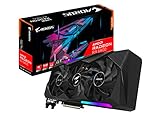
- Top Pick: GIGABYTE AORUS Radeon RX 6800 Master 16G Graphics Card, MAX-Covered Cooling, 16GB 256-bit GDDR6, GV-R68AORUS M-16GD Video Card
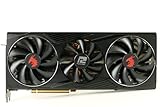
- Best Value: PowerColor Red Dragon AMD Radeon RX 6800 Gaming Graphics Card with 16GB GDDR6 Memory, Powered by AMD RDNA 2, Raytracing, PCI Express 4.0, HDMI 2.1, AMD Infinity Cache (Renewed)
- Premium Choice: GIGABYTE GeForce RTX 4060 Ti WINDFORCE OC 8G Graphics Card, 2X WINDFORCE Fans, 8GB 128-bit GDDR6, GV-N406TWF2OC-8GD Video Card (Renewed)
The RX 6800 is the stronger gaming card in traditional rendering, roughly 15-25% faster than the RTX 4060 Ti, and its 16 GB of VRAM on a 256-bit bus makes it the better 1440p card for the money. The RTX 4060 Ti is the better pick for ray tracing, DLSS 4 with frame generation, and low-power builds on a 550 W supply. Among the two RTX 4060 Ti versions, the 16 GB model is the safer long-term buy, but it costs more without being any faster in most games.
The RX 6800 launched in October 2020 at $579 as an upper-tier RDNA 2 card. The RTX 4060 Ti arrived in May 2023 in two forms: an 8 GB model at $399 and a 16 GB model at $499, with otherwise identical GPUs. All three are previous generation now, behind the RTX 50 series and Radeon RX 9000 family, but they still overlap heavily on the used market.
As an Amazon Associate we earn from qualifying purchases at no extra cost to you.


Spec Comparison: RX 6800 Versus Both RTX 4060 Ti Models
| Specification | RX 6800 | RTX 4060 Ti 8GB | RTX 4060 Ti 16GB |
|---|---|---|---|
| Architecture | RDNA 2.0 | Ada Lovelace | Ada Lovelace |
| Release date | 28 October 2020 | 18 May 2023 | 18 May 2023 |
| Launch MSRP | $579 | $399 | $499 |
| Shaders / CUDA cores | 3840 | 4352 | 4352 |
| Boost clock | 2105 MHz | 2535 MHz | 2535 MHz |
| Process | 7 nm | 5 nm | 5 nm |
| Board power | 250 W | 160 W | 165 W |
| Memory | 16 GB GDDR6 | 8 GB GDDR6 | 16 GB GDDR6 |
| Bus width | 256-bit | 128-bit | 128-bit |
| Bandwidth | 512.0 GB/s | 288.0 GB/s | 288.0 GB/s |
| Cache | 4 MB L2 + 128 MB L3 | 32 MB L2 | 32 MB L2 |
| Interface | PCIe 4.0 x16 | PCIe 4.0 x8 | PCIe 4.0 x8 |
| Power connectors | 2x 8-pin | 1x 16-pin (reference spec) | 1x 16-pin (reference spec) |
| Length / width | 267 mm, 2-slot | 240 mm, 2-slot | 240 mm, 2-slot |
| Outputs | 1x HDMI, 2x DisplayPort, 1x USB Type-C | 1x HDMI 2.1, 3x DisplayPort 1.4a | 1x HDMI 2.1, 3x DisplayPort 1.4a |
The RX 6800 has 78% more memory bandwidth and a 128 MB Infinity Cache, while the RTX 4060 Ti relies on a 32 MB L2 cache to compensate for its narrow 128-bit bus. The two RTX 4060 Ti models differ only in memory capacity and a 5 W power rating difference, so the 16 GB version gains nothing in raw speed. It simply avoids running out of memory.
Raster Gaming: The RX 6800 Leads
TechPowerUp’s RTX 4060 Ti launch data placed the card about level with the RTX 3070 and roughly 7-10% ahead of the RX 6700 XT at 1080p. TechSpot’s RX 7700 XT review, meanwhile, found the RX 7700 XT performing at roughly RX 6800 level and about 9% ahead of the RTX 4060 Ti 16GB at 1080p, and TechPowerUp measured the RX 7700 XT about 20% faster than the RTX 4060 Ti at 1440p. Independent comparisons that test the RX 6800 directly report raster leads of about 15-30% over the RTX 4060 Ti. A reasonable summary: the RX 6800 is roughly 15-25% faster, with the gap widening at 1440p and 4K.
At 1080p, both cards are high-refresh options in most games, and the gap can narrow when the CPU becomes the limit. At 1440p, the RX 6800’s wider bus and larger cache pull ahead clearly, and it is the more consistent card at high settings. As a broad guide, the RX 6800 typically holds 60+ FPS at 1440p high in demanding modern games where the RTX 4060 Ti may need DLSS to do the same. FPS ranges vary with settings, CPU and game patch.
Ray tracing flips the result
With ray tracing enabled, the RTX 4060 Ti takes the lead. TechPowerUp’s data shows the RTX 4060 Ti matching the higher-tier RX 6800 XT in ray tracing, which means it outpaces the RX 6800. Ada’s third-generation RT cores are far more capable than RDNA 2’s first-generation ray accelerators. For RT-heavy single-player games, the NVIDIA card is the better experience.
Upscaling and Frame Generation
The RTX 4060 Ti supports DLSS 4 Super Resolution with the transformer model, Ray Reconstruction and DLSS frame generation (2x). Multi Frame Generation is limited to RTX 50 cards. In supported games, DLSS plus frame generation can push the RTX 4060 Ti’s displayed frame rate well past the RX 6800’s native result.
The RX 6800 uses FSR 3.x upscaling and frame generation, along with AMD Fluid Motion Frames for driver-level frame generation. FSR 4 officially targets RDNA 4 Radeon RX 9000 cards. The RX 6800 has the raw horsepower to need upscaling less often at 1440p, but when both cards upscale, DLSS generally produces the cleaner image.
VRAM: Why the 4060 Ti Version Matters
Here is how the three memory configurations line up against typical modern AAA demands:
| Scenario | Typical VRAM need | RX 6800 16GB | 4060 Ti 8GB | 4060 Ti 16GB |
|---|---|---|---|---|
| 1080p high | 6-8 GB | Comfortable | At the limit | Comfortable |
| 1440p high | 8-11 GB | Comfortable | Needs lower textures | Comfortable |
| 1440p with RT and frame gen | 10-13 GB | Comfortable | Stutter risk | Comfortable |
The 8 GB RTX 4060 Ti is the weakest option for long-term ownership, because ray tracing and frame generation, its two main selling points, both consume extra memory. TechPowerUp’s RTX 4060 Ti 16 GB review found that the extra memory makes little difference in average frame rates across most games, but it prevents stutter and texture problems in the memory-heavy titles where 8 GB runs out.
Power, PSU and Case Fit
Using GPU board power plus CPU gaming power plus about 150 W of headroom:
- RX 6800: 250 W + ~125 W (typical midrange CPU while gaming) + 150 W = about 525 W, so a quality 600-650 W unit is advisable.
- RTX 4060 Ti 8GB / 16GB: 160-165 W + ~125 W + 150 W = about 435-440 W, so a quality 500-550 W unit is enough.
The RX 6800 needs two 8-pin connectors. The RTX 4060 Ti reference specification lists a 16-pin connector, but most partner cards use a single 8-pin, so check the specific model. In size, the RX 6800 reference card is 267 mm and the RTX 4060 Ti reference figure is 240 mm, both dual-slot; many RTX 4060 Ti partner models are compact. The RTX 4060 Ti also uses a PCIe 4.0 x8 link, which costs a little performance on PCIe 3.0 motherboards, especially the 8 GB model when VRAM overflows.
Cost Per Frame
Using launch MSRP and approximate 1440p raster performance (RTX 4060 Ti = 100, RX 6800 = about 120):
- RX 6800: $579 / 120 = about $4.83 per performance point.
- RTX 4060 Ti 8GB: $399 / 100 = $3.99 per performance point.
- RTX 4060 Ti 16GB: $499 / 100 = $4.99 per performance point.
At launch prices, the 8 GB RTX 4060 Ti was the cheapest per frame, and the 16 GB model was slightly worse value than the RX 6800 despite being much slower in raster. On today’s used market, the RX 6800 usually sells around $260-$330 used, the RTX 4060 Ti 8GB around $230-$290 and the 16GB model around $280-$350. At those prices, the RX 6800 typically offers the most raster performance and memory per dollar, while the 4060 Ti counters with features and efficiency.
Which to Buy
| Priority | Best choice |
|---|---|
| 1440p raster performance per dollar | RX 6800 |
| Ray tracing and DLSS frame generation | RTX 4060 Ti 16GB |
| 1080p esports on a 500-550 W PSU | RTX 4060 Ti 8GB |
| Long-term VRAM headroom | RX 6800 or RTX 4060 Ti 16GB |
| Older PCIe 3.0 motherboard | RX 6800 (full x16 link) |
| Small, quiet, cool build | RTX 4060 Ti |
Shoppers at the 16 GB price point should also compare current cards like the RX 9060 XT 16GB and RTX 5060 Ti 16GB, which offer newer upscalers and full driver feature support.
Frequently Asked Questions
Is the RX 6800 faster than the RTX 4060 Ti?
Yes, in rasterized games. Review data and independent comparisons place the RX 6800 roughly 15-25% ahead, with a larger lead at 1440p. With ray tracing enabled, the RTX 4060 Ti is faster.
Should I get the 8 GB or 16 GB RTX 4060 Ti?
The 16 GB model is the safer choice for 1440p, ray tracing and frame generation, because those features consume extra memory. Both versions use the same GPU, so the 16 GB card is not faster in most games. It simply avoids stutter when 8 GB runs out.
What PSU does the RX 6800 need?
A quality 600-650 W power supply with two 8-pin PCIe connectors suits a typical gaming build. The card is rated at 250 W. The RTX 4060 Ti runs comfortably on a quality 500-550 W unit.
Does the RTX 4060 Ti lose performance on PCIe 3.0?
Slightly. It uses a PCIe 4.0 x8 link, which halves bus bandwidth on PCIe 3.0 boards. The effect is usually small but grows when the 8 GB model runs out of memory, while the RX 6800 uses a full x16 link.
Is the RX 6800 still a good buy in 2026?
At used-market prices it remains one of the stronger 1440p raster values, with 16 GB of memory. Its weaknesses are ray tracing, higher power draw and no official FSR 4 support. AMD has also moved RDNA 2 toward a maintenance-style driver cadence.
Ready to decide? Our #1 pick for 2026 is the Architecture.
Live price & availability on Amazon.








Write Your Review
No reviews yet. Be the first to share your experience!