
nvidia shield serial number identification is a vital task for any streaming enthusiast or power user looking to optimize their home theater setup in 2026. This simple string of alphanumeric characters is far more than a basic manufacturing label; it acts as your personal gateway to secure software updates, firmware upgrades, and official hardware warranty claims. Whether you are dealing with minor system glitches, looking to verify the authenticity of a pre-owned purchase, or registering your newly acquired device for support, knowing where to find this identifier is incredibly important. This comprehensive, objective review analyzes how managing this system code correctly protects your investment in high-end streaming gear.
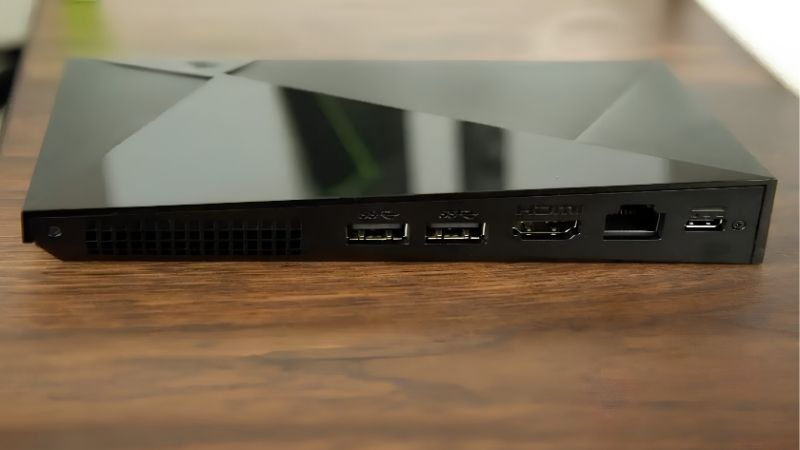
Navigating Your Streaming Console Hardware Configurations
Managing the settings and physical architecture of a premium streaming media player requires a thorough understanding of its key hardware details. While most users treat media players as simple plug-and-play electronics, high-end consoles function as advanced local servers capable of complex AI calculations and extensive network storage management. To keep this elite system running smoothly, you must know how to quickly retrieve your system’s unique identification details under different operational circumstances, whether your device is running or completely offline.
As an Amazon Associate we earn from qualifying purchases at no extra cost to you. Product prices and availability are accurate as of the date shown and are subject to change.





Locating the Physical Serial ID on the Device Packaging and Chassis
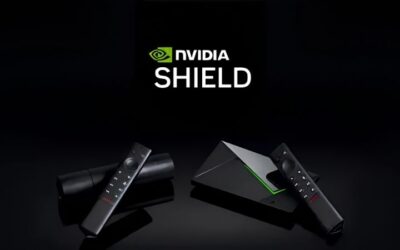
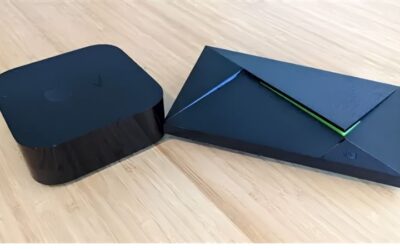
When your media player is completely powered off or disconnected from your TV, physical inspection remains the most direct way to check its credentials. Nvidia prints the unique ID code on a small, white adhesive label placed on the bottom surface of the console. This print is extremely small, so using a smartphone camera with zoom or a small magnifying glass can help you read it easily under solid lighting.
If you have kept the original retail packaging, you can also locate this code printed on the barcode sticker attached to the box’s outer sleeve. This sticker groups the model number, MAC addresses, and serial codes together for convenient reference. Keeping this original packaging is highly recommended, as it allows you to cross-reference the physical device code to verify that the hardware matches the box, preventing any issues during return windows.
Retrieving Your System Details Electronically via Android TV Settings
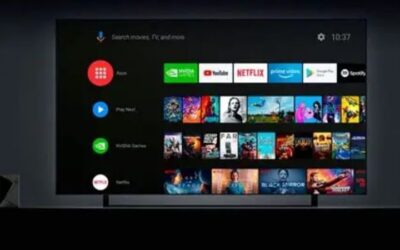
For users who have mounted their console behind a display or organized it deep within an entertainment unit, crawling behind cables is a major hassle. Fortunately, the Android TV software provides a simple digital method to find this code using your remote control. To start, navigate to the gear icon at the top right of your home screen to launch the settings panel.
Within this settings panel, select the “Device Preferences” menu and click on “About” to access the deeper system information options. Scroll down to the “Status” submenu, where the system displays your network MAC addresses, operating uptime, and your specific nvidia shield serial number. Writing this down or taking a quick photo secures your information for future troubleshooting or device registration without disturbing your physical cable setup, ensuring your nvidia shield tv setup remains clean and organized.
The Importance of Having Your Unique Identifier for Warranty Verification
Having your unique hardware code handy is absolutely essential if you ever experience system performance drops, power delivery failures, or remote connectivity issues. Nvidia’s technical support agents cannot open a repair ticket or approve a replacement device without first validating this specific code against their database. This process confirms that your product is a genuine retail unit and currently eligible for active warranty coverage.
Furthermore, if you are purchasing a pre-owned or refurbished streaming unit, checking this code with Nvidia is the best way to avoid buying blacklisted or stolen electronics. A clean hardware status gives you total peace of mind, ensuring that your device will continue to receive critical software updates and system security patches. It is a simple step that safeguards the value and usability of your media player investment over years of continuous use.
Amazon Customer Feedback Analysis: Real Pros and Cons
To offer an objective and honest evaluation of this premium streaming player, we have analyzed a wide array of verified customer reviews from Amazon. By comparing highly enthusiastic five-star ratings with critical two-star and three-star feedback, we can map out an authentic representation of daily user experiences. This valuable user feedback highlights both the incredible streaming performance of the console and the practical challenges that buyers face during long-term device ownership, helping you make an informed decision before buying.
What 5-Star Reviews Celebrate About Processing Power and Upgrades
Amazon buyers who gave this device a perfect five-star rating frequently praise its top-tier processing speeds and highly advanced AI 4K upscaling technology. Home theater enthusiasts report that the Tegra processor effortlessly runs demanding high-bitrate video formats, local media servers, and modern application tasks without lagging. The fluid user interface consistently outperforms cheaper streaming sticks, justifying the higher upfront cost for users who demand premium quality.
Additionally, customers love the multi-year software updates that Nvidia provides, which is highly unusual for Android TV devices. Positive reviews highlight how easy it is to register their units using their unique codes to join preview channels and test new system features before everyone else. This high level of ongoing manufacturer support makes the console feel like a long-lasting, smart investment for tech-savvy households looking for a reliable, elite entertainment box that remains fast and responsive.
Legitimate Technical Criticisms and Remote Control Issues from Buyers
Conversely, analyzing two-star and three-star critical reviews reveals several practical issues that buyers should consider before purchasing. A common complaint focuses on the triangular remote control, which some users find bulky and prone to rapid battery drain under heavy use. Others note occasional Bluetooth connectivity drops between the remote and the console, forcing them to manually reboot the entire system to restore control.
Additionally, some users have reported delays when contacting customer support to resolve system failures or software boot loops. Buyers noted that if they lost their original retail packaging and the sticker on the physical console became scratched, finding the nvidia shield serial number to initiate a warranty replacement was incredibly difficult. This emphasizes why writing down your system details early on is a critical best practice, ensuring you can perform an nvidia shield warranty check smoothly.
Evaluating the Pros and Cons of Registering Your Device Online
When it comes to registering your streaming hardware online using its identification digits, there are clear benefits and a few small drawbacks to weigh. On the positive side, registration links your hardware to your account, which speeds up support communication and ensures you receive prompt notices about product updates or recalls. It also establishes an official record of your purchase date, preserving your warranty rights even if you lose your physical receipt over time.
On the negative side, some privacy-conscious users dislike sharing their contact details and email address with a large technology company. Furthermore, registering binds the manufacturer warranty to your specific profile, which can sometimes complicate transferring support benefits if you decide to sell the console later. However, for most users, the security and support benefits of formal registration make it a highly worthwhile step that provides peace of mind.
Navigating Current Market Shifts and Electronics Supply Chains
The global electronics market is experiencing significant changes that influence the price and retail availability of premium home entertainment hardware. Major trade updates and economic trends are reshaping how companies distribute components and prioritize production lines worldwide. For smart shoppers, staying informed about these external market forces is essential for making smart buying decisions.
The Nvidia H200 AI Chip Export Policy and Consumer Stock Impacts
A major market factor is the recent trade decision allowing Nvidia to sell H200 chips, which are among their most advanced AI processors, to China. This trade policy has caused a major shift in production priorities, as silicon foundries allocate massive manufacturing resources to fulfill lucrative enterprise AI contracts. Consequently, consumer-focused silicon production has faced tighter supply windows, limiting the manufacturing volume of everyday media processors and streaming hardware. Because enterprise demand remains extremely high, consumer devices utilizing Nvidia chips are experiencing tighter inventory levels worldwide.
Rising Laptop and Component Manufacturing Costs and Retail Prices
At the same time, the global tech industry is dealing with rising manufacturing costs that affect everything from laptops to small media adapters. As laptop and component prices trend to continue rising, these overhead expenses are being passed directly to retail consumers in the form of higher price tags. The costs of raw materials, memory components, and secure shipping have risen steadily, making it harder for manufacturers to maintain low retail pricing, meaning discount prices for premium hardware are unlikely to happen anytime soon.
Why Purchasing Your High-End Streaming Media Player Today Makes Sense
When you combine the supply restrictions from AI chip production with the rising costs of raw components, buying your streaming console today is a wise decision. Securing your high-end media player now ensures you get a premium entertainment hub before inventory drops and prices rise. By taking action today, you protect your budget from rising tech costs and ensure you do not have to settle for cheaper, laggy streaming sticks. You can [check out the best deals on premium streaming hardware] to secure your unit today.
See more:
Recommended Products

msi
MSI GeForce RTX 4090 SUPRIM Liquid X 24G Gaming Graphics Card – 24GB GDDR6X, 2625 MHz, PCI Express Gen 4, 384-bit, 3X DP v 1.4a, HDMI 2.1a (Supports 4K & 8K HDR)
View on Amazon
1 day ago

Sapphire
Sapphire 11323-02-20G Pulse AMD Radeon RX 7900 XT Gaming Graphics Card with 20GB GDDR6, AMD RDNA 3
View on Amazon
1 day ago

msi
MSI GeForce RTX 4080 16GB Gaming X Trio Gaming Graphics Card – 16GB GDDR6X, 2610 MHz, PCI Express Gen 4, 256-bit, 3X DP v 1.4a, HDMI 2.1a (Supports 4K & 8K HDR)
View on Amazon
1 day ago
As an Amazon Associate we earn from qualifying purchases. Product prices and availability are accurate as of the date/time indicated.
Conclusion
To sum up, the Nvidia Shield TV Pro remains an exceptional choice for home entertainment in 2026, offering premium performance, robust software, and elite AI upscaling capabilities. Finding and managing your nvidia shield serial number is a crucial task that allows you to easily register your hardware, access official support, and protect your device warranty. With global market shifts, rising component prices, and prioritized AI chip manufacturing, securing this high-quality streaming console today is highly recommended. To ensure you purchase a genuine unit with full manufacturer backing before stocks drop, [check the availability and pricing of this premium streaming console on Amazon today] and upgrade your living room experience.
Frequently Asked Questions
Where do I find the serial number on an NVIDIA Shield?
On the device, go to Settings, then Device Preferences, then About, and open Status, where the serial number is listed alongside the model. It is also printed on a label on the underside of the unit and on the original retail box, usually next to the barcode and model identifier.
Why does the serial number matter?
It is the key identifier for warranty claims and RMA requests, and support will not process a repair or replacement without it. It also confirms which hardware revision you own, which determines whether your unit still receives software updates, and it proves the device is genuine rather than a counterfeit or refurbished resale.
How do I tell which Shield model I have?
The About screen lists the model number directly, which distinguishes the 2015 original, the 2017 revision, and the 2019 Tube and Pro variants. Physically, the 2019 Tube is a small cylinder with the remote-only bundle, while the Pro keeps the flat angular chassis with USB ports and internal storage.
Can I find the serial if the device will not power on?
Yes. Check the label on the bottom of the unit first, then the original packaging, then your retailer order confirmation or invoice, which usually records it for warranty purposes. If you registered the device with an NVIDIA account, it may also be listed in your account’s registered products section.
Should I post my serial number publicly?
No. Serial numbers are used to validate warranty entitlement, so publishing one in a forum post or a marketplace listing photograph invites warranty fraud and gives scammers a credible detail to impersonate you with support. Blur it in any photos, and share it only in a direct support ticket.


Write Your Review
No reviews yet. Be the first to share your experience!